
YouTube Shorts Downloader
The Story
AI Overview
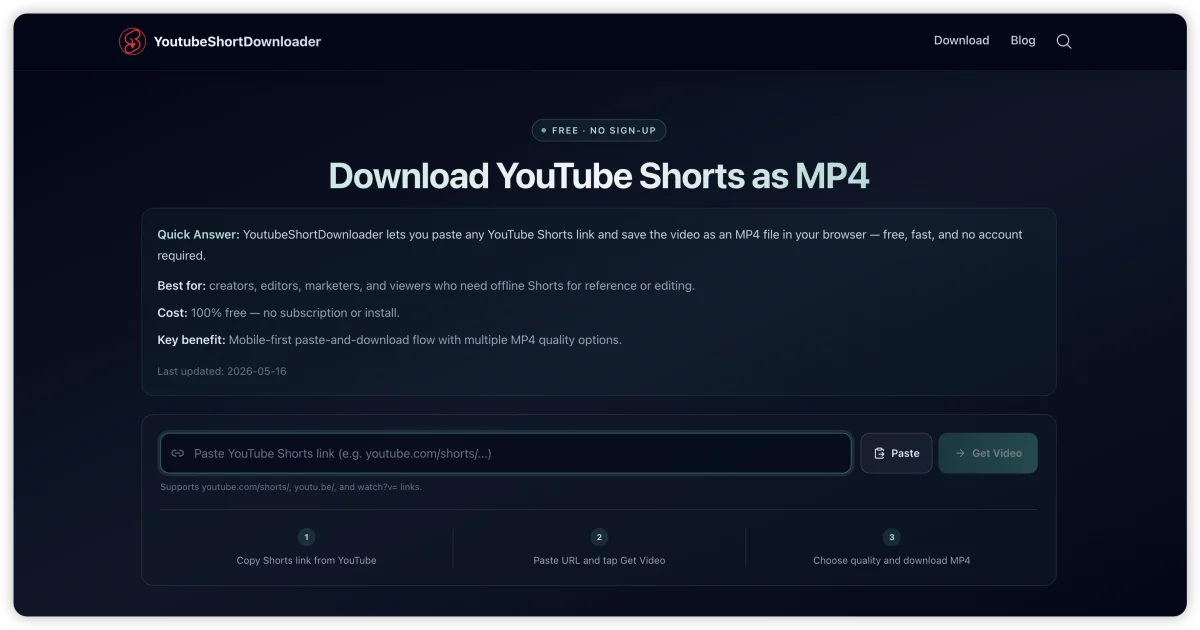
AI-generatedThe tool's primary value proposition centers on simplicity and speed. Users paste a YouTube Shorts URL (the tool accepts shorts URLs, youtu.be links, and standard watch?v= formats), trigger a fetch, select their preferred video quality, and download the resulting MP4 file—all within a browser and typically within seconds. The mobile-first design philosophy makes it particularly suited for smartphone users, where downloading videos for offline viewing or importing into editing applications is often necessary but typically involves friction or workarounds.
Several design choices differentiate this approach from competitors. The complete absence of gatekeeping—no account signup, no subscription tier, no time limits or download restrictions mentioned—removes the typical barriers to adoption. The immediate availability of metadata (title, thumbnail, quality options) upon URL submission indicates backend infrastructure capable of rapid video parsing and analysis. Support for multiple YouTube URL formats reflects attention to real-world usage patterns, where users encounter different link types depending on how they discover or share content.
The product targets a specific but sizable audience: content creators who work with short-form video, video editors building compilations or reference materials, and casual users who want offline access to ephemeral content. The technical implementation remains opaque from the user-facing interface, though the speed and reliability claims depend on robust API integration or direct platform data access.
A notable absence is any mention of pricing structure or monetization mechanism beyond the stated "free" offering. Whether this reflects a loss-leader strategy, ad-supported model, or venture-backed approach remains unclear from the available information. The tool represents a utilitarian solve rather than a feature-rich platform—it executes a single function efficiently, serving the focused needs of its target audience.
Key Features
Browser-Based Tool
Converts YouTube Shorts into downloadable MP4 files directly in the browser without software installation
No Account Required
Users can download videos without account creation, subscriptions, or gatekeeping
Multiple URL Format Support
Accepts shorts URLs, youtu.be links, and standard watch?v= YouTube URL formats
Mobile-First Design
Optimized for smartphone users with straightforward interface for offline viewing
Quality Selection
Users can select preferred video quality before downloading the MP4 file
Fast Processing
Downloads typically complete within seconds of URL submission
Use Cases
-
1
Content Creators
Short-form video creators who need offline access to video content for reference or building compilations
-
2
Video Editors
Editors creating reference materials or compilations from existing YouTube Shorts content
-
3
Casual Users
People seeking offline access to ephemeral or temporary video content
FAQ
Do I need an account to download YouTube Shorts? ▾
What YouTube URL formats does it support? ▾
Can I choose video quality before downloading? ▾
How fast is the download process? ▾
Pricing
Completely free with no account signup, subscription tiers, or download restrictions mentioned.
Tech Stack & Tags
Discussion
No comments yet — be the first!
Join the conversation — sign up to comment.
Sign up freeCommunity Support
Boost this project on Sell With boost