YT Video Summarizer
- No match
Machine translation — the English original is authoritative.
The Story
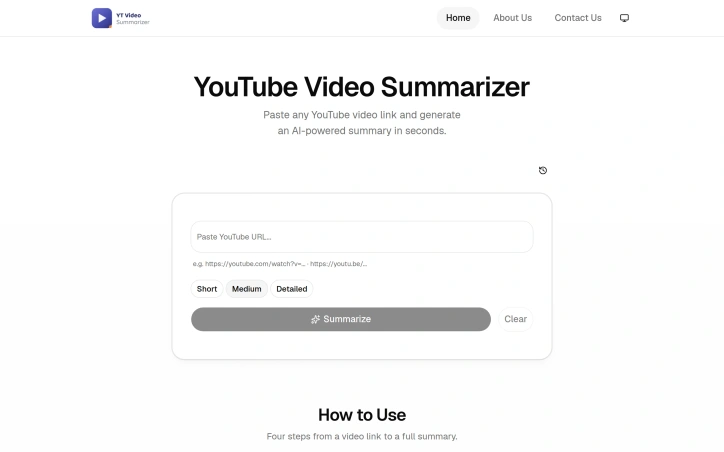
I built this because I spent too much time watching long YouTube videos when I really just needed the key points. This tool lets you paste any video link and instantly get an AI-powered summary in your preferred length—Short, Medium, or Detailed—so you can consume content faster without sacrificing understanding.
AI Overview
AI-generatedContent summarization tools have proliferated in recent years, yet most focus on text-based articles rather than the video content that increasingly dominates online consumption. YT Video Summarizer addresses this gap by letting users extract key information from YouTube videos without committing to full playbacks. The target audience spans students, researchers, busy professionals, and content curators who need efficient ways to evaluate or reference video material across educational, technical, and entertainment categories.
The core functionality is straightforward: users paste any YouTube link, select their preferred summary length—Short, Medium, or Detailed—and receive an AI-generated summary within seconds. The tool accepts standard watch links, shortened youtu.be URLs, Shorts, and even playlist links, suggesting broad compatibility across YouTube's ecosystem. This flexibility removes friction from the workflow; users don't need to adapt their links or worry about unsupported formats.
What distinguishes YT Video Summarizer is its multi-format export capability. Beyond reading summaries directly, users can download content as plain text, Markdown, or PDF, or copy individual sections for quick reference. This adaptability to different downstream workflows—pasting into notes, saving to external knowledge systems, or creating formatted documents—adds practical value beyond summarization itself. The tool also handles non-English videos, expanding its utility for international users and multilingual research scenarios.
The application demonstrates technical competence in managing YouTube's transcript retrieval, which occasionally triggers verification requirements that the tool acknowledges upfront. This transparency about technical constraints is refreshing; rather than hiding behind a polished facade, the FAQ addresses real friction points users may encounter.
The product occupies a niche where demand is demonstrable: video content continues growing faster than most people can watch it, and time-compressed alternatives have proven valuable in education and professional settings. YT Video Summarizer takes a utilitarian approach—no frills, straightforward interface, focus on solving a single problem well. Whether it achieves meaningful scale depends on factors the website doesn't address: how well the AI summaries actually capture video substance, how users discover it among competing tools, and what happens when platforms tighten API access. For now, it offers a working solution to a real problem.
Founder Diary
DevlogThe maker hasn't posted a diary entry yet.
Key Features
YouTube Link Input
Accepts standard watch links, shortened youtu.be URLs, Shorts, and playlist links
Customizable Summary Length
Users select Short, Medium, or Detailed summary options before generation
Multi-Format Export
Summaries can be downloaded as plain text, Markdown, or PDF, or copied for quick reference
Non-English Support
Handles non-English videos for international users and multilingual research scenarios
Fast Processing
AI-generated summaries are delivered within seconds
Use Cases
-
1
Students
Evaluate or reference video material efficiently for educational purposes without watching full videos
-
2
Researchers
Extract key information from videos without committing to full playbacks across technical categories
-
3
Busy Professionals
Evaluate video content in compressed timeframe for professional and technical reference
-
4
Content Curators
Quickly evaluate and reference video material across entertainment and educational categories
FAQ
What YouTube links does the tool support? ▾
What formats can I export summaries in? ▾
Does it work with non-English videos? ▾
What should I know about technical limitations? ▾
Tech Stack & Tags
Discussion
No comments yet — be the first!
Join the conversation — sign up to comment.
Sign up freeCommunity Support
Boost this project on Sell With boost
Meet the Founder

More in AI notetakers

Lynote
I built Lynote because AI-generated text sounds...

aipen.ink
Turn AI answers & math into hyper-realistic hand...
Corder. The Mac recorder with no bot in the call
Record any meeting on macOS. Speakers labelled,...

Aripsy
I built Aripsy to solve the tedious process of c...
Inkgest
Inkgest is an agentic writing tool for content c...

Merry AI
We built Merry AI to give clinicians their eveni...