
3dfileconverter.online
- No match
Machine translation — the English original is authoritative.
The Story
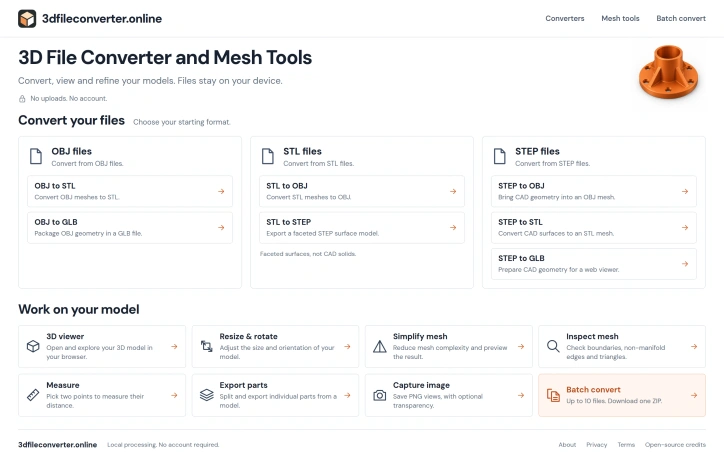
3dfileconverter.online is a free browser workspace for converting and inspecting OBJ, STL and STEP models. Convert formats, view models, resize and rotate meshes, simplify geometry, check mesh edges, measure distances, export separate parts and capture PNG views. Batch conversion handles up to 10 files. Model files are processed on your device, with no conversion-server uploads or account required. Inputs are limited to 50 MB per file, and operation-specific limits apply. STL-to-STEP produces faceted surface shells, not reconstructed parametric CAD solids. External OBJ textures are not imported. Validate exported models in your target software.
AI Overview
AI-generatedConverting between 3D file formats remains a friction point for designers, engineers, and makers working across different tools and workflows. A new browser-based converter addresses this pain by offering a free, no-frills workspace for handling OBJ, STL, and STEP files—the three formats most commonly used in product design, 3D printing, and CAD work.
What distinguishes 3dfileconverter.online from other conversion services is its commitment to privacy and simplicity. All processing happens on the user's device, with no server uploads or account requirements. This approach eliminates concerns about file confidentiality while removing setup friction entirely. Users simply open the browser tool, select their file, and begin converting. The interface stays focused on core conversion workflows rather than attempting to be an all-in-one 3D modeling suite.
The toolset covers essential operations beyond basic conversion. A viewer lets users inspect their models directly in the browser, with zoom, pan, and rotation controls. A mesh simplification feature reduces polygon complexity to speed up workflows or prepare models for web-based viewers. The inspector surfaces mesh quality issues—boundary problems, non-manifold edges—that users might otherwise miss. An optional measurement tool enables quick distance checks between points. Users can also isolate and export individual parts from larger assemblies and save viewport captures as PNG images for documentation or sharing.
Batch operations support up to ten files at once, condensing multi-file workflows into a single download. The 50 MB per-file limit strikes a reasonable balance for most use cases, though users working with extremely dense scan data or detailed CAD assemblies may find themselves constrained.
The service comes with important caveats worth noting. STL-to-STEP conversion produces faceted surface shells, not parametric solids, limiting its use for CAD workflows that require editable geometry. OBJ files with external textures lose those textures in conversion—the tool processes geometry only. The founder's explicit recommendation to validate exports in target software suggests users should expect occasional quirks or edge cases rather than treating the service as a definitive conversion solution.
As a free tool offering no-upload conversion with respectable feature depth, 3dfileconverter.online serves a clear niche: professionals and hobbyists who value privacy, speed, and simplicity over advanced capabilities.
Founder Diary
DevlogThe maker hasn't posted a diary entry yet.
Key Features
Browser-Based Conversion
Converts OBJ, STL, and STEP files directly in your browser without server uploads.
Client-Side Processing
All file handling occurs on your device with no account requirements.
3D Model Viewer
Inspect models interactively with zoom, pan, and rotation controls.
Mesh Simplification
Reduces polygon count to optimize models for web viewers or faster workflows.
Quality Inspector
Identifies mesh issues including boundary problems and non-manifold edges.
Batch Operations
Convert up to ten files simultaneously and download results together.
Use Cases
-
1
Product Designers
Convert models between CAD tools without uploading sensitive designs to servers.
-
2
3D Printing Professionals
Prepare models for printing by converting to STL and checking mesh quality.
-
3
CAD Engineers
Quickly convert between OBJ, STL, and STEP formats across different software platforms.
-
4
Privacy-Focused Makers
Process designs locally without account requirements or external file uploads.
FAQ
Is my file uploaded to a server? ▾
What 3D file formats are supported? ▾
Can it convert STL to STEP? ▾
What is the maximum file size? ▾
Pricing
The service is completely free with no subscription tiers or premium features mentioned.
Discussion
No comments yet — be the first!
Join the conversation — sign up to comment.
Sign up freeCommunity Support
Boost this project on Sell With boost
Meet the Founder

More by cNa Lee
More in 3D & Animation
Text3D Generator
I built Text3D Generator because content creator...

Img3D
Img3D is an AI 3D workspace built around referen...

ARView
We built ARView to make AR accessible to everyon...
Arnis
I created Arnis to generate Minecraft world maps...

STLRepair
STLRepair helps makers and 3D printing users che...
GameApi Builder tool
Young people need better tools at their early ca...