EasyTyping
- No match
Machine translation — the English original is authoritative.
The Story
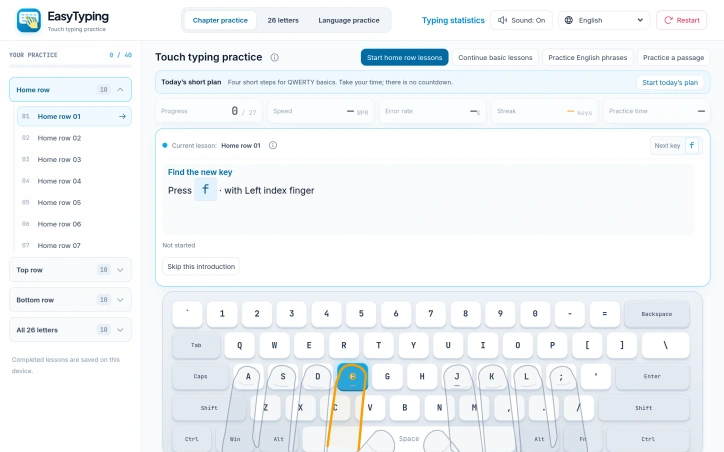
EasyTyping is a free browser-based touch typing practice tool for beginners. Start with home-row, top-row and bottom-row lessons, practice individual letters, or move on to phrases and passages. On-screen key and finger guides help you find the next key, and you can gradually turn the guides off. A short daily plan combines warm-up, learning, application and independent practice. Speed, accuracy, active practice time and progress are recorded locally in your browser, with targeted key review. The interface supports English, Japanese, Vietnamese, Hindi, Indonesian and Simplified Chinese. Local-language exercises use fixed Pinyin, Romaji, Telex or InScript key sequences where applicable; they are not a full input method. No account is needed, and practice records do not sync across devices.
AI Overview
AI-generatedLearning to type with proper finger placement remains a fundamental digital skill that many first-time computer users never develop. EasyTyping addresses this gap by offering structured, evidence-based touch typing instruction entirely free and in the browser.
The platform targets complete beginners who want to build correct typing habits from scratch. It progresses methodically through lessons covering home-row keys, top-row keys, bottom-row keys, and ultimately all 26 letters, before advancing to phrases and longer passages. This incremental approach prioritizes accuracy over speed, grounding learners in the fundamentals before asking them to type faster.
What distinguishes EasyTyping is its attention to pedagogical detail. The interface displays which key and finger you should use next, helping learners map their finger position to the keyboard layout rather than hunting and pecking. Critically, these guides can be gradually turned off, forcing learners to internalize the muscle memory. A daily plan structures practice sessions into four phases: warm-up, learning, application, and independent practice. Mistakes cannot be skipped; the system requires correction before progression. The platform also identifies which keys users repeatedly miss and offers targeted practice for those problem areas.
The tool is grounded in research, citing a 2016 study establishing the connection between consistent finger-to-key mapping and typing performance. This scientific foundation differentiates it from gamified typing apps that prioritize entertainment over skill transfer.
Technical implementation reflects sensible design choices. EasyTyping runs in the browser without requiring account creation or cloud synchronization. Progress and metrics are stored locally on the device, preserving user privacy at the cost of cross-device continuity. The platform records speed measured as correct keystrokes per minute, accuracy, error rates, and practice streaks. Users can connect a physical keyboard for authentic practice or use on-screen keys, making it accessible on various devices.
Notably, EasyTyping supports multiple languages and scripts, including English, Japanese, Vietnamese, Hindi, Indonesian, and Simplified Chinese. For languages requiring complex input sequences, the platform offers fixed key mappings rather than full input method support.
The platform is entirely free with no paid tiers or premium features mentioned. This model prioritizes accessibility over monetization, positioning EasyTyping as a public good for anyone seeking to develop proper touch typing technique.
Founder Diary
DevlogThe maker hasn't posted a diary entry yet.
Key Features
Structured Progression
Methodically advances through home-row, top-row, bottom-row keys, and all 26 letters before progressing to phrases and longer passages.
Visual Key Guidance
Displays which key and finger to use next, with gradually removable guides to help internalize muscle memory.
Daily Practice Phases
Organizes sessions into warm-up, learning, application, and independent practice phases.
Targeted Remediation
Identifies repeatedly missed keys and offers focused practice for problem areas.
Error Correction
Requires users to correct mistakes before advancing to the next lesson.
Multi-Language Support
Includes English, Japanese, Vietnamese, Hindi, Indonesian, and Simplified Chinese.
Use Cases
-
1
Complete beginners
Those starting from scratch who want to build correct typing habits with proper finger placement.
-
2
First-time computer users
Individuals who never developed touch typing skills and want structured instruction.
-
3
Accuracy-focused learners
Users prioritizing correct technique and fundamentals before building speed.
-
4
Multilingual students
Learners needing proper touch typing instruction in languages beyond English.
FAQ
Do I need to create an account to use EasyTyping? ▾
Can I use EasyTyping on different devices? ▾
What languages does EasyTyping support? ▾
How much does EasyTyping cost? ▾
Pricing
The platform is entirely free with no paid tiers or premium features, prioritizing accessibility over monetization.
Discussion
No comments yet — be the first!
Join the conversation — sign up to comment.
Sign up freeCommunity Support
Boost this project on Sell With boost
Meet the Founder


More in Online learning

LangLime
Dear Duolingo, I'm fed up of spending weeks lear...

Ziyo
Ziyo is a 𝘴𝘵𝘶𝘱𝘪𝘥𝘭𝘺 simple Japanese online Kanji...

Pyzit
I built Pyzit to remove friction from learning a...

Study Share
I built Study Share because students waste time...

MCQS ZONE
As an educator with a Computer Science backgroun...
Grade Curve Calculator
I built this free tool to help teachers fairly a...