Cardify
- No match
Machine translation — the English original is authoritative.
The Story
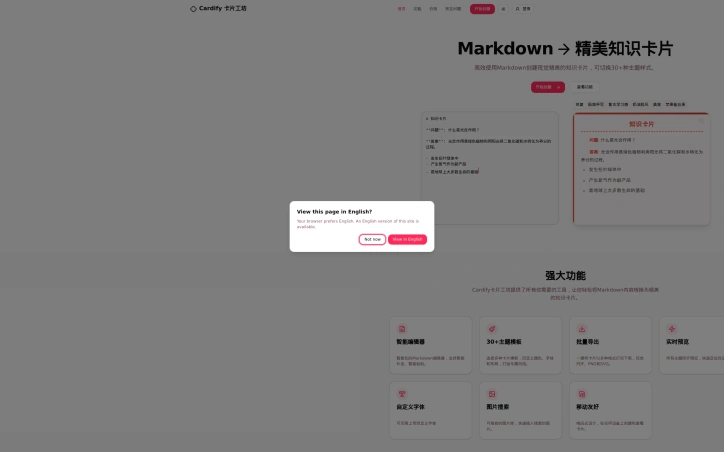
I write notes and READMEs in Markdown all day, but the moment one needs to be shared visually I am back inside a design tool. Cardify is the shortcut: paste Markdown on the left, watch the card render live on the right, then export it as PNG, SVG or PDF. There are 30+ themes to pick from side by side, adjustable card sizes, built-in fonts or one you upload, image upload plus 2000+ emoji, and batch export when a whole set has to go out at once. Markdown stays fully supported - headings, lists, code blocks, links. Creating and previewing is free, exports need a paid plan. It runs in the browser on desktop and mobile, no install.
AI Overview
AI-generatedDesigners often complain that developers write good documentation, and developers often complain that getting that documentation into a shareable visual format requires jumping between tools. Cardify bridges this gap by converting Markdown directly into styled visual cards without leaving the browser.
The product targets knowledge workers who live in Markdown—developers writing READMEs, researchers compiling notes, product teams documenting processes—and need to present that content visually without learning design software. Instead of copying content into a design tool and recreating the layout, users paste Markdown into Cardify's editor and watch a polished card render in real time on the adjacent preview pane.
What distinguishes Cardify from a simple Markdown-to-image converter is the breadth of design flexibility baked in. The tool offers over 30 pre-built themes that can be browsed side by side, with adjustable card dimensions, customizable fonts either from a built-in library or via upload, and the ability to add images. The full Markdown specification is supported—headings, lists, code blocks, inline links—so users aren't restricted to plain text. A searchable image library and thousands of emoji options let creators add visual weight without hunting elsewhere.
The workflow supports batch operations. Users who need to export an entire set of cards can do so at once rather than one-by-one, with output available in PNG, SVG, and PDF formats. This is particularly valuable for teams generating marketing materials, knowledge bases, or educational content where consistency and scale matter.
Cardify runs entirely in the browser on both desktop and mobile devices with no installation required, lowering the barrier to adoption. The company employs a freemium model: creating and previewing cards is free, while exporting to final formats requires a paid plan. This strikes a reasonable balance—users can experiment with the tool and its extensive theme library without financial commitment, and those who find value can unlock distribution.
The product occupies a specific niche but a real one: the friction between how technical people naturally write and how that content needs to be shared. By handling that translation automatically within a single tool, Cardify removes a small but persistent annoyance from the workflow of people who spend their time in text editors and Markdown files.
Founder Diary
DevlogThe maker hasn't posted a diary entry yet.
Key Features
Markdown to Cards
Converts Markdown directly into styled visual cards in the browser without switching tools
30+ Pre-built Themes
Browse and apply over 30 design themes side by side with customizable dimensions
Full Design Control
Adjustable fonts from a built-in library or custom uploads, plus image insertion
Batch Export
Export entire sets of cards at once in PNG, SVG, and PDF formats
Image & Emoji Library
Searchable image library and thousands of emoji options to enhance visual content
No Installation Required
Runs entirely in browser on desktop and mobile devices
Use Cases
-
1
Developers
Convert READMEs and technical documentation into visual cards for sharing without design software
-
2
Researchers
Transform compiled notes into visually polished cards for academic or professional presentations
-
3
Product teams
Generate consistent visual process documentation at scale across teams
-
4
Marketing teams
Batch-produce visual cards for knowledge bases and marketing materials with design consistency
FAQ
Can I use Cardify on mobile? ▾
What file formats can I export cards as? ▾
What Markdown features are supported? ▾
Is there a free version? ▾
Pricing
Creating and previewing cards is free; exporting to PNG, SVG, and PDF requires a paid plan.
Discussion
No comments yet — be the first!
Join the conversation — sign up to comment.
Sign up freeCommunity Support
Boost this project on Sell With boost
Meet the Founder

More by Chip Tong
More in Graphic design tools

Zoviz
Zoviz is a complete AI branding and marketing pl...

InkSoul
I got my first tattoo at 28 — spent three weeks...

Shademix
I built Shademix to solve the frustration of col...

Tier List Maker
We created Tier List Maker because people love r...

TypeScript
Cardzy is a web-based design and invitation plat...

Thank Cards
We built Thank Cards to make creating beautiful,...