
Font Studio
- No match
Machine translation — the English original is authoritative.
The Story
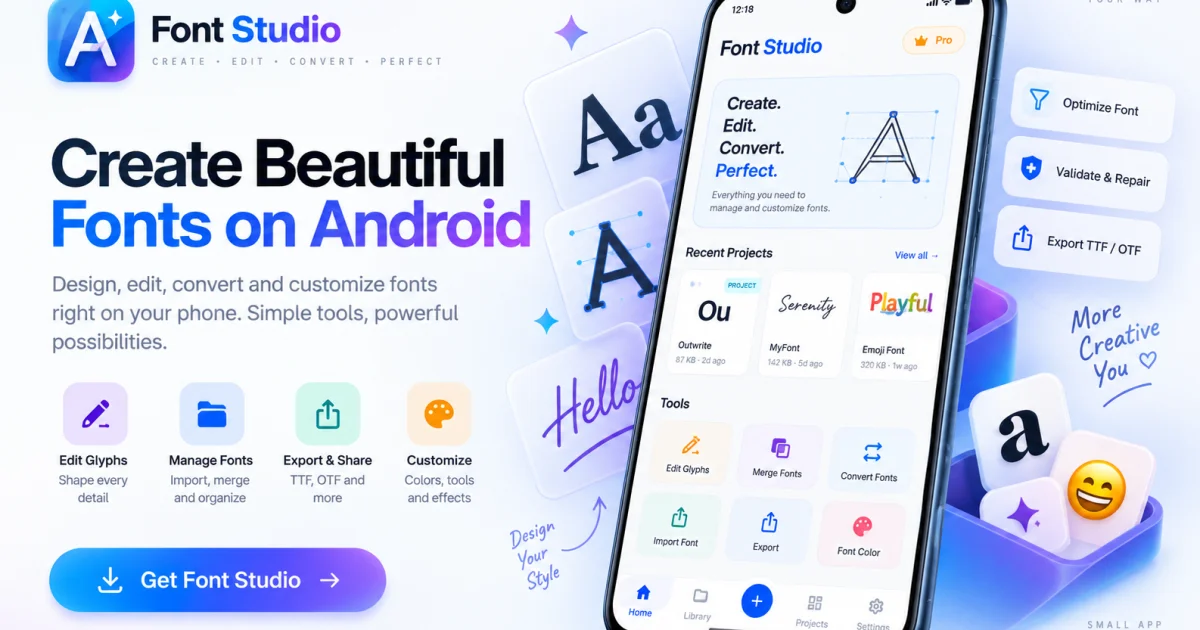
We built Font Studio because font editing shouldn't require expensive desktop software or uploading your files to the cloud. It's a complete professional toolkit for inspecting, editing, converting, and repairing fonts directly on your phone or tablet, giving you full control over your typography work.
AI Overview
AI-generatedMobile technology has transformed nearly every creative field, yet professional font engineering remains tethered to desktop software or compromised by cloud-based tools that require uploading proprietary files. Font Studio bridges this gap by delivering a complete font editing and engineering toolkit directly on Android, iPhone, and iPad devices.
The app addresses a genuine friction point in typographic workflows. Designers and developers frequently encounter fonts that need inspection, conversion, repair, or modification—tasks that previously demanded either expensive desktop applications or trusting online services with their files. Font Studio eliminates both constraints by processing fonts locally on the device, giving users full control while avoiding subscription costs associated with professional desktop tools.
The toolkit includes ten distinct functions organized around common typographic tasks. Font Inspector surfaces metadata, metrics, Unicode coverage, and GSUB/GPOS tables to answer the fundamental question of what a font actually contains. Font Converter handles format transformations—TTF to WOFF for web deployment, OTF to formats compatible with Android apps. Font Repair addresses structural damage that causes installation failures or rendering issues. Font Subsetter reduces file size by stripping unused glyphs, a critical optimization for web-delivered typefaces. Font Merger combines glyphs from multiple sources into a single file without requiring scripts or cloud uploads.
On the design side, Glyph Editor enables vector-based character drawing and editing. The app recognizes platform-specific workflows—iPad users benefit from Apple Pencil support and a larger canvas, while Android users gain pocket-sized access to professional tools.
The business model follows a freemium pattern. The core inspection, conversion, subsetting, merging, and repair functions remain free, creating a low-friction entry point for casual users. The Pro tier unlocks advanced capabilities including vector glyph design with transformation tools, metrics editing, batch processing, and export packages. This structure aligns incentives well—basic users get genuine utility for free, while professionals performing heavy engineering justify the paid upgrade.
The positioning against desktop software and cloud-based competitors is explicit throughout the marketing. Rather than claiming feature parity with years-old desktop applications, Font Studio claims practical sufficiency for mobile device workflows. For designers who want to travel light, developers who want to avoid uploading sensitive typeface files, and teams without budget for desktop licenses, it delivers utility that previously didn't exist at this price point.
Founder Diary
DevlogThe maker hasn't posted a diary entry yet.
Key Features
Font Inspector
Reveals metadata, metrics, Unicode coverage, and GSUB/GPOS table data
Format Converter
Transforms fonts between TTF, WOFF, OTF, and Android-compatible formats
Glyph Editor
Enables vector-based character design and editing with Apple Pencil support
Font Subsetter
Reduces file size by removing unused glyphs for web optimization
Font Repair
Fixes structural damage that causes installation failures or rendering issues
Font Merger
Combines glyphs from multiple sources into a single file
Use Cases
-
1
Mobile Designers
Full font editing on iPad and iPhone eliminates the need for expensive desktop applications
-
2
Security-Conscious Developers
Local device processing ensures proprietary font files never leave the device
-
3
Budget-Limited Teams
Free tier provides genuine utility without the cost of professional desktop software licenses
-
4
On-the-Go Professionals
Pocket-sized access to professional font engineering tools for travel and remote workflows
FAQ
Can I edit fonts directly on my mobile device? ▾
Is Font Studio free? ▾
What font formats does the app support? ▾
Is my font data secure? ▾
Pricing
Core inspection, conversion, repair, subsetting, and merging are free; Pro tier includes vector design, metrics editing, batch processing, and export packages.
Tech Stack & Tags
Discussion
No comments yet — be the first!
Join the conversation — sign up to comment.
Sign up freeCommunity Support
Boost this project on Sell With boost
Meet the Founder

More in Graphic design tools

Zoviz
Zoviz is a complete AI branding and marketing pl...

InkSoul
I got my first tattoo at 28 — spent three weeks...

Shademix
I built Shademix to solve the frustration of col...

TypeScript
Cardzy is a web-based design and invitation plat...

Tier List Maker
We created Tier List Maker because people love r...
Logo Double-R
I founded Logo Double-R to make professional des...