Haptics Explorer
- No match
Machine translation — the English original is authoritative.
The Story
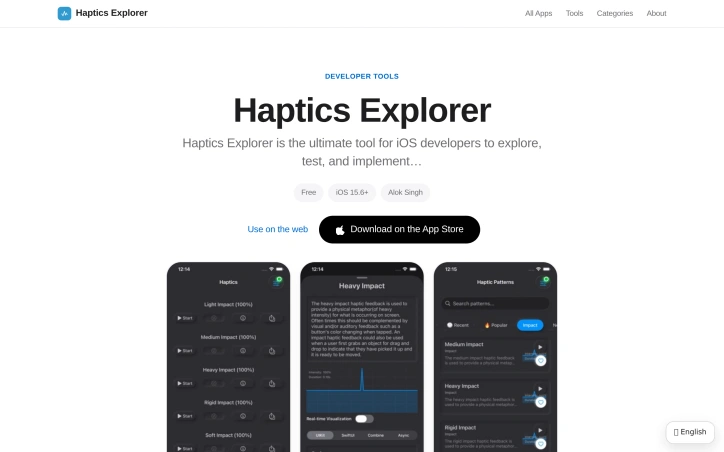
Haptics Explorer is for iOS developers who need to feel a haptic on a real iPhone before they ship it, because the Simulator does not vibrate. Eight groups are on the device: impact from light through rigid, notification success, error, and warning, selection ticks, rhythms such as a heartbeat, double tap, and tick-tock, gesture patterns for swipe, pinch, and long press, game hits such as an explosion or a power-up, accessibility patterns, and custom ones. You can play a pattern, loop it, change the speed, and adjust intensity and sharpness, then copy a code snippet in a form you can paste into an app. It is a try-on bench for UIKit haptics, not a game.
AI Overview
AI-generatedTesting haptic feedback on an iPhone simulator is impossible because the simulator doesn't vibrate. Developers working with iOS haptics have long faced this gap between design and device reality. Haptics Explorer closes that gap by providing a hands-on testing environment for the full range of haptic patterns available on iOS devices.
The app is built for iOS developers who need to feel haptic patterns on a real iPhone before shipping them into production. Rather than guessing at how a haptic will land, developers can preview each pattern, tweak its parameters, and copy ready-to-use code snippets directly into their projects.
The product organizes haptic patterns into eight distinct categories. Developers can trigger impact patterns ranging from light to rigid, test notification feedback types like success, error, and warning, explore rhythm patterns such as heartbeats and tick-tock sequences, and experiment with gesture feedback for swipes, pinches, and long presses. Game-specific patterns for explosions and power-ups round out the library, alongside accessibility patterns and a custom pattern designer for building entirely new haptic experiences.
What distinguishes Haptics Explorer is its focus on the actual developer workflow. Rather than abstract documentation or simulator tools that cannot replicate the real experience, this app bridges the gap by letting developers work directly on a physical device. The intensity and sharpness controls give fine-grained tuning, while the speed adjustment and looping features enable iterative testing. The code generation capability means developers can move from exploration to implementation without context switching or manual transcription.
The app requires iOS 15.6 or later and runs on both iPhone and iPad. A 24 MB download size keeps installation friction minimal. Haptics Explorer is free to download from the App Store, supported by ads and basic anonymous analytics.
The privacy model deserves a note: the app keeps data on-device by default, does not sell personal information, and limits itself to Google AdMob for ad serving. This positions it as straightforward tooling rather than a data-collection vehicle.
For any iOS developer working with UIKit haptics, this app removes the guesswork from translating design intent to device behavior. It is a focused tool that solves a specific problem in a developer's workflow, which is exactly what developer tools should do.
Founder Diary
DevlogThe maker hasn't posted a diary entry yet.
Key Features
Haptic Pattern Testing
Test all haptic patterns on real iPhone devices before production deployment
Code Generation
Copy ready-to-use code snippets directly into projects without manual transcription
Pattern Library
Eight categories including impact, notification, rhythm, gesture, game-specific, and accessibility patterns
Advanced Controls
Fine-tune with intensity, sharpness, speed adjustments and looping for iterative testing
Custom Pattern Designer
Build entirely new haptic experiences beyond the predefined library
Use Cases
-
1
iOS Developers
Test haptic patterns on real devices to bridge the gap between design intent and actual device behavior
-
2
Pre-Production Verification
Validate how haptics will feel before shipping to production
-
3
Game Developers
Experiment with game-specific patterns like explosions and power-ups in realistic context
-
4
Accessibility Teams
Explore and implement accessibility patterns to enhance user experience
FAQ
Why can't I test haptics in the iOS simulator? ▾
What types of haptic patterns are available? ▾
Can I use the generated code in my project? ▾
Does the app collect my personal data? ▾
Pricing
Free to download from the App Store, supported by ads and basic anonymous analytics
Tech Stack & Tags
Discussion
No comments yet — be the first!
Join the conversation — sign up to comment.
Sign up freeCommunity Support
Boost this project on Sell With boost