iisacc Vincent
- No match
Machine translation — the English original is authoritative.
The Story
I want minimal paint tool, quick open when i pressed app icon. Unfortunatly, it not anymore in now. So i build it.
AI Overview
AI-generatedMinimalist design tools have carved out a niche for creators who value speed and clarity over feature sprawl, and Vincent carves out a distinctive position in this landscape. The macOS application is a deliberate throwback to the simplicity of MS Paint, reimagined for contemporary workflows. It targets designers, illustrators, and product teams who need to capture visual ideas quickly without the cognitive load of navigating complex menus or managing countless palettes.
The core appeal rests on disciplined restraint. Rather than competing with Photoshop, Figma, or other comprehensive design suites, Vincent strips painting down to essentials: freehand drawing, fill buckets, erasing, and basic selection tools. The interface reflects this philosophy through a spacious, contemporary layout that keeps controls visible without encroaching on canvas real estate. Text tools that sit directly on the canvas allow quick annotations and labels without breaking sketching flow, and the addition of crop, rotate, and tonal adjustments in version 2.0 provides just enough image manipulation for rough asset cleanup.
What distinguishes Vincent from other minimalist sketch tools is its deliberate embrace of the MS Paint metaphor. Rather than introducing novel interaction patterns, the application leans into a workflow most designers learned years ago, lowering the barrier to adoption. Someone familiar with basic paint programs can open Vincent and start working immediately. This matters when the goal is capturing ideas before they evaporate.
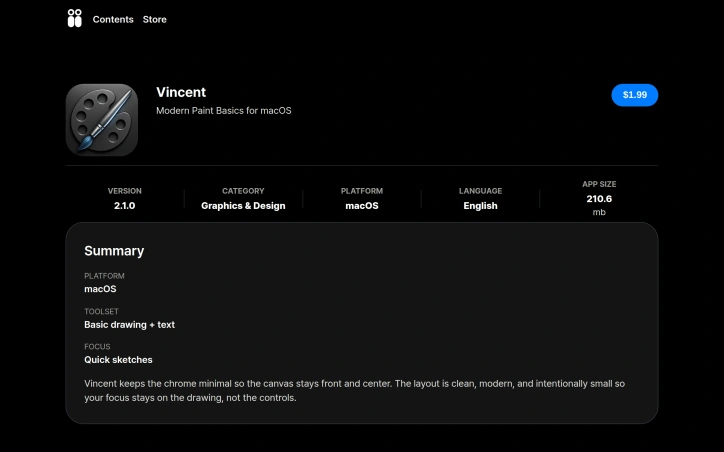
The version history suggests thoughtful iteration. Version 2.0 sharpened the interface and expanded the toolset with text and lightweight edits, addressing the gap between quick sketching and minimal asset refinement. The current 2.1.0 represents continued polish rather than feature creep. At 210.6 megabytes, the application footprint remains lean.
The business model relies on direct sales, with a GitHub repository suggesting openness to technical transparency and privacy policy documentation indicating basic compliance standards. For creators who find mainstream design tools bloated and distracting, Vincent offers a focused alternative that prioritizes intention over feature breadth. It is software that gets out of the way and trusts the canvas to be enough.
Founder Diary
DevlogThe maker hasn't posted a diary entry yet.
Key Features
Minimalist Interface
Spacious contemporary layout inspired by MS Paint with controls visible without encroaching on canvas space
Essential Drawing Tools
Freehand drawing, fill buckets, erasing, and basic selection tools focused on core functionality
On-Canvas Text
Quick annotations and labels directly on the canvas without breaking sketching flow
Image Editing
Version 2.0 added crop, rotate, and tonal adjustments for lightweight asset cleanup
Lightweight Application
Only 210.6 megabytes with a lean footprint designed for fast loading
Use Cases
-
1
Designers
Capture visual ideas quickly without cognitive load of complex design suite menus
-
2
Illustrators
Sketch and refine concepts immediately using familiar paint program workflows
-
3
Product Teams
Rapid visual ideation for prototyping and early-stage concept development
-
4
Quick Ideation
For anyone who needs to capture visual thoughts before they evaporate
FAQ
Is Vincent as powerful as Photoshop or Figma? ▾
Can I use Vincent if I know basic paint programs? ▾
What tools and features does Vincent include? ▾
Discussion
No comments yet — be the first!
Join the conversation — sign up to comment.
Sign up freeCommunity Support
Boost this project on Sell With boost
Meet the Founder

More in Graphic design tools

Zoviz
Zoviz is a complete AI branding and marketing pl...

InkSoul
I got my first tattoo at 28 — spent three weeks...

Shademix
I built Shademix to solve the frustration of col...

Tier List Maker
We created Tier List Maker because people love r...

TypeScript
Cardzy is a web-based design and invitation plat...

Logo Double-R
I founded Logo Double-R to make professional des...