Jomatter
- No match
Machine translation — the English original is authoritative.
The Story
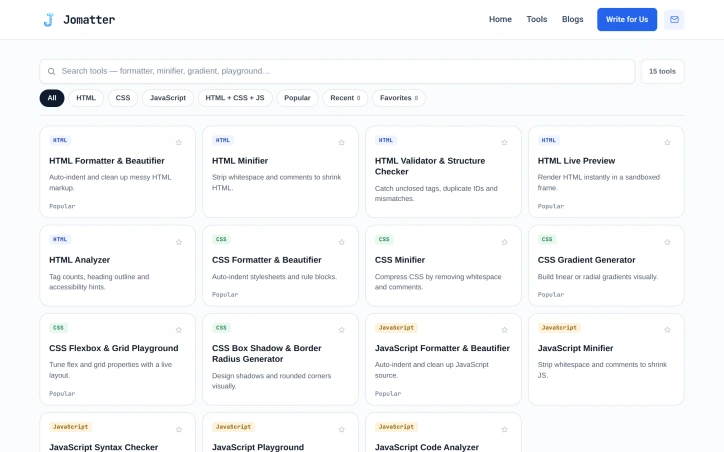
I built Jomatter to solve the friction developers face when needing quick tools for HTML, CSS, and JavaScript work. Too many solutions require signups, installations, or subscriptions—we wanted free, browser-based alternatives that just work. Now developers can format, minify, validate, and test their code instantly without barriers.
AI Overview
AI-generatedFriction in web development tooling remains surprisingly persistent. Developers regularly need to format code, minify assets, validate syntax, and test snippets during their workflows, yet many existing solutions demand signup credentials, software installations, or paid subscriptions before delivering even basic functionality. This gatekeeping creates workflow interruptions and forces developers to choose between context-switching overhead and suboptimal workarounds.
Jomatter addresses this directly by providing a collection of free, browser-based utilities built specifically for HTML, CSS, and JavaScript work. The product strips away friction by requiring no authentication, no local installation, and no payment. Instead, it operates entirely in the browser, making tools accessible to any developer with a web connection and a few seconds to spare.
The core offering focuses on fundamental developer tasks: formatting messy code into readable structure, minifying assets to reduce file size, validating code against standards, and testing JavaScript execution. These capabilities address genuine pain points in daily development work. A developer debugging CSS issues no longer needs to leave their workflow to find a validator. Someone optimizing bundle size can minify and compare results without installing additional dependencies. The browser-native approach means the tool works everywhere—on personal machines, shared workstations, or contractor environments where software installation rights are restricted.
What distinguishes Jomatter is its commitment to removal rather than addition. Many developer tools have evolved into feature-rich platforms with extensive configuration options, learning curves, and complexity. Jomatter inverts this approach by prioritizing immediate usability. The implicit philosophy holds that a simple, free tool used frequently proves more valuable than a powerful tool that's never accessed due to setup friction.
The product operates on a pure free model with no premium tiers or hidden limitations mentioned. This positioning makes it particularly attractive to freelancers, students, and small teams where tool costs accumulate quickly. For enterprises, the no-installation requirement sidesteps procurement and security review processes that often delay adoption of developer utilities.
Jomatter targets a straightforward audience: web developers who value speed and simplicity over feature depth. For developers tired of onboarding friction or seeking lightweight alternatives to installed IDEs and build tools, the offering delivers genuine utility. The question of sustainable revenue remains unanswered in available materials, but as a free browser-based utility, Jomatter removes all barriers between developers and the tools they need.
Founder Diary
DevlogThe maker hasn't posted a diary entry yet.
Key Features
Code Formatting
Converts messy code into readable, structured format for HTML, CSS, and JavaScript
Asset Minification
Reduces file size of code and assets to optimize bundle size
Code Validation
Validates code against web development standards
JavaScript Testing
Allows execution and testing of JavaScript snippets
Browser-Based
Works entirely in the browser with no local installation required
No Authentication
Requires no signup, credentials, or account creation
Use Cases
-
1
CSS debugging
Developers can validate and format CSS issues without interrupting their workflow
-
2
Bundle optimization
Developers can minify assets and compare results without installing build tool dependencies
-
3
Restricted environments
Contractors and employees working in organizations where software installation is not permitted
-
4
Cost-conscious teams
Freelancers, students, and small teams seeking free alternatives to paid developer utilities
FAQ
Do I need to sign up or install software to use Jomatter? ▾
What developer tasks can Jomatter help with? ▾
Does Jomatter cost money? ▾
Where can I access Jomatter? ▾
Pricing
Jomatter operates on a pure free model with no premium tiers or hidden limitations.
Tech Stack & Tags
Discussion
No comments yet — be the first!
Join the conversation — sign up to comment.
Sign up freeCommunity Support
Boost this project on Sell With boost
Meet the Founder

"founder of xsquareseo.com | wordpressspeedoptimizationservice.com | distributenow.online"