Prism
- No match
Machine translation — the English original is authoritative.
The Story
We realized AI tools had become scattered across windows, tabs, and apps—losing productivity to context-switching. We built Prism to consolidate everything: multiple AI models, code assistance, local models, agents, and system-wide writing into one native Mac workspace. Now you focus on what matters, not tool management.
AI Overview
AI-generatedScattered AI tools fracture workflows, forcing users to juggle browser tabs, separate applications, and disconnected windows just to access different models. Prism consolidates this chaos into a unified macOS workspace, eliminating the friction of context-switching and letting users stay focused on their actual work.
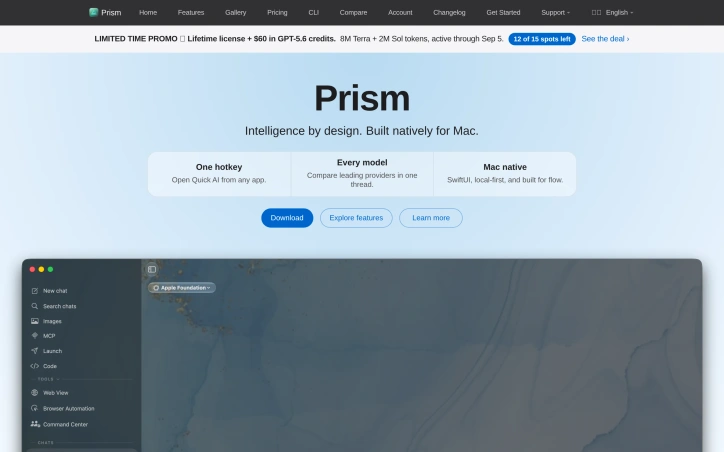
Built natively in SwiftUI for macOS, Prism brings together multiple AI models, code assistance, local model support, and agent automation into one integrated environment. Users invoke the application via a single hotkey from any app, gaining instant access to a suite of tools without leaving their current workspace. The product targets knowledge workers and developers who rely on AI for writing, coding, and analysis—anyone drowning in scattered tools who wants a streamlined alternative.
The standout capabilities center on flexibility and consolidation. Prism allows users to compare leading AI providers within a single thread, switching between models mid-conversation without disrupting context. This is a practical solution to the lock-in problem: users aren't forced to commit to one provider but can instead evaluate and swap based on task requirements. The application also supports local GGUF models with minimal setup friction, appealing to privacy-conscious users or those with specific model preferences.
Beyond chat, Prism includes a native code companion with an integrated terminal, bringing development workflows into the same environment. The platform's agent features—AI that watches, summarizes, and acts automatically—suggest a system designed to anticipate user needs rather than simply respond to them. Integration with MCP and custom tools enables connections to files, databases, and APIs, expanding what users can accomplish without leaving the application.
User testimonials highlight the experience as seamless integration with macOS itself. One key differentiator is the frictionless interaction model: hitting a hotkey, asking a question, and returning to work creates a flow that respects user attention rather than demanding it. The ability to swap models mid-session without breaking conversation context directly addresses a common pain point in multi-model workflows.
Prism operates under a paid licensing model, with promotional messaging around limited-time lifetime access offers paired with cloud credits. Specific pricing details remain behind a link, though the site references tiered options.
For macOS users struggling with AI tool fragmentation, Prism presents a consolidated alternative that prioritizes native integration, model flexibility, and minimal friction in the core interaction loop.
Founder Diary
DevlogThe maker hasn't posted a diary entry yet.
Key Features
Unified Workspace
Consolidates multiple AI tools, code assistance, local models, and agent automation into a single macOS application
Model Switching
Compare different AI providers and swap between models within a single conversation thread without losing context
Local Model Support
Supports local GGUF models with minimal setup friction for privacy-conscious users
Code Companion
Native code assistant with integrated terminal for development workflows and AI-assisted coding
Agent Automation
AI that watches, summarizes, and acts automatically to anticipate user needs
MCP Integration
Connects to files, databases, APIs, and custom tools to expand capabilities beyond chat
Use Cases
-
1
Knowledge workers
Consolidate scattered AI tools into one unified environment to reduce context-switching and stay focused
-
2
Developers
Access code assistance, local models, and integrated terminal in a single native macOS application
-
3
Multi-provider users
Evaluate and compare different AI models for different tasks without committing to one provider
-
4
Privacy-conscious users
Run local GGUF models with minimal setup for data privacy and security
FAQ
Can I use multiple AI models with Prism? ▾
Does Prism support local AI models? ▾
How do I access Prism? ▾
What development features does Prism offer? ▾
Pricing
Prism operates on a paid licensing model with limited-time lifetime access offers and cloud credits, plus tiered pricing options.
Tech Stack & Tags
Discussion (1)

Founder here 👋 Built Prism because I was tired of jumping between five AI apps and tabs just to get through a workday. Would love to hear what tools you’re currently juggling — trying to make sure we’re solving the right pain.
Join the conversation — sign up to comment.
Sign up freeCommunity Support
Boost this project on Sell With boost
Meet the Founder
More in AI Chatbots

Sora 2
Turn text prompts and images into hyperreal vide...

Ask Brave
Ask Brave is a new interface from Brave that uni...

Vibe Coding Award
Vibe Code Award celebrates innovation in coding,...

Omni AI
Omni AI is an all-in-one artificial intelligence...

Octave 2 by Hume AI
Introducing Octave 2. What’s new: - Fluent in 11...

LFM2-Audio
LFM2-Audio defines a new class of audio foundati...