
Screenshot to Code

- No match
Machine translation — the English original is authoritative.
The Story
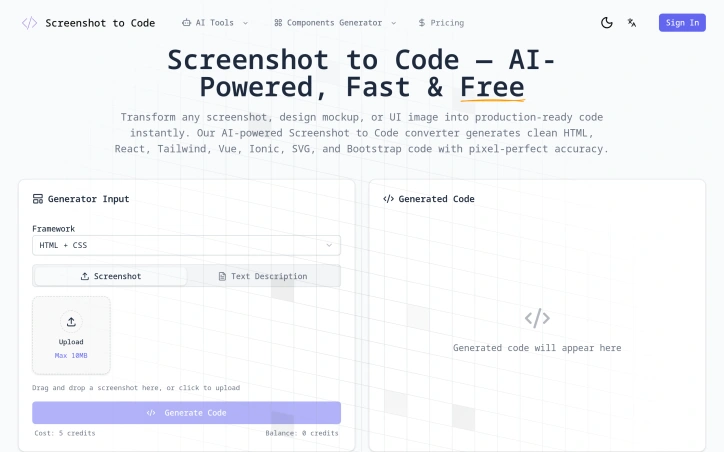
I created Screenshot to Code to solve a problem every developer faces: spending hours manually converting design mockups into code. Designers hand off Figma files and screenshots, and then developers waste days writing HTML, CSS, and JavaScript just to match the design. Our AI-powered tool instantly transforms any screenshot into clean, production-ready code, eliminating tedious manual work and saving teams hours of development time.
AI Overview
AI-generatedAutomating the conversion of visual designs into functional code addresses a genuine pain point in modern development workflows. Screenshot to Code targets developers and designers grappling with design-to-development handoffs, whether that's individuals prototyping quickly or teams moving designs from Figma into production applications. The tool eliminates hours of manual HTML, CSS, and JavaScript work required to match mockups pixel-for-pixel.
What distinguishes this product is its range of framework support and execution speed. Rather than locking users into a single output format, Screenshot to Code generates code across multiple paradigms: vanilla HTML and CSS, React with JSX and TypeScript support, Vue single-file components, Next.js components, Tailwind CSS utility classes, Bootstrap, Ionic, and SVG. This flexibility means developers can feed it a screenshot and receive output in their framework of choice.
The core technology uses AI-powered visual recognition to identify UI components—buttons, forms, navigation menus, cards, images—with the precision required for production work. It reconstructs these elements while preserving layout, spacing, typography, colors, and responsive breakpoints exactly as they appear in the original design. Users can upload PNG, JPG, or WebP files from any source: website screenshots, Figma designs, Sketch mockups, or hand-drawn wireframes. The tool outputs semantic, well-structured code suitable for direct integration into projects.
Generated code is downloaded or copied directly to the clipboard. What the tool notably doesn't do is generate application logic or backend integration—it strictly converts visual elements to front-end code. Developers still need to wire up interactivity and data flows themselves.
The product operates on a credit-based system, with each conversion consuming a fixed number of credits, though explicit pricing details aren't available. The value proposition is straightforward: it removes the bottleneck of translating visual designs into responsive, semantic code. For teams with heavy design-to-code workflows, that efficiency gain is meaningful. The tool's real-world effectiveness ultimately depends on how it handles complex nested layouts and edge cases beyond simple UI patterns.
Founder Diary
DevlogThe maker hasn't posted a diary entry yet.
Key Features
Multi-Framework Support
Generates code across HTML/CSS, React, Vue, Next.js, Tailwind, Bootstrap, Ionic, and SVG
AI Visual Recognition
Identifies UI components with production-grade precision from screenshots and design mockups
Layout Preservation
Maintains exact spacing, typography, colors, and responsive breakpoints from original designs
Multiple Input Formats
Accepts PNG, JPG, WebP from website screenshots, Figma designs, Sketch mockups, or wireframes
Production-Ready Output
Generates semantic, well-structured code suitable for direct integration into projects
Use Cases
-
1
Developers and Designers
Eliminates manual HTML, CSS, and JavaScript work required for design-to-code handoffs
-
2
Individual Prototypers
Speeds up quick prototyping by converting visual designs into functional code
-
3
Teams Transitioning from Figma
Streamlines moving design mockups from Figma into production applications
-
4
Design-Heavy Workflows
Removes the bottleneck of translating visual designs into responsive, semantic code
FAQ
What file types can I upload to Screenshot to Code? ▾
What programming frameworks does it support? ▾
Does it create backend logic or just frontend code? ▾
How is pricing structured? ▾
Tech Stack & Tags
Discussion
No comments yet — be the first!
Join the conversation — sign up to comment.
Sign up freeCommunity Support
Boost this project on Sell With boost
Meet the Founder


More in Website builders

KanuniLabs DataGrid & PivotGrid
Every data grid demo looks fast until you give i...
Bg Remover
Powerful AI Image Tools for Easy Editing Create...
WordPress Speed Optimization Service
WordPress Speed Optimization Service helps busin...
Synor Web development and digital marketing agency
Synor Is one of the best web development and dig...

BuiltToWinWeb
I built BuiltToWinWeb because businesses were st...

InMinutes AI
We built InMinutes to serve as a unified launch...