
Stash

- No match
Machine translation — the English original is authoritative.
The Story
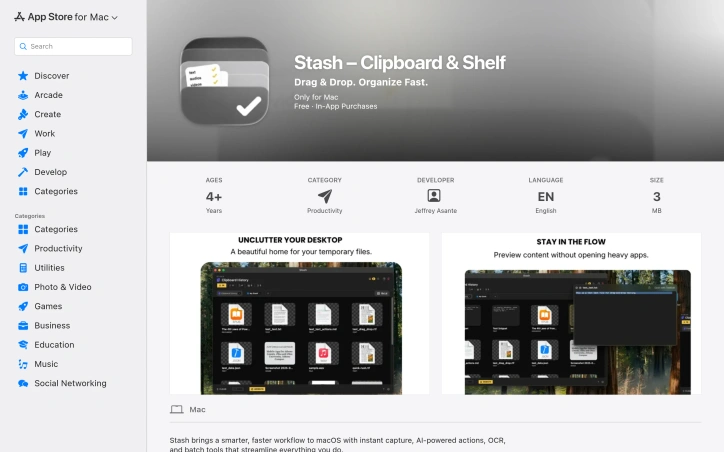
Capture anything on your Mac with Stash. This smart shelf uses OCR, AI background removal, and now on-device audio transcription & translation. Batch process files, text, and media with powerful, context-aware quick actions. No cloud required.
AI Overview
AI-generatedMac users who work with files daily often find themselves bogged down in repetitive tasks and disorganized workflows. Stash aims to address this issue by providing a smarter, faster way to capture, organize, and process files, text, images, and links on macOS.
What stands out about Stash is its emphasis on intelligence and automation. The app leverages AI-powered actions and OCR (Optical Character Recognition) technology to extract text from images and screenshots, making it an attractive option for professionals who spend a significant amount of time working with visual content. Additionally, the app's ability to recognize specific file types and apply batch processing tools can greatly streamline workflows.
Stash's feature set is comprehensive, covering everything from instant capture and organization to voice transcription support. The app also boasts a seamless workflow, staying hidden until needed and revealing itself at the edge of the screen or with a customizable keyboard shortcut. This attention to detail is impressive and suggests that the developers have put considerable thought into creating an intuitive user experience.
The pricing model for Stash consists of a free tier with limited features and two paid options: a yearly subscription ($29.99) and a lifetime purchase ($59.99). The free tier seems fairly generous, offering 10 items, one shelf, and 15 advanced actions per hour. However, users looking to get the most out of Stash will likely need to opt for one of the paid plans.
Overall, Stash shows promise as a tool that can greatly simplify file management workflows on macOS. Its intelligent organization capabilities, AI-powered actions, and seamless workflow make it an attractive option for professionals who work with files daily.
Founder Diary
DevlogThe maker hasn't posted a diary entry yet.
Key Features
AI-Powered Actions
Uses artificial intelligence to automate and enhance file processing tasks.
OCR Text Extraction
Automatically extracts text from images and screenshots using OCR technology.
Batch Processing
Recognizes specific file types and applies batch processing tools to streamline workflows.
Voice Transcription
Supports voice transcription capabilities for capturing information.
Intelligent Organization
Captures, organizes, and processes files, text, images, and links in an intelligent way.
Quick Access
Stays hidden until needed and reveals itself at the screen edge or via customizable keyboard shortcut.
Use Cases
-
1
Daily File Management
Mac users who work with files daily and struggle with repetitive tasks and disorganized workflows.
-
2
Visual Content Professionals
Professionals who spend significant time working with images and screenshots and need automated text extraction.
-
3
Knowledge Workers
Users who need to seamlessly capture, organize, and process multiple types of content including files, text, images, and links.
FAQ
How does Stash extract text from images? ▾
What are the pricing options for Stash? ▾
Can I access Stash with keyboard shortcuts? ▾
Pricing
Free tier with 10 items and one shelf; premium plans at $29.99/year or $59.99 lifetime.
Tech Stack & Tags
Discussion
No comments yet — be the first!
Join the conversation — sign up to comment.
Sign up freeCommunity Support
Boost this project on Sell With boost
Meet the Founder
Anonymous Maker
More in Project management software

Snippetly
Snippetly helps developers and teams capture, or...

Chatquick AI
Create audiobooks, podcasts, and interactive aud...

Focus Session by SyncTasks
Select your tasks and enter a distraction-free m...

Dropstone
Dropstone: World's first generational recursive...

Krisp AI Note Taker Mobile
Meetings don’t wait. Neither should your notes....

US Global Mail
Managing paper mail costs time and resources. US...