
Best Budgeting apps Startups & Tools

Track accounts, categorize spending, forecast cash flow, and plan budgets.

Recently Listed

5 launches

Sort
CoolMeow

Dividing expenses among roommates, travel companions, or romantic partners remains one of those friction points that modern apps haven't fully resolved. CoolMeow addresses this gap by packaging expense tracking, photo attachment, and settlement calculations into a single ledger that syncs across iOS and Android. The product targets groups that need ongoing financial accounting: couples managing household costs, friend groups splitting trips, or roommates tracking shared utilities and groceries. The core functionality is straightforward—users log expenses, assign who paid and who benefited, and the app calculates resulting balances. Where it distinguishes itself from basic expense splitters is the attention to supporting context. Expenses can include photos and notes, keeping receipts and justifications alongside transactions rather than scattered across email or messaging apps. Several features demonstrate thoughtful design. Receipt scanning extracts amounts, merchants, dates, and times directly from photos, returning a draft for verification before commitment. Spending reports break down costs by date, category, and individual, with each total linking back to underlying transactions. Support for multiple currencies within a single ledger addresses the friction of international trips or cross-border payments, converting everything to a primary currency for settlement calculations. The architecture acknowledges payment logistics: CoolMeow calculates who owes whom but leaves actual transfers outside the app, avoiding the complexity and regulation of processing payments directly. One practical element is governance—the ledger creator controls who can add or view expenses and what role participants play. The business model reflects this philosophy. Personal expense tracking is free. Sharing requires the creator to hold an active Basic subscription, though invited participants join without paying. Receipt scanning also requires a subscription and carries usage limits. Cloud synchronization and ledger restoration similarly depend on an active subscription. This creates clear monetization while lowering initial friction for new users exploring the product. A notable addition is MCP support, allowing AI tools to query ledgers, check splits, and preview changes. This positions CoolMeow at the intersection of expense tracking and AI integration, though it currently applies only to cloud ledgers and requires separate AI service subscriptions.


Budgeting-apps
L
leconio

Dividing expenses among roommates, travel companions, or romantic partners remains one of those friction points that modern apps haven't fully resolved. CoolMeow addresses this gap by packaging expense tracking, photo attachment, and settlement calculations into a single ledger that syncs across iOS and Android. The product targets groups that need ongoing financial accounting: couples managing household costs, friend groups splitting trips, or roommates tracking shared utilities and groceries. The core functionality is straightforward—users log expenses, assign who paid and who benefited, and the app calculates resulting balances. Where it distinguishes itself from basic expense splitters is the attention to supporting context. Expenses can include photos and notes, keeping receipts and justifications alongside transactions rather than scattered across email or messaging apps. Several features demonstrate thoughtful design. Receipt scanning extracts amounts, merchants, dates, and times directly from photos, returning a draft for verification before commitment. Spending reports break down costs by date, category, and individual, with each total linking back to underlying transactions. Support for multiple currencies within a single ledger addresses the friction of international trips or cross-border payments, converting everything to a primary currency for settlement calculations. The architecture acknowledges payment logistics: CoolMeow calculates who owes whom but leaves actual transfers outside the app, avoiding the complexity and regulation of processing payments directly. One practical element is governance—the ledger creator controls who can add or view expenses and what role participants play. The business model reflects this philosophy. Personal expense tracking is free. Sharing requires the creator to hold an active Basic subscription, though invited participants join without paying. Receipt scanning also requires a subscription and carries usage limits. Cloud synchronization and ledger restoration similarly depend on an active subscription. This creates clear monetization while lowering initial friction for new users exploring the product. A notable addition is MCP support, allowing AI tools to query ledgers, check splits, and preview changes. This positions CoolMeow at the intersection of expense tracking and AI integration, though it currently applies only to cloud ledgers and requires separate AI service subscriptions.

CoolMeow preview

Key features

  • Expense Tracking: Users log expenses and assign who paid and who benefited with automatic settlement calculations
  • Receipt Scanning: Extracts amounts, merchants, dates, and times directly from photos with draft verification
See full listing
Cove

Personal finance management remains fragmented across multiple apps and bank websites, leaving most people unable to answer basic questions about their spending patterns or financial health. Cove addresses this fragmentation by consolidating banking, investments, credit cards, and subscriptions into a single dashboard while layering AI assistance on top. The product targets financially conscious individuals ranging from students to professionals who want oversight without the friction of manual spreadsheets or juggling separate logins. The core value proposition centers on visibility and action: see everything in one place, identify wasteful subscriptions, and get concrete guidance on spending and savings. Several capabilities distinguish Cove from basic aggregation tools. The AI assistant transforms financial data into conversational insights, letting users ask open-ended questions like "what do I spend on food?" rather than digging through transaction histories. This natural language interface lowers the barrier for people who find traditional budgeting tools tedious. The subscription detection feature specifically targets recurring charges, a known pain point where consumers often forget about free trials or low-cost services that accumulate. The platform's budgeting engine generates recommendations based on actual spending patterns rather than zero-based assumptions, which should improve adoption compared to traditional budgeting tools that feel prescriptive. Weekly money recaps keep users informed without requiring active engagement, addressing the information asymmetry most people face around their finances. Notably, Cove offers a bill negotiation service where the company's team contacts providers on users' behalf—a concierge element uncommon in fintech. This suggests a willingness to bundle services that deliver concrete value, like actual bill reductions, rather than stopping at pure visibility. On trust and security, Cove positions read-only connections prominently, meaning the app can't move money or initiate transactions. The company holds SOC 2 Type II certification and uses 256-bit encryption, standard practices that nonetheless matter when asking users to link sensitive financial accounts. App Store ratings of 4.4 and Google Play ratings of 4.6 suggest reasonable user satisfaction in the real world. The product notably avoids anchoring on what it doesn't do—there's no mention of investment advice, robo-advising, or lending products. This focused scope, combined with the emphasis on connectivity and AI-driven insights, positions Cove as a financial command center rather than a full wealth management platform. For users drowning in financial chaos, that clarity has appeal.


Budgeting-apps
A
Abhishek Sharma

Personal finance management remains fragmented across multiple apps and bank websites, leaving most people unable to answer basic questions about their spending patterns or financial health. Cove addresses this fragmentation by consolidating banking, investments, credit cards, and subscriptions into a single dashboard while layering AI assistance on top. The product targets financially conscious individuals ranging from students to professionals who want oversight without the friction of manual spreadsheets or juggling separate logins. The core value proposition centers on visibility and action: see everything in one place, identify wasteful subscriptions, and get concrete guidance on spending and savings. Several capabilities distinguish Cove from basic aggregation tools. The AI assistant transforms financial data into conversational insights, letting users ask open-ended questions like "what do I spend on food?" rather than digging through transaction histories. This natural language interface lowers the barrier for people who find traditional budgeting tools tedious. The subscription detection feature specifically targets recurring charges, a known pain point where consumers often forget about free trials or low-cost services that accumulate. The platform's budgeting engine generates recommendations based on actual spending patterns rather than zero-based assumptions, which should improve adoption compared to traditional budgeting tools that feel prescriptive. Weekly money recaps keep users informed without requiring active engagement, addressing the information asymmetry most people face around their finances. Notably, Cove offers a bill negotiation service where the company's team contacts providers on users' behalf—a concierge element uncommon in fintech. This suggests a willingness to bundle services that deliver concrete value, like actual bill reductions, rather than stopping at pure visibility. On trust and security, Cove positions read-only connections prominently, meaning the app can't move money or initiate transactions. The company holds SOC 2 Type II certification and uses 256-bit encryption, standard practices that nonetheless matter when asking users to link sensitive financial accounts. App Store ratings of 4.4 and Google Play ratings of 4.6 suggest reasonable user satisfaction in the real world. The product notably avoids anchoring on what it doesn't do—there's no mention of investment advice, robo-advising, or lending products. This focused scope, combined with the emphasis on connectivity and AI-driven insights, positions Cove as a financial command center rather than a full wealth management platform. For users drowning in financial chaos, that clarity has appeal.

Cove preview

Key features

  • Consolidated Dashboard: Aggregates banking, investments, credit cards, and subscriptions into a single interface
  • AI Financial Assistant: Answers open-ended questions about spending patterns through natural language conversation
See full listing
Arrel: Budget & Money

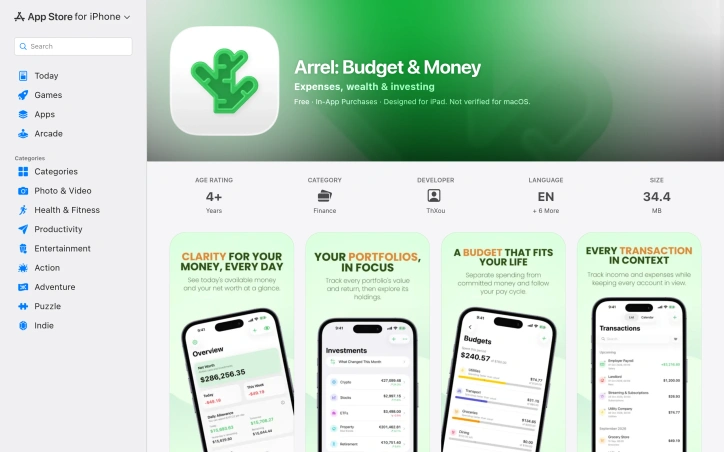
Personal finance apps have traded user privacy for free services for so long that Arrel's opposite approach feels almost radical. This iOS and iPad application inverts the typical business model: instead of harvesting spending data to fuel advertising or resale, it keeps everything offline and on your device, with no analytics tracking, no ads, and no third-party SDKs lurking in the background. The app targets people who want to manage their money without wondering if their financial details are being profited from elsewhere. You can use Arrel entirely without creating an account, though free sync across devices becomes available once you choose to sign in. The core product respects your autonomy at every level. Beyond privacy, Arrel handles the actual work of personal finance competently. It tracks multiple account types—cash, bank, savings, and credit cards—each in their own currency, which matters for anyone managing money across borders. The budgeting approach is particularly thoughtful, distinguishing between committed expenses and available money, so recurring bills like rent next week don't artificially inflate your spending budget for the month. Investment tracking extends beyond simple logging. You can build portfolios across stocks, ETFs, and crypto, and Arrel automatically calculates holdings and cost basis as you record buys and sells. Premium subscribers access live pricing for these assets; everyone else can input values manually. The app also calculates net worth, visualizes income versus expenses, and breaks down spending by category to surface spending patterns. The feature set feels complete without becoming overwhelming. Home Screen widgets and a read-only Apple Watch app keep essentials accessible. You can import bank statements from CSV and export all your data whenever you want, avoiding the lock-in that many finance apps rely on. Recent updates added Apple Intelligence features on supported devices for querying finances and categorizing imported transactions, processed entirely on-device. The business model is straightforward: the base app is free, and a premium subscription unlocks unlimited accounts, portfolios, budgets, trackers, analytics history, multi-currency exchange rates, shared trackers, PDF reports, and cash-flow forecasting. Sync and CSV export remain free regardless of subscription. Arrel succeeds because it solves a real problem—managing personal finances privately—without over-engineering the solution. It's a tool that trusts users rather than exploiting them.

Budgeting-apps
L
Luis

Personal finance apps have traded user privacy for free services for so long that Arrel's opposite approach feels almost radical. This iOS and iPad application inverts the typical business model: instead of harvesting spending data to fuel advertising or resale, it keeps everything offline and on your device, with no analytics tracking, no ads, and no third-party SDKs lurking in the background. The app targets people who want to manage their money without wondering if their financial details are being profited from elsewhere. You can use Arrel entirely without creating an account, though free sync across devices becomes available once you choose to sign in. The core product respects your autonomy at every level. Beyond privacy, Arrel handles the actual work of personal finance competently. It tracks multiple account types—cash, bank, savings, and credit cards—each in their own currency, which matters for anyone managing money across borders. The budgeting approach is particularly thoughtful, distinguishing between committed expenses and available money, so recurring bills like rent next week don't artificially inflate your spending budget for the month. Investment tracking extends beyond simple logging. You can build portfolios across stocks, ETFs, and crypto, and Arrel automatically calculates holdings and cost basis as you record buys and sells. Premium subscribers access live pricing for these assets; everyone else can input values manually. The app also calculates net worth, visualizes income versus expenses, and breaks down spending by category to surface spending patterns. The feature set feels complete without becoming overwhelming. Home Screen widgets and a read-only Apple Watch app keep essentials accessible. You can import bank statements from CSV and export all your data whenever you want, avoiding the lock-in that many finance apps rely on. Recent updates added Apple Intelligence features on supported devices for querying finances and categorizing imported transactions, processed entirely on-device. The business model is straightforward: the base app is free, and a premium subscription unlocks unlimited accounts, portfolios, budgets, trackers, analytics history, multi-currency exchange rates, shared trackers, PDF reports, and cash-flow forecasting. Sync and CSV export remain free regardless of subscription. Arrel succeeds because it solves a real problem—managing personal finances privately—without over-engineering the solution. It's a tool that trusts users rather than exploiting them.

Arrel: Budget & Money preview

Key features

  • Offline Privacy: All financial data stays on-device with no analytics tracking, ads, or third-party SDKs
  • Multi-Currency Support: Tracks cash, bank, savings, and credit cards each in separate currencies for international use
See full listing
AI Budget Assistant

Spreadsheet-based family budgets collapse under their own friction. AI Budget Assistant addresses this by automating the most tedious part of household finance management: data entry. Instead of typing receipts or forwarding bank statements, family members log expenses through voice commands or photos of receipts, which the AI then categorizes and summarizes. The result is a shared, real-time budget visible to everyone in the household. The product solves a specific pain point: families struggling to coordinate on spending because the process of tracking expenses is too burdensome to maintain consistently. The target audience is households where multiple people contribute expenses but lack a centralized, frictionless way to see them together. It appeals to people who find spreadsheets tedious and prefer input methods that don't require typing. Several capabilities distinguish AI Budget Assistant from basic expense-tracking apps. Receipt scanning uses optical character recognition to extract line items, amounts, and merchant names from photos rather than forcing manual entry. Voice input allows users to log expenses conversationally. The platform supports shared access across family members, with all participants seeing the same data in real-time across phones, tablets, and web browsers. Beyond tracking, it includes budget creation, savings goal management, debt monitoring, and expense analytics broken down by category and merchant. Bank integration imports transactions directly from Wise and other institutions via CSV or PDF, with duplicate detection to prevent double-counting. The AI component extends beyond data entry into analysis. Instead of reading charts, users can ask natural-language questions about their finances and receive conversational responses. This positions the product as more of a financial advisor interface than a simple ledger. The business model relies on a freemium structure. Core features are free, while a Pro plan removes limits on AI queries and enables advanced analytics. The company does not disclose specific pricing or feature breakdowns beyond this split. For households tired of juggling multiple tools or spreadsheet disciplines, AI Budget Assistant offers a more human-friendly approach to a fundamentally important problem. Its strength lies not in novelty but in consolidating scattered household finance management into a single, voice-and-photo-driven interface designed for collaboration rather than isolation.


Spreadsheet-based family budgets collapse under their own friction. AI Budget Assistant addresses this by automating the most tedious part of household finance management: data entry. Instead of typing receipts or forwarding bank statements, family members log expenses through voice commands or photos of receipts, which the AI then categorizes and summarizes. The result is a shared, real-time budget visible to everyone in the household. The product solves a specific pain point: families struggling to coordinate on spending because the process of tracking expenses is too burdensome to maintain consistently. The target audience is households where multiple people contribute expenses but lack a centralized, frictionless way to see them together. It appeals to people who find spreadsheets tedious and prefer input methods that don't require typing. Several capabilities distinguish AI Budget Assistant from basic expense-tracking apps. Receipt scanning uses optical character recognition to extract line items, amounts, and merchant names from photos rather than forcing manual entry. Voice input allows users to log expenses conversationally. The platform supports shared access across family members, with all participants seeing the same data in real-time across phones, tablets, and web browsers. Beyond tracking, it includes budget creation, savings goal management, debt monitoring, and expense analytics broken down by category and merchant. Bank integration imports transactions directly from Wise and other institutions via CSV or PDF, with duplicate detection to prevent double-counting. The AI component extends beyond data entry into analysis. Instead of reading charts, users can ask natural-language questions about their finances and receive conversational responses. This positions the product as more of a financial advisor interface than a simple ledger. The business model relies on a freemium structure. Core features are free, while a Pro plan removes limits on AI queries and enables advanced analytics. The company does not disclose specific pricing or feature breakdowns beyond this split. For households tired of juggling multiple tools or spreadsheet disciplines, AI Budget Assistant offers a more human-friendly approach to a fundamentally important problem. Its strength lies not in novelty but in consolidating scattered household finance management into a single, voice-and-photo-driven interface designed for collaboration rather than isolation.

AI Budget Assistant preview

Key features

  • Receipt Scanning: Extracts line items, amounts, and merchant names from photos using optical character recognition.
  • Voice Logging: Allows users to log expenses conversationally without typing.
See full listing
DIYCalcKit

Homeowners tackling renovation projects face a familiar frustration: each calculation requires hunting for a different tool. Paint coverage, tile counts, grout amounts, and cost estimates each live on separate websites, forcing users to juggle tabs and context switch constantly. DIYCalcKit consolidates this scattered experience into one unified platform, offering 34 calculators designed for the most common home improvement tasks. The product targets do-it-yourself homeowners who need quick, reliable estimates without complexity. Its value proposition is straightforward: no account creation, no ads cluttering the interface, instant results presented clearly. The founder identified a real pain point—the repetitive search for relevant calculators—and built a single source of truth. The range of tools spans the typical home project lifecycle. Paint estimators cover gallons needed, cost projections, coverage areas, and primer requirements. Flooring tools address tile placement, carpet seaming, hardwood board counts, and grout quantities. Beyond surfaces, the platform includes roofing calculators, insulation assessments, and renovation cost breakdowns by room and scope. More niche additions like the Christmas lights calculator and home renovation ROI tool show the creator anticipated varied user needs and seasonal projects. What distinguishes DIYCalcKit from building spreadsheets or using generic calculators is the specialization. Each tool bakes in domain knowledge—accounting for pattern repeats in wallpaper, waste allowances in tile, angles in roofing installation. The decision to bundle 20 project guides alongside calculators acknowledges that homeowners don't just need numbers; they need direction. The business model is transparent. The entire platform is free and will remain so indefinitely, with no signup wall gating access. This removes hesitation for casual users and makes the product instantly accessible mid-project, when someone realizes they need an estimate but doesn't have time for lengthy onboarding. For a homeowner planning their first bathroom remodel or calculating materials for a weekend paint job, the platform eliminates the friction of sourcing multiple calculators and consolidates decision-making. It won't appeal to professionals who already have established estimation workflows, but for the DIY segment making project decisions at the hardware store or on the couch with a tape measure, having 34 relevant tools in one place shifts the calculus.

Budgeting-apps
C
canghun13

Homeowners tackling renovation projects face a familiar frustration: each calculation requires hunting for a different tool. Paint coverage, tile counts, grout amounts, and cost estimates each live on separate websites, forcing users to juggle tabs and context switch constantly. DIYCalcKit consolidates this scattered experience into one unified platform, offering 34 calculators designed for the most common home improvement tasks. The product targets do-it-yourself homeowners who need quick, reliable estimates without complexity. Its value proposition is straightforward: no account creation, no ads cluttering the interface, instant results presented clearly. The founder identified a real pain point—the repetitive search for relevant calculators—and built a single source of truth. The range of tools spans the typical home project lifecycle. Paint estimators cover gallons needed, cost projections, coverage areas, and primer requirements. Flooring tools address tile placement, carpet seaming, hardwood board counts, and grout quantities. Beyond surfaces, the platform includes roofing calculators, insulation assessments, and renovation cost breakdowns by room and scope. More niche additions like the Christmas lights calculator and home renovation ROI tool show the creator anticipated varied user needs and seasonal projects. What distinguishes DIYCalcKit from building spreadsheets or using generic calculators is the specialization. Each tool bakes in domain knowledge—accounting for pattern repeats in wallpaper, waste allowances in tile, angles in roofing installation. The decision to bundle 20 project guides alongside calculators acknowledges that homeowners don't just need numbers; they need direction. The business model is transparent. The entire platform is free and will remain so indefinitely, with no signup wall gating access. This removes hesitation for casual users and makes the product instantly accessible mid-project, when someone realizes they need an estimate but doesn't have time for lengthy onboarding. For a homeowner planning their first bathroom remodel or calculating materials for a weekend paint job, the platform eliminates the friction of sourcing multiple calculators and consolidates decision-making. It won't appeal to professionals who already have established estimation workflows, but for the DIY segment making project decisions at the hardware store or on the couch with a tape measure, having 34 relevant tools in one place shifts the calculus.

DIYCalcKit preview

Key features

  • Specialized Calculators: 34 tools covering paint, flooring, roofing, insulation, and other home improvement tasks
  • No Account Required: Instant access without signup, login, or email verification
See full listing