AI Photo Editor No Sign Up

- No match
Machine translation — the English original is authoritative.
The Story
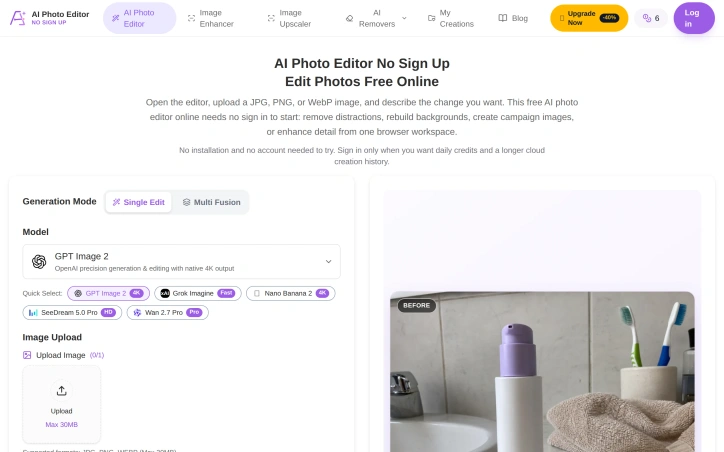
AI Photo Editor No Sign Up is a browser-based AI image editor that lets people start editing without creating an account. Users upload a JPG, PNG, or WebP image, describe the changes they want, and generate a new result online. It supports prompt-based editing, object removal, background replacement, restoration, enhancement, Single Edit, and Multi Fusion.
AI Overview
AI-generatedQuick photo editing without the signup friction remains a genuine user need, and this browser-based AI editor tackles it head-on. Users upload an image, describe the edits they want in natural language, and receive results without creating an account first. The approach removes a major barrier to entry for photographers who just need one-off adjustments before moving on.
The product works with standard web image formats (JPG, PNG, WebP) up to 30MB and supports a range of editing tasks through its prompt-based interface. Object removal stands out as a particularly useful feature, letting users eliminate distracting elements while requesting specific texture or detail handling to maintain natural results. Background replacement handles both transparent outputs and custom scene generation, making it practical for product photography and profile images. The editor also includes restoration workflows for old photos and generative fill for adding or modifying elements within an image.
What distinguishes this tool is its genuine no-friction approach. Rather than burying the free tier behind a signup wall, the editor lets users engage immediately, then offers optional accounts for those who want daily credits and extended history. This positioning targets creators who value speed over feature depth and e-commerce sellers preparing marketplace listings without commitment.
The interface presents multiple AI model options, giving users flexibility in generation approach and output quality. Aspect ratio and resolution controls let users tailor outputs to specific uses, whether that's creating social media content, campaign images, or marketplace thumbnails. The product demonstrates clear use cases through task-specific guidance and step-by-step examples.
The business model trades immediate conversion for accessibility. Free usage with a credits system means casual users can experiment before deciding whether the product earns a subscription. This low-barrier approach suits a fragmented market where many photo editors sit unused after signup friction or confusing paywalls.
The main tradeoff is predictable: a credits-based model combined with the browser platform means users are limited in how much they can generate for free, creating natural paths toward paid accounts for power users. For those seeking unlimited local editing, desktop tools remain the alternative. But for the specific case of quick AI-assisted edits that need no installation and no login, the product delivers directly on its proposition.
Founder Diary
DevlogThe maker hasn't posted a diary entry yet.
Key Features
No Signup Required
Upload, edit, and download images immediately without creating an account
Object Removal
Eliminate distracting elements while specifying texture and detail handling for natural results
Background Replacement
Generate custom scenes or create transparent backgrounds for products and profiles
Photo Restoration
Restore and improve old photographs using AI workflows
Generative Fill
Add or modify elements within images using AI generation
Multiple AI Models
Choose between different AI models to control generation approach and output quality
Use Cases
-
1
Photographers
Perform quick one-off image adjustments without signup friction
-
2
E-commerce Sellers
Prepare product images and marketplace listings without account commitment
-
3
Social Media Creators
Generate campaign images and social media content quickly without installation
-
4
Profile Image Users
Create or update profile pictures with AI-powered background replacement
FAQ
Can I edit photos without signing up? ▾
What file formats does the editor support? ▾
Is this free or do I need to pay? ▾
What editing features are available? ▾
Pricing
Free tier with credits system for experimentation; optional paid accounts unlock daily credits and extended image history.
Tech Stack & Tags
Discussion
No comments yet — be the first!
Join the conversation — sign up to comment.
Sign up freeCommunity Support
Boost this project on Sell With boost
Meet the Founder

More in Photo editing

MetaScope
As a professional photographer, I needed a tool...

Banana AI - Free AI Image Generator
Banana AI is a free AI image and video generatio...

AImageResize
I built AImageResize to simplify image resizing...
TurboConvert - Image Converter
As a solo web dev I was constantly juggling PNG...

ImgKit
I built ImgKit because uploading photos to rando...

PixelBoost AI
I built PixelBoost AI to eliminate the complexit...