
AudienceCue

- No match
Machine translation — the English original is authoritative.
The Story
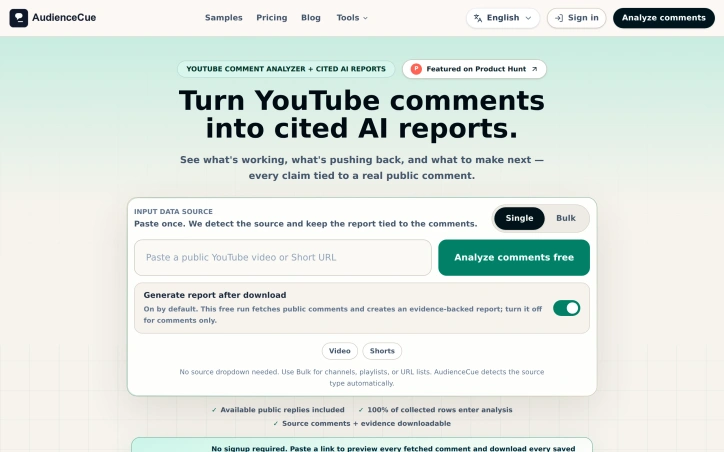
AudienceCue helps creators and researchers collect public YouTube comments and turn them into cited audience reports. Start with supported video, Shorts, live, channel, playlist, or URL-list inputs. Export returned public comments and available public replies to CSV, JSON, TXT, or XLSX. Analyze audience questions and feedback with reports linked to supporting comments. Share read-only reports or export them as HTML, Markdown, or JSON. AudienceCue does not post comments, moderate conversations, or take actions on a YouTube channel. Free access and paid plans are available.
AI Overview
AI-generatedUnderstanding audience sentiment from YouTube comments has traditionally been a manual, anecdotal exercise. Creators and researchers scroll through hundreds or thousands of comments, picking out patterns by hand, with no systematic way to validate whether their impressions reflect broader audience consensus. AudienceCue addresses this gap by automating the collection and analysis of public YouTube comments, converting raw feedback into structured reports that tie every insight back to supporting evidence.
The product works across multiple input types, including individual videos, Shorts, channels, playlists, and even bulk URL lists. Users paste a link or list, and the tool automatically detects the source type, collects public comments and available replies, and feeds them into an AI analysis engine. Rather than black-box insights, AudienceCue's reports cluster audience feedback into thematic narratives—what viewers repeatedly mention, what they defend, what they ask for next—and every finding links directly to the original comment that supports it. This evidence-based approach gives creators and researchers confidence that reported trends actually reflect their audience's comments.
The feature set reflects practical creator needs. Reports can identify audience narrative patterns, surface content demand signals, flag backlash risks, and prioritize where creators should engage in replies. Users can export the underlying comments to CSV, JSON, TXT, or XLSX formats, and share read-only reports with collaborators or export them as HTML, Markdown, or JSON. The public sample reports demonstrate the breadth of use cases: creator planning, competitive research, launch readiness assessment, and sponsorship risk evaluation.
A notable design choice: the tool collects and analyzes only—it does not post comments, moderate conversations, or take automated actions on YouTube channels. This constraint keeps the product focused and removes potential friction around channel moderation policies or accidental spam.
The business model includes free and paid plans, though specific pricing details are not publicly detailed in available materials. For creators and content strategists seeking to understand audience sentiment without manual analysis, the tool fills a real gap in knowing what audiences actually think beyond anecdotal impressions.
Founder Diary
DevlogThe maker hasn't posted a diary entry yet.
Key Features
Automated Collection
detects source type and collects public YouTube comments and replies automatically
Evidence-Based Reports
clusters feedback into thematic narratives with links to supporting original comments
Multiple Input Types
analyzes individual videos, Shorts, channels, playlists, and bulk URL lists
Data Export
exports comments to CSV, JSON, TXT, or XLSX formats
Collaborative Sharing
share read-only reports or export as HTML, Markdown, or JSON
Use Cases
-
1
Content Creators
understand audience sentiment and priorities without manually scrolling through comments
-
2
Content Strategists
identify narrative patterns and content demand signals for planning
-
3
Competitive Researchers
analyze what audiences are saying about competitors and market trends
-
4
Sponsorship Teams
flag backlash risks and evaluate partnership fit before campaigns
FAQ
Can I export YouTube comments to CSV? ▾
Does it post or moderate YouTube comments? ▾
What types of YouTube content can I analyze? ▾
How does it organize audience feedback? ▾
Pricing
Free and paid plans are available, but specific pricing details are not publicly disclosed.
Discussion
No comments yet — be the first!
Join the conversation — sign up to comment.
Sign up freeCommunity Support
Boost this project on Sell With boost