
Diskfern
- No match
Machine translation — the English original is authoritative.
The Story
We built Diskfern to help Mac users finally understand what's filling up their storage. Most tools are slow or invade privacy - we created a fast, private analyzer with a visual map that shows exactly what's taking space and makes cleanup safe and confident.
AI Overview
AI-generatedStorage bloat on Mac is a persistent frustration that most users simply avoid rather than solve. Diskfern tackles this directly by building a visual map of what occupies disk space, making the abstract problem of a full drive concrete and actionable.
Mac storage analysis isn't new, but Diskfern differentiates itself on speed and privacy. The application performs a complete scan of a startup disk containing nearly three million files in approximately sixteen seconds, and searches across millions of records in just a few milliseconds. All analysis happens locally on the user's Mac with no cloud uploads or account requirements, addressing a core privacy concern that plagues many utility applications.
The product targets multiple constituencies effectively. Developers find value in dedicated tooling for build artifacts like Xcode's DerivedData folders, simulator runtimes, and node_modules directories that accumulate across projects. Creative professionals benefit from identification of large media files and render caches left behind by Final Cut Pro and similar applications. General users gain insight into system caches and app data that Apple's own storage reporting doesn't clearly explain.
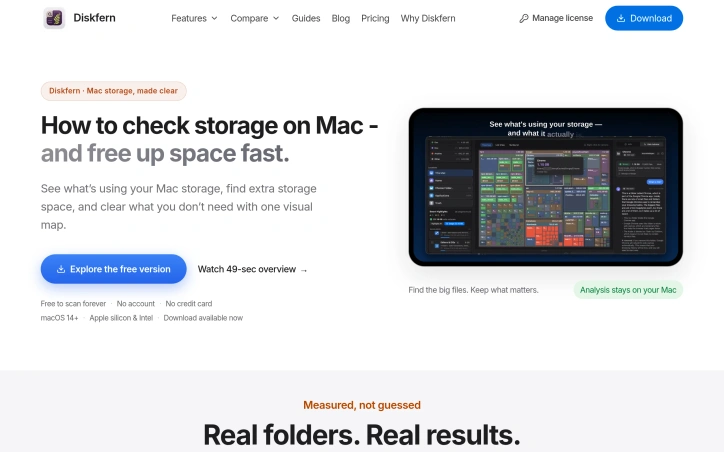
What stands out most is the treemap visualization. Rather than presenting files as text lists, Diskfern renders them as proportionally sized tiles, making it immediately obvious which folders and files dominate storage usage. This visual approach combines with natural language search capabilities, allowing users to hunt for specific file types without learning query syntax.
The application enforces a safety-conscious workflow. Smart highlights categorize different kinds of clutter, distinguishing between rebuildable caches that are safe to delete and files that warrant review before removal. This prevents the common cleanup mistake of removing something necessary. Users can collect candidates for deletion, review the total space involved, and proceed with full control rather than operating on incomplete information.
The free version removes a key barrier to adoption. Users can scan forever without providing payment information or creating accounts, with Diskfern offering a Pro tier for advanced capabilities. This model respects user skepticism about storage tools while generating revenue from power users who find sustained value in the analysis features.
Diskfern succeeds because it simplifies a genuinely frustrating problem through speed, privacy, and thoughtful design. The treemap visualization alone makes storage issues graspable in ways traditional file browsers cannot match.
Founder Diary
DevlogThe maker hasn't posted a diary entry yet.
Key Features
Visual Treemap
Renders files as proportionally sized tiles making storage usage distribution immediately obvious
Fast Scanning
Completes full disk scans on drives with nearly three million files in approximately sixteen seconds
Privacy-Focused
All analysis happens locally on the user's Mac with no cloud uploads or account requirements
Natural Language Search
Allows users to hunt for specific file types without learning query syntax
Smart Highlights
Categorizes clutter types to distinguish between rebuildable caches that are safe to delete and files warranting review
Use Cases
-
1
Developers
Dedicated tooling for build artifacts like Xcode's DerivedData folders, simulator runtimes, and node_modules directories
-
2
Creative Professionals
Identification of large media files and render caches left behind by Final Cut Pro and similar applications
-
3
General Users
Insight into system caches and app data that Apple's own storage reporting doesn't clearly explain
FAQ
Does Diskfern upload my data to the cloud? ▾
How fast can Diskfern scan my entire disk? ▾
What is the difference between the free and Pro versions? ▾
Can I search for files using natural language? ▾
Pricing
Free version includes unlimited scanning; Pro tier available for advanced capabilities and power users.
Tech Stack & Tags
Discussion
No comments yet — be the first!
Join the conversation — sign up to comment.
Sign up freeCommunity Support
Boost this project on Sell With boost
Meet the Founder

More in Security software

Locksy - Tab Locker & Password Protection
Your browser tabs are a security disaster. Pr...

GeoPatrol
GeoPatrol is a cloud-based SaaS platform that de...
FixMyMacNow
We built FixMyMacNow because Mac users face cons...

Fraudly
We built Fraudly because too many people lose mo...

ArkWarden
ArkWarden is a privacy-focused vault app for iPh...

VeilDB
We built VeilDB because teams need production-li...