
Omni Flash
- No match
Machine translation — the English original is authoritative.
The Story
I saw creators struggling with complicated AI video tools that required API setup and technical knowledge. That's why I built Omni Flash—a completely free, web-based video generator connected to Google's model. Anyone can now turn simple text prompts, images, or clips into professional videos in seconds, perfect for social shorts, ads, and product demos. No installation, no friction.
AI Overview
AI-generatedVideo creation has long demanded either serious technical expertise or expensive subscriptions. Omni Flash tackles this friction by placing a free, web-based AI video generator in the hands of everyday creators who want results without setup headaches. The product targets individuals and small teams making social content, product demonstrations, short-form ads, and quick video edits who have neither the time nor inclination to wrangle API keys and local environments.
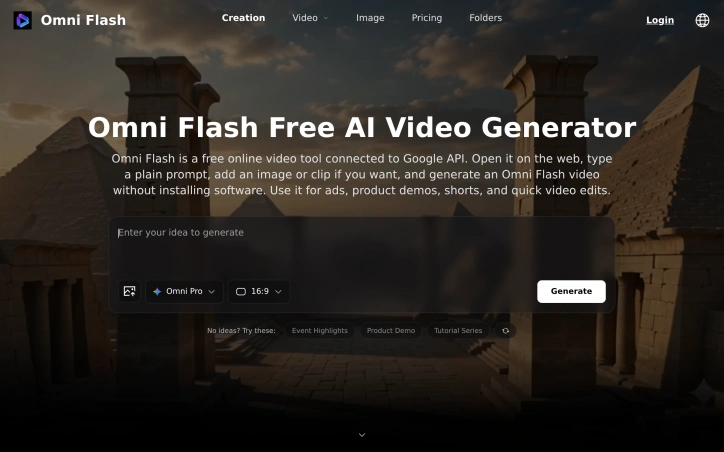
The core appeal lies in its radical simplicity. Users open the tool in a browser, enter a text prompt, optionally upload an image or reference clip, and generate a video—all without installing software or managing technical infrastructure. The platform connects to Google's video generation API, handling the complexity behind the scenes so creators can focus on their vision rather than configuration.
Functionally, Omni Flash offers both text-to-video and image-to-video capabilities, supporting typical creator workflows across TikTok, YouTube, Instagram, and landing pages. The reference image and video features allow users to guide the model's output toward specific subjects, styles, and motion patterns, giving everyday prompts more precision than raw text alone might provide. Downloads happen directly from the browser, completing the workflow without external dependencies.
The business model follows a freemium pattern. New users receive complimentary credits for testing before deciding to spend. This approach removes the adoption barrier—potential users can validate whether the tool meets their needs before committing financially. Specific pricing tiers are not detailed in available materials, though the messaging emphasizes upgrading only when demand exceeds free allocations.
What distinguishes Omni Flash in a crowded AI video space is its uncompromising focus on accessibility. Rather than marketing toward AI researchers or power users, it explicitly targets people whose technical ceiling is write a prompt and click generate. This positioning represents a deliberate constraint that shrinks complexity. By outsourcing the underlying model and API infrastructure to Google, the team eliminated the development surface area that trips up smaller tools—no model fine-tuning, no infrastructure scaling for users to navigate.
The risk inherent in this approach is dependency. Users cannot control which Google model powers generations, cannot self-host for privacy, and cannot escape API rate limits beyond what the platform manages. For creators whose needs outgrow these boundaries, Omni Flash functions more as an on-ramp than a permanent solution. Yet for the specific audience of casual creators making throwaway content at speed, those constraints barely register.
Founder Diary
DevlogThe maker hasn't posted a diary entry yet.
Key Features
Browser-Based Generation
Create videos directly in a web browser without installing software or managing infrastructure
Text-to-Video Capability
Convert text prompts into full videos with optional image or video references for guidance
Reference-Guided Output
Use reference images and videos to direct the model toward specific subjects, styles, and motion patterns
Direct Downloads
Export generated videos directly from the browser without external dependencies or additional tools
Google API Integration
Leverages Google's video generation API to handle technical complexity behind the scenes
Image-to-Video Support
Generate videos from uploaded images in addition to text-based prompts
Use Cases
-
1
Social Media Creators
Make TikTok, YouTube, and Instagram content without technical expertise or expensive software
-
2
Product Demonstrations
Quickly generate product demo videos for landing pages and e-commerce sites
-
3
Short-Form Advertising
Create promotional and ad content at speed without production overhead
-
4
Small Teams
Enable non-technical team members to produce video content independently and efficiently
FAQ
Do I need technical skills to use Omni Flash? ▾
Can I control what video model is used? ▾
How much does Omni Flash cost? ▾
Can I self-host or use Omni Flash offline? ▾
Pricing
New users receive complimentary credits to test before upgrading; specific pricing tiers are not detailed in available materials.
Tech Stack & Tags
Discussion
No comments yet — be the first!
Join the conversation — sign up to comment.
Sign up freeCommunity Support
Boost this project on Sell With boost
Meet the Founder

More by TOOLREEL




More in AI Generative Media

AI Mixer - AI Photo | AI Video | AI Voice. All AI tools in one app!
AI Mixer was built to solve a simple but frustra...
FacelessGenie
We built FacelessGenie to solve the biggest bott...

GeniusAI
We built GeniusAI to make professional AI image...

MyRaxAI
I built MyRaxAI to help creators generate stunni...

Berrioo
We built Berrioo to democratize professional vis...

Seedance
We built Seedance to make cinematic video creati...