
PdfCompare

- No match
Machine translation — the English original is authoritative.
The Story
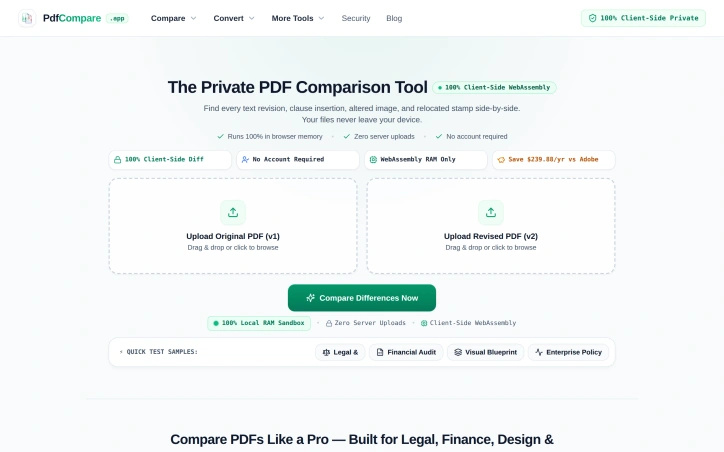
I built PdfCompare to help legal teams, auditors, and designers spot critical changes without manually reviewing documents line-by-line. Our 100% private, client-side tool compares PDFs with legal-grade accuracy—finding subtle contract revisions, financial adjustments, and layout shifts—while keeping your files completely secure on your device, no uploads required.
AI Overview
AI-generatedComparing PDF versions manually invites disaster, especially when subtle changes carry legal or financial consequences. A confidentiality clause shifting from 3 to 5 years, a decimal point moved in a balance sheet, or an authorization stamp drifting 14 millimeters—these shifts demand precision detection but consume hours of tedious line-by-line review. PdfCompare addresses this friction directly by automating differential PDF analysis for legal teams, financial auditors, designers, and HR departments who cannot afford to miss critical revisions.
The product's defining feature is its privacy-first architecture. All processing happens client-side in the browser using WebAssembly; files never touch a server and require no account creation. For organizations handling sensitive contracts, financial records, or proprietary designs, this eliminates a major friction point around data security and compliance. The approach is technically sound and operationally simpler than uploading to cloud-based competitors.
PdfCompare's feature set is specialized for its target verticals. Legal users get targeted highlighting of textual changes within contract language. Auditors see isolated financial deltas and line-item shifts while the system filters out noise from standard document repagination—a meaningful improvement over line-by-line scanning of 50-page earnings reports. The visual design comparison mode deserves mention for its specificity: an overlay tool (marketed as an X-ray pixel slider) lets architects and designers detect moved elements, shifted logos, or altered spacing without misidentifying text reflow as a substantive change. For HR and operations teams, the tool generates transparent changelogs suitable for communicating policy updates to staff.
The implementation decisions reflect a product built for actual workflows rather than generic PDF viewing. The tool recognizes that legal, finance, and design teams have distinct comparison needs—contract language requires semantic precision, financial documents need numerical isolation, and technical drawings prioritize visual layout accuracy. The quick-start samples (contract, financial, and visual) reinforce this specialization.
Pricing information is minimal in the available materials, though a comparison to Adobe suggests competitive positioning around cost savings. The lack of subscription lock-in—no account required, no recurring fees mentioned—makes the product more accessible for occasional users or organizations already skeptical of SaaS sprawl.
The risk is a narrow addressable market. Organizations comfortable with existing PDF workflows or less sensitive to privacy concerns may not see sufficient differentiation. For the segments it targets, however, PdfCompare solves a genuine problem with a straightforward technical approach and reasonable tradeoff: local processing for privacy and simplicity, sacrificing some advanced features or batch automation that cloud competitors offer.
Founder Diary
DevlogThe maker hasn't posted a diary entry yet.
Key Features
Client-Side Processing
All PDF analysis happens in the browser using WebAssembly without uploading files to servers
No Account Required
Access the tool without account creation or login
Contract Language Highlighting
Detects and highlights textual changes within legal documents
Financial Delta Isolation
Identifies numerical changes and line-item shifts while filtering out repagination noise
Visual Overlay Comparison
X-ray pixel slider tool for detecting moved elements, logos, and spacing changes
Policy Changelog Generation
Creates transparent changelogs for communicating updates to staff
Use Cases
-
1
Legal Teams
Detect subtle changes in clauses and contract language with precision detection
-
2
Financial Auditors
Isolate numerical deltas and line-item shifts in earnings reports and balance sheets
-
3
Designers and Architects
Identify moved elements, shifted logos, and altered spacing in technical drawings
-
4
HR and Operations
Generate transparent changelogs for communicating policy updates to staff
FAQ
Does PdfCompare require creating an account? ▾
Is my data stored on servers? ▾
What types of PDFs can PdfCompare compare? ▾
How does PdfCompare compare to cloud-based PDF tools? ▾
Tech Stack & Tags
Discussion
No comments yet — be the first!
Join the conversation — sign up to comment.
Sign up freeCommunity Support
Boost this project on Sell With boost
Meet the Founder

More in PDF Editor

CropItFast
I built CropItFast because I was tired of clunky...
PDF Redaction
We built this because companies were sending sen...

HEICPDF.TO
I built HEICPDF.TO to solve the problem of incom...

SimpliConvert
We built SimpliConvert to solve the frustration...

PDF Tools India
We built PDF Tools India to eliminate the need f...
QuickDocs
One Suite for All Your Document Conversions. 🛡...