
tmps.fyi – Online Clipboard

- No match
Machine translation — the English original is authoritative.
The Story
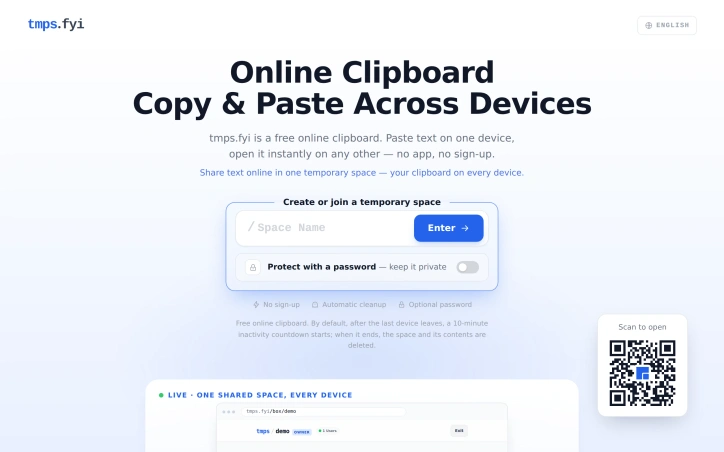
tmps.fyi is a free online clipboard and temporary file-sharing tool, built and maintained by an independent developer to make moving content between devices simple. Share text, images, and files between your phone, tablet, and computer in real time. On desktop, capture screenshots and share them directly, all in your browser with no app or sign-up required. Join the same clipboard using a name, link, or QR code. Optional password protection lets you restrict access. Shared content is temporary and is automatically cleared 10 minutes after the last device leaves. It is a non-AI utility.
AI Overview
AI-generatedMoving files and text between multiple devices has long required either cumbersome app installations, account creation, or reliance on single-ecosystem solutions. tmps.fyi addresses this friction point with a browser-based clipboard that lets users instantly sync content across phones, tablets, and computers without authentication, downloads, or long-term storage.
The core appeal lies in its simplicity. Users create a named space, optionally password-protect it, and access it from any other device by entering the same name. Real-time synchronization means updates appear within milliseconds. The product targets anyone who regularly moves screenshots, links, code snippets, or files between devices but doesn't need cloud storage's permanence—developers testing mobile interfaces, presenters sharing slides during meetings, or anyone bridging the gap between iOS, Android, Windows, and macOS without proprietary ecosystem constraints.
What distinguishes tmps.fyi from alternatives is its stateless design. Unlike email (which clutters inboxes), AirDrop (limited to Apple devices), cloud storage (requiring folders and permission management), or USB cables (needing physical hardware), this solution offers immediate, friction-free handoffs. Content persists only as long as needed; once all devices disconnect, a 10-minute countdown begins before automatic deletion. This design sidesteps privacy concerns around permanent cloud storage while making the tool genuinely ephemeral.
The feature set remains focused. Users can transfer text, images, and files. Desktop users can directly capture and share screenshots. Access can be secured with passwords for sensitive transfers. File download capability means users aren't restricted to copying and pasting—they can move actual files across platforms. The absence of required sign-up or app installation removes baseline friction compared to almost every competitor.
The business model is worth noting: tmps.fyi is entirely free with no mentioned premium tier or monetization strategy. This positions it as a utility with no recurring revenue but also no pressure to adopt freemium or subscription mechanics. An independent developer maintains the service, which carries both advantages—rapid iteration, user-first prioritization—and inherent risks around long-term sustainability that potential users should weigh.
The product excels at addressing a narrow, genuine problem with elegant restraint. It doesn't try to be Dropbox or iCloud; it's specifically engineered for temporary, cross-device transfers where the user values speed and simplicity over permanence.
Founder Diary
DevlogThe maker hasn't posted a diary entry yet.
Key Features
Real-Time Sync
Updates appear across devices within milliseconds
No Sign-Up Required
Access content instantly without authentication or account creation
Password Protection
Optional password security for sensitive transfers
Automatic Deletion
Content automatically deletes 10 minutes after all devices disconnect
Cross-Platform Transfers
Move text, images, and files between iOS, Android, Windows, and macOS
Screenshot Capture
Desktop users can directly capture and share screenshots
Use Cases
-
1
Developers
Quick testing environment for transferring content between desktop and mobile devices
-
2
Presenters
Share slides and materials during meetings without email or cloud storage dependencies
-
3
Cross-Device Transfer
Instantly sync screenshots, links, and files between phones, tablets, and computers
-
4
Multi-Ecosystem Users
Transfer content between iOS, Android, Windows, and macOS without vendor lock-in
FAQ
Do I need to sign up for tmps.fyi? ▾
How long is content stored? ▾
Can I password protect my files? ▾
Is tmps.fyi free? ▾
Pricing
Entirely free with no premium tier or monetization strategy
Discussion
No comments yet — be the first!
Join the conversation — sign up to comment.
Sign up freeCommunity Support
Boost this project on Sell With boost
Meet the Founder

More in File storage and sharing apps

X-Streamify
X-Streamify is a private digital vault that brin...
Smart Renamer
A few months ago, I was stuck at a café with onl...

DropAI.zone
We built DropAI to solve the friction of sharing...

File Walk
Smart Organization • Duplicate Detection • Light...

Transfereko
I built Transfereko to make secure file sharing...
Zency - Smart Document Manager
I built Zency to securely manage personal files...