
Vehla
- No match
Machine translation — the English original is authoritative.
The Story
I'm building a Mac command center to streamline user workflow with AI actions, dictation, and native commands, solving the problem of inefficient task management.Replace 15+ mac utilities with one.
AI Overview
AI-generatedStreamlining workflows on Mac devices is a daunting task, especially when users have to juggle multiple utilities to accomplish various tasks. The solution lies in a comprehensive command center that integrates AI actions, dictation, and native commands, making it easier for users to manage their tasks efficiently.
Vehla's product is designed to address this issue by providing a centralized platform that replaces the need for multiple Mac utilities. It is tailored for individuals who value productivity and are looking for a way to simplify their workflow. By doing so, it caters to professionals and power users seeking to maximize their efficiency on Mac devices.
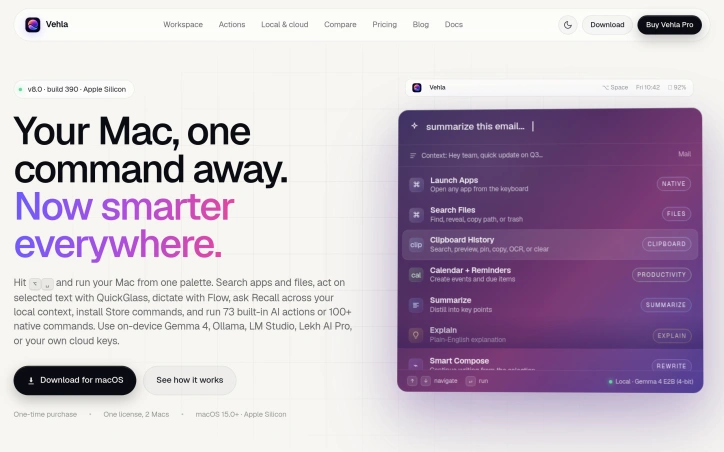
One of the standout aspects of Vehla is its integration of AI capabilities directly into the Mac command center. The product utilizes on-device AI models such as Gemma 4, Ollama, and LM Studio, among others, to enable advanced features like Recall, which builds a local search index across various sources, and Smart Compose, which assists in writing tasks.
Key features worth noting include the ability to search for apps and files, act on selected text with QuickGlass, dictate with Flow, and access to 73 built-in AI actions or 100+ native commands. Additionally, the product offers functionalities like window management through Snap Wheel, note-taking, and task organization.
The product is available for macOS 15.0+ on Apple Silicon devices, making it compatible with the latest Mac technology. The business model is straightforward, with a one-time purchase option that allows users to license the product for use on two Macs.
Overall, Vehla presents a compelling solution for Mac users looking to simplify their workflow and enhance productivity. By integrating AI capabilities and native commands into a single command center, it effectively consolidates multiple utilities into one, making it an attractive option for those seeking to streamline their tasks.
Founder Diary
DevlogThe maker hasn't posted a diary entry yet.
Key Features
Search Capability
Search for apps and files
QuickGlass
Act on selected text
Flow Dictation
Dictate with Flow
Snap Wheel
Manage windows
Smart Compose
Assist in writing tasks
Use Cases
-
1
Professionals
Maximize efficiency on Mac devices
-
2
Power Users
Simplify workflow and enhance productivity
-
3
Productivity Enthusiasts
Streamline tasks with a centralized platform
FAQ
Is Vehla compatible with my Mac device? ▾
How many Macs can I use Vehla on? ▾
What AI models does Vehla utilize? ▾
Pricing
One-time purchase option available
Tech Stack & Tags
Founder's Resources
Discussion
No comments yet — be the first!
Join the conversation — sign up to comment.
Sign up freeCommunity Support
Boost this project on Sell With boost
Meet the Founder

More in AI Workflow Automation

Zoye
The CRM You Never Need to Open. The AI Native...

Vora IQ
I built Vora IQ to help entrepreneurs build real...

SaaS scaffold
One command. Auth, payments, database, email, Ta...

MOOGH
We built MOOGH to bring intelligent task automat...

prompt-ctl.com
Structures every prompt for max signal, min wast...

SpokenPost
As a builder, my best ideas rarely hit me when I...