
Zoye
- No match
Machine translation — the English original is authoritative.
The Story
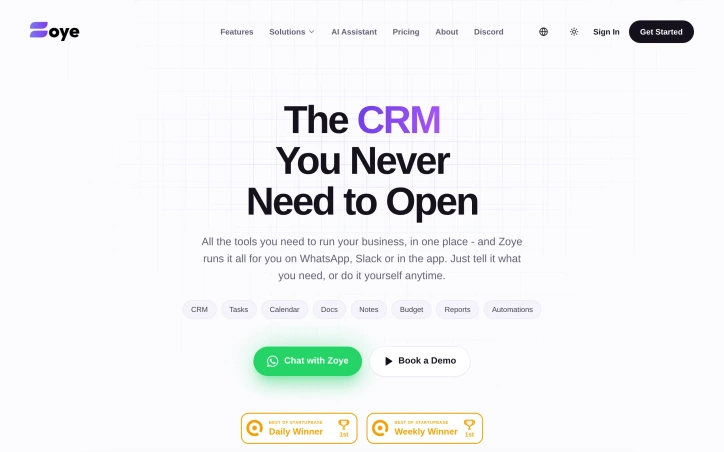
The CRM You Never Need to Open.
The AI Native CRM that is fully managed by an AI agent even from WhatsApp or Slack. You'd spend most of your time chatting with the agent rather than managing it all manually
AI Overview
AI-generatedA fundamental frustration among founders and small business operators is the sprawl and complexity of managing multiple specialized software tools. Rather than forcing users to hop between platforms for CRM, task management, calendars, documents, and reporting, Zoye consolidates these functions into a unified interface accessible through conversational channels like WhatsApp and Slack, complemented by a traditional web application.
The core innovation is architectural. Instead of requiring users to learn and navigate another complex dashboard, Zoye delegates operational workflows to an AI agent that executes tasks based on natural language instructions or predefined automations. A user can communicate with the system through existing communication channels rather than opening yet another browser tab. This directly addresses a pain point that resonates across the productivity software industry: tool fatigue and the cognitive overhead of context-switching between applications.
The platform bundles traditional business functions—customer relationship management, task tracking, calendars, document storage, notes, budgeting, and reporting—alongside automation capabilities. This breadth positions it as a centralized operational hub rather than a single-purpose CRM. The company's blog content reveals vertical-specific marketing efforts, including targeted guides for real estate agents, fitness professionals, legal practitioners, and event organizers, indicating the product has been adapted to support workflows beyond generic sales and customer service.
Zoye targets a specific niche: resource-constrained startups and small businesses where hiring dedicated operations staff remains impractical. For this audience, the value proposition is compelling. An AI-managed CRM eliminates the traditional setup and ongoing management burden that discourages many founders from implementing structured customer workflows at all.
Notably, the positioning emphasizes what the product does not require: opening the application itself. This inverts the typical software experience where the application is the primary interface. Whether this approach proves sufficient for teams needing deeper analysis, complex custom workflows, or extensive collaboration remains an open question. The reliance on conversational interfaces depends heavily on the quality and consistency of the underlying AI, which directly determines whether the system reliably interprets and executes business-critical operations.
The company provides a live preview and demo booking, though no pricing is disclosed publicly, suggesting a sales-driven motion typical of B2B SaaS targeting SMBs.
Founder Diary
DevlogThe maker hasn't posted a diary entry yet.
Key Features
Unified CRM Platform
Consolidates customer relationship management, task tracking, calendars, documents, notes, budgeting, and reporting into one system.
Conversational AI Assistant
Executes tasks based on natural language instructions through WhatsApp, Slack, and web application channels.
Multi-Channel Access
Available through existing communication platforms instead of requiring a separate dashboard.
Workflow Automation
Enables predefined automations and AI-driven task execution for business operations.
Use Cases
-
1
Startups and Small Businesses
Eliminates setup and management burden of traditional CRM systems for resource-constrained teams.
-
2
Real Estate Agents
Supports real estate-specific workflows including customer management and scheduling.
-
3
Service Professionals
Designed for fitness professionals, legal practitioners, and event organizers with vertical-specific needs.
-
4
Tool-Fatigued Teams
Consolidates multiple software tools into one interface to reduce context-switching overhead.
FAQ
How do I access Zoye? ▾
What business features does Zoye include? ▾
Does Zoye automate tasks? ▾
Is Zoye good for small businesses? ▾
Pricing
Tech Stack & Tags
Discussion
No comments yet — be the first!
Join the conversation — sign up to comment.
Sign up freeCommunity Support
Boost this project on Sell With boost
Meet the Founder

More in AI Workflow Automation

Vehla
I'm building a Mac command center to streamline...

Vora IQ
I built Vora IQ to help entrepreneurs build real...
SaaS scaffold
One command. Auth, payments, database, email, Ta...

prompt-ctl.com
Structures every prompt for max signal, min wast...

MOOGH
We built MOOGH to bring intelligent task automat...

SpokenPost
As a builder, my best ideas rarely hit me when I...