Animate images and photos
- No match
Machine translation — the English original is authoritative.
The Story
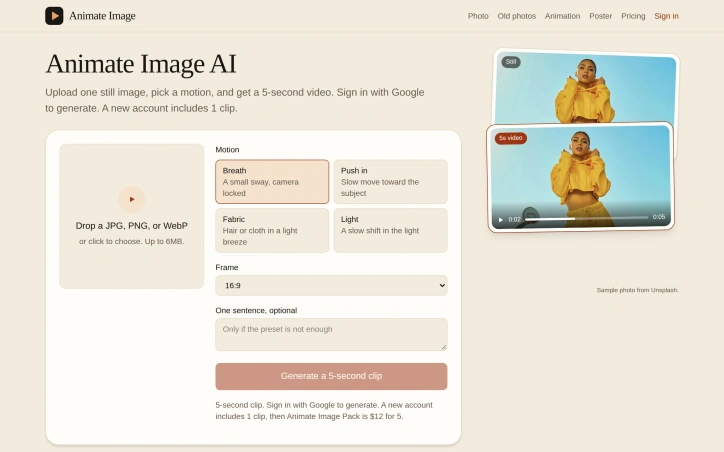
Upload a photo, poster, or render, then animate image into a short clip. The face, objects, and background stay put. Animate a photo or poster without redrawing the person.
AI Overview
AI-generatedAnimate Image AI addresses a narrow but common need: bringing a single still picture to life without a reshoot or a full production pipeline. The tool takes one JPG, PNG, or WebP file of up to 6MB, lets the user choose a motion preset, and returns a five-second video built from that same image. Its stated scope excludes generating video from a text prompt and excludes turning a person into a different character, which makes it a focused instrument rather than a general video generator. Product photographers preparing listings, portrait owners who want a subtle breath or slow push, and designers who need to animate key art or renders are the clearest audiences.
The most distinctive aspect is restraint. The site emphasizes that the still image serves as the first frame and that the motion presets are designed to preserve the face, objects, and background. Four presets cover the main options: a small sway with a locked camera, a slow push-in toward the subject, movement in hair or cloth from a light breeze, and a gentle shift in lighting. An optional sentence can refine the result, and the frame can be set to 16:9, 9:16, or 1:1. For posters, the locked camera and light-only movement help keep lettering from being rewritten, which is a meaningful advantage over tools that redraw the entire frame.
The workflow is short and clear. The browser downsizes the long edge to 1280 pixels before upload, the controls sit on the same screen as the upload area, and a visible timer runs while the clip renders, which usually finishes in under a minute. Sign-in with Google is required only when the user presses Generate.
On pricing, the page states that a new account includes one free clip and that an Animate Image Pack costs $12 for five clips. Beyond that, the content provides no further details on business model or limits.
Overall, the product is best understood as a targeted draft generator. It produces a quick, five-second preview to test whether a motion suits an image, and its design choices prioritize fidelity to the original still over dramatic reinterpretation.
Founder Diary
DevlogThe maker hasn't posted a diary entry yet.
Key Features
Single Image Input
Accepts one JPG, PNG, or WebP file of up to 6MB and uses that same image as the first frame of the clip.
Motion Presets
Offers four presets, including a small sway with locked camera, a slow push-in, hair or cloth movement from a light breeze, and a gentle lighting shift.
Subject Preservation
Motion presets are designed to preserve the face, objects, and background of the original image.
Optional Refinement Sentence
Lets users add one sentence to refine the result of the generated clip.
Adjustable Frame Ratio
Supports 16:9, 9:16, and 1:1 frame sizes.
Browser-Side Resizing
Downsizes the long edge to 1280 pixels before upload, with controls on the same screen as the upload area.
Use Cases
-
1
Product photographers
They can animate listing photos without a reshoot or full production pipeline.
-
2
Portrait owners
They can add a subtle breath or slow push to a still portrait.
-
3
Designers
They can animate key art or renders while keeping the original image largely intact.
-
4
Poster creators
The locked camera and light-only movement help keep lettering from being rewritten.
FAQ
What file types and sizes does Animate Image AI accept? ▾
How long is the video generated by Animate Image AI? ▾
Can Animate Image AI create video from a text prompt? ▾
How much does Animate Image AI cost? ▾
Pricing
The page lists a free clip for new accounts and a $12 pack of five clips, but it does not describe a monthly subscription, so the $12 figure is a one-time pack price rather than a monthly rate.
Discussion
No comments yet — be the first!
Join the conversation — sign up to comment.
Sign up freeCommunity Support
Boost this project on Sell With boost
Meet the Founder

More by JC X
More in 3D & Animation
Text3D Generator
I built Text3D Generator because content creator...

Img3D
Img3D is an AI 3D workspace built around referen...
Arnis
I created Arnis to generate Minecraft world maps...

STLRepair
STLRepair helps makers and 3D printing users che...

3dfileconverter.online
3dfileconverter.online is a free browser workspa...
GameApi Builder tool
Young people need better tools at their early ca...