RemoveBG
- No match
Machine translation — the English original is authoritative.
The Story
Remove background from a product shot or a portrait, then download a transparent PNG or place the subject on a flat color. Cut a subject out of a photo and download a transparent PNG.
AI Overview
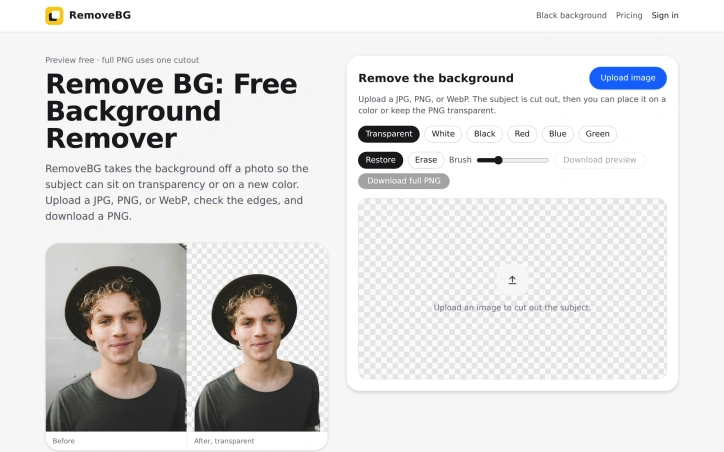
AI-generatedAnyone who has spent time isolating a product or a person from a busy photo knows how tedious that work can be. Online sellers, marketers, designers, and staff teams who need consistent headshots all face the same task: separating the subject from its surroundings so it can sit cleanly on a new canvas. This web tool targets that workflow. Users upload a JPG, PNG, or WebP, review the cutout, and download the result as a PNG.
What stands out is the focus on the final composition rather than the cutout alone. The site treats transparency as the central goal, explaining that empty pixels let one file drop onto a white card, a dark campaign, or a colored banner without another pass. It also makes a practical point that many tools skip: JPEG cannot store transparent pixels, so PNG export is the only way to keep the background truly empty. The guidance is also candid about where cutouts typically fail, pointing to hair, hat brims, and the gaps beside shoulders. That honesty makes the advice more credible.
The editing toolset is modest but covers the common repair cases. Restore brings back an edge the cutout clipped, Erase clears leftover wall or fringe from the original background, and a brush supports finer work. Once the subject is separated, users can choose a canvas of transparent, white, black, red, blue, or green. The color options place the subject on a flat field rather than recoloring the original photograph, and the white canvas drops the studio gradient and shadows from the source shot. That distinction matters for catalog work, where visual consistency across a row of product images is the goal.
The workflow is simple: open the site, upload, check the edges, adjust, and download. No account is needed to view the cutout or download a small preview PNG. The full-resolution PNG, however, uses one cutout from either the RemoveBG Pack or RemoveBG Plus, so anyone planning heavy use should factor that in.
Overall, this is a focused utility with a clear path from photo to usable PNG. Its strength lies in that straightforward process and in its honest guidance about what a transparent export can and cannot do. Users who need quick, flat-background cutouts for listings, marketing assets, or staff pages will find it a practical choice.
Founder Diary
DevlogThe maker hasn't posted a diary entry yet.
Key Features
Transparent Background Export
Exports the cutout as a PNG so empty pixels let the subject drop onto any new background without another editing pass.
Restore Brush
Brings back an edge that the cutout clipped away from the subject.
Erase Tool
Clears leftover wall or fringe from the original background.
Canvas Color Options
Places the subject on a transparent, white, black, red, blue, or green flat field instead of recoloring the original photo.
White Canvas Cleanup
Drops the studio gradient and shadows from the source shot for consistent catalog imagery.
Use Cases
-
1
Online sellers
Need clean, uniform product cutouts across a row of catalog listings.
-
2
Marketers
Need subjects placed on white cards, dark campaigns, or colored banners without redoing the cutout.
-
3
Designers
Need transparent PNG files that can be dropped onto new canvases.
-
4
Staff teams
Need consistent headshots placed on flat, matching backgrounds for staff pages.
FAQ
Can I download a background-removed image as a JPG? ▾
Do I need an account to remove the background from a photo? ▾
What image formats can I upload to RemoveBG? ▾
Where does background removal usually fail? ▾
Discussion
No comments yet — be the first!
Join the conversation — sign up to comment.
Sign up freeCommunity Support
Boost this project on Sell With boost