AppScreenshoot
- No match
Machine translation — the English original is authoritative.
The Story
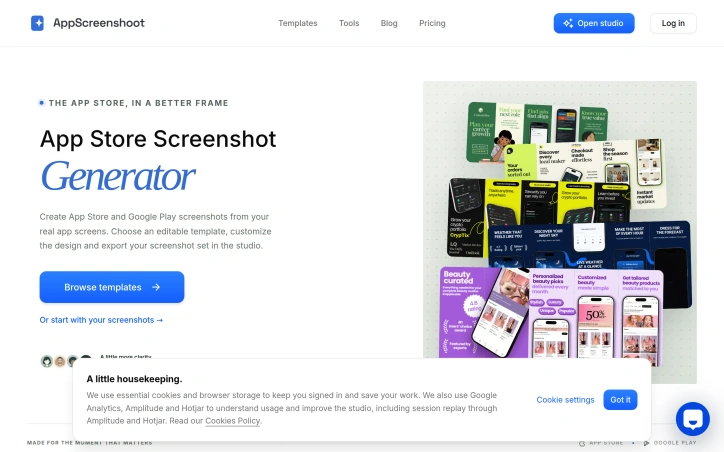
We saw app creators spending hours resizing and redesigning screenshots for every platform. AppScreenshoot lets you drop your real app screens into beautiful templates, tell your story once, and export the whole set for App Store and Google Play without all the file wrangling. Good design should get to the point—that's what we built.
AI Overview
AI-generatedCreating mobile app store listings demands attention to detail that most developers would rather avoid. App creators typically spend considerable time resizing and customizing screenshots for multiple platforms—each with distinct technical requirements and design constraints. AppScreenshoot addresses this friction point by offering a template-based studio that consolidates the workflow for both App Store and Google Play submissions.
The product targets mobile app developers and publishers who need to produce professional, cohesive screenshot sets across iOS and Android without navigating endless file formats and dimension specifications. Rather than treating design as an afterthought, AppScreenshoot positions visual presentation as integral to app discovery, acknowledging that store listings serve as the first impression for potential users.
What distinguishes AppScreenshoot from basic screenshot tools is its emphasis on narrative. The platform encourages developers to start with a visual direction that aligns with their app's identity, then layer in real product screens and thoughtful copy to tell a coherent story. This approach reflects a deliberate design philosophy: good communication requires clarity over decoration, and apps are discovered and installed based on genuine understanding of what they do.
The studio provides presets for the most common deployment scenarios—iPhone devices at standard sizes, iPad listings, and Android phones—alongside feature graphics for Google Play. Developers drop in actual screenshots from their app, adjust backgrounds and headlines, and preview the complete set before exporting. The tool supports both PNG and JPEG formats, reducing the manual resizing that typically consumes development time.
The platform acknowledges a critical distinction often overlooked: an app store image for iPhone differs structurally from an iPad listing screenshot or a Google Play card, even when conveying the same core message. AppScreenshoot's template library, organized by app category (shopping, weather, finance, education, productivity), provides starting points while remaining flexible enough for customization.
One practical detail worth noting: the platform includes a built-in reminder that no screenshot generator can replace human judgment about whether an image truthfully represents the product. Developers still own the responsibility of selecting screens that align with their headlines and removing placeholder content before submission.
For mobile developers juggling multiple app platforms and marketing complexity, AppScreenshoot simplifies a concrete, repetitive task that currently consumes disproportionate effort relative to its importance in the app discovery process.
Founder Diary
DevlogThe maker hasn't posted a diary entry yet.
Key Features
Template-Based Studio
Consolidates screenshot creation workflow for both App Store and Google Play submissions.
Multi-Platform Presets
Includes standard sizes for iPhone, iPad, and Android phones with feature graphics for Google Play.
Category-Organized Templates
Provides starting templates organized by app category including shopping, weather, finance, education, and productivity.
Format Support
Supports both PNG and JPEG formats with built-in preview functionality before export.
Narrative-Focused Design
Encourages aligning visual direction with app identity and layering real product screens with thoughtful copy.
Customizable Backgrounds
Allows developers to adjust backgrounds and headlines while maintaining design cohesion across platforms.
Use Cases
-
1
Mobile app developers and publishers
Need to produce professional screenshot sets across iOS and Android without navigating multiple file format specifications.
-
2
App creators with limited design resources
Reduce time spent on manual resizing and technical compliance across different platform requirements.
-
3
Apps competing in crowded categories
Establish visual identity and coherent storytelling through coordinated store listings to improve app discovery.
FAQ
Can I use my own app screenshots in AppScreenshoot? ▾
What file formats does AppScreenshoot support? ▾
Does AppScreenshoot have templates for different types of apps? ▾
Can I preview my screenshots before submitting to app stores? ▾
Tech Stack & Tags
Discussion
No comments yet — be the first!
Join the conversation — sign up to comment.
Sign up freeCommunity Support
Boost this project on Sell With boost
Meet the Founder

More by Yu CAO
More in Screenshots and screen recording apps

iOS Live Face Cam Screen Recorder
Demo Scope is a mobile screen recorder with a li...
ClickToGuide
As a software engineer, I constantly see how muc...
ScreenGlimpse
Trying to find quick screen recording tool that...
Website Scroll Video
I created Website Scroll Video because manually...
Soundtest
We built Soundtest because noise disputes withou...