iOS Live Face Cam Screen Recorder
- No match
Machine translation — the English original is authoritative.
The Story
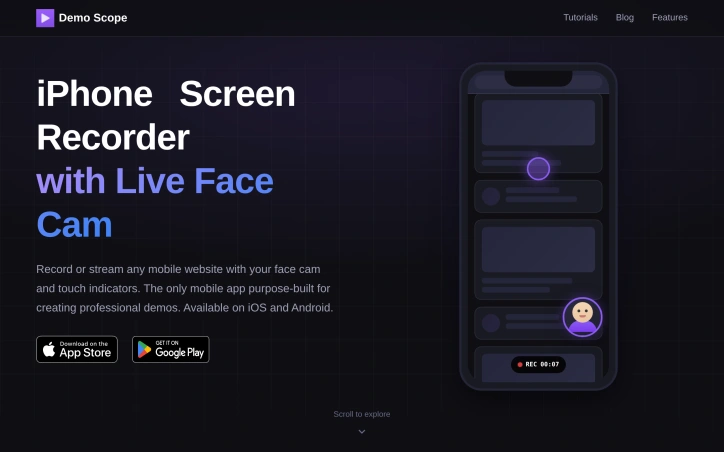
Demo Scope is a mobile screen recorder with a live face cam overlay, touch indicators, a built-in teleprompter, and live streaming. It started as a thing I made to demo my own stuff, and now it's the thing.
Without being too modest, I honestly feel this is the best iOS screen recorder app on the market right now, fight me
I make web games as side projects. Every time I wanted to record a quick demo, I'd burn an hour wrestling with OBS on desktop. All I wanted was to open my phone, load my site, and hit record — with my face on screen and my taps visible.
(Yes, that's right, you saw a "—", this was written by AI, all but this sentence)
That tool didn't exist. So I built it.
Free to try. One-time purchase to unlock everything. No subscriptions.
AI Overview
AI-generatedProfessional mobile demos have historically required desktop recording software or awkward workarounds that compromise the viewing experience. DemoScope solves this by building a purpose-built screen recording app specifically for capturing mobile web interactions alongside live commentary, making it particularly valuable for startup founders pitching to investors, content creators launching on platforms like Product Hunt, and developers documenting user workflows.
The standout feature is the integrated face cam overlay with positioning and resizing controls, paired with touch indicator visualization. Rather than relying on viewers to infer what actions are happening on screen, the app makes every tap, swipe, and gesture visible with customizable animations and colors. This combination addresses a real friction point in mobile demos—without these cues, viewers often struggle to follow along with rapid interactions or multi-step workflows.
Beyond recording, DemoScope supports live streaming directly to Twitch, YouTube, and Facebook, along with custom RTMP servers, which extends the tool's utility to real-time use cases like product launches, tutorials, and gaming content. The app accepts input from any website loaded in its built-in browser, video playback, or photo slideshows, giving creators flexibility in what they choose to record. Features like URL favorites and browsing history are included, acknowledging that many recording sessions involve navigation or comparison work.
The product positioning targets multiple audiences simultaneously—investor-focused founders who need polished pitch materials, streamers and live content creators, and educators building tutorial content for YouTube or online courses. Each use case gets explicit attention in the marketing, suggesting the creators have deliberately built for this spectrum rather than trying to serve everyone generically.
The app is available on both iOS and Android, which is a meaningful differentiation from desktop-only solutions, since it positions recording and streaming as native mobile workflows rather than desktop adjacent tasks. The face cam customization (circular, square, or rectangular shapes with dragging and pinching controls) suggests attention to usability details that matter for on-the-fly content creation.
No pricing or subscription model is mentioned in the available content, making it unclear whether this is a freemium offering, one-time purchase, or subscription service. That omission is notable for a product clearly targeting creators and entrepreneurs who evaluate tools partly on cost structure.
Founder Diary
DevlogThe maker hasn't posted a diary entry yet.
Key Features
Integrated Face Cam Overlay
Customizable face camera with positioning, resizing controls, and shape options (circular, square, rectangular)
Touch Indicator Visualization
Makes all taps, swipes, and gestures visible with customizable animations and colors
Live Streaming Support
Enables direct streaming to Twitch, YouTube, Facebook, and custom RTMP servers
Built-in Browser
Accepts input from websites, video playback, or photo slideshows for flexible recording content
Cross-Platform Support
Available on both iOS and Android as native mobile recording and streaming workflows
URL Favorites and History
Includes browsing history and URL favorites to support navigation during recording sessions
Use Cases
-
1
Investor Pitches
Startup founders create polished pitch materials with professional mobile demos and integrated live commentary
-
2
Live Content Creation
Streamers and creators broadcast product launches and tutorials directly to Twitch, YouTube, and Facebook
-
3
Educational Tutorials
Educators build tutorial content for YouTube and online courses with visible user interactions and gestures
-
4
Product Demonstrations
Teams conduct real-time product launches and document user workflows with synchronized face cam and screen recording
FAQ
Does DemoScope support live streaming to Twitch or YouTube? ▾
Can I add a face camera while recording my phone screen? ▾
How do viewers see what I'm tapping on screen? ▾
What content can I record with DemoScope? ▾
Tech Stack & Tags
Discussion
No comments yet — be the first!
Join the conversation — sign up to comment.
Sign up freeCommunity Support
Boost this project on Sell With boost