Aster

- No match
Machine translation — the English original is authoritative.
The Story
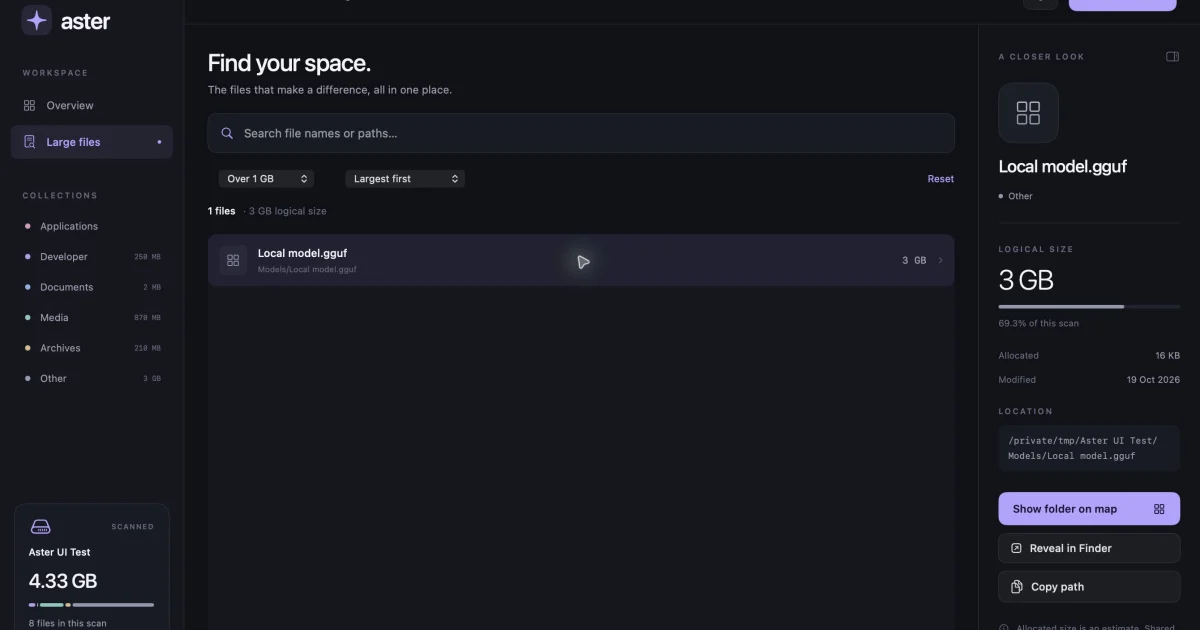
Mac storage full right before an export? Aster shows what’s taking up space. Start with a visual storage map, find large files by size or name, and review app caches, logs and developer clutter. Pick the items you want to remove, then confirm before they move to the Trash. You can recover them there until you empty it yourself.
Aster keeps file names, paths and scan results on your Mac. It runs on Apple silicon and Intel Macs with macOS 14 or later. A Pro license is $5 once for one Mac, with online activation and periodic license checks.
AI Overview
AI-generatedMac owners who run out of disk space at the wrong moment, such as right before a large export, will find Aster's approach useful. The app is built to show where storage has gone and then let the user decide what to remove. It suits people who need to reclaim space without guessing, including video and design workers with big project files and developers whose build folders and caches pile up over time.
What stands out most is the emphasis on user control. Rather than offering a one-click cleanup that makes deletion decisions automatically, Aster presents a visual storage map in which folders appear as proportionally sized blocks, so the biggest consumers of space are visible at a glance. Users can drill into folders, then move to a separate review stage where they check exact file paths before anything is removed. Selected items go to the Trash, and the app never empties the Trash on its own. This design addresses a common concern with cleanup utilities, and the product states its caution openly rather than leaving it to fine print.
The feature set centers on three areas. The storage map provides the overview. The large-file search lets users sort by size, filter by size, or search by name or path, which speeds up the hunt for forgotten archives and old installers. A cleanup queue gathers chosen items so they can be reviewed together before confirmation. The app also groups application caches, logs, and developer clutter as categories worth examining, and it surfaces leftover data from apps that have already been uninstalled.
Two practical details deserve attention. The Trash acts as a holding area rather than a final step, so space returns only after the user empties it manually. Scan access also depends on macOS permissions, which means first-time users will need to grant access before the tool can see everything on their drive.
On business terms, Aster Pro is a one-time purchase of US$5 for one Mac and requires macOS 14 or later. The company states that file names, paths, and scan results stay on the local machine, and that activation happens online with periodic license checks.
Founder Diary
DevlogThe maker hasn't posted a diary entry yet.
Key Features
Storage Map
A visual map shows folders as proportionally sized blocks so the biggest space consumers are visible at a glance.
Large-File Search
Users can sort, filter by size, or search by name or path to find forgotten archives and old installers.
Cleanup Queue
Chosen items are gathered so they can be reviewed together before confirmation.
Review Stage
Users check exact file paths before anything is removed, with selected items moved to the Trash.
Category Grouping
Application caches, logs, and developer clutter are grouped as categories worth examining.
Uninstalled App Leftovers
The app surfaces leftover data from apps that have already been uninstalled.
Use Cases
-
1
Video and design workers
Professionals with big project files who need to reclaim space without guessing before a large export.
-
2
Developers
Users whose build folders and caches pile up over time and need to see what is taking up room.
-
3
Mac owners low on disk space
Users who run out of storage at the wrong moment and want control over what gets removed.
FAQ
Does Aster delete files automatically? ▾
Does Aster free up space immediately after cleaning? ▾
What macOS version does Aster Pro require? ▾
Does Aster send my file names or paths to a server? ▾
Pricing
Aster Pro is a one-time purchase of US$5 for one Mac, not a monthly subscription.
Tech Stack & Tags
Discussion
No comments yet — be the first!
Join the conversation — sign up to comment.
Sign up freeCommunity Support
Boost this project on Sell With boost
Meet the Founder

More by Shivam Rohilla
More in File storage and sharing apps

X-Streamify
X-Streamify is a private digital vault that brin...

Smart Renamer
A few months ago, I was stuck at a café with onl...

DropAI.zone
We built DropAI to solve the friction of sharing...

File Walk
Smart Organization • Duplicate Detection • Light...

Transfereko
I built Transfereko to make secure file sharing...

Zency - Smart Document Manager
I built Zency to securely manage personal files...