
Grain Desktop Capture
- No match
Machine translation — the English original is authoritative.
The Story
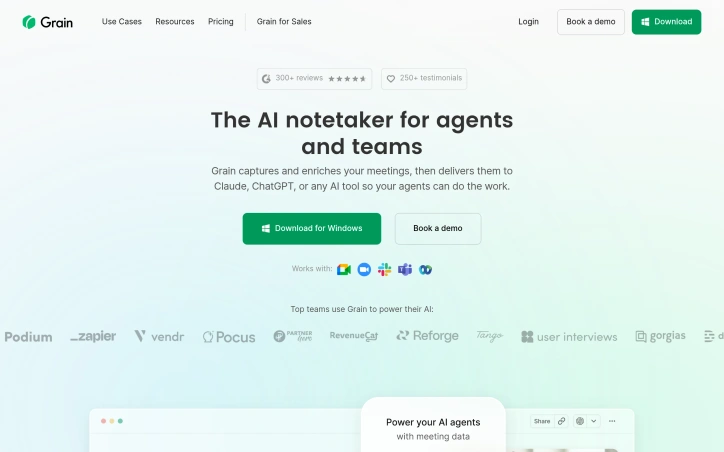
Get AI notes everywhere, no bot required. Grain Desktop Capture transcribes meetings by capturing audio from your Mac. Perfect for Slack Huddles, ad-hoc calls, and in-person conversations. First app to offer both bot-free notes and video recording.
AI Overview
AI-generatedMeeting notes and transcription have long been a tedious task for teams, devouring precious time that could be better spent on actual work. Grain Desktop Capture seeks to alleviate this burden by automating note-taking and transcription with AI.
Grain Desktop Capture appears well-suited for businesses, particularly sales teams, customer success, and product teams, which often require meticulous documentation of meetings and conversations. What stands out about the product is its ability to transcribe audio from a Mac without requiring any third-party bots or integrations. This feature makes it an attractive option for teams that conduct frequent ad-hoc calls, in-person conversations, or Slack Huddles.
Key features worth noting include automatic transcription of meetings in over 100 languages, customizable meeting templates, and a live notepad for annotating notes during the meeting. The platform also integrates with popular CRM systems, allowing users to sync notes and properties directly into their existing workflow. Furthermore, Grain's AI-powered follow-up emails aim to streamline communication by generating concise and coherent messages.
Pricing details are explicitly mentioned: at $29 per user per month for an annual plan, which may be considered reasonable for teams that can reap the productivity benefits of automated note-taking. While specific pricing tiers or custom plans are not detailed, the company's commitment to being cost-effective is evident.
Grain Desktop Capture shows promise as a tool for simplifying meeting notes and transcription, but its effectiveness will ultimately depend on how well it integrates with existing workflows and tools.
Founder Diary
DevlogThe maker hasn't posted a diary entry yet.
Key Features
Automatic Transcription
Transcribes meetings without requiring third-party bots or integrations
Multi-Language Support
Transcribes meetings in over 100 languages
Customizable Templates
Allows users to customize meeting templates
Live Notepad
Provides live annotation of notes during meetings
CRM Integration
Syncs notes and properties directly into popular CRM systems
AI Follow-up Emails
Generates concise follow-up messages automatically
Use Cases
-
1
Sales Teams
Automate documentation of client meetings and conversations
-
2
Customer Success Teams
Streamline meeting records and follow-up communication
-
3
Product Teams
Maintain meticulous documentation of team meetings
-
4
Remote Teams
Capture ad-hoc calls and Slack Huddles without manual note-taking
FAQ
Does Grain require bot installations? ▾
What languages does Grain support? ▾
Can I integrate Grain with my CRM? ▾
How much does Grain cost? ▾
Pricing
Annual plan is $29 per user per month; no other pricing tiers are detailed.
Tech Stack & Tags
Discussion
No comments yet — be the first!
Join the conversation — sign up to comment.
Sign up freeCommunity Support
Boost this project on Sell With boost
Meet the Founder
Anonymous Maker
More in Project management software
Snippetly
Snippetly helps developers and teams capture, or...

Chatquick AI
Create audiobooks, podcasts, and interactive aud...

Focus Session by SyncTasks
Select your tasks and enter a distraction-free m...

Dropstone
Dropstone: World's first generational recursive...

Krisp AI Note Taker Mobile
Meetings don’t wait. Neither should your notes....
Stash
Capture anything on your Mac with Stash. This sm...