
MSP Planner for Jira

- No match
Machine translation — the English original is authoritative.
The Story
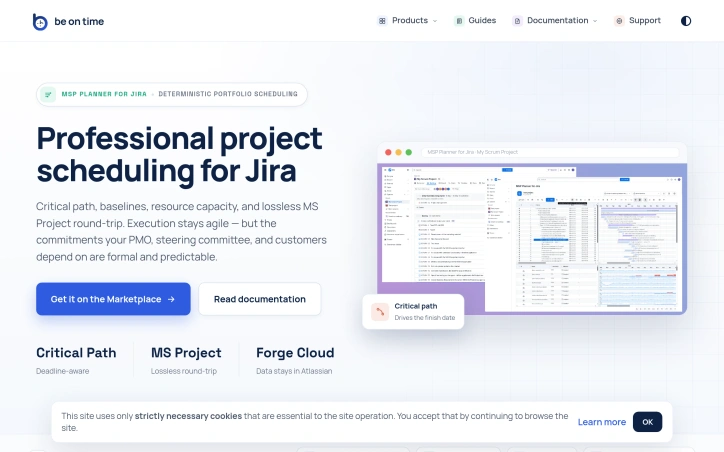
A professional scheduling engine for Jira Cloud (not a visual Gantt overlay): critical path, baselines, Fixed Duration/Work/Units, typed dependencies, resource capacity, protected Planning Space with explicit push/pull sync, and lossless Microsoft Project (.mpp) round-trip. Data stays in Atlassian Forge.
AI Overview
AI-generatedOrganizations running Jira often face a critical tension: agile teams need flexibility, but stakeholders—PMOs, steering committees, and customers—demand formal commitments backed by rigorous scheduling. This gap is where MSP Planner for Jira operates, providing what its creators position as a professional scheduling engine rather than a visual overlay.
The distinction matters. Most Jira Gantt integrations function as date visualizations, but MSP Planner implements an actual planning model, drawing its design from MS Project. This means support for industry-standard scheduling modes: Fixed Duration, Fixed Work, and Fixed Units. These controls let teams precisely define how effort, resources, and timing interact when project scope shifts—a capability that separates deliberate planning from guesswork.
The product's strongest differentiator is its MS Project interoperability. Rather than one-way exports, the tool enables lossless round-trip sync: you export Jira schedules to .mpp format for external stakeholders, edit them in MS Project, and reimport them without losing structure or links. This is rare integration work. It means teams can satisfy both camps—Jira-native execution with formal external review—without maintaining parallel schedules.
Core features address the formal planning checklist: critical path analysis identifies which task delays actually matter, baselines track schedule drift over time, and dependency management supports all standard link types (FS, SS, FF, SF). Resource capacity checks ensure commitments account for team availability. Complex task hierarchies and nested structures handle real-world project logic rather than forcing oversimplified models.
The architecture choice is notable: data remains in Atlassian Forge, avoiding external data migration or vendor lock-in concerns. The protected Planning Space with explicit push/pull sync suggests controlled synchronization rather than constant bidirectional mirroring, giving teams deliberate moments to reconcile agile execution with formal planning artifacts.
This targets a specific market segment: organizations too large or regulated to rely on pure task lists, but committed to Jira for their execution layer. It's not for teams that view scheduling as overhead; it's for those where predictability itself is a competitive requirement.
Founder Diary
DevlogThe maker hasn't posted a diary entry yet.
Key Features
Fixed Work Scheduling
Supports industry-standard scheduling modes (Fixed Duration, Fixed Work, and Fixed Units) to precisely define how effort, resources, and timing interact.
MS Project Interoperability
Enables lossless round-trip synchronization between Jira and MS Project formats without losing structure or links.
Critical Path Analysis
Identifies which task delays actually matter to project timelines.
Schedule Baselines
Tracks schedule drift over time to monitor project progress against baseline.
Dependency Management
Supports all standard link types (FS, SS, FF, SF) for comprehensive task relationships.
Resource Capacity Planning
Ensures project commitments account for team availability.
Use Cases
-
1
Large Organizations
Bridges agile execution in Jira with formal commitments needed by PMOs and steering committees.
-
2
Regulated Industries
Provides rigorous scheduling and predictability for organizations with strict accountability requirements.
-
3
Cross-Functional Teams
Lets stakeholders review schedules in MS Project while teams execute in Jira without maintaining parallel schedules.
-
4
Complex Projects
Handles real-world project logic with complex task hierarchies and nested structures.
FAQ
Can I sync Jira projects with MS Project? ▾
What scheduling modes does MSP Planner support? ▾
Does MSP Planner include resource planning? ▾
Where is my data stored? ▾
Tech Stack & Tags
Discussion
No comments yet — be the first!
Join the conversation — sign up to comment.
Sign up freeCommunity Support
Boost this project on Sell With boost
Meet the Founder


More in Project management software

Snippetly
Snippetly helps developers and teams capture, or...

Chatquick AI
Create audiobooks, podcasts, and interactive aud...

Focus Session by SyncTasks
Select your tasks and enter a distraction-free m...

Dropstone
Dropstone: World's first generational recursive...

Krisp AI Note Taker Mobile
Meetings don’t wait. Neither should your notes....
Stash
Capture anything on your Mac with Stash. This sm...