
Remove Handwriting
- No match
Machine translation — the English original is authoritative.
The Story
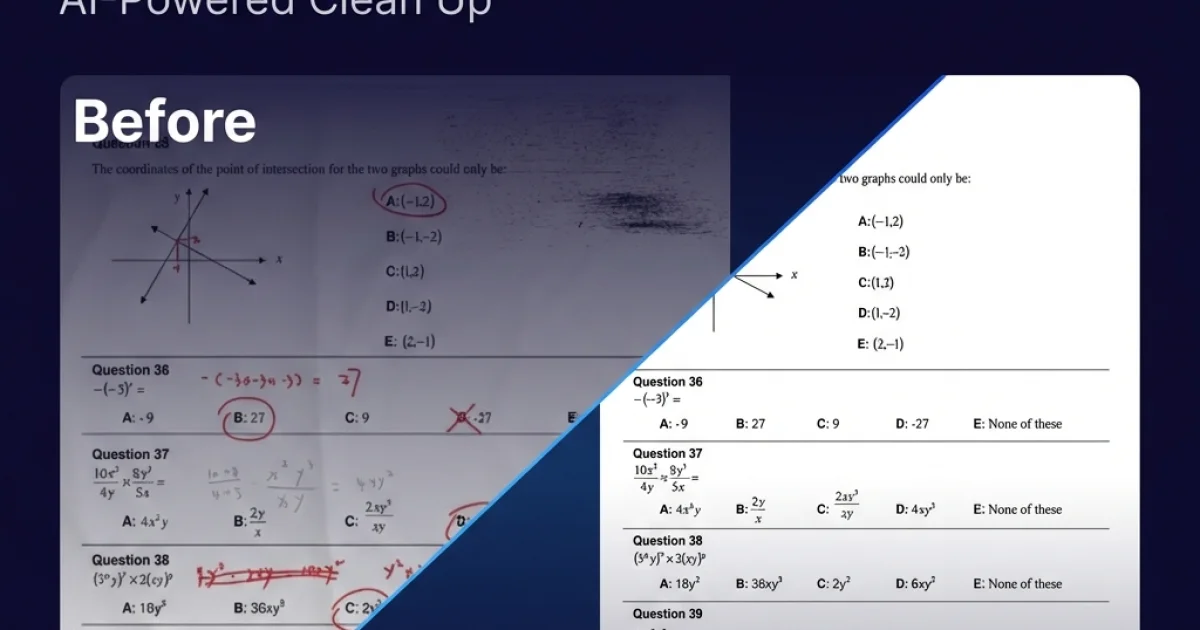
I built Remove Handwriting to solve the frustration of manually erasing handwritten notes from documents. Whether it's cleaning up exam papers, removing annotations from contracts, or preparing scanned documents for archival, our AI analyzes pages and intelligently removes handwritten text while preserving printed content—saving students, teachers, and businesses hours of tedious manual work.
AI Overview
AI-generatedHandwritten annotations on documents—whether from exam grading, contract revisions, or archival materials—represent a persistent productivity headache for students, educators, and professionals. Cleaning them up manually consumes hours of tedious work with tools like photo editors or requires scanning documents twice. An AI-powered document processor tackles this directly: it strips handwritten text, notes, and scribbles from images, PDFs, and scanned pages while preserving printed content, tables, and diagrams intact.
The tool distinguishes itself through automated document analysis that goes beyond simple handwriting detection. It performs intelligent boundary recognition to identify document edges, corrects skew and rotation automatically, unrolls curled page corners, and neutralizes uneven backgrounds and shadow artifacts. This multi-layered approach produces clean, archival-quality output suitable for reprinting or digital filing. The distinction between handwritten and printed content matters deeply here—many document cleanup solutions either over-erase legitimate text or leave behind smudges. This one prioritizes precision on that boundary.
The product offers three processing paths to match different needs. A single-image remover handles individual photos and scans in common formats (JPG, PNG, JPEG). A PDF-specific mode preserves layout across multi-page documents, allows page-level selection, and exports cleaned results directly as PDFs. For damaged pages or complex marks that defeat automated detection, manual processing gives users direct control. The tool runs in a web browser, eliminating software installation friction, and native iOS and Android apps extend accessibility to mobile workflows.
Business model details are minimal in public messaging. The service operates on a free tier requiring no credit card, lowering friction for trial use. Paid plans exist but their scope and pricing remain undisclosed on the available content. Batch processing and API access are mentioned as available for larger-scale workflows, suggesting infrastructure for enterprise or institutional customers—schools processing hundreds of exam papers, document management companies handling archives, or legal firms preparing discovery materials.
The founder's motivation aligns cleanly with market need: the product emerged from frustration with manual erasure workflows. For students cleaning submission copies, teachers preparing answer keys for reuse, and archivists preserving historical documents without handwritten overlays, the time savings justify the free entry point. The combination of multi-format support, intelligent background preservation, and straightforward interface addresses a real but previously unglamorous gap in document processing.
Founder Diary
DevlogThe maker hasn't posted a diary entry yet.
Key Features
Handwriting Removal
Strips handwritten text, notes, and scribbles while preserving printed content and diagrams
Document Enhancement
Automatically corrects skew, rotation, unrolls corners, and neutralizes backgrounds and shadows
Multi-Format Support
Processes individual images, multi-page PDFs, and includes manual processing for complex documents
Cross-Platform Access
Available as a web browser tool and native iOS and Android apps
Batch Processing
Offers batch processing and API access for enterprise and institutional workflows
Use Cases
-
1
Students
Cleaning submission copies by removing handwritten annotations and markups from documents
-
2
Educators
Preparing answer keys for reuse by removing teacher annotations from exam papers
-
3
Document Professionals
Preserving archival materials and preparing legal discovery documents by removing handwritten overlays
-
4
Institutions
Processing high volumes of exam papers and archived documents at scale
FAQ
How does it distinguish between handwriting and printed text? ▾
Can it process multi-page documents? ▾
What file formats are supported? ▾
Do I need to install software? ▾
Pricing
Free tier available with no credit card required; paid plans exist but pricing not disclosed
Tech Stack & Tags
Discussion
No comments yet — be the first!
Join the conversation — sign up to comment.
Sign up freeCommunity Support
Boost this project on Sell With boost
Meet the Founder


More in PDF Editor

CropItFast
I built CropItFast because I was tired of clunky...

PDF Redaction
We built this because companies were sending sen...

SimpliConvert
We built SimpliConvert to solve the frustration...

HEICPDF.TO
I built HEICPDF.TO to solve the problem of incom...

PDF Tools India
We built PDF Tools India to eliminate the need f...

QuickDocs
One Suite for All Your Document Conversions. 🛡...