
Reset Beer
- No match
Machine translation — the English original is authoritative.
The Story
I built Reset Beer because I kept missing quota resets on my AI subscriptions and wasting paid credits. It tracks quota resets and pricing changes across 15+ AI products — OpenAI Codex, Claude, Gemini, Cursor, DeepSeek, and more. Free tier gets daily digest email. Pro ($9.99 one-time) gets near-realtime alerts + MCP protocol access + Chrome extension.
AI Overview
AI-generatedKeeping track of quota resets across multiple AI services represents a genuine friction point for developers juggling subscriptions to OpenAI, Anthropic, Google, and countless other platforms. Reset Beer addresses this squarely by aggregating quota reset announcements, status signals, and pricing changes for over fifteen AI products in a single dashboard.
The product solves a straightforward problem: developers waste paid credits when they lose track of when daily, weekly, or rolling quotas refresh across different services. Each platform handles resets differently, ranging from midnight Pacific time resets for Gemini to hourly rolling windows for Claude to billing cycle alignments for other services. Rather than monitoring separate documentation pages and dashboards, users get centralized tracking with historical reset data and calculated average intervals between resets.
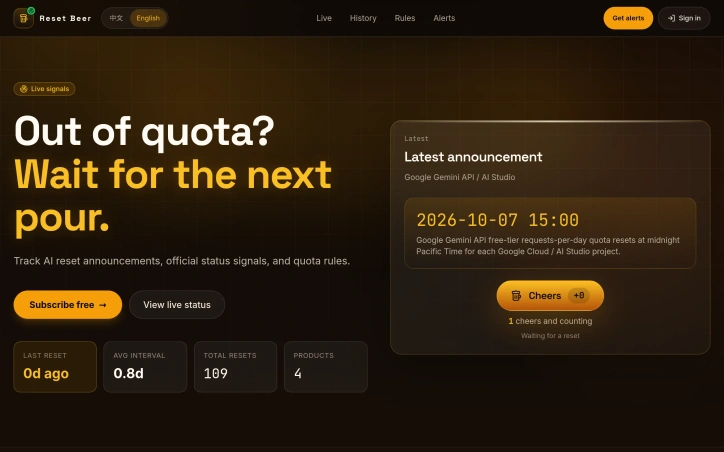
What distinguishes Reset Beer is its dual-layer approach. The core offering tracks official reset announcements and displays recent signals across supported products alongside calculated patterns like last reset date and average reset interval. On top of that sits a price watch feature that flags pricing changes across the same product set, letting users catch pricing increases before they take effect.
The free tier delivers daily email digests covering all tracked products. The Pro option at a one-time $9.99 price unlocks near-realtime alerts, access to the MCP protocol for integration into other workflows, and a Chrome extension that surfaces reset signals directly in the browser. A Telegram alert feature is listed as coming soon, suggesting roadmap expansion toward other notification channels.
The product's value proposition narrows itself to a specific audience: developers and teams actively managing API quotas across multiple vendors rather than relying on a single service. Someone using only Claude or only OpenAI gets minimal benefit. But for teams splitting workloads or experimenting across models, avoiding quota exhaustion mid-project has real economic impact.
The one-time Pro pricing model makes sense given the use case. Developers either solve this problem once and move on, or they establish a persistent monitoring routine. The free daily digest satisfies basic needs, while Pro positions itself as a convenience premium for those who want real-time signals without manual checking.
The product appears lean and focused on its single stated problem without feature sprawl. The implementation includes the expected modern touches—a browser extension, API protocol access—without suggesting overengineering for a niche workflow optimization.
Founder Diary
DevlogThe maker hasn't posted a diary entry yet.
Key Features
Quota Aggregation
Monitors quota reset announcements across fifteen-plus AI products in a single dashboard
Reset Patterns
Displays last reset dates and calculated average intervals between resets
Price Watch
Flags pricing changes across tracked AI services
Multi-Channel Alerts
Delivers daily email digests with optional real-time alerts
MCP Integration
Provides access to the MCP protocol for workflow integration and a Chrome extension
Use Cases
-
1
Multi-vendor teams
Avoid manually tracking separate reset schedules across OpenAI, Anthropic, Google, and other platforms
-
2
Budget optimization
Prevent wasting paid API credits by catching quota refreshes before exhaustion impacts projects
-
3
Multi-model experimentation
Monitor reset cycles across competing services to allocate workloads efficiently
FAQ
How many AI services does Reset Beer track? ▾
What's included in the free plan? ▾
What does the Pro plan include? ▾
Is this useful if I only use one AI service? ▾
Pricing
Free tier with daily digests; Pro at one-time $9.99 for real-time alerts, MCP access, and Chrome extension.
Tech Stack & Tags
Discussion
No comments yet — be the first!
Join the conversation — sign up to comment.
Sign up freeCommunity Support
Boost this project on Sell With boost
Meet the Founder

More in AI Workflow Automation

Vehla
I'm building a Mac command center to streamline...

Zoye
The CRM You Never Need to Open. The AI Native...

Vora IQ
I built Vora IQ to help entrepreneurs build real...

SaaS scaffold
One command. Auth, payments, database, email, Ta...

prompt-ctl.com
Structures every prompt for max signal, min wast...

MOOGH
We built MOOGH to bring intelligent task automat...