Teleprompter Studio
- No match
Machine translation — the English original is authoritative.
The Story
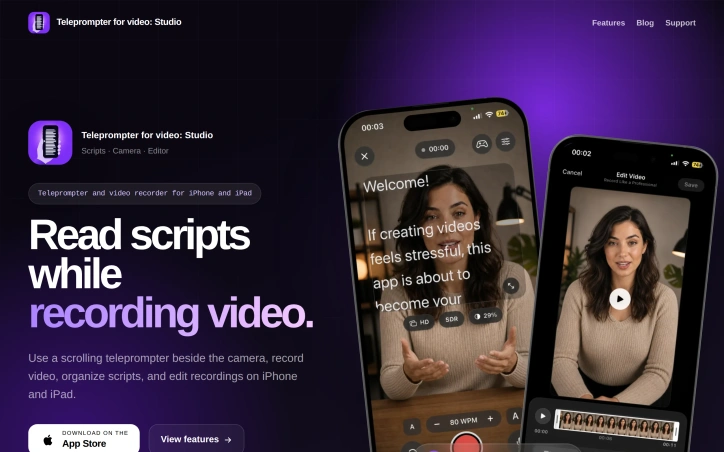
I built Teleprompter Studio to help creators read their scripts naturally while maintaining eye contact during recordings. The app displays a scrolling script beside your camera on iPhone and iPad, letting you record professional videos without looking away. It combines a teleprompter, camera recorder, and video editor in one focused workspace.
AI Overview
AI-generatedContent creators recording videos on mobile devices face a persistent challenge: reading scripts while maintaining natural eye contact with the camera. Most solutions force an awkward choice between memorization, looking off-camera to reference notes, or accepting the production quality hit of a distracted delivery. Teleprompter Studio addresses this for iPhone and iPad users by placing a scrolling script directly beside the camera lens, allowing creators to read their material without breaking the visual connection with their audience.
The product targets creators ranging from solo content producers to small teams who need to shoot professional-looking videos but lack access to dedicated studio teleprompter setups. This includes social media creators, educational content producers, sales professionals recording pitches, and anyone else who benefits from reading prepared remarks while maintaining on-camera presence.
What distinguishes Teleprompter Studio is its integrated approach. Rather than offering a standalone teleprompter feature, the app consolidates three essential functions into one workspace: the prompt display, video recording, and post-production editing. This consolidation eliminates the friction of jumping between multiple applications, keeping creators in a focused environment from script preparation through final export.
During recording, the app provides granular control over the teleprompter itself. Users can adjust scrolling speed in real time, modify text size and positioning, enable mirroring, and switch between front and back cameras without exiting the recording interface. The microphone controls remain accessible, allowing audio adjustments without interrupting the take. This flexibility matters because reading speeds and comfort levels vary significantly between individuals.
The editing capabilities handle standard post-production tasks including trimming, cropping, and aspect ratio adjustments to accommodate different platforms, whether vertical, square, widescreen, or cinematic formats. Scripts and recordings are organized within the app's library, and importantly, all content remains stored locally on the device rather than relying on cloud infrastructure.
The app requires iOS 18 or later and is available exclusively on the App Store for iPhone and iPad. Pricing information is not detailed in publicly available materials. The product includes a blog resource offering practical guidance on teleprompter technique, addressing how users can maintain natural delivery while reading from a prompt.
Teleprompter Studio fills a legitimate gap in mobile content creation by removing a technical barrier that often undermines video quality. The integration of recording and editing alongside the teleprompter feature simplifies workflow for creators who need rapid turnaround on professional-looking content.
Founder Diary
DevlogThe maker hasn't posted a diary entry yet.
Key Features
Integrated Teleprompter
Scrolling script positioned beside the camera lens allowing eye contact while reading
Real-time Script Control
Adjust scrolling speed, text size, positioning, mirroring, and switch cameras during recording
Built-in Video Editing
Trim, crop, and adjust aspect ratio for vertical, square, widescreen, and cinematic formats
Local Content Storage
All scripts and recordings stored on device rather than in the cloud
Microphone Controls
Audio adjustments accessible without interrupting the recording take
Use Cases
-
1
Solo Content Creators
Shoot professional-looking videos without access to dedicated studio teleprompter setups
-
2
Social Media Creators
Maintain natural eye contact while reading scripts for higher-quality engagement
-
3
Educational Content Producers
Deliver prepared remarks while maintaining on-camera presence and visual connection
-
4
Sales Professionals
Record polished pitches while reading prepared material without looking off-camera
FAQ
What does Teleprompter Studio do? ▾
Can I edit videos after recording? ▾
Where are my videos stored? ▾
What devices and iOS versions are supported? ▾
Discussion
No comments yet — be the first!
Join the conversation — sign up to comment.
Sign up freeCommunity Support
Boost this project on Sell With boost
Meet the Founder

More in Video editing

VideoSnap
I built VideoSnap to provide a private and free...
Leumos AI
See a color grading look you love? Bring it to y...
Bulin 47 AI
Bulin 47 AI turns a portrait into a 19-second ve...
SubtitleGenerator
SubtitleGenerator helps creators turn videos int...
CineGen
CineGen began with a simple problem: creating an...
ReelHive
We built ReelHive to save real estate agents hou...