Zipic
- No match
Machine translation — the English original is authoritative.
The Story
Zipic is a native image compressor for macOS and Windows (Windows beta). It compresses, converts and resizes JPEG, PNG, WebP, HEIC, AVIF, JPEG XL, TIFF, GIF, SVG, APNG and PDF files entirely on-device, plus ICNS on macOS and ICO on Windows. The built-in zipic CLI returns structured JSON, exit codes, per-file results and dry-run previews, while an installable AI skill lets Claude Code, Codex and other agents automate local image workflows. Folder monitoring, clipboard compression, Finder actions, Shortcuts and Raycast support are also available. The free tier includes 25 images per day; Pro is a one-time purchase with lifetime updates. No uploads or account are required for local processing.
AI Overview
AI-generatedProfessionals managing visual content face a persistent friction point: compressing images to save storage and bandwidth while maintaining acceptable quality, often across multiple formats and thousands of files. Zipic addresses this squarely with a native desktop application for macOS and Windows, built around the principle that image processing belongs on the user's device rather than uploaded to cloud servers.
The product's core value proposition is straightforward but well-executed. It handles compression, format conversion, and resizing across a broad range of formats including JPEG, PNG, WebP, HEIC, AVIF, JPEG XL, TIFF, GIF, PDF, and SVG, plus platform-specific formats like ICNS on macOS and ICO on Windows. The compression claims near-lossless quality, demonstrated through a slider comparison showing a 403KB image reduced to 108KB without visible degradation. This matters for content creators, web developers, and designers working under storage or bandwidth constraints.
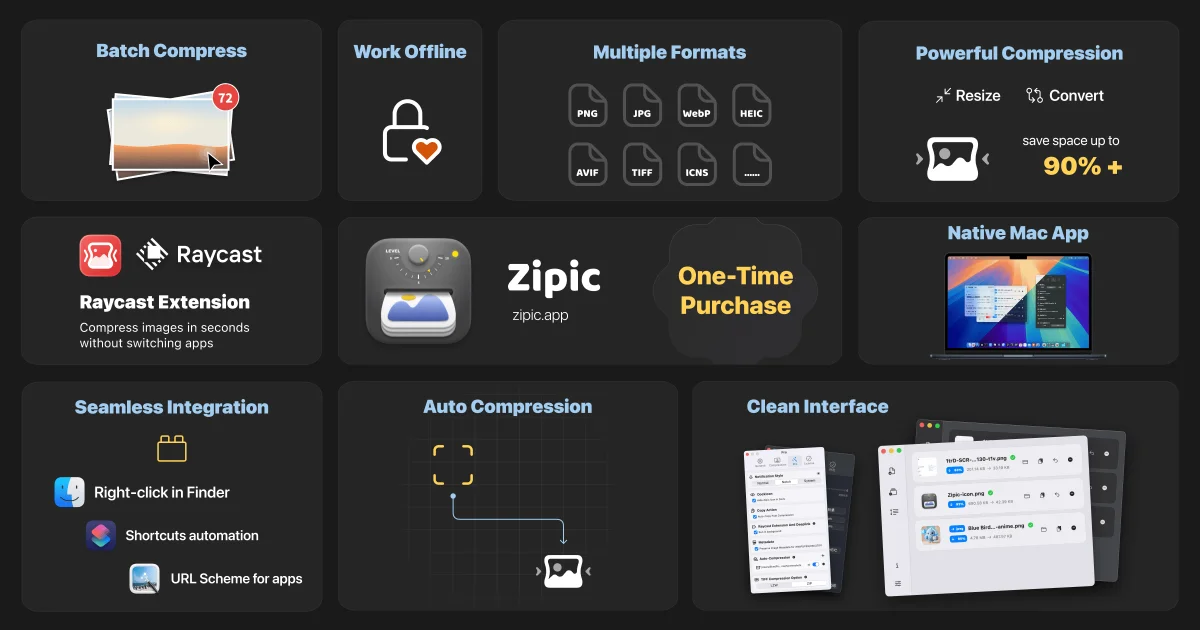
What distinguishes Zipic from simpler competitors is its commitment to workflow integration. Beyond a straightforward graphical interface, it offers folder monitoring with custom rules, clipboard auto-compression, a command-line interface that returns structured JSON output and exit codes, Apple Shortcuts support on macOS, a Raycast extension, and an installable skill for Claude Code and other AI agents. The presence of these integration points suggests the product is targeting power users and professionals building automated pipelines, not casual users compressing a photo here and there.
The native application approach carries real benefits. Zipic processes everything locally without requiring uploads or account creation, eliminating privacy concerns and latency. The desktop apps adapt to system themes and support drag-and-drop operation alongside hotkey access and menu bar integration. Custom presets allow users to switch between different compression profiles instantly, useful for workflows with varying quality and size requirements.
The pricing model is straightforward: a free tier allowing 25 images daily with basic features, or a one-time Pro purchase that includes lifetime updates. This structure avoids recurring subscriptions and removes the friction of account management for local processing, though the 25-image daily limit on the free tier may frustrate heavy users quickly.
The founder notes that metadata preservation and customizable notifications are available for Pro users, along with CLI access. These details suggest the product has matured beyond basics to support professional workflows. The compressed feature set and focus on reliability over feature sprawl indicate disciplined product design.
Zipic occupies a specific but valuable niche: professionals who need reliable, fast, local image processing with minimal friction and automation-friendly APIs. It solves a real problem without unnecessary complexity.
Founder Diary
DevlogThe maker hasn't posted a diary entry yet.
Key Features
Multi-Format Compression
Handles JPEG, PNG, WebP, HEIC, AVIF, JPEG XL, TIFF, GIF, PDF, SVG, ICNS, and ICO with near-lossless quality.
Local Processing
Processes all images on your device without uploads or account creation.
Workflow Integration
Includes folder monitoring with custom rules, clipboard auto-compression, CLI with JSON output, Apple Shortcuts, Raycast extension, and Claude Code skill.
Native Desktop Apps
Available for macOS and Windows with system theme adaptation, drag-and-drop, hotkeys, and menu bar integration.
Custom Presets
Switch between different compression profiles instantly for varying quality and size requirements.
Use Cases
-
1
Content Creators
Manage large visual content libraries with reliable local compression without cloud uploads.
-
2
Web Developers
Optimize images and convert formats efficiently to reduce bandwidth costs.
-
3
Designers
Integrate image compression into automated pipelines using Raycast, Claude Code, or Apple Shortcuts.
-
4
Professionals with Storage Constraints
Compress thousands of files locally under strict bandwidth or storage limitations.
FAQ
Do I need to create an account or upload my images? ▾
What image formats can Zipic compress? ▾
Does Zipic offer automation features? ▾
How much does Zipic cost? ▾
Pricing
Free tier with 25-image daily limit; Pro is one-time purchase with lifetime updates and full features.
Tech Stack & Tags
Discussion
No comments yet — be the first!
Join the conversation — sign up to comment.
Sign up freeCommunity Support
Boost this project on Sell With boost
Meet the Founder

More in Photo editing
MetaScope
As a professional photographer, I needed a tool...

Banana AI - Free AI Image Generator
Banana AI is a free AI image and video generatio...

TurboConvert - Image Converter
As a solo web dev I was constantly juggling PNG...

AImageResize
I built AImageResize to simplify image resizing...

throwback: same you. another lifetime.
We built Throwback to help people reconnect with...

PixelBoost AI
I built PixelBoost AI to eliminate the complexit...