
Best Presentation Software Startups & Tools

Tools for creating structured slide decks (pitch, sales, lessons). Many use AI to generate slides from prompts or outlines with templates, layouts, and collaboration.

Recently Listed

3 launches

Sort
GhostPrompter

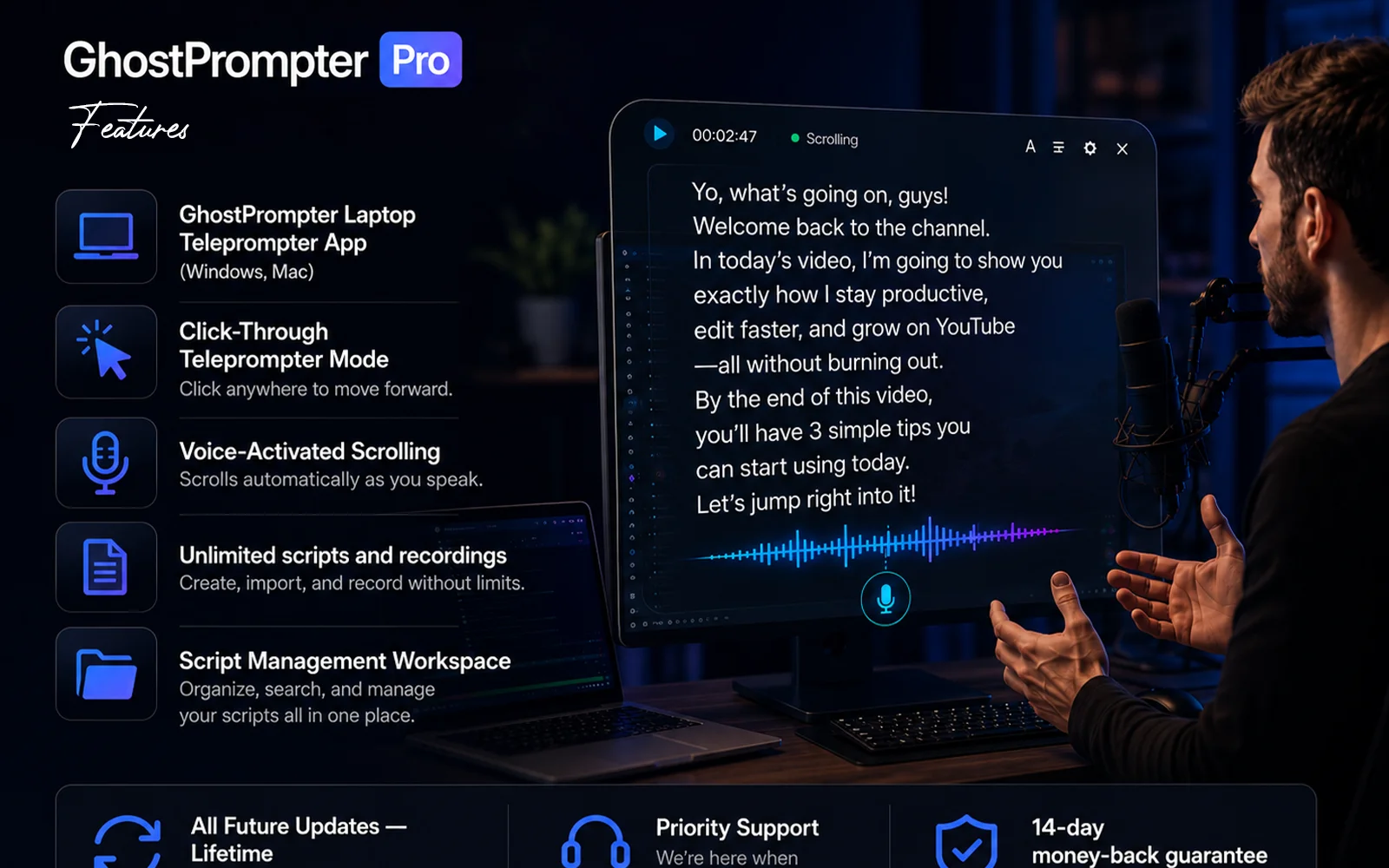
Recording on camera presents a paradox: you know what to say, but maintaining natural eye contact while reading notes proves nearly impossible. Most teleprompter applications claim to solve this by appearing in one form or another, whether as a blocking overlay that covers your interface, a tool that forces you to match its scroll speed, or software that crumbles the moment you need to click or type during a demonstration. This product addresses that frustration with a straightforward design philosophy—a transparent laptop teleprompter that reads your script while staying invisible to both you and your audience. The tool serves creators, educators, sales professionals, and anyone whose work involves recording or presenting on camera. Its core innovation is a click-through overlay that displays your script in a transparent layer, passing mouse clicks and keyboard input directly to whatever application sits behind it. This means you can read your notes while demonstrating software, navigating slides, or answering questions without the tool interfering with your work. Several features distinguish it from conventional teleprompter applications. Voice-activated scrolling lets the script advance automatically based on your speaking pace, pausing when you emphasize points and catching up when you speak quickly. The script remains invisible in screen shares and recordings regardless of your streaming platform, working seamlessly with Zoom, Loom, OBS, ScreenFlow, and Teams. Built-in script management lets you write, organize, and store multiple scripts within the application rather than juggling files elsewhere. The product supports Windows and Mac and offers a free trial. The positioning reflects a philosophy evident in its origin story: most existing teleprompter applications solve one problem but create another. By designing around a click-through overlay that genuinely gets out of your way, this solution attacks a frustration point in the creator economy. It recognizes that helping people remember their lines matters less than letting them maintain the composure and eye contact that distinguishes polished content from obviously scripted delivery. The bet is that most creators would rather invest in a purpose-built tool than waste countless hours re-recording takes until the delivery finally lands.
Presentation-software
E
ELDHO BENNY

Recording on camera presents a paradox: you know what to say, but maintaining natural eye contact while reading notes proves nearly impossible. Most teleprompter applications claim to solve this by appearing in one form or another, whether as a blocking overlay that covers your interface, a tool that forces you to match its scroll speed, or software that crumbles the moment you need to click or type during a demonstration. This product addresses that frustration with a straightforward design philosophy—a transparent laptop teleprompter that reads your script while staying invisible to both you and your audience. The tool serves creators, educators, sales professionals, and anyone whose work involves recording or presenting on camera. Its core innovation is a click-through overlay that displays your script in a transparent layer, passing mouse clicks and keyboard input directly to whatever application sits behind it. This means you can read your notes while demonstrating software, navigating slides, or answering questions without the tool interfering with your work. Several features distinguish it from conventional teleprompter applications. Voice-activated scrolling lets the script advance automatically based on your speaking pace, pausing when you emphasize points and catching up when you speak quickly. The script remains invisible in screen shares and recordings regardless of your streaming platform, working seamlessly with Zoom, Loom, OBS, ScreenFlow, and Teams. Built-in script management lets you write, organize, and store multiple scripts within the application rather than juggling files elsewhere. The product supports Windows and Mac and offers a free trial. The positioning reflects a philosophy evident in its origin story: most existing teleprompter applications solve one problem but create another. By designing around a click-through overlay that genuinely gets out of your way, this solution attacks a frustration point in the creator economy. It recognizes that helping people remember their lines matters less than letting them maintain the composure and eye contact that distinguishes polished content from obviously scripted delivery. The bet is that most creators would rather invest in a purpose-built tool than waste countless hours re-recording takes until the delivery finally lands.

GhostPrompter preview

Key features

  • Invisible Screen Recording: Keep your script visible while remaining hidden from OBS, Loom, Zoom, Teams, and other screen recording tools.
  • Click-Through Overlay: Read your script while clicking, typing, presenting, or demonstrating applications without blocking your workflow.
See full listing
VoicePrompter

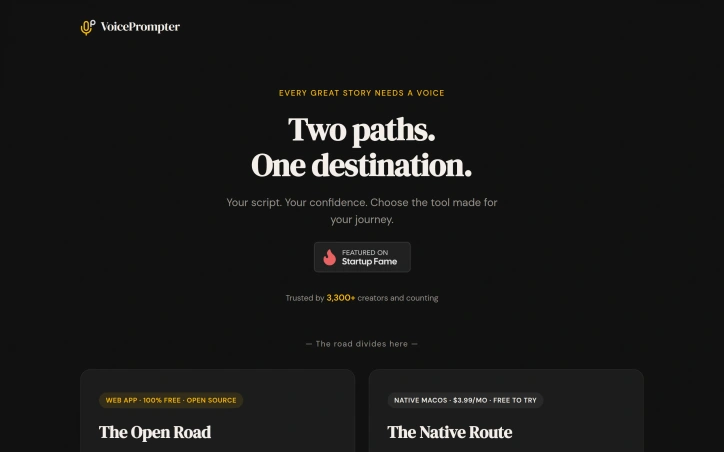
For creators who rely on teleprompters to deliver their message with confidence, a new solution has emerged that checks all the right boxes. The need for a reliable, versatile, and accessible teleprompter has been met with VoicePrompter, a tool born out of frustration with existing options. After years of searching for an app that could deliver on features like voice-activated scrolling, multi-language support, and offline functionality, the founder took matters into their own hands and built a comprehensive solution. What stands out about VoicePrompter is its commitment to flexibility and user freedom. It offers two distinct paths to suit different user needs: a free, open-source web app and a native macOS app. The web app is a progressive web app that works on any device without installation, supporting 34 languages and voice commands like back, forward, and restart. It even works offline and includes built-in video recording. The native macOS app, on the other hand, provides an invisible overlay that stays on top of other apps, including full-screen ones, and is voice-activated, making it ideal for presentations and screen shares. This version supports over 60 languages via Apple speech recognition. Key features worth noting include the voice-activated scrolling, mirror mode for teleprompter glass, and the fact that scripts never leave the user's device, ensuring privacy. The native macOS app is also designed to be unobtrusive, living in the menu bar and launching quickly from the clipboard. The pricing model for the native app is straightforward: it's free to try, with a monthly fee of $3.99 thereafter, and includes three scripts to start. Overall, VoicePrompter is a robust and flexible solution for creators seeking a reliable teleprompter that meets their specific needs.

Presentation-software
K
Konstantin

For creators who rely on teleprompters to deliver their message with confidence, a new solution has emerged that checks all the right boxes. The need for a reliable, versatile, and accessible teleprompter has been met with VoicePrompter, a tool born out of frustration with existing options. After years of searching for an app that could deliver on features like voice-activated scrolling, multi-language support, and offline functionality, the founder took matters into their own hands and built a comprehensive solution. What stands out about VoicePrompter is its commitment to flexibility and user freedom. It offers two distinct paths to suit different user needs: a free, open-source web app and a native macOS app. The web app is a progressive web app that works on any device without installation, supporting 34 languages and voice commands like back, forward, and restart. It even works offline and includes built-in video recording. The native macOS app, on the other hand, provides an invisible overlay that stays on top of other apps, including full-screen ones, and is voice-activated, making it ideal for presentations and screen shares. This version supports over 60 languages via Apple speech recognition. Key features worth noting include the voice-activated scrolling, mirror mode for teleprompter glass, and the fact that scripts never leave the user's device, ensuring privacy. The native macOS app is also designed to be unobtrusive, living in the menu bar and launching quickly from the clipboard. The pricing model for the native app is straightforward: it's free to try, with a monthly fee of $3.99 thereafter, and includes three scripts to start. Overall, VoicePrompter is a robust and flexible solution for creators seeking a reliable teleprompter that meets their specific needs.

VoicePrompter preview

Key features

  • Voice-Activated Scrolling: scrolls through scripts with voice commands
  • Multi-Language Support: supports over 60 languages via Apple speech recognition
See full listing
Click to Save the World

In a rapidly changing world where environmental concerns are increasingly pressing, Click to Save the World emerges as a novel solution for everyday individuals seeking to make a tangible impact. By harnessing the power of click-based fundraising, this platform empowers users to contribute to various eco-friendly initiatives and charitable causes with minimal effort. What stands out about Click to Save the World is its straightforward, user-friendly approach. The website's design is intuitive, guiding users through a simple process that encourages engagement and sustained participation. This ease of use is a significant strength, as it helps overcome common barriers to online activism, such as feeling overwhelmed or uncertain about where to start. Key features worth noting include the platform's curated selection of reputable organizations focused on environmental conservation and social welfare. Click to Save the World's partnerships with established charities and advocacy groups ensure that users' contributions are invested in meaningful initiatives. Additionally, the platform's gamification elements – including rewards and leaderboards – provide a sense of accomplishment and community engagement. The pricing model for Click to Save the World is straightforward: there are no upfront costs or subscription fees required. Users can contribute as much or as little as they wish, making it accessible to everyone, regardless of financial means. This inclusive approach reflects the platform's commitment to democratizing the power to create positive change.
Presentation-software
N
Nick G

In a rapidly changing world where environmental concerns are increasingly pressing, Click to Save the World emerges as a novel solution for everyday individuals seeking to make a tangible impact. By harnessing the power of click-based fundraising, this platform empowers users to contribute to various eco-friendly initiatives and charitable causes with minimal effort. What stands out about Click to Save the World is its straightforward, user-friendly approach. The website's design is intuitive, guiding users through a simple process that encourages engagement and sustained participation. This ease of use is a significant strength, as it helps overcome common barriers to online activism, such as feeling overwhelmed or uncertain about where to start. Key features worth noting include the platform's curated selection of reputable organizations focused on environmental conservation and social welfare. Click to Save the World's partnerships with established charities and advocacy groups ensure that users' contributions are invested in meaningful initiatives. Additionally, the platform's gamification elements – including rewards and leaderboards – provide a sense of accomplishment and community engagement. The pricing model for Click to Save the World is straightforward: there are no upfront costs or subscription fees required. Users can contribute as much or as little as they wish, making it accessible to everyone, regardless of financial means. This inclusive approach reflects the platform's commitment to democratizing the power to create positive change.

Click to Save the World preview

Key features

  • Click-Based Fundraising: Users contribute to eco-friendly initiatives and charitable causes with minimal effort through simple clicks
  • Curated Charity Partnerships: The platform partners with reputable organizations focused on environmental conservation and social welfare
See full listing