
CSS Inspector Pro

- No match
Machine translation — the English original is authoritative.
The Story
CSS Inspector Pro - The Ultimate Tool for Web Developers & Designers
Inspect, edit, and experiment with CSS properties on any webpage in real-time. Perfect for web developers, designers, and anyone learning CSS.
KEY FEATURES:
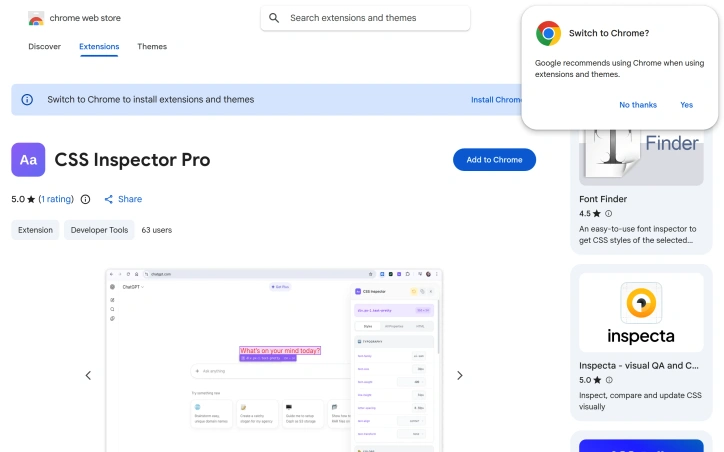
🎯 Visual Element Selection • Hover highlighting with purple overlay • Click to inspect with pink selection box • Real-time element dimensions display • Smart selector information (tag, ID, class)
🎨 Real-Time CSS Editing • See changes instantly as you type • Color pickers for color properties • Smart dropdowns for common values • Add custom CSS properties on the fly • Properties organized by category (Typography, Colors, Layout, etc.)
↩️ Granular Revert System • Revert individual property changes with dedicated buttons • Yellow highlight shows modified properties • Global revert to undo all changes at once • Smart tracking of modifications
📦 Box Model Visualization • Interactive diagram showing margin, border, padding, and content • Real-time computed dimensions • Clear visual hierarchy
📋 Multiple View Tabs • Styles - Organized CSS properties by category • All Properties - Complete list with search functionality • HTML - Formatted source code of selected element
🔍 Property Search • Search through all computed CSS properties • Instant filtering as you type
📄 Copy & Export • Copy individual properties with one click • Export all styles for the element • Copy HTML markup
WHY CSS INSPECTOR PRO?
✅ No data collection - completely private ✅ Works offline - no external servers ✅ Temporary changes - nothing is permanently modified ✅ Easy to use - intuitive interface ✅ No sign-up required
PERFECT FOR: • Web developers debugging CSS issues • Designers experimenting with styles • Students learning CSS • Anyone wanting to customize web pages temporarily
HOW IT WORKS:
- Click the extension icon to activate
- Hover over elements to preview
- Click any element to inspect its CSS
- Edit properties and see instant results
- Revert changes
AI Overview
AI-generatedDebugging CSS issues on unfamiliar websites presents a familiar challenge for web developers and designers: how to quickly understand styling structure without struggling through the browser's default developer tools. CSS Inspector Pro addresses this need with a lightweight Chrome extension that layers an intuitive inspection interface over the inspection workflows most developers already use.
The extension centers on three core workflows. First, it provides visual element selection through hover highlighting and click-to-select functionality, displaying element dimensions and selector information in real-time. Once an element is selected, developers can edit its CSS properties live with instant visual feedback, supported by color pickers and dropdown suggestions for common values. A granular revert system then allows undoing individual property changes or clearing all modifications at once, with visual indicators showing which properties have been modified.
What distinguishes CSS Inspector Pro from existing inspection tools is its focus on immediate usability and simplicity. The interface organizes CSS properties by category—typography, colors, layout—rather than presenting an overwhelming flat list. A dedicated search function filters through computed properties as users type. The extension also includes a box model visualization that dynamically updates with the current element's dimensions, and tabs for viewing organized styles, all properties, or the underlying HTML source.
The product appeals to a broad audience: web developers troubleshooting inherited styles on third-party sites, designers experimenting with aesthetic changes before committing to code, and students building foundational CSS understanding. The developer emphasizes privacy as a differentiator—the extension operates entirely locally, requires no signup, and collects no telemetry or usage data. All modifications remain temporary and disappear upon page refresh.
The 50-user adoption rate and single five-star review suggest the extension is early in its lifecycle. Version 1.2.2, updated in February 2026, indicates ongoing maintenance. For developers who find themselves frequently inspecting unfamiliar CSS or iterating on styling without touching their editor, the extension offers a faster feedback loop than traditional browser developer tools allow.
Founder Diary
DevlogThe maker hasn't posted a diary entry yet.
Key Features
Visual Element Selection
Hover highlighting and click-to-select functionality displaying element dimensions and selector information in real-time
Live CSS Editing
Edit CSS properties with instant visual feedback, supported by color pickers and dropdown suggestions for common values
Property Organization
CSS properties organized by category—typography, colors, layout—rather than presented as an overwhelming flat list
Box Model Visualization
Dynamically updates with the current element's dimensions and displays organized styles, all properties, or underlying HTML source
Property Search
Dedicated search function filters through computed properties as users type
Granular Reverts
Undo individual property changes or clear all modifications at once with visual indicators showing which properties have been modified
Use Cases
-
1
Web Developers
Troubleshooting inherited styles on third-party sites faster than traditional browser developer tools
-
2
Designers
Experimenting with aesthetic changes before committing to code without touching their editor
-
3
Students
Building foundational CSS understanding through interactive exploration of styling on unfamiliar websites
FAQ
How does CSS Inspector Pro compare to browser developer tools? ▾
Is my data safe when using CSS Inspector Pro? ▾
Do my CSS changes persist after closing the browser? ▾
What is the current version of CSS Inspector Pro? ▾
Tech Stack & Tags
Discussion
No comments yet — be the first!
Join the conversation — sign up to comment.
Sign up freeCommunity Support
Boost this project on Sell With boost
Meet the Founder

More in Chrome Extensions

Page Walker
Read with Ease, Browse with Comfort. Page Wa...

SFM - Surface Filter Mode
Our Surface Filter Mode (SFM) plugin enhances we...
Tabme
I'm Oleg, the creator of Tabme. A few years ago...

How Much Does It Cost? - Know what things really cost. in dollars and lattes
How Much Does It Cost? — The Chrome extension th...

LexiLint
LexiLint started from a simple frustration: ever...

Sidenote
I kept catching AI summaries that were confident...