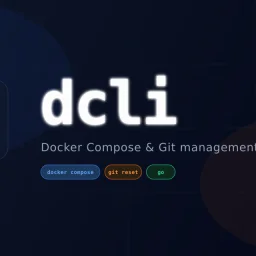
dcli - docker and git workflows, stremlined
- No match
Machine translation — the English original is authoritative.
The Story
I kept repeating the same tedious Docker-reset and Git-sync steps across dozens of micro-service repos, so I built a tiny CLI that turns them into one-liners. dcli lets me reset containers, fetch and checkout the branch I actually need, and get clean feedback without leaving my terminal.
AI Overview
AI-generatedMicro-service teams waste untold hours sweeping up stale containers, juggling Git resets, and hunting down “it works on my machine” gremlins; dcli compresses that busywork into three verb-heavy commands. The utility targets any developer who juggles Docker Compose stacks and multiple source repositories on a daily basis—essentially anyone who has cursed at a half-dead dev environment five minutes before stand-up.
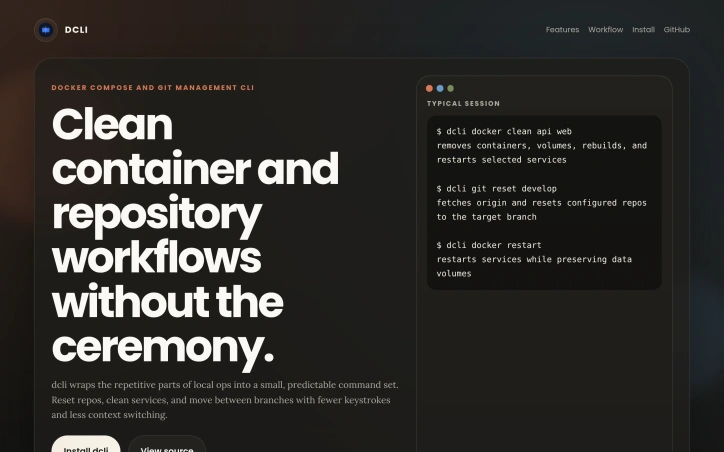
What elevates dcli above a dusty binder full of shell aliases is its ruthless focus on single-shot outcomes. Resetting state means one shot, one story: ask for “docker clean api web” and it tears down the listed containers, purges volumes, rebuilds images, and restarts only the services you name, while keeping persistent volumes intact. Repeat the same mindset on the Git side when you tell it to “git reset develop”; the CLI fetches upstream and snaps each configured repository onto the exact branch without you ever having to open another window. It reports successes and failures in terse, colored lines, sparing you the Kubernetes-grade prose dump.
The binary is delivered via Homebrew on macOS and Linux, with direct executables for Windows, so onboarding is literally two shell commands and a version check. No setup dance, no cloud service to register—just fetch, drop in your PATH, and start pruning noise from local dev. Because the entire surface area is nine sub-commands wrapped in a Go binary, updates are equally light; a new tag shows up in the tap, you pull, done.
No pricing information is surfaced on the landing page, nor are there reference to paid tiers or enterprise licensing; the code lives in a public GitHub repository and binaries are distributed free of charge today. That leaves room for future monetization, but right now the pitch is simple: dcli trades ceremony for speed, and if you live in Docker and Git all day, that trade is convincingly one-sided.
Founder Diary
DevlogThe maker hasn't posted a diary entry yet.
Key Features
Docker Container Management
Teardown, purge volumes, rebuild images, and restart services in one command.
Git Repository Reset
Snap configured repositories to exact branches with a single command.
Cross-Platform Delivery
Distributed via Homebrew on macOS/Linux and direct executables for Windows.
Terse Status Output
Reports successes and failures in colored lines without verbose prose.
No Setup Required
No configuration dance, cloud service registration, or complex onboarding needed.
Use Cases
-
1
Microservice developers
Teams managing multiple Docker Compose stacks can automate container cleanup and recreation workflows.
-
2
Multi-repository maintainers
Developers juggling multiple source repositories can synchronize branches across projects without manual resets.
-
3
Local dev environment recovery
Developers facing stale containers and 'works on my machine' issues can reset their entire dev stack in seconds.
FAQ
How do I install dcli? ▾
Does dcli cost anything? ▾
What Docker commands does dcli support? ▾
Can dcli manage Git branches? ▾
Pricing
Currently free and open source on GitHub with room for future monetization.
Tech Stack & Tags
Discussion
No comments yet — be the first!
Join the conversation — sign up to comment.
Sign up freeCommunity Support
Boost this project on Sell With boost
Meet the Founder

"10+ years shipping fintech APIs, AI features & OSS Lead engineer · open: full-time, fractional, f..."
More by Oleg Koval

SaaS scaffold
One command. Auth, payments, database, email, Ta...

queryd - slow query detection for Node.js
Latency budgets for the SQL your Node app actual...

prompt-ctl.com
Structures every prompt for max signal, min wast...

Trembita - a lightweight TypeScript HTTP client
I built Trembita to simplify consuming third-par...
More in Command line tools
Trembita - a lightweight TypeScript HTTP client
I built Trembita to simplify consuming third-par...

mac-onboarding
I kept wiping Macs while freelancing across clie...

mac-dev-station
I built mac-dev-station to simplify setting up a...

FreeToolDev
I was constantly frustrated processing files one...
starters
I built starters to provide production-ready sca...
JSON Formatter & Converter
We built JSON Formatter to solve the frustration...