
Devscribe
The Story
I built DevScribe to solve a problem I faced every day as a software engineer: constantly switching between tools.
One app for documentation, another for diagrams, another for API testing, another for databases, a terminal window, Docker, code snippets, and countless browser tabs.
DevScribe brings all of these workflows into a single offline workspace:
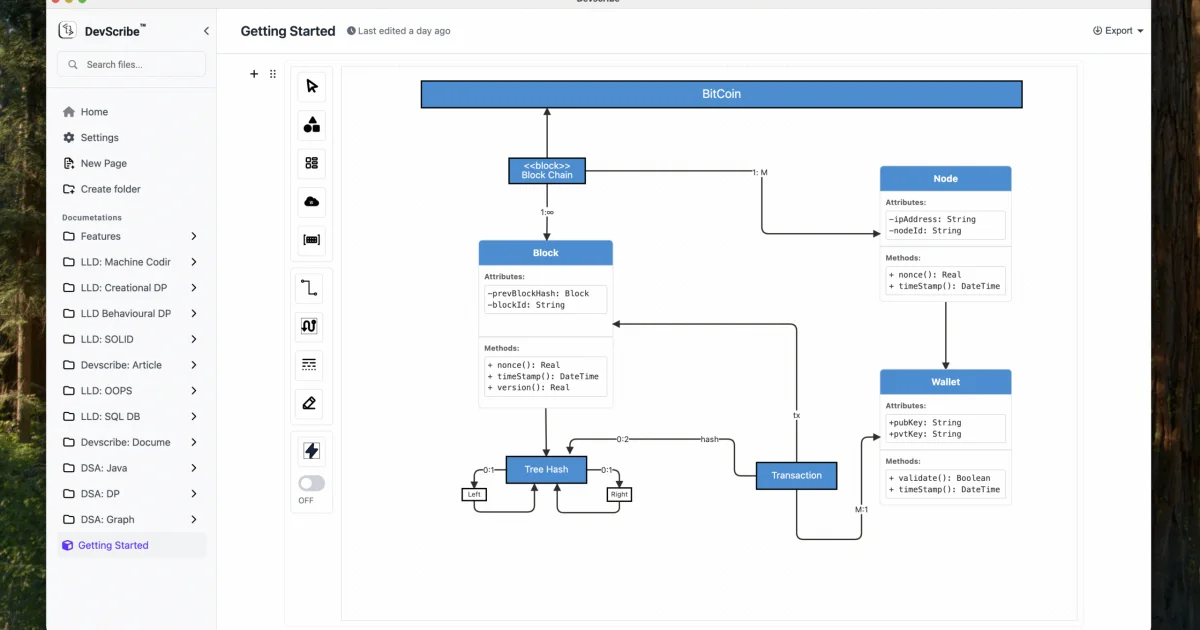
• Write technical documentation and notes • Create HLD, LLD, ERD, sequence, and architecture diagrams • Test REST APIs, WebSockets, SSE, and Webhooks • Connect to multiple databases and run queries • Execute code snippets in multiple languages • Run Docker Compose files • Save and reuse terminal commands • Integrate tools like Excalidraw, Mermaid, and Redash • Share complete engineering collections with your team
The goal is simple: reduce context switching and help developers stay focused and productive.
I built it as a passion project for the developer community, and it's completely free. https://devscribe.app
AI Overview
AI-generatedAs software engineers and architects increasingly juggle multiple tools to manage their workflows, a pressing need has emerged for a unified solution that streamlines documentation, diagramming, coding, and testing. DevScribe is a robust response to this challenge, offering an all-in-one offline editor that brings together disparate tasks into a single, cohesive workspace. The product is specifically designed for software engineers and architects who value productivity and are tired of switching between different applications.
What stands out about DevScribe is its comprehensive approach to addressing the complexities of software development, coupled with a strong emphasis on data privacy. By storing all documents, code, and diagrams locally on the user's Mac, DevScribe ensures that sensitive information remains secure and under the user's control. The absence of cloud syncing or server connections means that users can work entirely offline, making it an attractive option for those working in secure environments or with sensitive intellectual property.
The product boasts an impressive array of features, including multi-language code execution, a visual design tool called Diagramly for creating professional diagrams, and an API documentation tool that allows users to document and test APIs directly within their documents. Users can execute code snippets in languages such as JavaScript, TypeScript, Java, Shell/Bash, and SQL, and create various types of diagrams, including entity-relationship diagrams, UML class diagrams, and high-level design diagrams.
Notably, DevScribe is available for free, with the founder having developed it as a passion project for the developer community. The product is downloadable for macOS, Windows, and Linux, and promises to deliver all its features without any cost to the user. This generous offering is likely to make DevScribe an appealing choice for developers seeking to simplify their workflow without incurring additional expenses. Overall, DevScribe offers a compelling solution for software engineers and architects looking to boost their productivity while maintaining data privacy.
Key Features
Document Plugin – Create technical documentation and engineering notes
Design Plugin – Create HLD, LLD, ERD, sequence, and architecture diagrams
API Plugin – Test REST APIs, WebSockets, SSE, and Webhooks within documentation
Database Plugin – Connect to and query multiple databases
Terminal Plugin – Run and save terminal commands for future reuse
Code Plugin – Run code snippets in multiple languages along with Execute Docker Compose files
Use Cases
-
1
Software Engineers
Simplify workflow by managing documentation, diagramming, and coding in one place
-
2
Software Architects
Boost productivity while maintaining data privacy
-
3
Developers in Secure Environments
Work offline without compromising sensitive information
-
4
Users with Sensitive Intellectual Property
Keep data secure and under their control
FAQ
Is DevScribe available for Windows? ▾
Does DevScribe require an internet connection? ▾
How much does DevScribe cost? ▾
Pricing
Available for free as a passion project for the developer community.
Tech Stack & Tags
Discussion
No comments yet — be the first!
Join the conversation — sign up to comment.
Sign up freeCommunity Support
Boost this project on Sell With boost
Meet the Founder

More in Note and writing apps

JumpNotes — The missing notebook for Youtube
A lightweight Chrome extension for time-stamped...

Time Capsule - Memory Vault
I built Time Capsule because most memories get l...
Markbin
We built Markbin to make sharing markdown effort...

Mind Elixir
I built Mind Elixir to supercharge creativity wi...

cipherwrite.com
At last year in December, I had a lot on my mind...
ShixxNOTE 7.net
Modern note-taking and productivity apps are oft...