
Edit Image Text
- No match
Machine translation — the English original is authoritative.
The Story
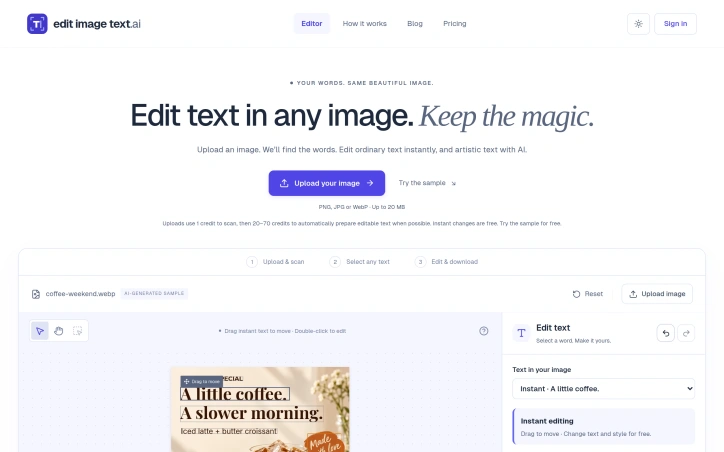
Edit Image Text helps creators update words in existing images without rebuilding the design. Upload a PNG, JPG or WebP, scan for text, select the words to change, and edit their wording or font style. Use it to update menu prices, refresh event posters, fix product-image typos or change text in screenshots. Review the result, keep editing, and download as PNG or JPEG. Free initial credits are available, with paid subscriptions and one-time credit packs for more edits.
AI Overview
AI-generatedDesigners and content creators often face a frustrating constraint: an image is nearly perfect, but the text needs updating. Whether refreshing a menu's prices, fixing a typo on product photography, or adjusting copy on an event poster, the usual solution demands rebuilding the entire design from scratch. Edit Image Text solves this by letting users modify text within existing images without starting over.
The product targets creators working with static visual assets who lack design expertise or want to avoid the time investment of full redesigns. The workflow is straightforward: upload an image in PNG, JPG, or WebP format, let the system scan for text, select what needs changing, and edit the words or fonts. The AI component handles the technical lift, automatically detecting text blocks and preparing them for editing while attempting to match the original font style.
What distinguishes this offering is its focus on preservation. Rather than forcing users into regeneration, it works within constraints. The interface shows original and edited versions side by side, giving users confidence that their design vision remains intact. The ability to add new text alongside editing existing text expands utility beyond simple replacements. Font matching, while noted as approximate, addresses a key pain point: manually hunting down typefaces after making text changes.
The credit system reflects realistic resource consumption. Scanning an image costs one credit, while automatic text preparation runs between twenty and seventy credits depending on complexity. The distinction matters: editing prepared text is free, encouraging iteration without penalty. This aligns incentives with user behavior—experimentation is encouraged once initial work is complete.
Pricing operates through free trial credits, monthly subscriptions, and à la carte credit packs, though specific pricing details remain unstated. Free downloads include a watermark; paid plans remove it. This monetization model works for both casual users testing the service and power users committing regular spending.
The product positions itself for practical, immediate use rather than artistic exploration. A poster refresh, a screenshot correction, a menu update—these are quick wins. The absence of claims about replacing professional designers suggests realistic positioning. For creators managing existing visual assets and needing rapid edits without rebuilding, this fills a genuine gap in available tools.
Founder Diary
DevlogThe maker hasn't posted a diary entry yet.
Key Features
AI Text Detection
Automatically scan images to identify and locate text blocks for editing
Side-by-Side Preview
Compare original and edited versions simultaneously to verify design consistency
Font Style Matching
The system attempts to match original font styles when editing text
Multi-Format Support
Edit text in PNG, JPG, and WebP image files
Text Addition
Add new text to images in addition to editing existing text
Watermark Control
Remove watermarks on paid plans while free downloads include them
Use Cases
-
1
Menu Pricing Updates
Designers can refresh menu prices without rebuilding designs from scratch
-
2
Product Photo Corrections
Fix typos and text errors on product photography quickly
-
3
Event Marketing Materials
Update copy on event posters and promotional materials without full redesigns
FAQ
What image formats can I edit? ▾
How does the credit system work? ▾
Can I add new text to images? ▾
Do paid plans remove watermarks? ▾
Pricing
Free trial credits available with monthly subscriptions and à la carte credit packs; specific pricing details unstated.
Discussion
No comments yet — be the first!
Join the conversation — sign up to comment.
Sign up freeCommunity Support
Boost this project on Sell With boost
Meet the Founder

More by 郭朕



More in Photo editing

MetaScope
As a professional photographer, I needed a tool...

Banana AI - Free AI Image Generator
Banana AI is a free AI image and video generatio...

TurboConvert - Image Converter
As a solo web dev I was constantly juggling PNG...

AImageResize
I built AImageResize to simplify image resizing...

throwback: same you. another lifetime.
We built Throwback to help people reconnect with...

PixelBoost AI
I built PixelBoost AI to eliminate the complexit...