GPTZZZ
GPTZZZ 是面向开发者的独立第三方 AI API 中转与多模型网关,提供 OpenAI 兼容接口和 Claude Messages 接口,帮助应用与编程工具...

@fuck.it
Email privacy has become an afterthought at mainstream providers, which treat inboxes as data sources to be mined for ad...
Categories
Best LLM Developer Tools Startups & Tools
SDKs, APIs, and libraries for working with language models.
Recently Listed
3 launches
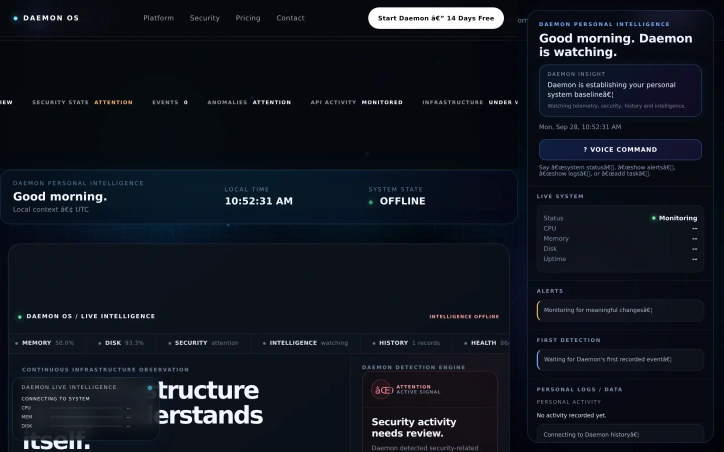
Infrastructure visibility remains fragmented across dashboards, logs, and scattered monitoring tools. Daemon OS consolidates this problem by delivering infrastructure intelligence that transforms raw telemetry into contextual understanding rather than endless data streams. The platform targets developers, SREs, and platform engineers who spend too much time piecing together system health signals manually. Instead of forcing users to interpret graphs and alerts, Daemon OS uses AI to connect dots between CPU behavior, memory consumption, security events, and system history to surface what actually matters. What distinguishes Daemon OS is its tiered approach to infrastructure watching. The Personal tier at $4.99 monthly monitors up to five personal devices and home networks, providing health summaries and performance insights for non-technical users. The Pro tier at $9.99 monthly scales to personal infrastructure with trend detection and anomaly analysis. The Business tier at $29.99 monthly handles production systems, offering Kubernetes cluster visibility, pod health tracking, and blast-radius analysis for teams running containerized workloads. The product embeds security monitoring alongside performance tracking, continuously comparing live signals against infrastructure state. The detection engine identifies anomalies and infrastructure degradation automatically rather than requiring engineers to set custom thresholds or maintain alert rules. This reduces operational toil for teams managing complex systems. The company emphasizes a local-first philosophy, meaning intelligence happens close to where systems run rather than centralizing all data to external services. This matters for security-conscious organizations and teams with data residency requirements. The platform also surfaces automation-ready output, suggesting it integrates findings into workflow tools and incident response processes. The pricing structure is notably accessible. Starting at $4.99 monthly for personal use makes infrastructure intelligence available to individual engineers, not just enterprises. The progression through tiers suggests the product can grow with users, from side projects to full production clusters. What remains unclear from available information is the depth of AI analysis, specific anomaly detection capabilities, and how the platform handles multi-cloud or hybrid infrastructure. The focus on Kubernetes in the Business tier may narrow appeal for teams not yet containerized. Daemon OS positions itself around intelligence and contextual understanding rather than raw data collection. For teams tired of dashboard fatigue and wanting AI to simplify infrastructure operations, it offers a direct alternative in a crowded observability space.
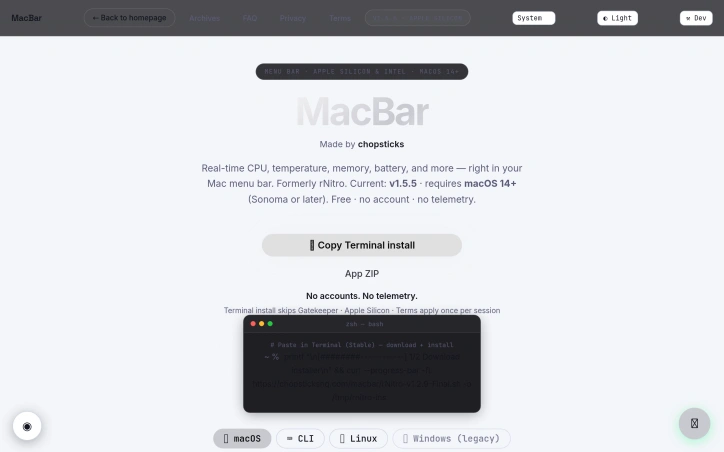
Menu bar system monitors solve a real friction point for Mac users: the need to quickly check CPU, memory, and thermal performance without opening Activity Monitor or third-party bloatware. MacBar addresses this with a lightweight, native alternative that stays out of the way until needed. The product installs entirely on your terms. Rather than downloading a prebuilt binary, the terminal installation command builds MacBar locally on your machine, with checksum verification to prevent tampering. This approach eliminates a common trust barrier between users and developer tools. The application collects no telemetry and requires no account, making it straightforward for privacy-conscious users to adopt without suspicion of data harvesting downstream. The monitoring capabilities deliver what users expect from a menu bar app: real-time CPU usage, temperature readings, clock speed, and memory stats. The interface includes a per-core CPU breakdown and a 60-second history graph, which adds useful context beyond the current snapshot. For Mac users who want to diagnose sudden slowdowns or track thermal behavior under load, this granularity matters. The technical implementation choices reinforce the privacy position. MacBar is built as native code and comes ad-hoc signed rather than notarized, a trade-off that keeps installation simple at the cost of a one-time security warning. The developers have committed to supporting Apple Silicon going forward while ending updates for Intel Macs after version 1.2.5, a pragmatic decision reflecting the real-world platform shift in the Mac ecosystem. Installation presents three paths: a hardened terminal command, a ZIP file, or compilation from source via Xcode. The terminal route is the default recommendation and avoids Gatekeeper friction entirely. This layered approach accommodates different user risk tolerances and technical comfort levels. The pricing model is straightforward: the application is free. This, combined with open-source development and no account requirements, positions MacBar as a genuine public service rather than a loss leader or future revenue trap. MacBar targets a specific audience: technical Mac users who want transparency in their system performance without the overhead of full-featured system utilities. It does not attempt to be everything; it stays in the menu bar and reports metrics. For users in that niche, it removes friction and requires no compromise on privacy.

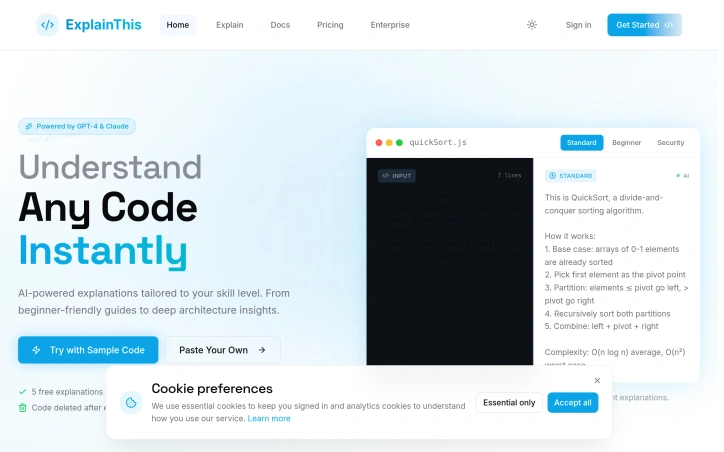
Developers regularly encounter codebases written in unfamiliar patterns, legacy languages, or architectures outside their expertise—and the gap between code literacy and actual understanding can significantly slow productivity. ExplainThisCode targets this friction by providing AI-generated explanations of code snippets adapted to individual skill levels, eliminating the need to hunt through documentation or rely on colleagues for clarification. The product's core strength lies in its recognition that code comprehension isn't one-size-fits-all. Rather than generating a single explanation, it tailors output to the user's proficiency: beginners receive analogies and step-by-step walkthroughs, while experienced developers get architectural context and complexity analysis. This approach, powered by GPT-4 and Claude, treats understanding as a variable problem rather than a commodity feature. The tool supports eighteen programming languages, reducing barriers for polyglot teams. The interface emphasizes frictionless experimentation. Users can paste code, upload files, reference GitHub repositories directly, or integrate via API without signing up—a deliberate choice that prioritizes discovery over gatekeeping. Explanations stream token-by-token as they generate, providing immediate feedback rather than forcing users to wait for complete responses. The product bundles explanation depth (quick summaries through comparative analysis) with analysis modes focused on security vulnerabilities and performance bottlenecks, making it pragmatic for code review and auditing workflows. The API pathway is notable. Rather than positioning itself as a chat interface for code (a territory crowded with general-purpose AI assistants), ExplainThisCode frames itself as a purpose-built microservice that teams can embed into existing development tools—an architecture that acknowledges where code explanation actually happens: in IDEs, documentation platforms, and CI/CD pipelines, not in dedicated browser tabs. The pricing structure reflects this positioning. A free tier caps requests at twenty per day, sufficient for casual exploration but clearly designed to convert regular users. The Pro plan at nineteen dollars monthly grants five hundred requests daily and unlocks API access, supporting both individual developers and small teams. Enterprise contracts accommodate large organizations with custom limits, team SSO, and deployment flexibility including self-hosted options. The main limitation is scope: the tool excels at explaining what code does and highlighting potential issues, but doesn't appear to help users *refactor* or *improve* the code in place. It remains fundamentally an explanatory tool, not a development partner. That's a rational constraint—it keeps the product focused—but it leaves a logical follow-on workflow unaddressed.