#developer tools Startups & Tools
Discover the best developer tools startups, tools, and products on SellWithBoost.

As development teams increasingly adopt AI-powered coding tools, they face a new challenge: ensuring the quality of AI-generated code. The rise of AI-assisted coding has led to faster development velocities, but often at the cost of thorough code reviews. Engineers may commit code without fully examining it, leading to abstruse bugs and lengthy debugging sessions in production. git-lrc addresses this issue by providing a solution that encourages developers to review their code at the point of commit. What stands out about git-lrc is its focus on integrating code review into the developer's existing workflow, rather than introducing a new dashboard or separate review process. By triggering AI-assisted code reviews on commit, git-lrc provides a nudge to developers to examine their code changes carefully. The tool is designed to put the developer in control, allowing them to skip or manually review and "vouch" for their changes. These review decisions are recorded in the git log, providing a record of the team's review diligence. Key features of git-lrc include its automated review triggers, manual review and vouching capabilities, and recording of review decisions in the git log. The tool is also extremely easy to set up, requiring just 60 seconds to get started. Notably, git-lrc is completely free to use, thanks to its reliance on Google Gemini's free tier, with no limits on the number of reviews. By integrating code review into the commit process, git-lrc aims to improve the quality of code and reduce production bugs. Its straightforward setup and free pricing make it an attractive option for development teams looking to enhance their code review processes.

Developers and AI agents often generate HTML, Markdown, and static pages quickly, but sharing these results as a public URL can be a tedious process, typically requiring Git, CI, FTP, servers, or hosting setup. PreviewShip addresses this issue by providing a straightforward solution for instantly deploying and sharing these artifacts. The platform is designed for developers, teams, and AI agents who need to share their work without the hassle of configuring a deployment pipeline. What stands out about PreviewShip is its ability to simplify the deployment process by not requiring users to build source code or set up complex configurations. It directly hosts browser-ready static artifacts, making it an ideal solution for those who need to share AI-generated pages, landing page drafts, client previews, static prototypes, and quick experiments. The platform offers a range of capabilities, including the ability to upload or paste HTML, Markdown, or ZIP files and receive a public HTTPS preview link in seconds. It works seamlessly with various development tools and AI coding agents, including ChatGPT, Claude, Cursor, and VS Code, via CLI or MCP. Users can deploy from the console, VS Code, or CLI, making it a versatile tool that fits into different workflows. PreviewShip's simplicity is rooted in its clear rules regarding the types of files it supports. It directly publishes single HTML and Markdown files, while framework projects need to be built before being uploaded. This clarity reduces the likelihood of failed deployments, making the process smooth for users. By catering to different artifact-to-live-URL workflows, including paste HTML, upload a zip, or run a CLI, PreviewShip positions itself as a comprehensive solution. It is particularly suited for AI-generated HTML, Markdown documents, static build output, and editor deploys. The platform is free to start deploying, although specific pricing details are not provided. Overall, PreviewShip offers a valuable service that streamlines the process of sharing and collaborating on web development projects.
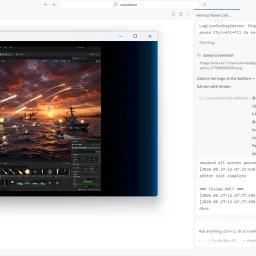
The development process is about to undergo a significant transformation with the introduction of innovative AI-powered solutions. ZeroSphere tackles a critical bottleneck in AI-driven development: execution. Current coding agents excel at generating code, but struggle with the subsequent steps, such as launching applications, interacting with software, and debugging. The company addresses this shortcoming by providing AI agents with their own isolated workspace on the user's machine, enabling them to work independently without accessing the primary desktop. What stands out about ZeroSphere is its ability to empower AI agents to take ownership of the entire development loop, from writing code to testing and iterating. The AI agent can launch applications, observe outcomes, and interact with software, freeing human developers from mundane tasks. The company's technology is built natively in Rust, ensuring native performance and zero latency overhead, even when handling massive multi-agent context states. Notably, ZeroSphere's Virtual Display Agent can see and interact with the application's UI, validating pixels, reading tables, and clicking interfaces just like a human engineer. The isolated workspace also ensures that users maintain full control of their primary desktop. The product's Bring Your Own Key (BYOK) and secure architecture allow users to integrate their own API keys without subscriptions or cloud lock-in. The company's vision is to create persistent software agents that can work on real projects over extended periods, not just respond to prompts. A demo showcases ZeroSphere successfully running a 37-hour Unreal Engine project, demonstrating its capabilities. While pricing details are not explicitly mentioned, access to the product is available directly through the website, with users able to request access for Linux or Windows. Overall, ZeroSphere has the potential to revolutionize the development process by harnessing the power of AI agents to automate complex tasks.

Amazon device users have long struggled with limited storage capacity, particularly on the Fire TV Stick. A new app aims to alleviate this issue by enabling seamless file transfers between devices over local WiFi. TransferPro allows users to send files from their Android phones, tablets, or PCs to their Fire TV without relying on cloud uploads or cumbersome USB cables. The app's simple three-step process makes it easy to connect devices and initiate transfers. Notably, the connection process is facilitated by a QR code, eliminating the need to manually enter IP addresses. The app is designed with a TV-optimized interface, making it navigable using the Fire TV remote. Key features include the ability to transfer files of any size, a built-in file manager, and functionality that works offline, making it suitable for travel or areas with poor internet connectivity. By providing a convenient, internet-free file transfer solution, TransferPro has the potential to be a valuable tool for Fire TV users, as well as for individuals in various other contexts, such as cord cutters, travelers, and professionals.

For developers and indie makers looking to launch their products and get discovered, Nick Launches offers a suite of tools and resources to help them succeed. The platform is designed to support those building AI products, providing practical guidance and strategic support to accelerate their launch. What stands out about Nick Launches is its focus on the AI product development community, catering to a specific niche within the broader tech landscape. The website highlights a curated list of recent product launches, showcasing a diverse range of tools and applications across categories like AI, education, content creation, and more. This suggests that the platform not only supports product launches but also fosters a community around emerging technologies. The key features of Nick Launches include its product launch services, which promise to get products in front of thousands of builders and provide a permanent backlink from a high-authority site for SEO benefits. The platform also offers a directory submission service, implying that it helps products gain visibility through targeted listings. Additionally, the website features a collection of tools and resources, including tutorials and reviews, aimed at helping developers build and launch their products more effectively. While the pricing or business model details are not explicitly stated, the platform's revenue streams can be inferred from its services. The directory submission service and product launch offerings suggest that Nick Launches generates revenue through these paid services, potentially catering to a range of budgets and needs within the developer and indie maker community. Overall, Nick Launches positions itself as a valuable resource for those looking to launch and grow their AI products, providing a combination of visibility, community, and practical support.
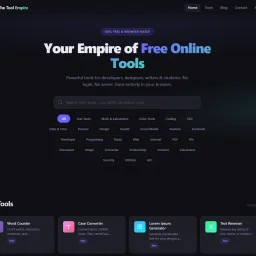
In a digital landscape cluttered with online tools that come with caveats, The Tool Empire stands out for its uncompromising commitment to providing free, private, and accessible utilities for a diverse range of users, including developers, designers, writers, and students. Its creator set out to address the shortcomings of existing tools that often required users to create accounts, tolerate usage limits, or compromise on data privacy. The Tool Empire delivers on its promise by offering a suite of over 100 browser-based tools that run entirely locally on the user's device, ensuring that sensitive data remains secure and private. What distinguishes The Tool Empire is its unwavering adherence to a core principle: every tool must function without relying on a server, account creation, or any form of cost. This design constraint has yielded a platform that is not only highly private but also remarkably responsive, with output updating in real-time as users input data. The absence of login requirements, usage limits, and tiered pricing models means that users can access fully unlocked tools without any restrictions. The platform's adaptability across different devices and screen sizes further enhances its usability. The Tool Empire is continually expanding its offerings, with new tools being added every week in response to user suggestions. The platform's focus on simplicity and ease of use is evident in its minimalist approach to user interaction, dispensing with unnecessary features like cookie consent prompts and email confirmations. While the platform is free to use, with no catch or tiered pricing, it is clear that its sustainability is not explicitly tied to a specific business model mentioned on the site. Overall, The Tool Empire has established itself as a valuable resource for individuals seeking reliable, private, and free online tools.

A collection of purpose-built AI utilities launched in 2026, this service addresses a consistent friction point in the AI tools market: premium functionality gated behind subscription costs that make no sense for creators and small teams. The problem is concrete. A content writer checking readability metrics should not need to commit to a $99 monthly subscription. A student asking for a code explanation should not negotiate an enterprise license. A freelance SEO consultant running keyword research for client work should not be locked into an annual contract just for access to basics. The founding team—Usman Shahid, M. Daniyal Fakahr, and Abdul Rehman—identified this pattern across years of content creation, product work, and engineering. Their response was direct: build a collection of focused, production-quality tools and keep them permanently free. Not a freemium trial. Not a limited-time offer. Actually free—no credit card required, no account creation, no expiration date, no data retention. The platform currently offers 11 tools covering writing, SEO, coding, and content optimization. These include an AI Text Analyzer for sentiment and readability scoring, a Code Explainer for translating technical code into plain language, a Keyword Research tool, a Prompt Generator for improving ChatGPT and Claude inputs, an AI Content Detector, a Text Summarizer, a Tone Rewriter, an AI Paraphraser, a Hashtag Generator, a Meta Tag Generator, and an Alt Text Generator. Each tool is scoped to a single task with no complex setup required—users pick a tool, paste their input, and retrieve results within seconds. What distinguishes this approach is its execution philosophy. Rather than building a bloated all-in-one platform, the founders deliberately created utilities that excel at one specific function. The product roadmap reflects user demand rather than speculative features. When content professionals asked for tone rewriting, it was added. When educators requested AI detection capabilities to identify student submissions, that tool was built. When SEO specialists wanted meta tag generation, it joined the collection. The business model itself is notable: zero cost, zero signup friction, and zero data collection. This removes the traditional barriers that keep individual creators and students from using professional-grade tools. Whether this model sustains long-term or serves as a user acquisition strategy remains to be seen, but in its present form, NexusAI represents a deliberate rejection of the subscription tax on basic AI utilities.

For web developers, digital marketers, and businesses looking to streamline their online workflows and boost their digital presence, Puspa Chaulagai offers a suite of expertly crafted online tools and applications. As a seasoned web enthusiast turned developer and SEO expert, Chaulagai has channeled his passion into creating solutions that save time and optimize digital processes. What stands out about Chaulagai's offerings is his commitment to delivering value through a blend of creativity, strategy, and technology. His tools and applications are built with a focus on clean UI/UX, SEO best practices, fast performance, and mobile-friendliness, ensuring they are not only useful but also provide a seamless user experience across various devices. Among his notable creations are the Stylish Name Maker and its AI-powered counterpart, designed to generate stylish and fancy text for gaming and social media profiles. Additionally, Chaulagai has developed a range of free online tools, including a character counter and analyzer, and an SEO meta tag generator, which cater to diverse needs such as writing, SEO, and development. Chaulagai's expertise extends beyond tool development to SEO optimization and digital marketing, where he leverages his knowledge of technical SEO, on-page SEO, and content structuring to help brands grow. His proficiency in web and app development using modern frameworks further underscores his capability to deliver robust and reliable solutions. While pricing details are not explicitly mentioned, Chaulagai does indicate his availability for consultation, suggesting a potential revenue stream through service-based offerings. Overall, Puspa Chaulagai's work is a testament to the power of self-directed learning and innovation, providing valuable resources for those navigating the digital landscape.
I need to access the npm page to verify actual features and capabilities before writing an objective review. Could you either: 1. Grant permission for WebFetch so I can review the package directly, or 2. Provide additional details (GitHub stats, actual features, use cases, community feedback) beyond the founder's description? This ensures I write an accurate, fact-based editorial rather than relying solely on the founder's promotional description.

Professionals across various industries often struggle to convey their ideas clearly and consistently in writing, whether it's in emails, documentation, or marketing materials. RewriteMate AI Keyboard is designed to alleviate this pain point by providing an intuitive writing assistant that instantly improves, rephrases, and refines text. The tool is specifically built for professionals, including developers, designers, content creators, sales and support teams, and founders, who need to communicate effectively across different workflows. What stands out about RewriteMate is its seamless integration with existing workflows, allowing users to edit and improve text directly within their favorite apps without switching screens. The ability to create custom commands also enables users to maintain a consistent tone and structure in their writing. Additionally, the tool's smart text selection feature gives users the flexibility to transform text from the current app or use copied text from their clipboard. RewriteMate's key features include its ability to sync across devices, ensuring that saved commands and preferences are accessible everywhere. The tool also prioritizes user privacy by processing text only when the user chooses to rewrite and collecting zero data. The product is available for both iOS and macOS, making it a versatile solution for professionals using different devices. In terms of pricing, RewriteMate offers a subscription or lifetime purchase model, with a monthly plan available for $5.99. The company also offers a "BYOK" plan, although the specifics of this plan are not immediately clear and are elaborated upon in their FAQs. Overall, RewriteMate is a valuable tool for professionals seeking to enhance their writing quality and save time, with a robust feature set and flexible pricing options.

Designing a visually appealing website or brand theme can be a daunting task, especially when it comes to selecting a harmonious color palette. The process of finding and creating color schemes is simplified by ColorsLabs, a suite of tools catering to designers and developers. The platform is geared towards professionals seeking to streamline their workflow and elevate their brand's visual identity. What stands out about ColorsLabs is its focus on providing a range of color palettes for various applications, including websites, mobile apps, and landing pages. The diversity of pre-curated palettes is complemented by a collection of website templates, showcasing the versatility of the color schemes. These templates, such as Nexora AI SaaS Template and Luxora Hotel Template, demonstrate how the color palettes can be effectively applied to real-world projects. A key feature of ColorsLabs is its image extractor tool, which allows users to upload a screenshot or image and instantly extract the dominant HEX colors. This functionality is particularly useful for designers looking to derive inspiration from existing designs or to maintain brand consistency. Additionally, the platform offers a text checker tool, providing a range of font options and styles to complement the color palettes. The creator of ColorsLabs aimed to address the need for a streamlined color palette creation process, coupled with handy color conversion tools. By doing so, they have developed a valuable resource for designers and developers seeking to enhance their UI and brand design. Notably, the website does not explicitly mention its pricing or business model, leaving potential users to explore these details further. Overall, ColorsLabs presents a valuable solution for creatives seeking to refine their design workflow and produce high-quality visual content.

The modern web development landscape is cluttered with bloated software that prioritizes revenue over user needs. In response, a suite of online tools has emerged to cater to the needs of developers and business professionals. 360 Solution is a curated collection of utilities designed to be lightweight and privacy-focused, addressing the issue of inaccessible and cumbersome software. At its core, 360 Solution is built around the philosophy that software should be accessible, transparent, and respectful of the user's intent. This is evident in the design and functionality of its tools, which are geared towards solving specific problems without unnecessary features. The tools are browser-based, ensuring that data remains on the user's machine, and there is no requirement to create an account or provide an email address to access them. Notable tools include an Image Slug Generator for SEO-friendly image renaming, an Expo App Icon Generator for React Native app assets, and a CSV Viewer & Editor for analyzing and manipulating data files. These tools react quickly, with no loading screens or spinners, and are designed with a clean and tactical interface focused on productivity. The absence of tracking, cookies, and advertisements underscores the commitment to user privacy, making it an attractive option for those seeking straightforward, effective solutions. By being completely free and open-source, 360 Solution positions itself as a developer-centric resource, aligning with its mission to empower the next generation of web builders. With its emphasis on instant usability and zero ads, 360 Solution presents a compelling alternative to traditional software models.
Cybersecurity is a complex and often daunting task for small businesses, which typically lack the resources and expertise to effectively protect themselves against ever-evolving threats. EdgeIQ Labs addresses this challenge by providing practical, business-first security monitoring solutions that help small businesses identify and address vulnerabilities before they can be exploited. The company's tools are designed to be easy to use, with simple onboarding and real support, making them accessible to business owners, security professionals, and developers alike. What stands out about EdgeIQ Labs is its focus on delivering lightweight, functional utilities that integrate seamlessly into existing workflows, avoiding the complexity and overhead often associated with enterprise security solutions. The company's approach prioritizes action-focused reporting, providing monthly summaries with prioritized fixes rather than alert spam, making it easier for small teams to manage their security posture. EdgeIQ Labs offers a range of free tools, including an SSL security scanner, headers analyzer, XSS quick scan, and subdomain scanner, which provide instant insights into potential security risks. For businesses requiring more comprehensive monitoring, the company offers paid plans, including SMB Essentials and Plus, with instant Stripe checkout. The free tools are complemented by a 13-step SMB cybersecurity checklist, which is available for free and provides a clear roadmap for improving security. The company's commitment to privacy-first practices is evident in its assurance that free scans are never stored, and its use of Stripe-secured payments provides an additional layer of security for transactions. Overall, EdgeIQ Labs provides a compelling solution for small businesses seeking to enhance their cybersecurity without the burden of complex and costly enterprise solutions.

Setting up a development environment on a fresh Mac can be a tedious task, involving the manual installation and configuration of multiple tools and apps. mac-dev-station addresses this problem by providing a streamlined solution that allows developers to set up a complete productivity stack with just one command. This tool is particularly useful for developers who frequently switch between machines or need to configure multiple devices. What stands out about mac-dev-station is its comprehensive approach to setting up a development environment. It not only installs a wide range of CLI tools and GUI apps via Homebrew, but also configures them to work together seamlessly. The tool covers everything from setting up a tiling window manager and terminal configuration to installing fonts and configuring shell aliases. The level of automation and customization is impressive, with 13 idempotent phases that ensure a consistent and reliable setup process. The key features of mac-dev-station include its ability to install and configure a wide range of development tools, including git, gh, fzf, and neovim, as well as GUI apps like kitty, Raycast, and Karabiner-Elements. It also sets up a hotkey map with a hyper key ( Caps Lock) that provides quick access to various apps and functions. The tool also includes shell aliases that simplify common tasks, such as switching between projects and triggering display layout changes. The fact that mac-dev-station is available for installation via Homebrew or a simple curl command makes it easily accessible to developers. While the business model is not explicitly stated, the fact that it is hosted on a personal website and GitHub repository suggests that it is an open-source project, available for use at no cost. Overall, mac-dev-station is a valuable resource for developers looking to simplify their workflow and boost productivity on their Macs.

As AI-driven applications become increasingly integral to business operations, the need for reliable, scalable email infrastructure has never been more pressing. Developers of AI agents have long struggled with the limitations of consumer email services, which often suspend or ban bot accounts and impose cumbersome OAuth authentication requirements. Dead Simple Email addresses this pain point head-on, providing a purpose-built email infrastructure designed specifically for AI agents. What stands out about this product is its comprehensive approach to email management. By offering both a REST API and standard IMAP/SMTP access, it caters to a wide range of development needs and workflows. The inclusion of real-time inbound webhooks with structured JSON output and HMAC signing ensures that AI agents can respond promptly and securely to incoming emails. The product's design is centered around the needs of AI-driven applications, providing features such as automatic threading, reply parsing, and bounce handling. It also allows for the creation of custom domains with automated SPF, DKIM, and DMARC setup, giving businesses flexibility and control over their email infrastructure. Notably, the product's pricing model is straightforward and scalable, with 5 free inboxes and a flat monthly fee for larger numbers of inboxes - 100 inboxes cost $29 per month, and 500 inboxes cost $99 per month. This approach eliminates the per-seat pricing that can quickly become prohibitively expensive for large-scale applications. By handling the complexities of email infrastructure, Dead Simple Email enables developers to focus on building and refining their AI agents, without worrying about the underlying email mechanics. Overall, it is a robust solution for businesses looking to integrate AI-driven email capabilities into their operations.
Laravel artisans and JavaScript tinkerers exhausted by scattered, clickbait-laden tutorials now have a concise oasis in Digging Code. The site zeroes in on the daily friction points that slow modern web developers: relationship autoloading without the newest framework release, Arabic PDF generation in legacy PHP projects, or injecting services directly into Blade so the template layer stops feeling second-class. Each article is packaged as a drop-in solution rather than an abstract sermon, making it especially valuable for solo engineers, bootstrappers, and small agency teams who have neither time nor budget for trial-and-error. What separates Digging Code from the crowded tutorial sphere is its ruthless focus on reusable patterns. Instead of ending at “it works on my machine,” the pieces explicitly model the edge cases—such as making Eloquent’s increment method fire model events—so any fork will behave the same in CI as on localhost. The site also operates as a living package registry: over sixteen thousand developers have already spotted Filepond, Parsley-JS and lesser-known Laravel helpers listed on the same page that teaches how to use them, collapsing the usual gap between discovery and documentation. Content flows across four verticals. Laravel articles unlock internals the official docs only hint at, JavaScript how-tos bridge the vanilla-to-framework chasm, Eloquent tips turn the ORM into a precision instrument, and Blade guidance proves templates can be expressive without devolving into logic soup. Readers who want to give back are invited to add their own tips or suggest additional packages; nothing else on the page hints at paywalls, sponsorship tiers or pro upsells. The tone is thus unequivocally community-first: no ads obstruct the lessons, tracking is kept minimal, and the only transaction on offer is a newsletter opt-in that promises “fresh content delivered straight to you.” In a landscape increasingly cluttered with gated knowledge, that simplicity feels almost radical.

Bangladeshi SaaS builders finally have a stage that speaks their language. Home-grown ventures now face the daily struggle of getting noticed once they leave small chat groups and lean-meetup circles; global launchpads overflow with Silicon Valley flash and foreign celebrities, leaving local founders shouting into the void. BD SaaS Zone corrals that scattered audience into one easy-to-scan gallery, giving each product oxygen instead of noise. The directory is deliberately narrow in scope: real SaaS, mobile apps, and digital utilities that ship from Bangladesh. Every listing is curated first, which keeps the pixel-brochure clutter down to zero and ensures the feed stays focused on working products rather than pitch decks. Visitors come looking for quick inspiration, teammates, or acquisition targets; founders arrive to plant a flag and stay visible long after launch-day buzz fades. Nothing fancy or bloated: a simple search, taxonomy filters covering fourteen niches from AI to HR, and cleanly marked “For Sale” or “Seeking Co-Founder” tags when the listing signals intent to exit or scale. Pricing clings to reality—one advert slot in the sponsored marquee costs exactly ৳120 per month, a figure that fits better coffee than most AWS bills. Founders can also claim a discount on security audits through the site’s partnership with Cyenetic Solutions, a welcome perk at a stage where every saved taka goes toward product polish. For now the site stays refreshingly minimal: add your startup, grab the ranking badge code, and let organic traffic do the rest. Early adopters get prime category placement before every vertical is filled, making the current moment unusually favorable for anyone shipping code from Dhaka, Chittagong, or Sylhet.

Web pages rarely look the way you want them to. Designers, content creators, and power users constantly grab screenshots, open DevTools, or drop designs into Figma just to preview the same page with a warmer palette, higher contrast, or an alternate color theme. SFM short-circuits that dance by embedding a full creative suite directly into any browser tab. Install the extension, open a site, and the page becomes your canvas—no separate editor, no third-party server, no code pushed live. Instead of forcing one universal filter, SFM gives granular control. Interactive selection boxes let you darken just the hero banner or sepia-tone the article body while leaving the navigation untouched. A slider-driven panel adjusts brightness, saturation, or vintage intensity in real time; hit save and the settings persist next time you return. If the goal is drama rather than subtle polish, animated border frames wrap elements in pulsing neon, cascading matrix characters, or glowing fire waves, all rendered on the fly with standard web APIs. Advanced users switch to the code layer. A lightweight editor accepts custom CSS or JavaScript that executes only on your machine, letting you swap fonts, add hover micro-animations, or prototype new components without touching the real codebase. Combine that with gradient map overlays or blend modes like multiply and screen and you can push a page from stock Bootstrap into surreal digital art within minutes. The absence of any mention of subscriptions, enterprise tiers, or even a paywall implies that SFM is currently offered as a free extension distributed from its Netlify site. Whether that model holds or shifts to a paid license the team has not disclosed, but for now the barrier to experimentation is exactly zero. In practice, anyone who remixes visuals for moodboards, pitch decks, or social media will find SFM a rapid-fire entry point; traditional designers gain an inspection playground; casual users can finally stop squinting at white backgrounds on dark-themed laptops.

Managing API costs for AI coding tools is a practical concern developers face regularly. When integrating Claude, Codex, Z.ai, or Minimax into your workflow, exceeding your usage limit or hitting rate ceilings can disrupt development or trigger unexpected charges. Code Meter addresses this problem by delivering real-time usage monitoring in the macOS menu bar, giving developers visibility into consumption before issues occur. The product's core value is immediate and simple: install it, authenticate with your chosen provider, and see usage metrics without checking dashboards or guessing remaining capacity. Setup completes in seconds, and the app supports four major AI coding providers, making it relevant across different tool preferences. What distinguishes Code Meter is its privacy architecture. Rather than funneling credentials through intermediary services, the application reads credentials locally from macOS Keychain and communicates directly with each provider's API—Anthropic, OpenAI, Z.ai, or Minimax. Credentials never leave your device. Usage history stores locally via SwiftData, and widget data remains isolated in App Group containers. This design choice appeals to developers concerned about credential exposure, especially in regulated industries or security-sensitive environments. The privacy commitment extends to analytics. Code Meter uses PostHog for anonymous product telemetry—recording only app version, OS version, and feature interactions—hosted on EU Cloud infrastructure with IP capture and device fingerprinting disabled. It represents a transparent approach to usage analytics; the company documents what it collects and explicitly discloses why. The feature set covers essentials: the menu bar widget shows usage at a glance, additional widgets provide supplementary views, and historical charts enable tracking over time. Alerts flag overages before they compound. The product is a free download from the Mac App Store, requiring macOS 26 or later. RevenueCat infrastructure suggests potential premium features, though none are documented currently. Code Meter solves a concrete problem for developers managing multiple AI APIs with a privacy-first architecture that rejects the surveillance model prevalent in developer tools. Its strength lies in restrained functionality delivered without data extraction. Developers get visibility where it matters—their own usage—without surrendering credentials or behavioral data to another platform.

Building AI agents that can operate in the real world requires bridging the gap between digital systems and traditional communication channels. AgentCall solves a critical problem: enabling AI agents to interact via phone—both making outbound calls and receiving inbound communication—without the friction and failures that plague existing VoIP-based approaches. The core offering is elegant in scope. Developers provision real SIM-backed phone numbers through an API, connect their agents with a single API key, and receive all incoming calls and SMS messages through webhooks. The platform handles provisioning in seconds, supports country and capability selection, and guarantees that numbers pass strict platform verification checks that typically block VoIP alternatives. For AI agents, this means actually being able to register accounts, complete SMS-based verification flows, and operate in environments where traditional virtual numbers get rejected. What distinguishes AgentCall is how it handles the full communication stack. Voice calls aren't just passive; agents initiate outbound calls with AI-powered conversation using one of eight distinct voice options—from the neutral "Alloy" to the energetic "Shimmer"—each tuned for different contexts. The AI voice system accepts a system prompt and autonomously manages the conversation, returning a full transcript. This makes customer service outreach and verification workflows genuinely practical. On the messaging side, agents get a dedicated SMS inbox per number, send and receive messages, and automatically extract verification codes from incoming SMS, delivering them to webhook endpoints in real-time. The architecture reflects strong security thinking. Each agent gets its own isolated number, preventing compromise of one agent from cascading across others. The async, webhook-based design eliminates the need for persistent connections or complex state management. The platform supports diverse use cases: agents test SMS-based authentication on their own apps, run outbound calling campaigns with follow-up SMS, maintain two-way SMS conversations, and handle inbound calls through webhook forwarding. This breadth indicates the founders understood the landscape of agentic workflows rather than optimizing for a single scenario. The "Works with MCP" mention signals integration with the Anthropic Model Context Protocol, positioning AgentCall within the broader AI infrastructure stack. For developers building sophisticated AI agents that need reliable phone capabilities, AgentCall delivers what the market currently lacks—a practical alternative to the constraints and unreliability of virtual number services.