#productivity Startups & Tools
Discover the best productivity startups, tools, and products on SellWithBoost.

Freelancers and businesses in South Africa now have a dedicated marketplace purpose-built for local talent networks and ZAR-denominated work. Aura Social addresses a genuine friction point in freelance marketwork by enabling transactions entirely in South African Rand through PayFast, sidestepping the currency conversion overhead and international banking delays that characterize competing platforms. For freelancers operating outside major talent hubs, this localization removes barriers to cash flow and makes income more predictable. The platform serves two distinct audiences: service providers offering design, development, writing, and marketing expertise who want steady work without geographic arbitrage pressure, and project owners seeking vetted talent without navigating global platforms designed for different labor markets. The core mechanism is simple—businesses post work free of charge and hire from a verified freelancer pool, while service providers build income and reputation through completed projects. Several design choices distinguish Aura Social from the broader marketplace category. The escrow protection mechanism builds confidence for both sides, particularly important when establishing trust in newer platforms. The verification layer for freelancers creates a quality signal that reduces hiring friction for businesses unfamiliar with portfolio evaluation across borders. The dual approach—accepting both project postings and service listings—accommodates different working styles, whether participants prefer discrete projects or ongoing arrangements. The platform covers necessary marketplace mechanics: project browsing, service discovery, profile building, and portfolio documentation. This breadth keeps the feature set focused without attempting to compete on ancillary services like accounting or contract templates that larger competitors offer. Pricing structure shows product discipline. The free project posting model eliminates activation friction for new businesses testing the platform. The founder emphasizes escrow protection and local currency payment, suggesting the revenue model operates on transaction fees rather than listings or membership tiers, though specific rates remain unstated. Aura Social succeeds by constraining scope to a real market gap rather than trying to be a global competitor. Local currency, domestic verification, and regional payment infrastructure are not marginal features for South African workers—they are often deal-breakers on international platforms. By solving for that specific context, the marketplace creates conditions for sustainable freelance work rather than gig economy extraction, which is a distinct value proposition in emerging markets where earning power and payment reliability matter as much as opportunity volume.

Developers and designers frequently face friction when translating visual concepts into Three.js scenes. Creating geometry, materials, lighting, and camera configurations from scratch for every new project adds setup overhead that detracts from the creative work itself. This is the core problem that Image to Threejs addresses. The product automates the initial translation step by accepting image uploads as visual references. Users provide one to three reference images, and the platform's AI generates Three.js code structured to match the visual content. Rather than claiming pixel-perfect reconstruction, the creators acknowledge that a single image cannot capture all depth details and hidden surfaces. This honest framing positions the generated model as an editable starting point rather than a final deliverable. The workflow keeps this pragmatic philosophy throughout. After generation, users encounter an interactive 3D preview where they can inspect the AI-generated model in real time. From there, they can directly edit the code, refine geometry and materials, and iterate visually without the traditional back-and-forth between reference images and development environments. Once satisfied, the model exports for integration into Three.js projects, websites, or interactive experiences. What distinguishes Image to Threejs is its integration of these typically separate concerns into one cohesive interface. Rather than managing uploaded images separately from code editors and preview tools, users stay within a single workspace. This reduces context switching and the friction of coordinating multiple tools. The target audience spans developers seeking faster iteration on 3D web projects, designers who want to prototype interactive models without deep Three.js expertise, and creative technologists exploring generative approaches to 3D design. The product makes sense for those building product visualizations, website experiences, or experimental interactive content. The core value proposition is straightforward: eliminate the tedious foundation-building phase of Three.js development. By generating working code and a realistic first draft from an image, the platform lets users reach the refinement stage faster. This appeals to teams that prioritize velocity and to individuals who want to experiment with 3D web concepts without significant setup investment. No pricing information appears in available materials, leaving the business model's specifics unclear. What is clear is that Image to Threejs solves a real friction point in visual web development, offering a practical bridge between design intent and executable Three.js code.

Distributed teams managing complex projects face a persistent friction point: project management tools force a choice between local ownership and AI integration. Kanban Pro sidesteps this tension by storing work as plain Markdown files on your machine while enabling AI agents and IDEs to read and modify tasks natively. The product targets small agile teams building sophisticated solutions, particularly those already working with AI assistants or considering it. Its core value proposition is simplicity and transparency. Unlike subscription-based competitors that hide data behind proprietary formats and APIs, Kanban Pro keeps everything accessible and portable. There is no cloud requirement, no vendor lock-in, and no recurring fees. Five distinct views—Board, List, Calendar, Notes, and Gantt—let teams visualize work without switching tools. The Kanban view offers familiar drag-and-drop columns. The Calendar view supports drag-to-schedule functionality, while the Gantt view handles timeline dependencies and drag-resizing. This multiplicity within a single file structure is genuinely useful for teams toggling between high-level planning and tactical execution. What makes Kanban Pro distinctive is its design philosophy. Rather than positioning AI as an afterthought or premium feature, the software treats agent collaboration as a first-class concern. Tasks remain human-readable Markdown, so AI can parse and modify them without API proxies. An embedded CLI reinforces this keyboard-first, automation-ready approach. Bulk operations and customizable shortcuts accelerate workflow. Custom fields, themes, color palettes, and user logos transform the interface from generic to personal. Collaboration happens through existing cloud drives—iCloud, Dropbox, network storage—avoiding a proprietary sync layer. This pragmatism extends to the native Markdown editor, which includes Prism.js syntax highlighting and live preview to compete with specialized alternatives. The early-access positioning suggests incomplete feature coverage, but the foundation is solid. For teams frustrated with bloated project managers or those seeking AI-ready infrastructure without complexity overhead, Kanban Pro offers a rare combination: powerful visualizations paired with radical simplicity, available across Mac, Windows, and Linux at no cost.

Streamlining workflows on Mac devices is a daunting task, especially when users have to juggle multiple utilities to accomplish various tasks. The solution lies in a comprehensive command center that integrates AI actions, dictation, and native commands, making it easier for users to manage their tasks efficiently. Vehla's product is designed to address this issue by providing a centralized platform that replaces the need for multiple Mac utilities. It is tailored for individuals who value productivity and are looking for a way to simplify their workflow. By doing so, it caters to professionals and power users seeking to maximize their efficiency on Mac devices. One of the standout aspects of Vehla is its integration of AI capabilities directly into the Mac command center. The product utilizes on-device AI models such as Gemma 4, Ollama, and LM Studio, among others, to enable advanced features like Recall, which builds a local search index across various sources, and Smart Compose, which assists in writing tasks. Key features worth noting include the ability to search for apps and files, act on selected text with QuickGlass, dictate with Flow, and access to 73 built-in AI actions or 100+ native commands. Additionally, the product offers functionalities like window management through Snap Wheel, note-taking, and task organization. The product is available for macOS 15.0+ on Apple Silicon devices, making it compatible with the latest Mac technology. The business model is straightforward, with a one-time purchase option that allows users to license the product for use on two Macs. Overall, Vehla presents a compelling solution for Mac users looking to simplify their workflow and enhance productivity. By integrating AI capabilities and native commands into a single command center, it effectively consolidates multiple utilities into one, making it an attractive option for those seeking to streamline their tasks.

UK landlords often face a daunting task when dealing with multiple tenant applications, as the traditional referencing process is not only time-consuming but also costly. LetLogic addresses this issue by providing a streamlined solution that enables landlords to quickly and confidently assess potential tenants. The core problem LetLogic solves is the need for a fast and reliable way to screen tenant applications before deciding who is worth a full reference. By doing so, it saves landlords time and money that would be spent on unnecessary credit checks and referencing reports. What stands out about LetLogic is its ability to analyze tenant applications in seconds, providing an explainable risk score, summary, and recommendation. This is achieved through a simple process where landlords paste the applicant's details into the system, which then computes the income multiple and stability to explain the associated risk. Notably, LetLogic is designed with transparency and compliance in mind, being built with UK-focused data handling and minimal data collection, making it GDPR-aware. Additionally, it is Equality Act aware, focusing on affordability and stability while avoiding automated decisions about individuals. Key features of LetLogic include its ability to generate a score and recommendation in plain English, along with suggesting questions to ask next. It is also worth noting that LetLogic is not a credit check, nor does it provide legal advice, positioning itself as an aid to support landlords' decision-making. LetLogic offers a straightforward pricing model, with screenings starting from £4.99 or a 'Pro' option for 15 screenings a month. Overall, LetLogic offers a valuable solution for UK landlords, enhancing the tenant screening process with efficiency, transparency, and compliance.

Managing numerous software packages on macOS can be a daunting task, with multiple updates to track and install across various sources. Version Tracker addresses this challenge by providing a unified solution to monitor and update over 100,000 packages, ensuring users stay current with the latest software versions. The developer's primary goal is to simplify the update process, catering to individuals who value staying up-to-date with the latest software releases. By doing so, Version Tracker brings efficiency and security to the forefront, verifying code signing, notarization, and known vulnerabilities for every app. One of the standout aspects of Version Tracker is its comprehensive coverage of various package sources, including package managers, development runtimes, and app updaters. The app integrates data from 47 sources, encompassing Adobe Creative Cloud, npm, pip, Cargo, and many more. This breadth of coverage allows users to manage their entire software ecosystem within a single dashboard. Key features of Version Tracker include a real-time dashboard displaying outdated counts, charts, and categories, as well as one-click updates with progress tracking and auto-removal from the outdated list. The app also prioritizes security, with Apple code signing verification, notarization validation, and CVE database enrichment. Users can try Version Tracker free for 7 days, with no sign-up required. The app is signed and notarized by Apple, ensuring a secure user experience. The developer also highlights that Version Tracker is a natural replacement for MacUpdater, which is now discontinued. Overall, Version Tracker offers a robust solution for managing software updates on macOS, making it an attractive option for individuals seeking to streamline their update process.

Designers and developers often face a multitude of everyday tasks that slow them down, from creating harmonious color schemes to converting between different color formats. Devpalettes addresses this issue by providing a suite of free, instantly accessible online utilities that cater to the needs of designers, developers, students, and creators. What stands out about Devpalettes is its commitment to simplicity, speed, and privacy. The platform offers a range of professional-grade tools that work directly in the browser, eliminating the need for sign-ups or payments for basic features. The color palette generator, for instance, allows users to create stunning color combinations with a single click, while also providing features like automatic contrast checking to ensure compliance with WCAG contrast requirements. Key features worth noting include the interactive palette generator, CSS gradient builder, and image picker, which can extract dominant colors from any image. The platform also provides developer-ready code exports in various formats, including CSS, SCSS, JSON, and Tailwind config. Furthermore, Devpalettes offers practical resources and tutorials on color theory, accessibility, and design best practices. Notably, Devpalettes is entirely free to use, with no sign-up required, and the founder's goal is to continue expanding the platform into a comprehensive productivity hub. With its focus on speed, simplicity, and privacy, Devpalettes is poised to become a go-to destination for designers and developers looking to streamline their workflow and improve their productivity. Overall, Devpalettes is a valuable resource for anyone involved in digital design and development.

Handwriting is having a moment, at least in the digital age. One solo founder from Nepal has spotted an unusual niche: the demand for handwritten-looking text in an era when everyone types. Aipen.ink addresses this by converting plain text, ChatGPT responses, mathematical equations, and other written content into realistic handwriting styles, exportable as PDFs or SVG files. The product targets three distinct audiences. Students and educators can transform messy digital answers into clean, legible handwritten notes complete with rendered math and graphs, potentially useful for study materials or assignments. Founders and business professionals can convert written communications—emails, letters, financial projections—into text that reads as authentically human-written. A third segment involves technical audiences: engineers and researchers dealing with complex mathematics, quantum mechanics, and computational fluid dynamics who need these concepts rendered in handwriting rather than standard fonts. What distinguishes aipen.ink is its approach to a problem most would consider solved. While handwriting fonts exist, generating realistic handwriting at scale, especially with technical content, isn't trivial. The product leverages Google's Gemini API to handle the intelligence layer and employs twenty private Unicode variations to produce authentic-looking output. The tool runs entirely in the browser, meaning no user text is stored on servers, addressing privacy concerns. Users can select from existing handwriting styles or upload their own custom font. The feature set is practical. PDF and SVG export options provide flexibility across different workflows. Support for European languages broadens accessibility beyond English-speaking markets. The founder mentions video note generation as a forthcoming feature, suggesting active product development. The free trial removes friction for trying the product, though no explicit pricing model or revenue structure is disclosed. The sole founder status raises questions about sustainability and roadmap execution, but the technical foundation appears sound and the problem, if niche, is clearly defined. Aipen.ink occupies an interesting middle ground: not essential infrastructure but genuinely useful for specific workflows. Whether handwritten-style text becomes a mainstream requirement or remains a novelty depends heavily on adoption, but the product demonstrates that AI-powered writing interfaces can serve aesthetic and practical needs beyond traditional text generation.

Content analysis tools have become essential for anyone publishing online, whether for search engine optimization, social media, or academic purposes. This word counter addresses a genuine need: writers and creators want instant feedback on their text's metrics without surrendering their privacy to cloud storage. The tool's core strength lies in its comprehensive real-time analysis. It delivers word, character, sentence, and paragraph counts as users type or paste content. Beyond basic metrics, it estimates both reading time using a standard 200 words per minute rate and speaking time at 130 words per minute. This dual-time feature proves particularly valuable for podcasters, presenters, and audiobook creators planning content duration. The readability scoring employs the Flesch-Kincaid scale, helping writers gauge text accessibility on a 0-100 scale where higher scores indicate easier comprehension. Combined with the character-limit tracking for Twitter/X posts, meta descriptions, and meta titles, the tool directly serves SEO practitioners optimizing content for search visibility and social media distribution. The word frequency analysis adds another layer, identifying repeated terms and helping refine content for both readability and keyword targeting. What distinguishes this offering is its commitment to privacy. The application processes all analysis client-side, meaning users' text never touches external servers. For writers working with sensitive material, confidential documents, or simply those concerned about data collection, this approach removes a significant barrier to adoption. The interface includes thoughtfully chosen shortcuts for power users: Ctrl+H for find and replace, Ctrl+Shift+C to copy, and Ctrl+Shift+D to download. The dark and light theme options accommodate different working environments and preferences. Mobile responsiveness ensures the tool functions equally well on phones and tablets, matching how many writers actually compose content today. The product positions itself at the intersection of multiple audiences. Casual Twitter users benefit from character counting. SEO professionals leverage the meta description and title length trackers alongside readability metrics. Students writing essays rely on word count verification. This multi-use approach broadens appeal without diluting focus. No pricing information appears on the site, suggesting the tool operates as a free offering, though the presence of ad space indicates an advertising-supported model rather than a premium subscription approach. For anyone seeking a straightforward, privacy-preserving text analysis solution with solid feature depth, this counter delivers practical value without friction.

Digital workers constantly switch between apps and websites to handle routine tasks like counting words, converting text cases, calculating loan payments, or compressing files. Toolvio consolidates these scattered utilities into a single, free web-based platform designed for speed and simplicity. The service offers a focused library of utilities organized across six categories: text tools, calculators, PDF tools, image tools, AI features, and SEO utilities. The text suite includes word and character counters, case converters, text cleaners, slug generators, and duplicate line removers. The calculator section covers percentages, mortgages, business loans, standard loans, age calculations, and credit card payoff projections. Several tools remain in development, including image compression, PDF compression, PDF-to-Word conversion, and AI text summarization. What distinguishes Toolvio from similar tool aggregators is its zero-friction access model. No signup required, no hidden paywalls, and no login gates prevent immediate use. The tools run client-side, meaning files process locally rather than uploading to external servers, which carries privacy implications that appeal to security-conscious users. The interface emphasizes speed, with straightforward conversions and calculations delivering results instantly. The platform targets professionals and students handling routine digital tasks without dedicated software. Someone drafting content benefits from the word counter and character tracker. Freelancers and small business owners use the loan and mortgage calculators for client estimates. Writers toggle between case conversion and text cleaning. The tools address genuine friction points in everyday workflows without requiring installation or signup. The weakness evident in the available content is incompleteness. Multiple valuable features—image compression, PDF compression, PDF-to-Word conversion, and an AI summarizer—exist only as coming-soon placeholders. Until these launch, users comparing Toolvio against other tool aggregators may find the available toolset too narrow for a primary destination. The stated growth strategy centers on continuous expansion and educational resources. As additional tools become available, Toolvio could evolve into a genuine one-stop alternative for routine document and text processing tasks. Currently, it serves as a useful collection for specific needs—particularly text analytics and simple financial calculations—rather than a comprehensive replacement for dedicated software. For anyone avoiding sign-ups and installing apps, though, Toolvio removes barriers to getting work done quickly.

Marketing professionals frustrated by subscription sprawl have encountered a familiar pain point: managing separate services for email automation, content creation, image generation, and code assistance. NexiaTools addresses this friction by packaging over 30 specialized AI applications into a single platform designed specifically for agencies and freelancers scaling their operations. The platform targets users who lack technical expertise, offering pre-built workflows for common business tasks rather than requiring complex prompt engineering. Its feature set covers the marketing and sales workflows that agencies typically rely on: SEO-optimized article generation, proposal writing with dynamic sales structures, LinkedIn and Instagram content creation, and cold email campaign automation. Each tool accepts natural language descriptions and delivers outputs in seconds, positioning the software as a practical alternative to manually orchestrating outputs across separate AI services. The value proposition rests on consolidation economics. Rather than paying for ChatGPT Plus, Claude Pro, dedicated image generators, and copywriting specialists individually—a scenario the company quantifies at approximately 85 dollars monthly—the platform bundles these capabilities at a fraction of that cost. For freelancers and small agencies, this consolidation matters: fewer logins, consistent styling controls, and unified workflows reduce operational friction while lowering recurring software expenses. The product's strength lies in its specificity. Unlike general-purpose AI assistants, NexiaTools packages capability into task-oriented tools. A proposal generator includes templates for pricing structures and timelines; the social media tool maintains brand voice across platforms; the email automation tool focuses on high-open-rate subject lines and persuasive calls to action. This pre-structure removes decision fatigue compared to blank-canvas prompting. The marketing positioning emphasizes ease of use, a meaningful differentiator for non-technical founders who may find Claude or ChatGPT intimidating. The platform doesn't require learning prompt frameworks or API integration. Describing your goal in plain language and selecting the appropriate tool remains the primary workflow. Limitations aren't addressed in available materials—feature depth, output quality compared to standalone tools, and platform reliability remain unknowns. For agencies heavily invested in existing workflows or demanding highly specialized customization, NexiaTools' breadth-over-depth approach may not suit deeper needs. The platform represents a sensible option for teams prioritizing efficiency and cost reduction over maximum capability in any single function.

Creators constantly face friction when trying to save videos from social platforms—Instagram watermarks downloads, Facebook adds branding, and YouTube Shorts resists traditional saving. TezVid addresses this with a straightforward web tool that strips watermarks and captures original-quality footage across six major platforms in seconds. The service targets creators, marketers, and researchers who need to work with video content from Instagram, Facebook, YouTube, TikTok, Twitter, and Threads. The experience is frictionless: no extensions, no apps, no complex authentication. Copy a link, paste it, and the download arrives in your folder within 10 seconds. What distinguishes TezVid centers on speed and quality preservation. The platform maintains original HD resolution without re-encoding and processes most requests in under 10 seconds. A bulk-download feature for Pro subscribers handles up to 30 Instagram reels at once, appealing to agencies and archivists working at scale. Privacy stands out as a deliberate design choice. TezVid fetches videos in real time and never stores the actual files, only metadata for user history. This addresses legitimate concerns for creators handling copyrighted or sensitive content. The business model divides between a free tier offering 5 monthly downloads without payment information and a Pro plan starting at ₹299 per month in India, with regional pricing for Southeast Asia and Latin America. This structure targets growth markets where subscription adoption patterns differ from Western markets. The product's competitive moat is simplicity. While other video downloaders exist, the combination of multi-platform support, watermark removal, speed, and low entry friction creates clear value. TezVid reports more than 50,000 daily active users and carries a 4.9-star rating. For creators regularly working with video across multiple platforms, TezVid reduces the alternative: managing six separate tools or fighting platform limitations. The service fills that practical gap effectively.

Morning routines have become a battleground in countless households, where parents repeat themselves endlessly and children resist getting ready. Star Chart Kids addresses this friction by transforming daily tasks into a game that motivates kids to complete routines independently while keeping parents fully in control. The app targets families exhausted by negotiation loops around bedtime, breakfast, and chores. Rather than nagging, parents create visual task lists that children check off, earning stars for completion. This approach capitalizes on intrinsic motivation through immediate feedback and collectible rewards. What sets this product apart is its philosophy around monetization. It operates entirely free with no ads, subscriptions, or loot-box mechanics. Rewards unlock customizable elements like 3D pets, avatars, and interactive worlds, but parents maintain approval authority over real-life rewards like screen time or outings. This gatekeeping prevents the reward system from becoming a source of family conflict. The interface centers on simplicity. Kids see their next task, complete it with a tap, and immediately experience celebration through animations and star accrual. The app supports multiple children with separate avatars and tracking, allowing parents to manage household routines in one dashboard. Stars accumulate in a spendable bank while a lifetime progress tracker runs parallel, giving kids both immediate feedback and longer-term accomplishment. Three-dimensional pet characters serve as persistent companions, responding with happiness dances when tasks complete. This emotional anchoring appears designed to build attachment and investment in the routine loop, making the game element feel less arbitrary than a simple point counter. The product acknowledges that kids crave autonomy. Avatars, pet customization, and saving toward chosen rewards give children agency within boundaries parents control. This balance between kid empowerment and parental oversight is rare in this category. Availability spans browsers and mobile platforms, removing friction for families across devices. By eliminating subscription paywalls and ad interruptions, the app removes common obstacles to adoption that plague competitor products in the family-management space. For parents questioning whether another app will solve morning chaos, Star Chart Kids frames the problem not as tracking chores but making them feel rewarding rather than coercive. The execution reflects that belief throughout.

Audience-backed funding for creators remains an underserved market in many regions, particularly in Africa where traditional payment infrastructure and global platforms create barriers to monetization. This creator support platform directly addresses that gap by offering a unified solution for individuals and communities to receive financial backing from their audiences. The platform consolidates several monetization mechanisms into one ecosystem. Creators can establish personalized pages, accept one-time contributions from supporters, or build recurring revenue through membership offerings. The addition of digital product sales extends utility beyond simple patronage, allowing creators to package and distribute content or services alongside direct support. This multi-model approach recognizes that different creators and audiences have different transaction preferences—some favor one-off tipping while others commit to ongoing relationships. What distinguishes this offering is its explicit focus on African markets. Rather than assuming global payment solutions serve all regions equally, the platform prioritizes secure payment infrastructure tailored to local contexts and economic realities. The emphasis on ease of use reflects recognition that not all creators possess technical sophistication or familiarity with complex funding platforms. The public support links feature enables easy sharing across social channels and messaging platforms, reducing friction in the discovery and conversion funnel. This addresses a real challenge: even creators with engaged audiences often lack straightforward ways to direct that engagement into revenue. The positioning centers on simplification—both of the payment process and the user experience. The platform focuses creators on a core workflow: set up, share, receive funds. Rather than overwhelming users with analytics dashboards or complex configuration options, it prioritizes directness. The website itself offers limited operational details about pricing, transaction fees, or specific payment methods supported, making competitive positioning on cost and full feature set difficult to assess. The duplicate phrasing in the founder's description indicates the company is still refining its messaging. For creators seeking an alternative to global platforms, particularly those based in Africa or serving African audiences, this represents a focused solution. The combination of multiple revenue models and geographic specificity reflects a product built with particular user needs in mind rather than as a generic clone of existing solutions.

Recruiting decisions rest on incomplete information, yet most AI tools compound the problem by hiding their reasoning under a layer of polish. MindRecruiter addresses the core frustration: recruiters who want to understand why an AI system reached a particular conclusion before trusting it with a hiring decision. The product breaks this down into a two-stage thinking model. First, it surfaces raw reasoning across six structured dimensions: an initial hypothesis, underlying assumptions that might be flawed, an alternative evaluation angle, potential red flags, unexpected considerations, and a recommended next step. Only then does it synthesize these into a professional-grade conclusion suitable for documentation or stakeholder communication. The theory is sound—that gap between unfiltered reasoning and polished output contains the actual decision-making insight. The interface is designed for speed and flexibility. Users paste job descriptions, candidate profiles, or hiring scenarios directly into a web interface. A Chrome extension adds one-click analysis for LinkedIn profiles and job postings without scraping or storing data. File uploads support PDFs, Word documents, and images. The entry barrier is deliberately low: four free analyses available immediately without authentication. For extended use, the token system removes friction while maintaining privacy. Free tokens last 30 days and persist only on the user's device—no account creation, no email tracking, no data transmission. This is a genuine technical choice rather than marketing language. Every session remains local, and the company states it doesn't log or store anything, a rare commitment in an industry where data hoarding has become default practice. The ambitions here are measured rather than grandiose. MindRecruiter is explicitly positioned as a private beta experiment rather than a polished product, which signals genuine research into how AI transparency in hiring could work rather than a rush to market. It's part of a broader free suite under SKILLSINPUT.AI that includes resume generation, salary tools, and career roadmaps. What's genuinely missing are real constraints: evidence of how the reasoning holds up on complex hiring decisions, whether six dimensions exhaust all recruiting scenarios, or what the actual output quality looks like beyond template prompts. The transparency promise is the entire product—if that reasoning is shallow or misses domain-specific nuance, the tool fails immediately. For recruiters skeptical of black-box AI but willing to experiment with something genuinely transparent, this is worth testing. For those seeking a production-ready system, it's still too experimental.

B2B lead generation is a challenging task, especially when relying on outdated databases that often yield stale or irrelevant results. Surfaced tackles this problem head-on by utilizing AI-powered live web searches to deliver targeted, up-to-date leads. This is particularly beneficial for businesses seeking to connect with newer, niche, or regional companies that may not be listed in traditional databases. What sets Surfaced apart is its ability to search the live web in real-time, rather than relying on static databases that can be months out of date. This approach ensures that the leads generated are current and relevant, giving users a significant advantage in their outreach efforts. The AI-driven search process is also refined through a series of clarifying questions, ensuring that the results closely match the user's specific needs. The platform's functionality is streamlined into a three-step process: describing the target market and industry segment, launching an AI-powered search, and receiving a structured list of leads. The resulting list includes essential company information, such as website, contact details, location, and a relevance score, which can be easily exported to a CRM or cold email sequence. Notably, Surfaced's business model includes a fair pricing structure, where unused credits are returned if a search yields no results, and a built-in mail bounce checker to ensure that only valid email addresses are suggested. Overall, Surfaced offers a robust solution for businesses seeking to identify and connect with their target audience in a more efficient and effective manner.

Preparing for technical interviews typically forces candidates into exhausting fragmentation: hunting for relevant questions across scattered blog posts, switching to separate coding platforms for DSA practice, and hoping they can communicate their thinking clearly during the actual interview. Stack Interview consolidates this workflow into a unified, free platform targeting developers aiming for senior-level roles. The platform tackles three specific pain points head-on. Its question bank of 1,000+ scenarios focuses on modern stack technologies—React, Node.js, Next.js, MongoDB, SQL, and system design—rather than generic definitions. These are architected around realistic problems candidates encounter in interviews at top companies. The second pillar, 215+ data structures and algorithms problems, comes with live code execution directly in the browser, eliminating the friction of local setup. Rather than leaving communication to chance, the platform includes an AI-driven mock interview feature that accepts voice input, scores responses across technical depth and communication clarity, and tailors questions to a candidate's selected target company. What distinguishes Stack Interview from existing interview prep resources is its scope consolidation. Most platforms optimize for one dimension—question banks, coding environments, or interview simulation. By integrating all three with supporting analytics like weakness tracking and company-specific readiness scoring, the tool reduces context switching and cognitive load during preparation. The business model reflects an unusual commitment to accessibility: everything is available for free with no paywall. The founder, a solo developer, built this after struggling with the exact inefficiencies the platform now solves. That origin story carries weight because the product solves real friction rather than imagined problems. The platform does target a specific audience. Candidates preparing for mid-to-senior roles in full-stack development will find the most value; those pursuing other specialties or junior-level positions may find the content overscoped. The voice-based AI interview feature, while innovative, lacks published data on performance across different accents, speech patterns, or technical communication styles. For developers serious about cracking interviews at competitive companies and tired of juggling multiple preparation tools, Stack Interview represents a meaningful consolidation. Its free-forever model removes friction to trying it, and its focus on architectural thinking over trivia aligns with how serious companies actually interview senior engineers.
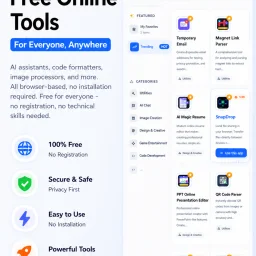
In today's digital landscape, productivity is often hindered by the need to install and manage multiple applications, each serving a specific purpose. CMDragon Tools addresses this issue by offering a comprehensive suite of online utilities that cater to diverse needs, from code formatting and image editing to file conversion and barcode scanning. The platform is designed for anyone seeking to streamline their workflow without the hassle of downloading and installing separate applications. What stands out about CMDragon Tools is its commitment to providing a seamless, browser-based experience that prioritizes user convenience and data privacy. The tools are carefully crafted to operate entirely within the user's browser, eliminating the need for server transmission and ensuring that sensitive data remains confidential. This approach is evident in tools like the EPUB Reader, which stores imported files locally and offers features such as customizable reading preferences, bookmarking, and full-text search. The platform boasts an impressive array of tools, including a Touch Screen Detection utility that performs comprehensive diagnostics and an advanced Barcode Scanner that supports a wide range of formats. These tools are not only feature-rich but also demonstrate a clear understanding of user needs, with functionalities such as live camera scanning, adjustable scan regions, and batch image decoding. By bringing essential utilities directly into the browser, CMDragon Tools simplifies workflows and enhances productivity. The absence of installation requirements, sign-ups, and server transmission aligns with the founder's vision of providing instant, no-download productivity. While pricing details are not explicitly mentioned, the platform's value proposition lies in its convenience, versatility, and commitment to user privacy, making it an attractive solution for individuals and professionals seeking to optimize their digital workflows.
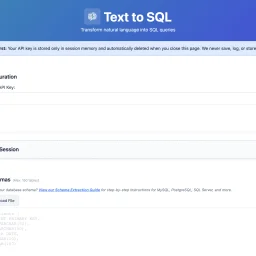
For many organizations, SQL query writing remains a bottleneck. Non-technical team members struggle to access data independently, while developers waste time on complex joins and unfamiliar schemas. Existing AI-powered SQL generators typically demand a trade-off: convenience in exchange for uploading database schemas to third-party servers—a proposition that makes security-conscious teams uncomfortable. Text2SQL breaks this pattern by architecting the problem differently. Rather than accepting user data through its own servers, the tool operates entirely client-side. Users provide their own Anthropic API key, and queries flow directly from their browser to Anthropic's endpoints, bypassing Text2SQL's infrastructure entirely. This architectural choice eliminates a crucial security risk: the company never sees, stores, or logs database schemas, sample data, or query history. For organizations handling sensitive information or operating under compliance constraints, this design addresses a genuine pain point that most competitors ignore. The product itself centers on natural language translation. Users describe their data needs in plain English—"Show me customers who purchased last month"—and receive SQL queries in return. The tool accepts database schemas as CREATE TABLE statements and uses them to generate context-aware queries. An optional feature lets users upload example queries from their codebase; the AI learns naming conventions and join patterns, improving consistency across generated queries. What distinguishes Text2SQL is its completeness without overreach. It includes schema validation, query explanations, and sample data support with a thoughtful reminder that sensitive data should be randomized first. Session management allows users to save and restore configurations across visits. The tool enforces reasonable limits: 150 tables, 300 example queries, 3,000 sample data rows. These constraints prevent runaway complexity while accommodating realistic use cases. The product is entirely free. There's no licensing tier, no gating of core functionality, no hidden costs. This positions Text2SQL less as a revenue-generating product and more as a genuinely useful utility—potentially a customer acquisition strategy for Anthropic API adoption, or simply a commitment to reducing friction around database queries. For teams looking to democratize data access or streamline SQL development without surrendering control of their schemas, Text2SQL delivers on a clear promise. It won't replace domain expertise in complex analytics, but it meaningfully lowers the barrier to ad-hoc querying and frees developers from repetitive query construction.
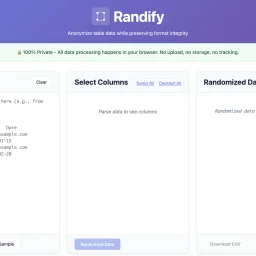
Privacy-conscious organizations managing sensitive data have long faced a troubling choice: anonymize customer or patient information for testing and demonstrations, or upload it to third-party services and accept the compliance and security risks. Randify eliminates that tension by processing all anonymization within the browser, never transmitting anything to external servers. The problem it targets is concrete. Development teams, QA engineers, and data analysts regularly need realistic test datasets without exposing actual customer records. Healthcare organizations must anonymize patient data for testing while maintaining HIPAA compliance. Financial services firms need to randomize customer information for development while staying PCI-compliant. SaaS companies want to demonstrate products with convincing but fabricated data. Randify addresses these scenarios through a single architectural commitment: all data stays local. What distinguishes the tool is its execution of this privacy-first model. It requires no registration and works offline, with zero network requests—users can verify this in their browser's developer console. For organizations subject to data protection regulations, this eliminates an entire class of security and compliance risk. The feature set reflects genuine practical needs. Rather than indiscriminately scrambling content, Randify lets users specify which columns to randomize and which to preserve, maintaining referential integrity so identical input values consistently produce identical outputs. The tool automatically detects PII patterns including email addresses, phone numbers, dates, names, addresses, and company names, applying appropriate formatting rules during randomization so results look realistic rather than obviously synthetic. It accepts data in multiple formats: CSV, TSV, pasted tables from spreadsheets, and SQL INSERT statements. Multi-language support for names and regional data patterns demonstrates attention to genuinely global use cases. The ability to preview changes before applying them reduces mistakes and friction. Randify is free and carries no monetization messaging in available materials, making it an accessible entry point for privacy-conscious teams. For organizations already skeptical of third-party data handling, a purpose-built, client-side-only solution occupies meaningful space in an otherwise server-dependent tooling landscape.