Best Project management software Startups & Tools

Tools to plan, organize, and track projects with tasks, timelines, resources, and team communication.

Recently Listed

25 launches

Sort
QUFO

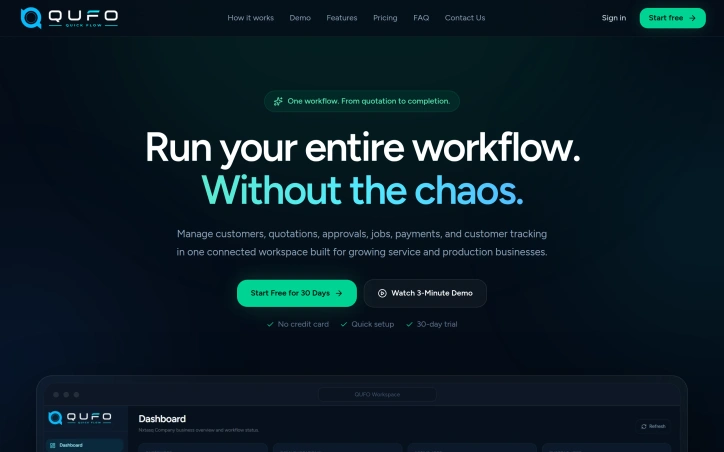
Fragmented workflows plague service and production businesses of all sizes. Quotations live in emails, approvals happen over chat, job progress gets tracked in spreadsheets, and payment records scatter across multiple systems. The result is data re-entered countless times, customers left guessing about status, and team members wasting hours searching for information instead of doing actual work. QUFO addresses this coordination problem by creating a single workspace where the entire customer journey flows from initial quotation through final payment. The product's core strength is its simplification of a genuinely complex process. Rather than asking businesses to adopt yet another tool, QUFO consolidates five critical functions—customer management, quotations, approvals, job tracking, and payment monitoring—into one connected system. This consolidation matters because it eliminates handoffs where information gets lost or requires manual re-entry. Several features stand out for their practical design. The online approval system lets customers review quotations and request changes from a secure link without needing an account, removing friction from the approval stage. The automatic payment balance calculation keeps financial tracking current without manual math errors. Customer tracking links provide visibility without exposing internal notes, solving a genuine tension between transparency and business privacy. The dashboard approach offers business owners a unified view of active work, payment status, and outstanding balances—information typically scattered across spreadsheets and separate accounting tools. Job progress moves automatically to customer-facing tracking pages as the team updates production status, reducing the need for repeated status update messages. The onboarding experience appears intentionally low-friction. A free 30-day trial requires no credit card, and the marketing language emphasizes "quick setup," suggesting the founders designed for businesses that want results without lengthy implementation. The three-minute demo video is positioned as watchable without signup, lowering the barrier to evaluation. No detailed pricing information is disclosed on the homepage, which is typical for early-stage SaaS but limits assessment of the business model's competitiveness. The free trial structure suggests a freemium or conversion-based model, though this remains unstated. QUFO targets a real inefficiency in small-to-medium service businesses, where operations currently depend on mixing purpose-built tools with improvisation. Its workflow-centric design and emphasis on reducing repeated data entry address genuine pain points. Whether the execution delivers on this promise requires direct experience with the product, but the problem is legitimate and the positioning is clear.

Project-management-software
N
nxt Tasq

Fragmented workflows plague service and production businesses of all sizes. Quotations live in emails, approvals happen over chat, job progress gets tracked in spreadsheets, and payment records scatter across multiple systems. The result is data re-entered countless times, customers left guessing about status, and team members wasting hours searching for information instead of doing actual work. QUFO addresses this coordination problem by creating a single workspace where the entire customer journey flows from initial quotation through final payment. The product's core strength is its simplification of a genuinely complex process. Rather than asking businesses to adopt yet another tool, QUFO consolidates five critical functions—customer management, quotations, approvals, job tracking, and payment monitoring—into one connected system. This consolidation matters because it eliminates handoffs where information gets lost or requires manual re-entry. Several features stand out for their practical design. The online approval system lets customers review quotations and request changes from a secure link without needing an account, removing friction from the approval stage. The automatic payment balance calculation keeps financial tracking current without manual math errors. Customer tracking links provide visibility without exposing internal notes, solving a genuine tension between transparency and business privacy. The dashboard approach offers business owners a unified view of active work, payment status, and outstanding balances—information typically scattered across spreadsheets and separate accounting tools. Job progress moves automatically to customer-facing tracking pages as the team updates production status, reducing the need for repeated status update messages. The onboarding experience appears intentionally low-friction. A free 30-day trial requires no credit card, and the marketing language emphasizes "quick setup," suggesting the founders designed for businesses that want results without lengthy implementation. The three-minute demo video is positioned as watchable without signup, lowering the barrier to evaluation. No detailed pricing information is disclosed on the homepage, which is typical for early-stage SaaS but limits assessment of the business model's competitiveness. The free trial structure suggests a freemium or conversion-based model, though this remains unstated. QUFO targets a real inefficiency in small-to-medium service businesses, where operations currently depend on mixing purpose-built tools with improvisation. Its workflow-centric design and emphasis on reducing repeated data entry address genuine pain points. Whether the execution delivers on this promise requires direct experience with the product, but the problem is legitimate and the positioning is clear.

QUFO preview

Key features

  • Unified Workspace: Consolidates customer management, quotations, approvals, job tracking, and payment monitoring into one connected system
  • Online Approval System: Customers review quotations and request changes via secure link without requiring an account
See full listing
Resource Management for Jira

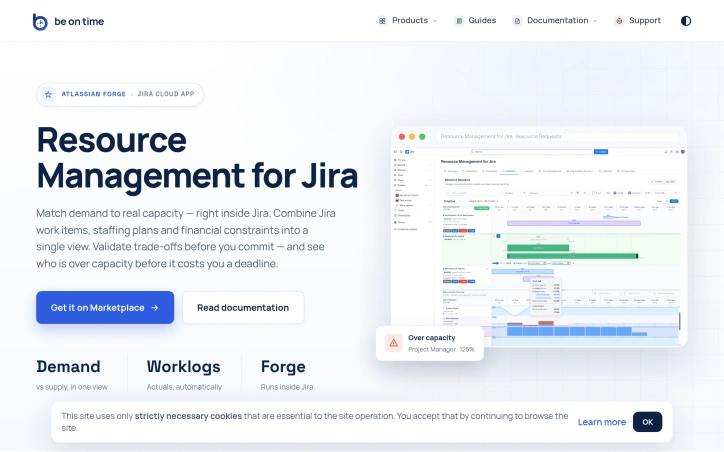
Portfolio resource management at scale is fundamentally about coordination. When dozens of projects compete for the time of the same specialized teams—engineers, designers, QA—organizations lose visibility into who can actually do what, when. Timelines slip not because work is impossible, but because capacity decisions were made in isolation or on gut feel rather than data. This Jira Cloud app tackles that core problem by collapsing org structure, capacity planning, and actual time tracking into a single view where project demand meets team reality. The product is built for organizations running parallel projects that share functional teams. Project managers and team managers gain a structured workflow for requesting resources and signaling availability, while PMOs and executives get analytics that surface over-allocation risks before they become missed deadlines. Everyone stays inside Jira rather than juggling spreadsheets or external tools. What distinguishes this solution is its scope. Most resource management tools handle one dimension well—tracking capacity or managing requests or reporting time. This consolidates org structure synced from Azure AD or Outlook, calendar-based capacity with self-service time-off, a stateful request workflow between PMs and Team Managers, time tracking via Jira worklogs, and analytics comparing demand against actual utilization. The ability to approve resource requests and see over-capacity warnings before committing transforms resource planning from intuition into precision. The execution trades breadth for focus. Rather than building a standalone platform, the team built a Forge app, which means it runs within Jira Cloud without context-switching or data duplication. This tight integration is both strategic and practical—organizations already managing work in Jira get resource visibility without adopting another system. The emphasis on enterprise features—org structure automation, compliance with data residency (Forge cloud), invoice-ready exports, REST API for org sync—signals intent to serve mid-market and larger organizations. The feature set hints at mature thinking about the problem. Calendar-based capacity avoids double-booking by design. The structured request workflow with Team Manager approval prevents PM-level chaos where every request is urgent. Analytics spanning past and future periods let organizations course-correct. Time-off management tied to capacity avoids the phantom availability problem common in spreadsheet-based shops. One limitation is implicit: the product assumes Jira is your system of record for project work and that resource decisions can be scoped to teams and projects tracked there. Organizations with work outside Jira or those needing resource visibility across tools beyond API integration would find this constraining. The REST API mitigates this for org-data sync but not for dynamic allocation scenarios. For organizations struggling to match project demand to expert-team capacity, this fills a real gap at the intersection of portfolio planning and team execution where most tools stop short.

Project-management-software
B
Be On Time

Portfolio resource management at scale is fundamentally about coordination. When dozens of projects compete for the time of the same specialized teams—engineers, designers, QA—organizations lose visibility into who can actually do what, when. Timelines slip not because work is impossible, but because capacity decisions were made in isolation or on gut feel rather than data. This Jira Cloud app tackles that core problem by collapsing org structure, capacity planning, and actual time tracking into a single view where project demand meets team reality. The product is built for organizations running parallel projects that share functional teams. Project managers and team managers gain a structured workflow for requesting resources and signaling availability, while PMOs and executives get analytics that surface over-allocation risks before they become missed deadlines. Everyone stays inside Jira rather than juggling spreadsheets or external tools. What distinguishes this solution is its scope. Most resource management tools handle one dimension well—tracking capacity or managing requests or reporting time. This consolidates org structure synced from Azure AD or Outlook, calendar-based capacity with self-service time-off, a stateful request workflow between PMs and Team Managers, time tracking via Jira worklogs, and analytics comparing demand against actual utilization. The ability to approve resource requests and see over-capacity warnings before committing transforms resource planning from intuition into precision. The execution trades breadth for focus. Rather than building a standalone platform, the team built a Forge app, which means it runs within Jira Cloud without context-switching or data duplication. This tight integration is both strategic and practical—organizations already managing work in Jira get resource visibility without adopting another system. The emphasis on enterprise features—org structure automation, compliance with data residency (Forge cloud), invoice-ready exports, REST API for org sync—signals intent to serve mid-market and larger organizations. The feature set hints at mature thinking about the problem. Calendar-based capacity avoids double-booking by design. The structured request workflow with Team Manager approval prevents PM-level chaos where every request is urgent. Analytics spanning past and future periods let organizations course-correct. Time-off management tied to capacity avoids the phantom availability problem common in spreadsheet-based shops. One limitation is implicit: the product assumes Jira is your system of record for project work and that resource decisions can be scoped to teams and projects tracked there. Organizations with work outside Jira or those needing resource visibility across tools beyond API integration would find this constraining. The REST API mitigates this for org-data sync but not for dynamic allocation scenarios. For organizations struggling to match project demand to expert-team capacity, this fills a real gap at the intersection of portfolio planning and team execution where most tools stop short.

Resource Management for Jira preview

Key features

  • Organization Structure Sync: Syncs org structure from Azure AD or Outlook for automated team management
  • Calendar-Based Capacity: Calendar-based capacity planning with self-service time-off to prevent double-booking
See full listing
MSP Planner for Jira

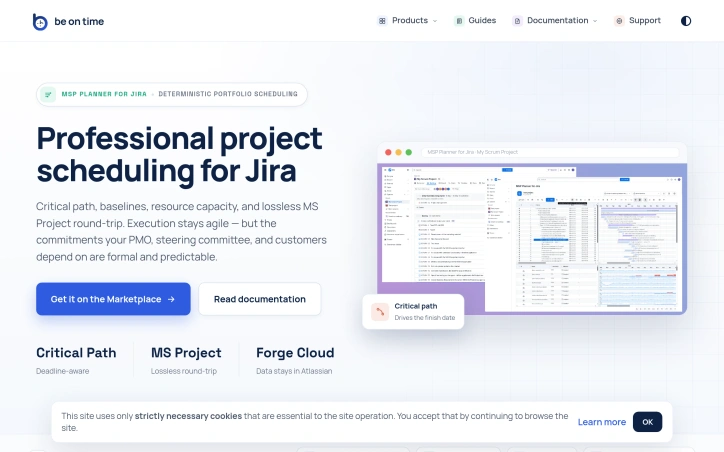
Organizations running Jira often face a critical tension: agile teams need flexibility, but stakeholders—PMOs, steering committees, and customers—demand formal commitments backed by rigorous scheduling. This gap is where MSP Planner for Jira operates, providing what its creators position as a professional scheduling engine rather than a visual overlay. The distinction matters. Most Jira Gantt integrations function as date visualizations, but MSP Planner implements an actual planning model, drawing its design from MS Project. This means support for industry-standard scheduling modes: Fixed Duration, Fixed Work, and Fixed Units. These controls let teams precisely define how effort, resources, and timing interact when project scope shifts—a capability that separates deliberate planning from guesswork. The product's strongest differentiator is its MS Project interoperability. Rather than one-way exports, the tool enables lossless round-trip sync: you export Jira schedules to .mpp format for external stakeholders, edit them in MS Project, and reimport them without losing structure or links. This is rare integration work. It means teams can satisfy both camps—Jira-native execution with formal external review—without maintaining parallel schedules. Core features address the formal planning checklist: critical path analysis identifies which task delays actually matter, baselines track schedule drift over time, and dependency management supports all standard link types (FS, SS, FF, SF). Resource capacity checks ensure commitments account for team availability. Complex task hierarchies and nested structures handle real-world project logic rather than forcing oversimplified models. The architecture choice is notable: data remains in Atlassian Forge, avoiding external data migration or vendor lock-in concerns. The protected Planning Space with explicit push/pull sync suggests controlled synchronization rather than constant bidirectional mirroring, giving teams deliberate moments to reconcile agile execution with formal planning artifacts. This targets a specific market segment: organizations too large or regulated to rely on pure task lists, but committed to Jira for their execution layer. It's not for teams that view scheduling as overhead; it's for those where predictability itself is a competitive requirement.
Project-management-software
B
Be On Time

Organizations running Jira often face a critical tension: agile teams need flexibility, but stakeholders—PMOs, steering committees, and customers—demand formal commitments backed by rigorous scheduling. This gap is where MSP Planner for Jira operates, providing what its creators position as a professional scheduling engine rather than a visual overlay. The distinction matters. Most Jira Gantt integrations function as date visualizations, but MSP Planner implements an actual planning model, drawing its design from MS Project. This means support for industry-standard scheduling modes: Fixed Duration, Fixed Work, and Fixed Units. These controls let teams precisely define how effort, resources, and timing interact when project scope shifts—a capability that separates deliberate planning from guesswork. The product's strongest differentiator is its MS Project interoperability. Rather than one-way exports, the tool enables lossless round-trip sync: you export Jira schedules to .mpp format for external stakeholders, edit them in MS Project, and reimport them without losing structure or links. This is rare integration work. It means teams can satisfy both camps—Jira-native execution with formal external review—without maintaining parallel schedules. Core features address the formal planning checklist: critical path analysis identifies which task delays actually matter, baselines track schedule drift over time, and dependency management supports all standard link types (FS, SS, FF, SF). Resource capacity checks ensure commitments account for team availability. Complex task hierarchies and nested structures handle real-world project logic rather than forcing oversimplified models. The architecture choice is notable: data remains in Atlassian Forge, avoiding external data migration or vendor lock-in concerns. The protected Planning Space with explicit push/pull sync suggests controlled synchronization rather than constant bidirectional mirroring, giving teams deliberate moments to reconcile agile execution with formal planning artifacts. This targets a specific market segment: organizations too large or regulated to rely on pure task lists, but committed to Jira for their execution layer. It's not for teams that view scheduling as overhead; it's for those where predictability itself is a competitive requirement.

MSP Planner for Jira preview

Key features

  • Fixed Work Scheduling: Supports industry-standard scheduling modes (Fixed Duration, Fixed Work, and Fixed Units) to precisely define how effort, resources, and timing interact.
  • MS Project Interoperability: Enables lossless round-trip synchronization between Jira and MS Project formats without losing structure or links.
See full listing
Wisegrid

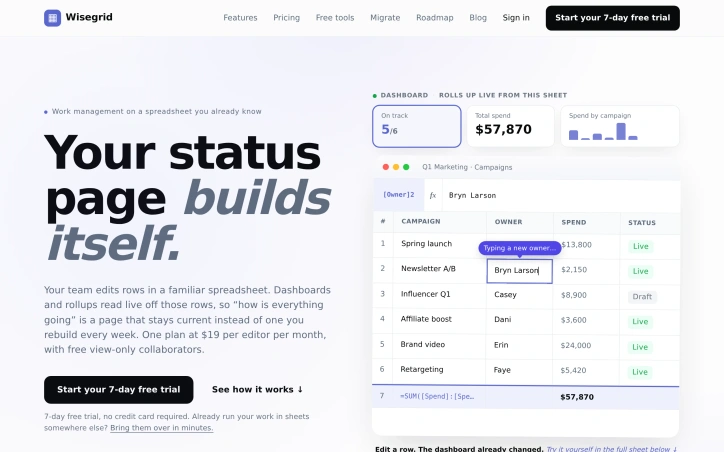
Teams across industries organize their work in spreadsheets, yet spend hours each week manually rebuilding status pages, creating dashboards, and tracking progress through disconnected tools. Wisegrid solves this friction by building an application layer directly on top of existing spreadsheets, keeping the source data familiar while adding the capabilities teams actually need. The product is built for teams that have invested in spreadsheet workflows but found them incomplete. Rather than forcing migration to a new system, Wisegrid keeps sheets as the core interface where team members edit and enter data, then automatically surfaces that information through dashboards, reports, and views that stay synchronized in real time. When someone edits a row, the dashboard updates instantly without manual intervention. It's an elegant inversion of the typical SaaS model: the familiar tool is the system of record, and everything else is built on top. The feature set reflects this philosophy. Dashboards pull live data directly from spreadsheet cells and can be shared at varying permission levels. Forms with conditional logic funnel submissions into rows. Reporting tools aggregate data across multiple sheets. Automations handle notifications, row assignments, and approval workflows on configurable triggers. Permissions are granular enough to share a full project, individual sheets, or specific slices with SSO and MFA included. Two capabilities particularly stand out. Blueprints let teams save a project as a reusable template, complete with formulas, automations, and dashboards, stamping out copies in under a minute. This transforms Wisegrid from a single-project tool into a factory system for standardized workflows. The AI formula capability deserves attention: teams write formulas that classify notes, extract structured data, or summarize text directly in cells, with costs metered per usage rather than as a separate line item. The pricing model is straightforward. Editors pay $19 per person per month, with unlimited free view-only collaborators, making it accessible for large teams where only a subset needs edit access. The plan includes $5 monthly AI credit, creating a built-in allowance for AI-powered cell operations. Wisegrid fills a specific but common gap: teams who have built working processes in spreadsheets but outgrew what spreadsheets alone can provide. By strengthening rather than replacing that interface, it solves the weekly status-page rebuild without forcing organizational change.

Project-management-software
A
Anh Nguyen

Teams across industries organize their work in spreadsheets, yet spend hours each week manually rebuilding status pages, creating dashboards, and tracking progress through disconnected tools. Wisegrid solves this friction by building an application layer directly on top of existing spreadsheets, keeping the source data familiar while adding the capabilities teams actually need. The product is built for teams that have invested in spreadsheet workflows but found them incomplete. Rather than forcing migration to a new system, Wisegrid keeps sheets as the core interface where team members edit and enter data, then automatically surfaces that information through dashboards, reports, and views that stay synchronized in real time. When someone edits a row, the dashboard updates instantly without manual intervention. It's an elegant inversion of the typical SaaS model: the familiar tool is the system of record, and everything else is built on top. The feature set reflects this philosophy. Dashboards pull live data directly from spreadsheet cells and can be shared at varying permission levels. Forms with conditional logic funnel submissions into rows. Reporting tools aggregate data across multiple sheets. Automations handle notifications, row assignments, and approval workflows on configurable triggers. Permissions are granular enough to share a full project, individual sheets, or specific slices with SSO and MFA included. Two capabilities particularly stand out. Blueprints let teams save a project as a reusable template, complete with formulas, automations, and dashboards, stamping out copies in under a minute. This transforms Wisegrid from a single-project tool into a factory system for standardized workflows. The AI formula capability deserves attention: teams write formulas that classify notes, extract structured data, or summarize text directly in cells, with costs metered per usage rather than as a separate line item. The pricing model is straightforward. Editors pay $19 per person per month, with unlimited free view-only collaborators, making it accessible for large teams where only a subset needs edit access. The plan includes $5 monthly AI credit, creating a built-in allowance for AI-powered cell operations. Wisegrid fills a specific but common gap: teams who have built working processes in spreadsheets but outgrew what spreadsheets alone can provide. By strengthening rather than replacing that interface, it solves the weekly status-page rebuild without forcing organizational change.

Wisegrid preview

Key features

  • Live Dashboards: Pull real-time data directly from spreadsheet cells and update instantly when source data changes.
  • Blueprints: Save projects as reusable templates with formulas, automations, and dashboards that can be stamped out in under a minute.
See full listing
Data Storage Lab

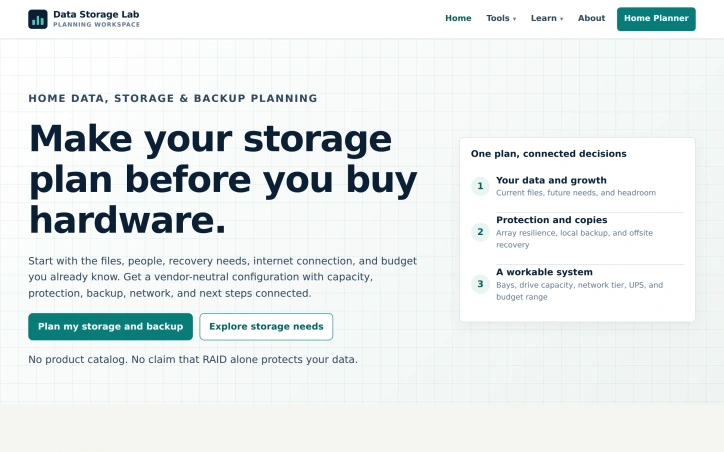
Storage planning typically requires navigating a fragmented ecosystem of product catalogs, vendor websites, and single-purpose calculators, each addressing only one dimension of the problem. Data Storage Lab consolidates this scattered process into a cohesive planning tool designed for households and small organizations that need to handle backup and recovery without vendor lock-in. The tool addresses a genuine friction point in how people approach storage decisions. Most users start with capacity questions but lack a structured way to think about protection, backup, and recovery together. Data Storage Lab guides planners through describing their data, setting recovery priorities, and reviewing a complete configuration that connects these decisions. This systematic approach distinguishes it from tools that isolate one question at a time. A core insight embedded in the tool's design is clarity about what RAID actually protects against. The product explicitly rejects the common misconception that RAID redundancy serves as backup. Instead, it frames array protection as a hedge against downtime from drive failure while emphasizing that independent backup copies protect against deletion, ransomware, theft, and site-wide failure. This distinction forces more rigorous thinking about recovery architecture. The planning paths accommodate different scenarios: families managing photos and video, media creators with growing storage needs, freelancers protecting work files, home lab builders, and small offices with multiple users. For each scenario, the tool produces guidance on usable capacity, bay and drive ranges, protection strategies, backup allocation, network specifications, and equipment categories. The vendor-neutral stance removes pressure to choose specific brands during planning, letting users focus on functional requirements first. The output is a configuration brief and equipment checklist, enabling users to shop for hardware independently after understanding what they actually need. The tool does not attempt to replace hardware decisions with formulas. Instead, it bridges the gap between abstract storage requirements and concrete equipment selection, providing enough specificity to guide purchasing without prescribing products. This positions it as infrastructure planning for people who would otherwise assemble their knowledge from scattered sources or make reactive decisions at purchase time.

Project-management-software
C
canghun13

Storage planning typically requires navigating a fragmented ecosystem of product catalogs, vendor websites, and single-purpose calculators, each addressing only one dimension of the problem. Data Storage Lab consolidates this scattered process into a cohesive planning tool designed for households and small organizations that need to handle backup and recovery without vendor lock-in. The tool addresses a genuine friction point in how people approach storage decisions. Most users start with capacity questions but lack a structured way to think about protection, backup, and recovery together. Data Storage Lab guides planners through describing their data, setting recovery priorities, and reviewing a complete configuration that connects these decisions. This systematic approach distinguishes it from tools that isolate one question at a time. A core insight embedded in the tool's design is clarity about what RAID actually protects against. The product explicitly rejects the common misconception that RAID redundancy serves as backup. Instead, it frames array protection as a hedge against downtime from drive failure while emphasizing that independent backup copies protect against deletion, ransomware, theft, and site-wide failure. This distinction forces more rigorous thinking about recovery architecture. The planning paths accommodate different scenarios: families managing photos and video, media creators with growing storage needs, freelancers protecting work files, home lab builders, and small offices with multiple users. For each scenario, the tool produces guidance on usable capacity, bay and drive ranges, protection strategies, backup allocation, network specifications, and equipment categories. The vendor-neutral stance removes pressure to choose specific brands during planning, letting users focus on functional requirements first. The output is a configuration brief and equipment checklist, enabling users to shop for hardware independently after understanding what they actually need. The tool does not attempt to replace hardware decisions with formulas. Instead, it bridges the gap between abstract storage requirements and concrete equipment selection, providing enough specificity to guide purchasing without prescribing products. This positions it as infrastructure planning for people who would otherwise assemble their knowledge from scattered sources or make reactive decisions at purchase time.

Data Storage Lab preview

Key features

  • Consolidated Planning: combines fragmented storage resources, vendor catalogs, and calculators into one cohesive tool
  • RAID vs Backup Clarity: explicitly distinguishes array protection from backup and explains what RAID actually protects against
See full listing
Print Production Lab

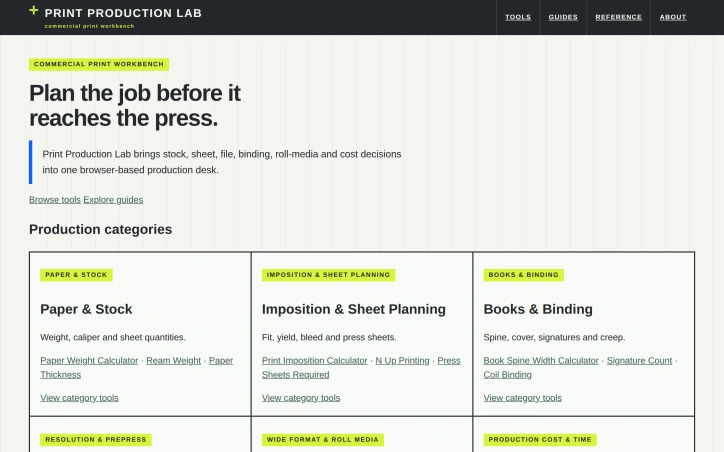
Coordinating the dozens of specifications required for commercial printing—stock weight, sheet layout, binding method, file resolution, production costs—forces designers and printers to juggle separate tools or work from memory. Print Production Lab consolidates these decisions into a single browser-based workbench, eliminating the need to toggle between spreadsheets and vendor specs. The platform targets commercial printers and graphic designers who need to plan jobs before they reach the press. It addresses a genuine gap: while design and prepress software handles file preparation, nothing bridges the practical production planning phase—translating a job's requirements into executable specifications across paper, layout, binding, and cost. The product stands out through deliberate restraint. It requires no signup, offers transparent formulas that users can audit and modify, and provides dual metric-imperial contexts where relevant. Rather than hiding assumptions, Print Production Lab invites users to adjust parameters based on supplier tolerances or equipment constraints. A clear disclaimer reinforces this: these are informational estimates, not guaranteed specifications—users must verify final specs with their printer. The calculator suite is comprehensive without overwhelming users. Six production categories—paper and stock, imposition, binding, resolution, wide-format media, and cost estimation—contain targeted tools addressing specific problems. The Print Imposition Calculator and Book Spine Width Calculator solve problems without obvious solutions elsewhere. A workflow diagram guides users through planning: define stock, plan layout, prepare files, check resolution, plan binding, estimate cost. Supporting infrastructure includes 14 production guides and 9 quick-reference sheets, positioning the site as a production reference rather than a one-off calculator. This educational layer distinguishes it from simpler tools. The business model is not stated. No pricing, account requirements, or premium tiers appear in available materials, suggesting a free service or model not yet publicly detailed. For production teams already juggling spreadsheet variants and multiple tabs, Print Production Lab offers genuine consolidation value through transparency. It won't replace vendor-specific systems or integrate into existing workflows automatically, but as a straightforward reference workbench, it fills a recognizable gap in the production planning space.

Project-management-software
C
canghun13

Coordinating the dozens of specifications required for commercial printing—stock weight, sheet layout, binding method, file resolution, production costs—forces designers and printers to juggle separate tools or work from memory. Print Production Lab consolidates these decisions into a single browser-based workbench, eliminating the need to toggle between spreadsheets and vendor specs. The platform targets commercial printers and graphic designers who need to plan jobs before they reach the press. It addresses a genuine gap: while design and prepress software handles file preparation, nothing bridges the practical production planning phase—translating a job's requirements into executable specifications across paper, layout, binding, and cost. The product stands out through deliberate restraint. It requires no signup, offers transparent formulas that users can audit and modify, and provides dual metric-imperial contexts where relevant. Rather than hiding assumptions, Print Production Lab invites users to adjust parameters based on supplier tolerances or equipment constraints. A clear disclaimer reinforces this: these are informational estimates, not guaranteed specifications—users must verify final specs with their printer. The calculator suite is comprehensive without overwhelming users. Six production categories—paper and stock, imposition, binding, resolution, wide-format media, and cost estimation—contain targeted tools addressing specific problems. The Print Imposition Calculator and Book Spine Width Calculator solve problems without obvious solutions elsewhere. A workflow diagram guides users through planning: define stock, plan layout, prepare files, check resolution, plan binding, estimate cost. Supporting infrastructure includes 14 production guides and 9 quick-reference sheets, positioning the site as a production reference rather than a one-off calculator. This educational layer distinguishes it from simpler tools. The business model is not stated. No pricing, account requirements, or premium tiers appear in available materials, suggesting a free service or model not yet publicly detailed. For production teams already juggling spreadsheet variants and multiple tabs, Print Production Lab offers genuine consolidation value through transparency. It won't replace vendor-specific systems or integrate into existing workflows automatically, but as a straightforward reference workbench, it fills a recognizable gap in the production planning space.

Print Production Lab preview

Key features

  • Browser-Based Workbench: Consolidates printing specifications for paper, layout, binding, and cost in a single interface
  • No Signup Required: Free access without account creation or authentication
See full listing
Kanban Pro

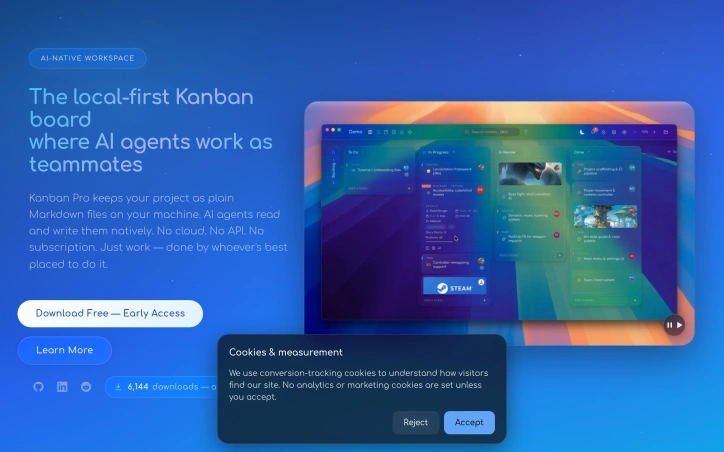
Distributed teams managing complex projects face a persistent friction point: project management tools force a choice between local ownership and AI integration. Kanban Pro sidesteps this tension by storing work as plain Markdown files on your machine while enabling AI agents and IDEs to read and modify tasks natively. The product targets small agile teams building sophisticated solutions, particularly those already working with AI assistants or considering it. Its core value proposition is simplicity and transparency. Unlike subscription-based competitors that hide data behind proprietary formats and APIs, Kanban Pro keeps everything accessible and portable. There is no cloud requirement, no vendor lock-in, and no recurring fees. Five distinct views—Board, List, Calendar, Notes, and Gantt—let teams visualize work without switching tools. The Kanban view offers familiar drag-and-drop columns. The Calendar view supports drag-to-schedule functionality, while the Gantt view handles timeline dependencies and drag-resizing. This multiplicity within a single file structure is genuinely useful for teams toggling between high-level planning and tactical execution. What makes Kanban Pro distinctive is its design philosophy. Rather than positioning AI as an afterthought or premium feature, the software treats agent collaboration as a first-class concern. Tasks remain human-readable Markdown, so AI can parse and modify them without API proxies. An embedded CLI reinforces this keyboard-first, automation-ready approach. Bulk operations and customizable shortcuts accelerate workflow. Custom fields, themes, color palettes, and user logos transform the interface from generic to personal. Collaboration happens through existing cloud drives—iCloud, Dropbox, network storage—avoiding a proprietary sync layer. This pragmatism extends to the native Markdown editor, which includes Prism.js syntax highlighting and live preview to compete with specialized alternatives. The early-access positioning suggests incomplete feature coverage, but the foundation is solid. For teams frustrated with bloated project managers or those seeking AI-ready infrastructure without complexity overhead, Kanban Pro offers a rare combination: powerful visualizations paired with radical simplicity, available across Mac, Windows, and Linux at no cost.

Project-management-software
B
Ben Evans

Distributed teams managing complex projects face a persistent friction point: project management tools force a choice between local ownership and AI integration. Kanban Pro sidesteps this tension by storing work as plain Markdown files on your machine while enabling AI agents and IDEs to read and modify tasks natively. The product targets small agile teams building sophisticated solutions, particularly those already working with AI assistants or considering it. Its core value proposition is simplicity and transparency. Unlike subscription-based competitors that hide data behind proprietary formats and APIs, Kanban Pro keeps everything accessible and portable. There is no cloud requirement, no vendor lock-in, and no recurring fees. Five distinct views—Board, List, Calendar, Notes, and Gantt—let teams visualize work without switching tools. The Kanban view offers familiar drag-and-drop columns. The Calendar view supports drag-to-schedule functionality, while the Gantt view handles timeline dependencies and drag-resizing. This multiplicity within a single file structure is genuinely useful for teams toggling between high-level planning and tactical execution. What makes Kanban Pro distinctive is its design philosophy. Rather than positioning AI as an afterthought or premium feature, the software treats agent collaboration as a first-class concern. Tasks remain human-readable Markdown, so AI can parse and modify them without API proxies. An embedded CLI reinforces this keyboard-first, automation-ready approach. Bulk operations and customizable shortcuts accelerate workflow. Custom fields, themes, color palettes, and user logos transform the interface from generic to personal. Collaboration happens through existing cloud drives—iCloud, Dropbox, network storage—avoiding a proprietary sync layer. This pragmatism extends to the native Markdown editor, which includes Prism.js syntax highlighting and live preview to compete with specialized alternatives. The early-access positioning suggests incomplete feature coverage, but the foundation is solid. For teams frustrated with bloated project managers or those seeking AI-ready infrastructure without complexity overhead, Kanban Pro offers a rare combination: powerful visualizations paired with radical simplicity, available across Mac, Windows, and Linux at no cost.

Kanban Pro preview

Key features

  • Multi-View Workspace: Board, List, Calendar, Notes, and Gantt views enable teams to visualize work without switching tools.
  • Markdown-Based Tasks: Work stored as plain Markdown files that AI agents and IDEs can read and modify natively.
See full listing
Lorari

Fitness and wellness businesses often struggle with administrative tasks that take away from the time they can devote to their clients and growing their operations. Lorari addresses this issue by providing an all-in-one management platform for yoga, pilates, and dance studios, as well as individual instructors. The platform is designed to simplify tasks such as booking management, payment tracking, and client communication, allowing business owners to focus on what matters most. What stands out about Lorari is its emphasis on ease of use and rapid setup. The platform promises configuration in just two minutes and enables users to start receiving bookings in under five minutes. This streamlined approach is particularly appealing to small businesses or solo instructors who may not have the time or technical expertise to navigate complex software. Lorari's features are geared towards alleviating the common pain points of fitness professionals, such as manually reprogramming sessions, keeping track of client payments and credits, and relying on messaging apps for communication. The platform allows users to create a profile, set up classes and fees, and share a link with clients, who can then book and pay for classes instantly. Several instructors and studio owners have shared their positive experiences with Lorari, citing the reduction in administrative time, ease of use, and improved management of bookings and payments. While the pricing model is not explicitly stated, the fact that users can reserve a demo without providing credit card information suggests a potentially flexible or customer-friendly approach. Overall, Lorari offers a practical solution for fitness and wellness businesses looking to simplify their operations and focus on delivering exceptional experiences to their clients.

Project-management-software
M
Marti M

Fitness and wellness businesses often struggle with administrative tasks that take away from the time they can devote to their clients and growing their operations. Lorari addresses this issue by providing an all-in-one management platform for yoga, pilates, and dance studios, as well as individual instructors. The platform is designed to simplify tasks such as booking management, payment tracking, and client communication, allowing business owners to focus on what matters most. What stands out about Lorari is its emphasis on ease of use and rapid setup. The platform promises configuration in just two minutes and enables users to start receiving bookings in under five minutes. This streamlined approach is particularly appealing to small businesses or solo instructors who may not have the time or technical expertise to navigate complex software. Lorari's features are geared towards alleviating the common pain points of fitness professionals, such as manually reprogramming sessions, keeping track of client payments and credits, and relying on messaging apps for communication. The platform allows users to create a profile, set up classes and fees, and share a link with clients, who can then book and pay for classes instantly. Several instructors and studio owners have shared their positive experiences with Lorari, citing the reduction in administrative time, ease of use, and improved management of bookings and payments. While the pricing model is not explicitly stated, the fact that users can reserve a demo without providing credit card information suggests a potentially flexible or customer-friendly approach. Overall, Lorari offers a practical solution for fitness and wellness businesses looking to simplify their operations and focus on delivering exceptional experiences to their clients.

Lorari preview

Key features

  • Booking Management: allows users to manage bookings efficiently
  • Payment Tracking: keeps track of client payments and credits
See full listing
L

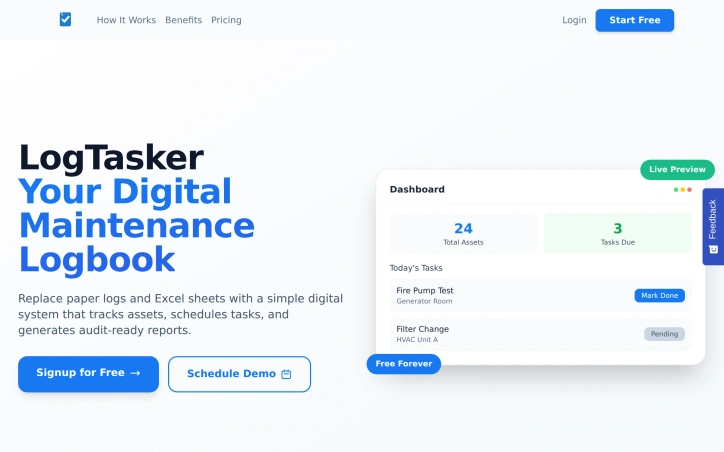
Facilities and organizations with complex maintenance operations often struggle with disorganized workflows, relying on outdated methods such as paper logs and Excel spreadsheets. LogTasker addresses this issue by providing a digital maintenance management system designed to streamline these processes. The target users are facilities managers and teams responsible for maintenance tasks, who will benefit from a more structured and efficient approach. What stands out about LogTasker is its focus on simplicity and clarity, transforming chaotic maintenance workflows into organized, easily manageable systems. The platform replaces cumbersome paper logbooks and error-prone Excel sheets with a user-friendly interface. By digitizing maintenance operations, LogTasker enables facilities to track assets effectively, schedule tasks, and generate reports that are ready for audits. Key features of LogTasker include a clean dashboard that displays tasks, KPIs, and status at a glance, smart scheduling with automatic reminders and recurring tasks, and instant report generation with one-click PDF exports. The platform also allows users to log task completion with photos and notes, adding a layer of detail and accountability. These features work together to reduce equipment downtime through proactive maintenance scheduling, keep facilities audit-ready with comprehensive logs, and improve team coordination with real-time updates. LogTasker offers a free forever plan, with the option to upgrade to other plans as needed, and does not require a credit card for signup. This flexible pricing approach makes it accessible to a range of facilities, from small to large operations. Overall, LogTasker provides a robust solution for facilities seeking to modernize their maintenance workflows and improve operational efficiency.
Project-management-software
Y
Yusuf Mohammed Delvi

Facilities and organizations with complex maintenance operations often struggle with disorganized workflows, relying on outdated methods such as paper logs and Excel spreadsheets. LogTasker addresses this issue by providing a digital maintenance management system designed to streamline these processes. The target users are facilities managers and teams responsible for maintenance tasks, who will benefit from a more structured and efficient approach. What stands out about LogTasker is its focus on simplicity and clarity, transforming chaotic maintenance workflows into organized, easily manageable systems. The platform replaces cumbersome paper logbooks and error-prone Excel sheets with a user-friendly interface. By digitizing maintenance operations, LogTasker enables facilities to track assets effectively, schedule tasks, and generate reports that are ready for audits. Key features of LogTasker include a clean dashboard that displays tasks, KPIs, and status at a glance, smart scheduling with automatic reminders and recurring tasks, and instant report generation with one-click PDF exports. The platform also allows users to log task completion with photos and notes, adding a layer of detail and accountability. These features work together to reduce equipment downtime through proactive maintenance scheduling, keep facilities audit-ready with comprehensive logs, and improve team coordination with real-time updates. LogTasker offers a free forever plan, with the option to upgrade to other plans as needed, and does not require a credit card for signup. This flexible pricing approach makes it accessible to a range of facilities, from small to large operations. Overall, LogTasker provides a robust solution for facilities seeking to modernize their maintenance workflows and improve operational efficiency.

LogTasker preview
L

Key features

  • Clean Dashboard: displays tasks, KPIs, and status at a glance
  • Smart Scheduling: automatic reminders and recurring tasks
See full listing
Gantt Gen AI

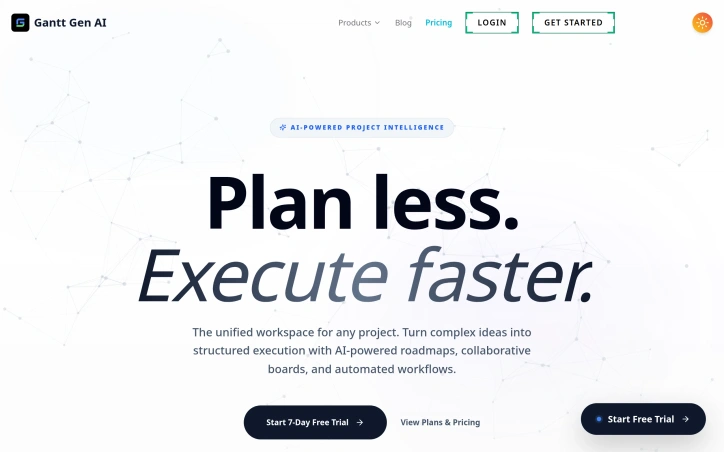
Project planning typically requires juggling multiple tools—spreadsheets for timelines, separate boards for task management, chat apps for collaboration, and feedback systems scattered across platforms. Gantt Gen AI consolidates this fragmented workflow into a single workspace designed for teams that need to move quickly without getting bogged down in planning overhead. The core appeal is straightforward: users describe their project in natural language, and the AI generates a structured Gantt chart with tasks, timelines, and dependencies. This text-to-chart approach eliminates the tedious manual work of creating roadmaps from scratch. Beyond Gantt charts, the platform integrates Kanban boards, collaborative whiteboards called NoteBoards, and a product intelligence layer that surfaces insights from user feedback and tickets. The unified approach means teams stay within one interface rather than context-switching between tools. What distinguishes Gantt Gen AI is its positioning across diverse project types. Rather than targeting only software teams, the marketing emphasizes applicability to marketing campaigns, PhD research, event planning, manufacturing, agencies, and nonprofits. This breadth suggests the founder recognized that project planning is universal, even if the terminology and workflows vary. The platform's ability to sync rough ideas from NoteBoards directly into project roadmaps creates a natural workflow from brainstorming to execution. The product intelligence feature stands out as a strategic differentiator. Instead of teams manually analyzing customer feedback, the tool can surface high-impact opportunities and generate feature specifications directly from raw input. This moves beyond simple project scheduling into strategic product planning—a higher-value proposition than competitors offering only Gantt generation. On the business side, Gantt Gen AI offers a seven-day free trial to test core functionality, though specific pricing tiers are not disclosed in the available materials. The existence of a plans page suggests a freemium or tiered model typical of collaboration tools. The main question for potential users is whether AI-generated plans require as much refinement as manually built ones, and whether the "plan less, execute faster" messaging translates to genuine time savings. For teams exhausted by planning overhead, the premise is compelling. For those needing precise control over every dependency, the automation-first approach may require adjustment.

Project-management-software
P
Paul Kemp

Project planning typically requires juggling multiple tools—spreadsheets for timelines, separate boards for task management, chat apps for collaboration, and feedback systems scattered across platforms. Gantt Gen AI consolidates this fragmented workflow into a single workspace designed for teams that need to move quickly without getting bogged down in planning overhead. The core appeal is straightforward: users describe their project in natural language, and the AI generates a structured Gantt chart with tasks, timelines, and dependencies. This text-to-chart approach eliminates the tedious manual work of creating roadmaps from scratch. Beyond Gantt charts, the platform integrates Kanban boards, collaborative whiteboards called NoteBoards, and a product intelligence layer that surfaces insights from user feedback and tickets. The unified approach means teams stay within one interface rather than context-switching between tools. What distinguishes Gantt Gen AI is its positioning across diverse project types. Rather than targeting only software teams, the marketing emphasizes applicability to marketing campaigns, PhD research, event planning, manufacturing, agencies, and nonprofits. This breadth suggests the founder recognized that project planning is universal, even if the terminology and workflows vary. The platform's ability to sync rough ideas from NoteBoards directly into project roadmaps creates a natural workflow from brainstorming to execution. The product intelligence feature stands out as a strategic differentiator. Instead of teams manually analyzing customer feedback, the tool can surface high-impact opportunities and generate feature specifications directly from raw input. This moves beyond simple project scheduling into strategic product planning—a higher-value proposition than competitors offering only Gantt generation. On the business side, Gantt Gen AI offers a seven-day free trial to test core functionality, though specific pricing tiers are not disclosed in the available materials. The existence of a plans page suggests a freemium or tiered model typical of collaboration tools. The main question for potential users is whether AI-generated plans require as much refinement as manually built ones, and whether the "plan less, execute faster" messaging translates to genuine time savings. For teams exhausted by planning overhead, the premise is compelling. For those needing precise control over every dependency, the automation-first approach may require adjustment.

Gantt Gen AI preview

Key features

  • AI Gantt Generation: Creates structured Gantt charts with tasks, timelines, and dependencies from natural language descriptions.
  • Kanban Boards: Integrated task management boards within the unified workspace.
See full listing
IndieRoadmaps

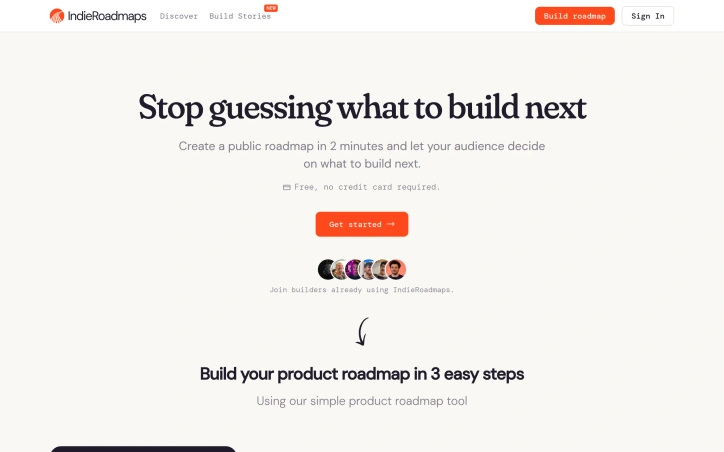
Building in public has become a defining trend among indie makers, but most lack an organized way to involve their community in product decisions. IndieRoadmaps addresses this gap by providing a dedicated platform where solo founders and small teams can publish their product roadmaps, collect feature requests through voting, and gather feedback from a community of people genuinely invested in their success. The platform targets indie hackers explicitly, recognizing that this audience operates differently from venture-backed startups. They're building for themselves first, iterating quickly, and often making decisions based on direct community input rather than internal product roadmaps. By centralizing roadmaps in one place, IndieRoadmaps creates a discoverable ecosystem where makers can showcase their direction and potential users can find products aligned with their needs. What distinguishes IndieRoadmaps is its focus on the indie maker community as both its audience and its value proposition. The site showcases successful indie products across multiple categories—everything from AI tools and productivity software to developer tools and design apps. This curatorial approach positions IndieRoadmaps not just as a feature-tracking tool but as a community hub. The voting mechanism lets users express genuine demand for features, providing founders with real-time market validation before investing engineering resources. The platform itself practices what it preaches. IndieRoadmaps runs its own public roadmap on the site, allowing users to see upcoming features like multiple roadmaps per user, public roadmap pages, and Google OAuth integration. This transparency about their own development reinforces the building-in-public philosophy they're promoting. The feature set remains straightforward and focused. Users can create roadmaps, collect votes on planned features, enable community comments, and sign in via Google. There's no mention of advanced collaboration features, custom branding, or enterprise pricing tiers—suggesting the product is designed for individual makers rather than larger organizations. This clarity of purpose is a strength, not a limitation. For indie makers seeking validation and community engagement before launch, IndieRoadmaps provides a purpose-built solution embedded within a supportive ecosystem of peers. It's a platform that understands its audience's workflows and philosophy, built by people navigating the same challenges.
Project-management-software
C
Chris X

Building in public has become a defining trend among indie makers, but most lack an organized way to involve their community in product decisions. IndieRoadmaps addresses this gap by providing a dedicated platform where solo founders and small teams can publish their product roadmaps, collect feature requests through voting, and gather feedback from a community of people genuinely invested in their success. The platform targets indie hackers explicitly, recognizing that this audience operates differently from venture-backed startups. They're building for themselves first, iterating quickly, and often making decisions based on direct community input rather than internal product roadmaps. By centralizing roadmaps in one place, IndieRoadmaps creates a discoverable ecosystem where makers can showcase their direction and potential users can find products aligned with their needs. What distinguishes IndieRoadmaps is its focus on the indie maker community as both its audience and its value proposition. The site showcases successful indie products across multiple categories—everything from AI tools and productivity software to developer tools and design apps. This curatorial approach positions IndieRoadmaps not just as a feature-tracking tool but as a community hub. The voting mechanism lets users express genuine demand for features, providing founders with real-time market validation before investing engineering resources. The platform itself practices what it preaches. IndieRoadmaps runs its own public roadmap on the site, allowing users to see upcoming features like multiple roadmaps per user, public roadmap pages, and Google OAuth integration. This transparency about their own development reinforces the building-in-public philosophy they're promoting. The feature set remains straightforward and focused. Users can create roadmaps, collect votes on planned features, enable community comments, and sign in via Google. There's no mention of advanced collaboration features, custom branding, or enterprise pricing tiers—suggesting the product is designed for individual makers rather than larger organizations. This clarity of purpose is a strength, not a limitation. For indie makers seeking validation and community engagement before launch, IndieRoadmaps provides a purpose-built solution embedded within a supportive ecosystem of peers. It's a platform that understands its audience's workflows and philosophy, built by people navigating the same challenges.

IndieRoadmaps preview

Key features

  • Public Roadmaps: Founders can publish product roadmaps to share their development direction with the community.
  • Feature Voting: Users vote on planned features to signal demand and provide real-time market validation.
See full listing
Snippetly

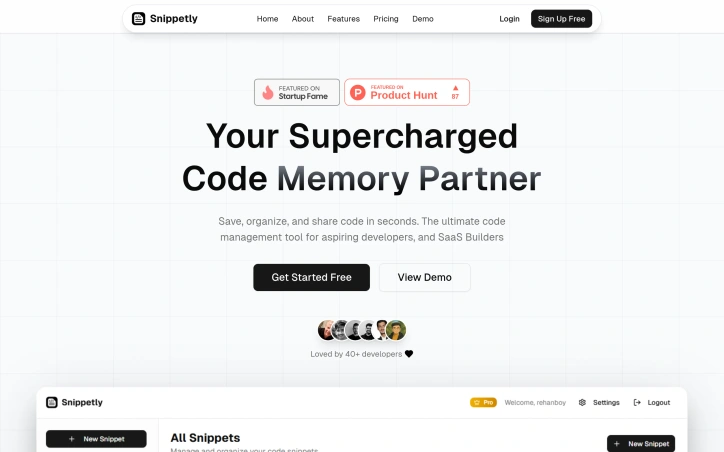
Developer productivity often suffers when scattered code snippets hide across old projects, browser bookmarks, and local files. Snippetly addresses this friction directly by providing a centralized vault for managing code fragments, designed for individual developers and teams who want to spend less time digging through archives and more time actually coding. The product targets aspiring developers and SaaS builders seeking a lightweight code management solution. Rather than inventing entirely new features, Snippetly executes on the fundamentals with particular attention to speed and usability. The interface emphasizes quick capture and retrieval—saving snippets with syntax highlighting across 50+ languages takes minimal effort, and searching across titles, tags, and code content returns results instantly. Users can organize their collection through tags, favorites, folders, and language filters, building a structure that adapts to their workflow rather than imposing rigid taxonomy. What distinguishes Snippetly is its GitHub integration, which enables two-way synchronization between the platform and repositories. Developers can push snippets to GitHub or import existing code directly, with the system automatically organizing content by language and preserving folder hierarchy. This bridges the gap between ad-hoc snippet storage and version-controlled backup, addressing a real pain point for developers who want both convenience and preservation. The feature set includes team collaboration capabilities (currently listed as coming soon), boilerplate templates, version control with change tracking, and encryption for stored credentials. The combination of individual productivity tools with team-ready infrastructure signals positioning for growth beyond solo developers into small teams. Pricing follows a straightforward freemium model. The free tier caps users at 50 snippets across 5 folders, supporting basic use cases without requiring payment. The $29 one-time Pro tier removes all limits and unlocks advanced features, making it accessible for price-conscious developers. Notably, this is a one-time purchase rather than recurring subscription—an unusual choice in SaaS that removes friction but limits recurring revenue. Snippetly is early in its lifecycle, with a user base of 40+ developers. The emphasis on core functionality over unnecessary complexity, combined with strong integration capabilities and transparent pricing, positions it as a straightforward alternative to scattered file management and paid notes platforms. Traction will depend on execution of promised team features and how well the GitHub integration resonates with developers already embedded in that ecosystem.

Project-management-software

Developer productivity often suffers when scattered code snippets hide across old projects, browser bookmarks, and local files. Snippetly addresses this friction directly by providing a centralized vault for managing code fragments, designed for individual developers and teams who want to spend less time digging through archives and more time actually coding. The product targets aspiring developers and SaaS builders seeking a lightweight code management solution. Rather than inventing entirely new features, Snippetly executes on the fundamentals with particular attention to speed and usability. The interface emphasizes quick capture and retrieval—saving snippets with syntax highlighting across 50+ languages takes minimal effort, and searching across titles, tags, and code content returns results instantly. Users can organize their collection through tags, favorites, folders, and language filters, building a structure that adapts to their workflow rather than imposing rigid taxonomy. What distinguishes Snippetly is its GitHub integration, which enables two-way synchronization between the platform and repositories. Developers can push snippets to GitHub or import existing code directly, with the system automatically organizing content by language and preserving folder hierarchy. This bridges the gap between ad-hoc snippet storage and version-controlled backup, addressing a real pain point for developers who want both convenience and preservation. The feature set includes team collaboration capabilities (currently listed as coming soon), boilerplate templates, version control with change tracking, and encryption for stored credentials. The combination of individual productivity tools with team-ready infrastructure signals positioning for growth beyond solo developers into small teams. Pricing follows a straightforward freemium model. The free tier caps users at 50 snippets across 5 folders, supporting basic use cases without requiring payment. The $29 one-time Pro tier removes all limits and unlocks advanced features, making it accessible for price-conscious developers. Notably, this is a one-time purchase rather than recurring subscription—an unusual choice in SaaS that removes friction but limits recurring revenue. Snippetly is early in its lifecycle, with a user base of 40+ developers. The emphasis on core functionality over unnecessary complexity, combined with strong integration capabilities and transparent pricing, positions it as a straightforward alternative to scattered file management and paid notes platforms. Traction will depend on execution of promised team features and how well the GitHub integration resonates with developers already embedded in that ecosystem.

Snippetly preview

Key features

  • Centralized Code Vault: Provides a centralized repository for managing code fragments with quick capture and retrieval.
  • GitHub Integration: Enables two-way synchronization between the platform and repositories for automatic organization and backup.
See full listing
Enhance

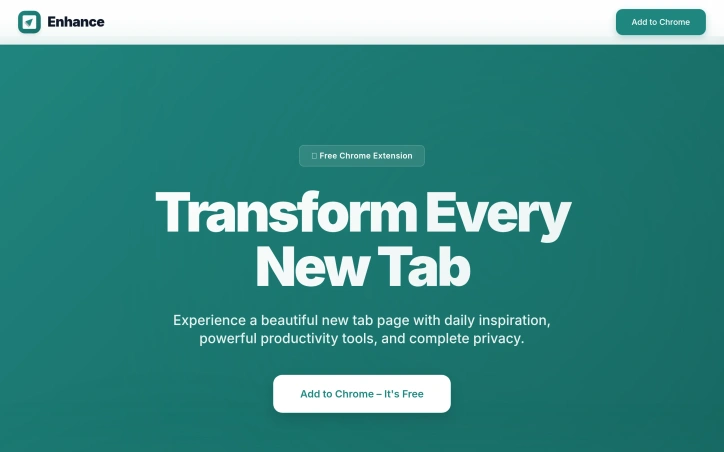
Productivity seekers and Chrome users in search of a distraction-free new tab experience will find solace in Enhance, a free Chrome extension that streamlines their browsing habits. By addressing the cluttered new tab page, Enhance solves a common problem faced by many users: staying focused amidst an abundance of digital stimuli. What sets Enhance apart is its thoughtful approach to feature integration and user customization. Rather than overwhelming users with a laundry list of tools, Enhance presents a clean and minimal design that allows individuals to focus on what matters most. Daily backgrounds, for instance, provide a visually appealing backdrop that can help stimulate the mind, while Minimal Notes offers a straightforward way to jot down quick thoughts without getting bogged down in unnecessary features. Enhance also boasts a robust set of productivity tools, including Shortcut Dock and Built-in Tasks. The former allows users to easily access their favorite websites and frequently used shortcuts, saving time and reducing clutter on their browser toolbar. Meanwhile, the latter enables users to capture, organize, and manage their tasks directly from the new tab page. The extension's commitment to user privacy is another notable aspect of its design. By storing all notes, tasks, and preferences securely on the user's own device, Enhance ensures that sensitive information remains confidential. This emphasis on data protection will likely appeal to users who value their online anonymity. Pricing or business model details are not explicitly mentioned in the provided content, so it is assumed that Enhance operates as a free service with no premium features or subscription models available at this time.

Project-management-software

Productivity seekers and Chrome users in search of a distraction-free new tab experience will find solace in Enhance, a free Chrome extension that streamlines their browsing habits. By addressing the cluttered new tab page, Enhance solves a common problem faced by many users: staying focused amidst an abundance of digital stimuli. What sets Enhance apart is its thoughtful approach to feature integration and user customization. Rather than overwhelming users with a laundry list of tools, Enhance presents a clean and minimal design that allows individuals to focus on what matters most. Daily backgrounds, for instance, provide a visually appealing backdrop that can help stimulate the mind, while Minimal Notes offers a straightforward way to jot down quick thoughts without getting bogged down in unnecessary features. Enhance also boasts a robust set of productivity tools, including Shortcut Dock and Built-in Tasks. The former allows users to easily access their favorite websites and frequently used shortcuts, saving time and reducing clutter on their browser toolbar. Meanwhile, the latter enables users to capture, organize, and manage their tasks directly from the new tab page. The extension's commitment to user privacy is another notable aspect of its design. By storing all notes, tasks, and preferences securely on the user's own device, Enhance ensures that sensitive information remains confidential. This emphasis on data protection will likely appeal to users who value their online anonymity. Pricing or business model details are not explicitly mentioned in the provided content, so it is assumed that Enhance operates as a free service with no premium features or subscription models available at this time.

Enhance preview

Key features

  • Clean Minimal Design: A streamlined interface that eliminates visual clutter and distractions on the new tab page.
  • Daily Backgrounds: Visually appealing backdrops that provide an aesthetically pleasing and stimulating new tab experience.
See full listing
Dropstone

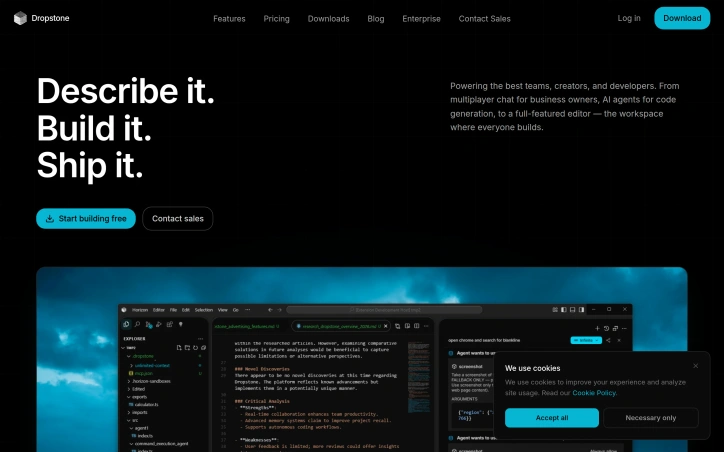
Collaborative software development has long been fragmented across chat platforms, code editors, and AI assistants—each forcing teams to context-switch between tools. Dropstone consolidates this workflow into a unified workspace designed for teams, developers, and creators who want AI-powered development without sacrificing real-time human collaboration. The product centers on two core experiences built from the same research foundation. The first is an AI-enhanced editor with intelligent autocomplete, code suggestions, and inline generation capabilities, paired with real-time multiplayer editing so teammates can work simultaneously on the same files. The second is a suite of autonomous agents that can be configured and deployed to handle end-to-end feature development with human oversight. Both tiers support direct integration with major platforms including GitHub, Vercel, Claude, and Figma, positioning Dropstone as infrastructure rather than a siloed tool. What distinguishes Dropstone from other AI coding assistants is its Memory system, which captures and persists architectural decisions, codebase patterns, and team preferences across sessions. Rather than requiring engineers to re-explain context with each interaction, Dropstone automatically surfaces relevant knowledge during future work. The system learns from every interaction without manual configuration, storing patterns like deploy conventions, API error-handling approaches, and authentication strategies—information typically scattered across documentation, pull requests, and institutional knowledge. The product is built on independent research into agentic systems and recursive swarms, published under the Blankline name. This foundation suggests depth beyond typical AI coding assistants, though the website offers limited technical detail on what this research enables in practice. The example workflows shown—such as migrating payment services to Stripe v3 or running integration test suites—illustrate realistic development tasks where the combination of agent autonomy and real-time team visibility appears valuable. The integration with MCP servers and support for Computer Use API indicates technical depth for teams requiring more sophisticated automation. Dropstone appears positioned for engineering teams already comfortable with AI-augmented development who want to graduate beyond chat-based assistants and move AI closer to their actual deployment workflows. The multiplayer-first design and persistent context system suggest the company is betting that the future of AI-assisted development is collaborative and stateful rather than conversational and ephemeral.

Project-management-software

Collaborative software development has long been fragmented across chat platforms, code editors, and AI assistants—each forcing teams to context-switch between tools. Dropstone consolidates this workflow into a unified workspace designed for teams, developers, and creators who want AI-powered development without sacrificing real-time human collaboration. The product centers on two core experiences built from the same research foundation. The first is an AI-enhanced editor with intelligent autocomplete, code suggestions, and inline generation capabilities, paired with real-time multiplayer editing so teammates can work simultaneously on the same files. The second is a suite of autonomous agents that can be configured and deployed to handle end-to-end feature development with human oversight. Both tiers support direct integration with major platforms including GitHub, Vercel, Claude, and Figma, positioning Dropstone as infrastructure rather than a siloed tool. What distinguishes Dropstone from other AI coding assistants is its Memory system, which captures and persists architectural decisions, codebase patterns, and team preferences across sessions. Rather than requiring engineers to re-explain context with each interaction, Dropstone automatically surfaces relevant knowledge during future work. The system learns from every interaction without manual configuration, storing patterns like deploy conventions, API error-handling approaches, and authentication strategies—information typically scattered across documentation, pull requests, and institutional knowledge. The product is built on independent research into agentic systems and recursive swarms, published under the Blankline name. This foundation suggests depth beyond typical AI coding assistants, though the website offers limited technical detail on what this research enables in practice. The example workflows shown—such as migrating payment services to Stripe v3 or running integration test suites—illustrate realistic development tasks where the combination of agent autonomy and real-time team visibility appears valuable. The integration with MCP servers and support for Computer Use API indicates technical depth for teams requiring more sophisticated automation. Dropstone appears positioned for engineering teams already comfortable with AI-augmented development who want to graduate beyond chat-based assistants and move AI closer to their actual deployment workflows. The multiplayer-first design and persistent context system suggest the company is betting that the future of AI-assisted development is collaborative and stateful rather than conversational and ephemeral.

Dropstone preview

Key features

  • AI-Enhanced Editor: Provides intelligent autocomplete, code suggestions, and inline generation with real-time multiplayer editing
  • Real-Time Collaboration: Multiple developers work simultaneously on the same files
See full listing
Focus Session by SyncTasks

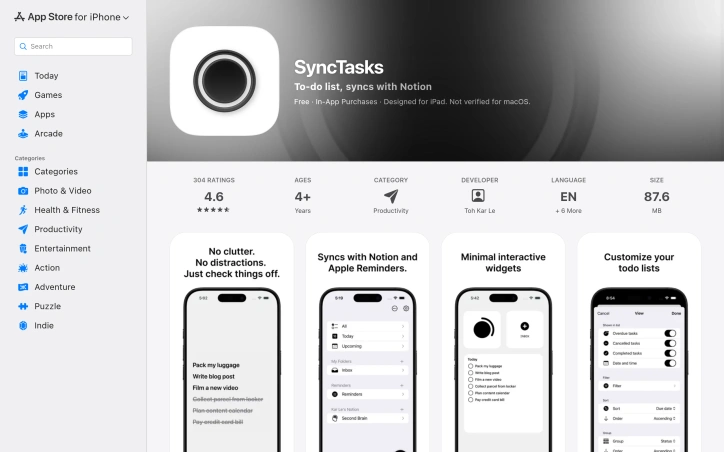
For individuals struggling with cluttered task management systems and seeking a distraction-free experience, SyncTasks offers an attractive solution. The app's primary function is to simplify task organization by integrating seamlessly with popular services such as Notion and Apple Reminders. What sets SyncTasks apart from other productivity apps is its focus on minimalism. Inspired by the simplicity of dumb phones, the app features a clean interface that blends seamlessly with wallpaper, providing an uncluttered view of tasks without any distractions. This design choice makes it easy to stay focused on a single task at a time. The app's integration capabilities are also noteworthy. SyncTasks allows for two-way syncing with Notion databases, including those from multiple workspaces, and supports Apple Reminders as well. Users can create new lists or leverage existing ones, making it an excellent choice for managing tasks across different platforms. In terms of features, the app stands out for its widget integration, which provides a convenient way to view tasks without opening the app itself. This feature is particularly useful for tracking simple tasks like grocery lists or other on-the-go needs. The developer has also included a folder system and search filters to help users stay organized and find specific tasks quickly. Pricing information reveals that SyncTasks operates on a one-time purchase model, avoiding subscription fees – a refreshing approach in the productivity app market. With its commitment to transparency, regular updates, and lack of ads or tracking, SyncTasks appears poised to appeal to those seeking a straightforward, ad-free experience. As a standalone solution for task management, SyncTasks is certainly worth considering for individuals looking for an intuitive and distraction-free way to stay organized. Its clean design, robust integration capabilities, and transparent business model make it an attractive option in the productivity app market.
Project-management-software

For individuals struggling with cluttered task management systems and seeking a distraction-free experience, SyncTasks offers an attractive solution. The app's primary function is to simplify task organization by integrating seamlessly with popular services such as Notion and Apple Reminders. What sets SyncTasks apart from other productivity apps is its focus on minimalism. Inspired by the simplicity of dumb phones, the app features a clean interface that blends seamlessly with wallpaper, providing an uncluttered view of tasks without any distractions. This design choice makes it easy to stay focused on a single task at a time. The app's integration capabilities are also noteworthy. SyncTasks allows for two-way syncing with Notion databases, including those from multiple workspaces, and supports Apple Reminders as well. Users can create new lists or leverage existing ones, making it an excellent choice for managing tasks across different platforms. In terms of features, the app stands out for its widget integration, which provides a convenient way to view tasks without opening the app itself. This feature is particularly useful for tracking simple tasks like grocery lists or other on-the-go needs. The developer has also included a folder system and search filters to help users stay organized and find specific tasks quickly. Pricing information reveals that SyncTasks operates on a one-time purchase model, avoiding subscription fees – a refreshing approach in the productivity app market. With its commitment to transparency, regular updates, and lack of ads or tracking, SyncTasks appears poised to appeal to those seeking a straightforward, ad-free experience. As a standalone solution for task management, SyncTasks is certainly worth considering for individuals looking for an intuitive and distraction-free way to stay organized. Its clean design, robust integration capabilities, and transparent business model make it an attractive option in the productivity app market.

Focus Session by SyncTasks preview

Key features

  • Notion & Apple Reminders Integration: seamlessly syncs tasks with Notion databases across multiple workspaces and Apple Reminders
  • Distraction-Free Interface: minimalist design inspired by dumb phones with a clean, uncluttered view that blends with wallpaper
See full listing
Krisp AI Note Taker Mobile

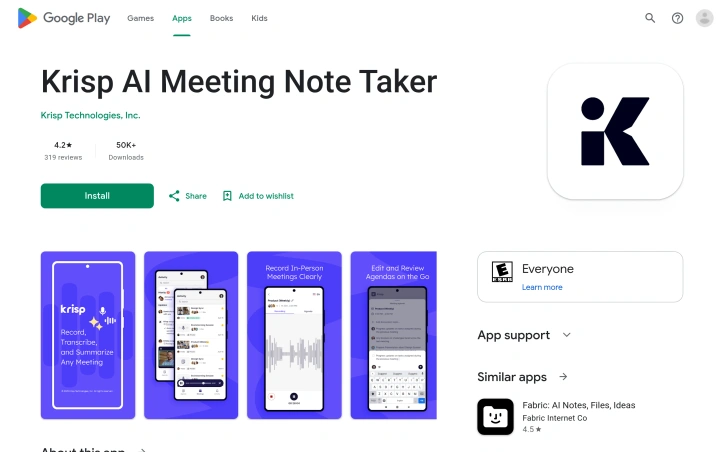
Meetings are a crucial part of modern work, but taking accurate and detailed notes can be a daunting task. Krisp's mobile app aims to alleviate this problem by providing an AI-powered meeting assistant that records conversations, transcribes audio, and delivers summaries in multiple languages. The app is designed for professionals who need to stay organized and follow up quickly on meetings held anywhere, whether online or offline. With Krisp Mobile, users can record in-person meetings with a single tap, upload voice notes or audio files for instant transcription, and view their entire meeting history on their mobile device. The app also allows users to send the Krisp AI bot to virtual calls on popular platforms like Zoom, Google Meet, and Microsoft Teams. What stands out about Krisp Mobile is its seamless integration with existing Krisp accounts and its ability to work offline or online. The app's features are intuitive and easy to use, making it an ideal solution for solo founders, remote teams, and hybrid meeting leaders who need to capture insights from meetings in real-time. Key features worth noting include the app's AI-powered transcription capabilities, which can deliver summaries and action items in 16+ languages. Users can also join virtual calls with the Krisp Bot or tap to capture live voice notes. All transcripts sync to desktop for easy access and management. Pricing details are not explicitly mentioned in the provided content, but the app is free to download and integrates with existing Krisp accounts. The mobile app extends Krisp's powerful meeting assistant to wherever users go, making it an essential tool for modern professionals who need to stay organized and follow up quickly on meetings held anywhere.

Project-management-software

Meetings are a crucial part of modern work, but taking accurate and detailed notes can be a daunting task. Krisp's mobile app aims to alleviate this problem by providing an AI-powered meeting assistant that records conversations, transcribes audio, and delivers summaries in multiple languages. The app is designed for professionals who need to stay organized and follow up quickly on meetings held anywhere, whether online or offline. With Krisp Mobile, users can record in-person meetings with a single tap, upload voice notes or audio files for instant transcription, and view their entire meeting history on their mobile device. The app also allows users to send the Krisp AI bot to virtual calls on popular platforms like Zoom, Google Meet, and Microsoft Teams. What stands out about Krisp Mobile is its seamless integration with existing Krisp accounts and its ability to work offline or online. The app's features are intuitive and easy to use, making it an ideal solution for solo founders, remote teams, and hybrid meeting leaders who need to capture insights from meetings in real-time. Key features worth noting include the app's AI-powered transcription capabilities, which can deliver summaries and action items in 16+ languages. Users can also join virtual calls with the Krisp Bot or tap to capture live voice notes. All transcripts sync to desktop for easy access and management. Pricing details are not explicitly mentioned in the provided content, but the app is free to download and integrates with existing Krisp accounts. The mobile app extends Krisp's powerful meeting assistant to wherever users go, making it an essential tool for modern professionals who need to stay organized and follow up quickly on meetings held anywhere.

Krisp AI Note Taker Mobile preview

Key features

  • AI Transcription: Automatically transcribes conversations and voice notes with support for 16+ languages
  • Virtual Meeting Bot: Sends Krisp AI bot to Zoom, Google Meet, and Microsoft Teams calls
See full listing
Grain Desktop Capture

Meeting notes and transcription have long been a tedious task for teams, devouring precious time that could be better spent on actual work. Grain Desktop Capture seeks to alleviate this burden by automating note-taking and transcription with AI. Grain Desktop Capture appears well-suited for businesses, particularly sales teams, customer success, and product teams, which often require meticulous documentation of meetings and conversations. What stands out about the product is its ability to transcribe audio from a Mac without requiring any third-party bots or integrations. This feature makes it an attractive option for teams that conduct frequent ad-hoc calls, in-person conversations, or Slack Huddles. Key features worth noting include automatic transcription of meetings in over 100 languages, customizable meeting templates, and a live notepad for annotating notes during the meeting. The platform also integrates with popular CRM systems, allowing users to sync notes and properties directly into their existing workflow. Furthermore, Grain's AI-powered follow-up emails aim to streamline communication by generating concise and coherent messages. Pricing details are explicitly mentioned: at $29 per user per month for an annual plan, which may be considered reasonable for teams that can reap the productivity benefits of automated note-taking. While specific pricing tiers or custom plans are not detailed, the company's commitment to being cost-effective is evident. Grain Desktop Capture shows promise as a tool for simplifying meeting notes and transcription, but its effectiveness will ultimately depend on how well it integrates with existing workflows and tools.

Project-management-software

Meeting notes and transcription have long been a tedious task for teams, devouring precious time that could be better spent on actual work. Grain Desktop Capture seeks to alleviate this burden by automating note-taking and transcription with AI. Grain Desktop Capture appears well-suited for businesses, particularly sales teams, customer success, and product teams, which often require meticulous documentation of meetings and conversations. What stands out about the product is its ability to transcribe audio from a Mac without requiring any third-party bots or integrations. This feature makes it an attractive option for teams that conduct frequent ad-hoc calls, in-person conversations, or Slack Huddles. Key features worth noting include automatic transcription of meetings in over 100 languages, customizable meeting templates, and a live notepad for annotating notes during the meeting. The platform also integrates with popular CRM systems, allowing users to sync notes and properties directly into their existing workflow. Furthermore, Grain's AI-powered follow-up emails aim to streamline communication by generating concise and coherent messages. Pricing details are explicitly mentioned: at $29 per user per month for an annual plan, which may be considered reasonable for teams that can reap the productivity benefits of automated note-taking. While specific pricing tiers or custom plans are not detailed, the company's commitment to being cost-effective is evident. Grain Desktop Capture shows promise as a tool for simplifying meeting notes and transcription, but its effectiveness will ultimately depend on how well it integrates with existing workflows and tools.

Grain Desktop Capture preview

Key features

  • Automatic Transcription: Transcribes meetings without requiring third-party bots or integrations
  • Multi-Language Support: Transcribes meetings in over 100 languages
See full listing
Super Intern

For entrepreneurs and small business owners, repetitive tasks can be a significant drag on productivity. Super Intern aims to alleviate this burden by delegating busywork to AI, allowing users to focus on high-value activities. What stands out about Super Intern is its unique approach to task delegation. Rather than offering a range of tools or workflows, the platform provides a self-evolving AI intern that can learn and adapt to specific tasks and skills. This means users don't need to invest time in training or configuring the system – they simply delegate their work to the AI, which can then evolve to handle increasingly complex tasks. Key features worth noting include instant expertise across 1000+ domain-expert skills, seamless integration with popular apps and platforms (such as Discord, Telegram, and Slack), and a flexible plans structure that allows users to customize their needs. The platform also boasts impressive credentials, backed by top venture capital firms. Pricing details are straightforward: users can choose from various plans that offer different credit allocations for daily usage, or create custom plans tailored to their specific requirements. For small projects and quick turnarounds, the Starter plan offers 2000 credits per month at $16/month, billed yearly. The Project Space plan is ideal for frequent use and team collaboration, offering unlimited skills and an extra 5000 credits per month at $160/month. Overall, Super Intern's innovative approach to task delegation makes it an attractive solution for entrepreneurs and small business owners looking to streamline their workflow and boost productivity.

Project-management-software

For entrepreneurs and small business owners, repetitive tasks can be a significant drag on productivity. Super Intern aims to alleviate this burden by delegating busywork to AI, allowing users to focus on high-value activities. What stands out about Super Intern is its unique approach to task delegation. Rather than offering a range of tools or workflows, the platform provides a self-evolving AI intern that can learn and adapt to specific tasks and skills. This means users don't need to invest time in training or configuring the system – they simply delegate their work to the AI, which can then evolve to handle increasingly complex tasks. Key features worth noting include instant expertise across 1000+ domain-expert skills, seamless integration with popular apps and platforms (such as Discord, Telegram, and Slack), and a flexible plans structure that allows users to customize their needs. The platform also boasts impressive credentials, backed by top venture capital firms. Pricing details are straightforward: users can choose from various plans that offer different credit allocations for daily usage, or create custom plans tailored to their specific requirements. For small projects and quick turnarounds, the Starter plan offers 2000 credits per month at $16/month, billed yearly. The Project Space plan is ideal for frequent use and team collaboration, offering unlimited skills and an extra 5000 credits per month at $160/month. Overall, Super Intern's innovative approach to task delegation makes it an attractive solution for entrepreneurs and small business owners looking to streamline their workflow and boost productivity.

Super Intern preview

Key features

  • Self-Evolving AI Intern: Learns and adapts to specific tasks without requiring manual training or configuration.
  • Domain Expert Skills: Provides instant expertise across 1000+ domain-expert skills.
See full listing
DayDrift

Task management applications often trap users in a cycle of broken streaks and overdue notifications, treating missed deadlines as failures rather than natural disruptions to workflow. DayDrift sidesteps this frustration by anchoring tasks to days of the week rather than specific dates. If you skip Monday's assignment, it simply carries forward to Tuesday without accumulating psychological baggage—a deliberately forgiving approach aimed at people who want structure without the weight of traditional productivity systems. The product's core innovation centers on its day-by-day accordion interface, which transforms weekly planning into a visual, tactile experience. Users assign tasks to specific weekdays and watch them organize naturally across a five or seven-day view. This design philosophy appeals to those who plan in weekly cycles rather than sprints or quarterly goals—professionals with recurring routines, freelancers managing variable workloads, or anyone seeking calm productivity over aggressive optimization. Beyond the layout, DayDrift embeds streak tracking directly into task management, gamifying consistency without the complexity of elaborate reward systems. You build momentum by completing recurring tasks, and the interface visibly tracks your progress. The application layers on practical utilities: customizable daily reminders, the ability to drag tasks between days, completed task history, and support for four languages including English, French, Portuguese, and Spanish. The business model separates functionality clearly between free and paid tiers. The Free plan accommodates up to seven incomplete tasks and provides basic weekly organization. The Unlimited plan removes the task ceiling, adds device synchronization via CloudKit, and enables viewing and customizing time windows for task history. The emphasis on CloudKit synchronization—with data stored in users' own iCloud accounts rather than company servers—signals a privacy-conscious stance that distinguishes it from mainstream productivity tools. The application's stripped-down visual design avoids the feature bloat that paralyzes many productivity users, instead betting that clarity and flexibility in weekly planning matter more than integration ecosystems. For people overwhelmed by traditional deadline-driven task managers, DayDrift presents a genuine alternative rooted in a different organizational philosophy.

Project-management-software

Task management applications often trap users in a cycle of broken streaks and overdue notifications, treating missed deadlines as failures rather than natural disruptions to workflow. DayDrift sidesteps this frustration by anchoring tasks to days of the week rather than specific dates. If you skip Monday's assignment, it simply carries forward to Tuesday without accumulating psychological baggage—a deliberately forgiving approach aimed at people who want structure without the weight of traditional productivity systems. The product's core innovation centers on its day-by-day accordion interface, which transforms weekly planning into a visual, tactile experience. Users assign tasks to specific weekdays and watch them organize naturally across a five or seven-day view. This design philosophy appeals to those who plan in weekly cycles rather than sprints or quarterly goals—professionals with recurring routines, freelancers managing variable workloads, or anyone seeking calm productivity over aggressive optimization. Beyond the layout, DayDrift embeds streak tracking directly into task management, gamifying consistency without the complexity of elaborate reward systems. You build momentum by completing recurring tasks, and the interface visibly tracks your progress. The application layers on practical utilities: customizable daily reminders, the ability to drag tasks between days, completed task history, and support for four languages including English, French, Portuguese, and Spanish. The business model separates functionality clearly between free and paid tiers. The Free plan accommodates up to seven incomplete tasks and provides basic weekly organization. The Unlimited plan removes the task ceiling, adds device synchronization via CloudKit, and enables viewing and customizing time windows for task history. The emphasis on CloudKit synchronization—with data stored in users' own iCloud accounts rather than company servers—signals a privacy-conscious stance that distinguishes it from mainstream productivity tools. The application's stripped-down visual design avoids the feature bloat that paralyzes many productivity users, instead betting that clarity and flexibility in weekly planning matter more than integration ecosystems. For people overwhelmed by traditional deadline-driven task managers, DayDrift presents a genuine alternative rooted in a different organizational philosophy.

DayDrift preview

Key features

  • Day-Based Organization: Tasks anchor to weekdays instead of specific dates, carrying forward naturally without guilt
  • Accordion Interface: Visual day-by-day layout transforms weekly planning into a tactile, organized experience
See full listing
Trunk Flaky Tests

Flaky tests can be a major pain point for development teams, causing frustration and slowing down the software development process. Trunk addresses this issue by providing a comprehensive solution to detect, quarantine, and eliminate flaky tests from a codebase. What stands out about Trunk is its ability to work seamlessly with various languages, test runners, and CI providers. This flexibility makes it an attractive option for teams using different technologies and workflows. The platform's AI-powered insights also allow for more efficient identification of flaky tests and tracking of their stability over time. Key features worth noting include the auto-quarantine of flaky tests, which eliminates unnecessary re-runs and unblocks CI pipelines. Additionally, Trunk's group-related failures feature helps identify patterns and trends in test failures, enabling teams to address root causes more effectively. The platform also integrates with existing ticketing systems, ensuring that flaky tests are properly assigned and resolved. Trunk's pricing model is not explicitly mentioned on the website, so I couldn't find any information on this aspect. However, based on the content provided, it appears that Trunk offers a robust solution for tackling flaky tests, which can be particularly beneficial for development teams struggling with test stability issues. The platform's scalability and flexibility make it suitable for organizations of various sizes and technical setups. Overall, Trunk presents itself as a reliable and efficient tool for managing flaky tests, and its features and capabilities align well with the needs of development teams looking to improve their testing processes. As such, it is worth considering for teams struggling with test stability issues or seeking to optimize their CI pipelines.
Project-management-software

Flaky tests can be a major pain point for development teams, causing frustration and slowing down the software development process. Trunk addresses this issue by providing a comprehensive solution to detect, quarantine, and eliminate flaky tests from a codebase. What stands out about Trunk is its ability to work seamlessly with various languages, test runners, and CI providers. This flexibility makes it an attractive option for teams using different technologies and workflows. The platform's AI-powered insights also allow for more efficient identification of flaky tests and tracking of their stability over time. Key features worth noting include the auto-quarantine of flaky tests, which eliminates unnecessary re-runs and unblocks CI pipelines. Additionally, Trunk's group-related failures feature helps identify patterns and trends in test failures, enabling teams to address root causes more effectively. The platform also integrates with existing ticketing systems, ensuring that flaky tests are properly assigned and resolved. Trunk's pricing model is not explicitly mentioned on the website, so I couldn't find any information on this aspect. However, based on the content provided, it appears that Trunk offers a robust solution for tackling flaky tests, which can be particularly beneficial for development teams struggling with test stability issues. The platform's scalability and flexibility make it suitable for organizations of various sizes and technical setups. Overall, Trunk presents itself as a reliable and efficient tool for managing flaky tests, and its features and capabilities align well with the needs of development teams looking to improve their testing processes. As such, it is worth considering for teams struggling with test stability issues or seeking to optimize their CI pipelines.

Trunk Flaky Tests preview

Key features

  • Auto-Quarantine: Automatically quarantines flaky tests to eliminate unnecessary re-runs and unblock CI pipelines.
  • Multi-Language Support: Works seamlessly with various languages, test runners, and CI providers.
See full listing