
GPTZZZ
GPTZZZ 是面向开发者的独立第三方 AI API 中转与多模型网关,提供 OpenAI 兼容接口和 Claude Messages 接口,帮助应用与编程工具...

@fuck.it
Email privacy has become an afterthought at mainstream providers, which treat inboxes as data sources to be mined for ad...
Best Productivity Startups & Tools
Recently Listed
278 launches
Creators and agencies routinely spend hours manually recording website scroll-throughs, editing the footage, and rendering polished videos suitable for presentations or marketing. Website Scroll Video automates this entire workflow, reducing the task to three straightforward steps: paste a URL, adjust a handful of settings, and export the finished video in the desired format. The product opens websites in a real browser, captures the full page scrolling from top to bottom, and outputs MP4, WebM, or GIF files without watermarks. What distinguishes this tool is the depth of control offered across its feature set. Compared to competitors Folge and HowdyGo, Website Scroll Video supports MP4, WebM, and GIF exports, up to 4K resolution with custom output sizes up to 4096 pixels, and variable frame rates at 24, 30, or 60 frames per second. The application offers five aspect ratio presets covering desktop and mobile orientations, plus the ability to define custom dimensions. Video duration can be controlled from 2 to 90 seconds without manually adjusting scroll speeds, and users can insert up to six automatic pauses at important sections—a useful feature for giving viewers time to absorb key content. Beyond basic capture capabilities, the tool includes refinements typically found only in dedicated video editing software. Custom hover effects can highlight elements on the page, cookie banners can be removed automatically, animations can be frozen, and specific page elements can be hidden before recording begins. Preview functionality lets creators review the recording before rendering, and finishing touches like frame padding and corner effects are available. The pricing model reflects a creator-first approach. Rather than enforcing a monthly subscription, Website Scroll Video operates on a credits system where users pay only for videos they create. A free tier grants 200 credits upon signup, with no credit card required. Paid tiers start at $5 for 200 credits and $12 for 450 credits plus a 50-credit bonus, purchased as one-time charges. Credits never expire and carry no recurring costs, making the service accessible for both occasional users and regular creators seeking production control without subscription overhead.


Spam infiltration remains a persistent frustration for email users, despite decades of filter improvements. Klar addresses this gap by applying machine learning directly on the user's Mac rather than relying on cloud servers. This approach prioritizes privacy while handling computational work locally, requiring no account setup or data transmission to external services. The spam problem Klar targets is genuine. Standard email filters from major providers miss substantial amounts of unwanted mail, leaving users manually sorting through clutter. The product targets anyone using Apple Mail who finds existing filters inadequate—whether they use iCloud, Gmail, Outlook, or other IMAP-based email services. What distinguishes Klar is its architectural choice to run the AI model on-device. This design decision carries meaningful implications: messages never leave the user's machine for processing, eliminating concerns about data privacy or third-party access. The absence of mandatory account creation further removes friction and reduces the attack surface for credential theft or data harvesting. The product integrates with multiple email providers, making it accessible to users across different ecosystems. Running locally on macOS means the filter operates within the user's existing email client rather than requiring a separate interface or app switching. The seamless integration reflects Klar's design philosophy—the filter is meant to fade into the background and simply work. The free pricing model removes barriers to adoption. There are no subscription costs, trial periods, or upsells mentioned. This approach prioritizes user acquisition and might reflect confidence in the core filtering technology, though it raises natural questions about long-term sustainability and development resources. The offering is notably straightforward. Klar doesn't claim to reorganize email, learn user preferences through feedback loops, or provide detailed analytics. It does one thing: filter spam with an AI model running locally on your Mac. This focus appeals to users who find existing filters ineffective and want to avoid cloud-based solutions or account requirements. For someone frustrated with Gmail's spam folder or Apple Mail's built-in filter missing obvious junk, Klar presents a technically interesting alternative. The privacy-first local processing model and lack of account friction are genuine advantages. Whether the on-device AI actually performs better than server-side models remains a question only testing can answer, but the architectural approach is sound and user-respecting.


56+ free online tools for PDF editing, image conversion, calculators, and text utilities. No signup, no limits. Browser-based - files stay on your device.


Clinical documentation has long consumed the evening hours of healthcare providers—time that should belong to them, not to their employer's administrative machinery. Merry AI targets this specific pain point by automating the note-writing process that traditionally happens after patient visits conclude. The product works through ambient AI that listens to conversations during clinical encounters, capturing clinical details without requiring keyboard input or manual data entry from the clinician. This allows providers to remain fully present with patients rather than dividing attention between the patient and their documentation system. The system generates complete progress notes with properly formatted SOAP sections in real-time, meaning clinicians can review and sign off on documentation before leaving the exam room. What distinguishes Merry AI in a crowded clinical AI space is its focus on the complete documentation lifecycle. Beyond ambient capture during visits, the system handles pre-visit work by pre-analyzing patient charts, organizing intake history, and completing chart preparation before the clinician enters the room. This addresses the full spectrum of administrative burden rather than just the note-writing piece. The product also handles billing code mapping, capturing complexity indicators like CPT G2211 that can unlock additional reimbursement revenue for healthcare systems. A 2026 JAMA study is cited as evidence of time savings, though specific figures aren't detailed in available materials. KLAS Research performance data is referenced, positioning it against established healthcare IT evaluation standards. From a compliance perspective, Merry AI explicitly highlights HIPAA compliance and rapid BAA execution, suggesting the company has baked healthcare's regulatory requirements into its go-to-market strategy. This matters because healthcare organizations moving to any new system face significant procurement friction around compliance verification. The business model is a software service aimed at healthcare systems and practices rather than an open-market consumer tool. Pricing isn't disclosed, though the website mentions requesting a demo without requiring credit card information, suggesting an enterprise-focused sales motion. The core value proposition is straightforward: clinicians recover their evenings, healthcare systems improve documentation compliance and capture lost billing revenue simultaneously. Whether the technology performs as demonstrated in promotional materials would require hands-on evaluation, but the problems Merry AI claims to solve are genuinely acute across the healthcare industry.


Modern development environments have become invisible performance drains. A developer's Mac accumulates gigabytes of cached machine learning models, orphaned Docker containers, npm package caches, and Xcode build artifacts that legacy system utilities simply don't recognize. WTMemory directly addresses this gap in the market, targeting both everyday users mystified by mysterious slowdowns and developers who understand the problem intimately. What distinguishes WTMemory from conventional Mac cleaning software is its specificity to the modern development stack. Rather than offering vague promises to remove "system junk," the tool directly identifies and clears Ollama model weights, HuggingFace transformer snapshots, Docker virtual disk images, and accumulated npm and pnpm caches. A real-world scan presented on the site identified over 94 gigabytes of recoverable space across these categories alone, demonstrating the scale of the problem WTMemory solves. The product's engineering choices reinforce this focus. At 794 kilobytes, the application is remarkably small, works entirely offline, and tracks nothing about users. It operates as a native Mac utility with a simple interface offering both automatic operations like one-click cleaning of inactive memory and purgeable space, and manual inspection tools. The inspector functionality lets users understand exactly what's consuming storage before committing to cleanup, a useful safety feature when dealing with cached data. The pricing model is straightforward and consumer-friendly. A $9 one-time purchase unlocks the cleaning functions permanently, with free updates included and support for up to three machines. The free tier offers unlimited inspection capability, allowing users to understand their storage situation before paying. The tool's positioning reflects a genuine market gap. As AI tools and local language models become commonplace in development workflows, and as containerization and package management create new classes of hidden storage consumption, the assumptions underlying existing Mac optimization software have become outdated. WTMemory recognizes this explicitly, acknowledging that modern Macs aren't aging so much as becoming exhausted by legitimate workloads legacy tools were never designed to comprehend. For developers accustomed to managing system resources and for everyday users simply frustrated by unexplained slowdowns, WTMemory offers both accessibility and precision.


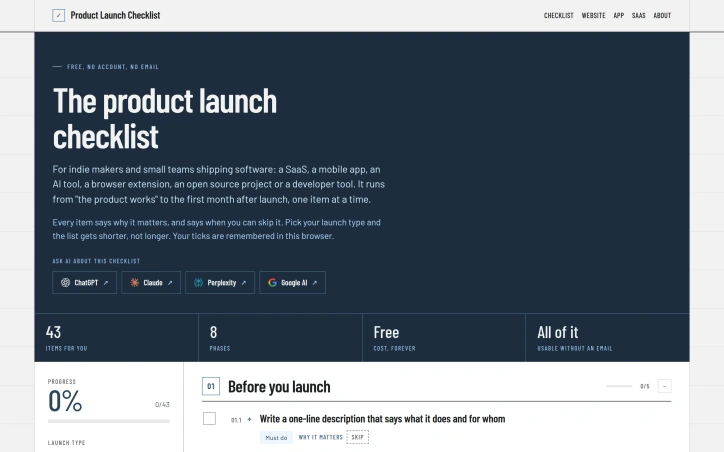
Shipping software without guidance often means recreating the wheel or following generic launch frameworks that treat all products identically. This checklist addresses that gap by combining practical structure with the flexibility indie teams need. The core insight is simple but powerful: launch guides traditionally overwhelm makers with exhaustive task lists, then fail to explain why each step matters or when it's safe to skip. By reversing this approach, the tool acknowledges that a browser extension follows a different path than a SaaS product, and what works for one creator's situation may waste another's time. The product spans eight phases from the moment the core product functions through the first month post-launch, containing 43 items total. Rather than displaying all tasks regardless of context, users select their launch type (SaaS, mobile app, AI tool, browser extension, open source, or developer tool), and irrelevant items filter out automatically. Each checklist item includes reasoning about why it matters and explicit conditions for skipping it. This transparency lets makers make informed decisions instead of feeling obligated to complete every task. The interface handles progress tracking directly in the browser without requiring authentication, email verification, or account creation. Users can export their work through multiple formats: shareable links, printable versions, markdown, or GitHub task integration. The product also includes integration points with major AI assistants, letting users ask ChatGPT, Claude, Perplexity, or Google AI for guidance specific to their launch. Notably, the founder has extended the tool beyond the web interface. A free MCP server enables developers to integrate the checklist into their own workflows, and an agent skill allows users to progress through their launch one item at a time with AI assistance. This expansion positions the checklist as part of a broader ecosystem rather than a standalone tool. The pricing model removes friction entirely. The complete checklist remains free indefinitely, with no account walls, email collection, or advertisements. This choice aligns with the maker community's preference for straightforward tools that respect their time and information. What distinguishes this from generic launch templates is the deliberate rejection of one-size-fits-all thinking. By making skip conditions explicit and contextual, the tool respects that optimization sometimes means doing less, not more. For indie makers tired of consulting bloated launch guides, this targeted approach offers clarity without compromise.
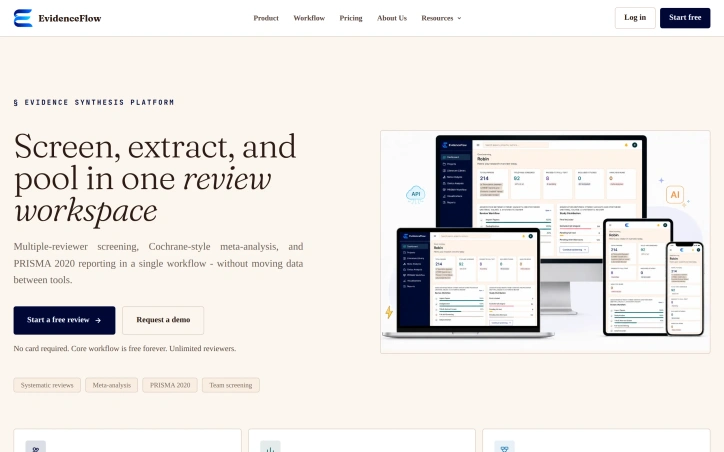
Researchers coordinating evidence synthesis have long faced a fragmented toolchain problem: screening studies in one system, extracting data in another, and analyzing results in a third, with handoffs between each step introducing friction and error. EvidenceFlow consolidates this workflow into a single platform designed explicitly for the research team conducting systematic reviews rather than individual researchers working alone. The platform connects the full cycle from research question definition through publication-ready reporting. A researcher starts by establishing their study's PICO framework—population, intervention, comparator, and outcome—which then serves as the reference point for every downstream decision. This traceability extends from initial screening through final meta-analysis, creating an audit trail that documents who made each decision, when, and at which workflow stage. What distinguishes EvidenceFlow is its focus on collaborative review structures. Rather than treating systematic review as a solitary task, it implements blind dual review as a core feature: two reviewers screen studies independently, neither seeing the other's decisions until conflicts emerge. The platform flags disagreements automatically and routes unresolved records to a third reviewer or manager for arbitration. This architecture prevents studies from silently slipping through as included when reviewers actually disagree, a common failure mode in manual processes. The meta-analysis engine handles the quantitative synthesis that follows screening. It supports multiple pooling approaches—inverse variance, Mantel-Haenszel, and Peto methods—and generates publication-ready forest and funnel plots directly from live screening data. The platform also integrates specialized omics support, enabling synthesis of GWAS and RNA-seq data across studies. On integration, EvidenceFlow connects to standard academic sources like PubMed, Crossref, and OpenAlex, and supports common formats including RIS, BibTeX, CSV, and JSON for import and export. Outputs comply with PRISMA 2020 guidelines, the current standard for systematic review reporting. The pricing model offers a free tier that includes the core workflow and unlimited reviewers—a significant differentiator for academic teams. The platform has received recognition through the AWS Activate Startup Program, suggesting traction among early adopters. EvidenceFlow addresses a genuine coordination gap in evidence synthesis, particularly for multi-reviewer research teams that currently piece together disparate tools. The combination of built-in collaboration features, standardized reporting, and integrated workflow reduces operational overhead for a process that remains computationally demanding and error-prone when fragmented.

Voice-to-social-content transformation has historically been one of the more friction-filled workflows for content creators, and SpokenPost addresses this by automating the leap from raw voice memos to polished, platform-specific posts. The product targets founders, consultants, and independent creators who possess strong ideas but struggle to translate them into engaging social media content within realistic time constraints. The core premise is straightforward: record a 60-second voice note, and the tool generates three distinct outputs—a LinkedIn carousel PDF, an optimized text post, and a formatted X thread. The system completes this process in under two minutes without requiring design expertise or manual formatting. Beyond raw speed, the product preserves the speaker's authentic voice and tone rather than flattening ideas into generic marketing language, a distinction the founder emphasizes as critical for building genuine audience connection. What distinguishes SpokenPost from broader content creation tools is its specificity. Rather than offering a general-purpose platform, it narrows to a precise workflow: capturing lightning-in-a-bottle moments that already happen in conversations or running commentary, then packaging them for public distribution. Users can train a custom voice profile by feeding the AI samples of past writing and vocabulary, ensuring generated content remains idiosyncratic rather than algorithmic. The tool also supports white-label branding on carousel footers and offers multiple slide themes for visual customization. The free tier provides meaningful access with three monthly exports and no credit card required, allowing users to test whether capturing ideas via voice genuinely changes their publishing behavior. A Pro tier extends recording length to three minutes instead of sixty seconds, though fuller pricing details remain unspecified on the landing page. The positioning acknowledges a specific founder pain point: time scarcity isn't the real constraint, but format-shifting friction is. By collapsing the repackaging step, the product converts publishing from an additional job into a natural outcome of the thinking work itself. The concept assumes users already generate worthwhile ideas and that the bottleneck is purely mechanical—turning raw speech into styled assets. For creators operating at high idea velocity, this positioning resonates. For those struggling to generate ideas in the first place, the product offers limited utility.


Finding quality AI tools amid a sea of low-quality directories has become a real problem for product builders and creators. Too many tool aggregators prioritize paid placements over actual utility, leaving users to sift through untested offerings. Amaze.directory tackles this by taking a radically simple approach: only list tools that the curator has genuinely used. The difference is immediately apparent. Rather than trying to be comprehensive, the directory restricts itself to a small number of hand-checked products—currently six tools across categories like research, content creation, coding, and audio processing. Each listing includes a candid one-sentence assessment of what makes that tool worth using, stripped of marketing language. Perplexity gets credit for citation behavior over a standard chat interface. ElevenLabs is noted for producing synthetic speech that sounds unremarkable. Cursor receives praise for feeling like an editor that happens to include AI, rather than an AI product forced into an editor. These descriptions reflect genuine usage rather than promotional copy. The vetting process reinforces this commitment to substance. Every tool must be actively used for an extended period before listing. Dead links are purged every Friday. The operator explicitly refuses paid placements, a decision that fundamentally shapes the trust equation. You're not browsing a paid ranking—you're seeing what someone actually uses and recommends. The interface itself is straightforward. Search functionality lets users find tools by job type. Filters handle category and pricing, which amaze.directory presents honestly: some tools operate on freemium models while others require payment. This transparency about cost and access prevents the surprise of discovering a tool's hidden paywall after investing time. What limits the directory is also its strength. With only a handful of listings, this isn't a comprehensive resource for every use case. New categories like video generation appear but show no entries. The directory is growing—six tools were added in the last week—but it remains deliberately sparse. The business model is implicit: curation as editorial service. By maintaining independence and refusing vendor payments, amaze.directory positions itself as a source of genuine opinion rather than a marketplace. This appeals to builders who want tools that work over tools that are well-marketed. For creators and developers tired of hollow tool directories, amaze.directory offers something increasingly rare: honest product assessment backed by actual use.


Designing a game world typically stops at concept art and mood boards—evocative but structurally vague. Vibe Worlding bridges that gap by transforming a creative impulse into a structured, machine-readable blueprint that developers can immediately act on. The tool chains together input decisions (game type, visual style, scale, core gameplay loop) and produces terrain, landmarks, asset lists, camera angles, spawn points, and a ready-to-execute prompt for implementation in any engine or tool. The product's core innovation is its intent-first, provider-agnostic workflow. Rather than locking creators into a particular engine or AI system, Vibe Worlding generates a neutral specification that builders can read, critique, and port to different backends. This separation between planning and execution means a developer can review the blueprint before committing resources to generation, catching conceptual misalignments early. The approach enforces a useful constraint: nail one small, playable loop before scaling to an open world, avoiding the common trap of ambitious scope that collapses under its own weight. The generated artifact goes beyond aesthetics. It codifies space through connected regions, readable paths, and explicit boundaries; pins gameplay through concrete mechanics and asset requirements; and grounds camera and spawn positioning in the player's first twelve seconds of experience. This transforms a vague atmosphere into decisions a builder can inspect and test. Examples like the Cliff Gorge Kingdom—layering a market terrace, hanging bridge, and cave shrine around a compact core loop—show how the method keeps early designs tight and navigable. Access removes friction entirely. The tool requires no account, charges no subscription, and delivers a complete spec through the browser. The local preview feature lets creators validate their vision before committing to a builder or agent implementation. For game developers, indie studios, and narrative designers searching for the gap between concept and code, Vibe Worlding addresses a genuine pain point. It won't replace the creative act of worldbuilding, but it systematizes the translation from artistic vision to buildable specification. The focus on intent over implementation, space over spectacle, and one tight loop over sprawling ambition positions it as a useful filter between ideation and production.


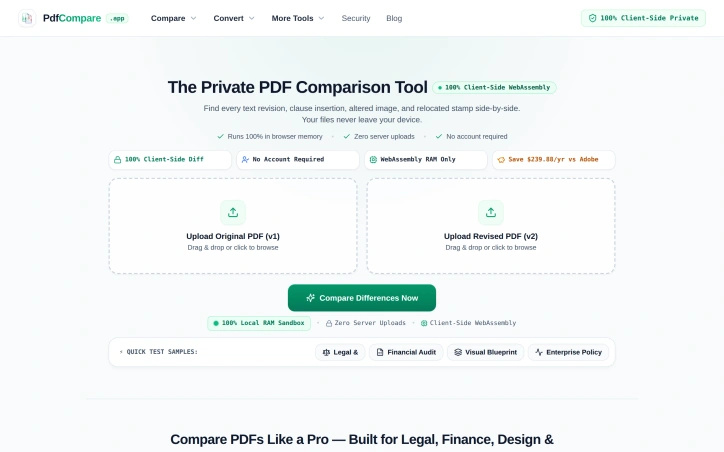
Comparing PDF versions manually invites disaster, especially when subtle changes carry legal or financial consequences. A confidentiality clause shifting from 3 to 5 years, a decimal point moved in a balance sheet, or an authorization stamp drifting 14 millimeters—these shifts demand precision detection but consume hours of tedious line-by-line review. PdfCompare addresses this friction directly by automating differential PDF analysis for legal teams, financial auditors, designers, and HR departments who cannot afford to miss critical revisions. The product's defining feature is its privacy-first architecture. All processing happens client-side in the browser using WebAssembly; files never touch a server and require no account creation. For organizations handling sensitive contracts, financial records, or proprietary designs, this eliminates a major friction point around data security and compliance. The approach is technically sound and operationally simpler than uploading to cloud-based competitors. PdfCompare's feature set is specialized for its target verticals. Legal users get targeted highlighting of textual changes within contract language. Auditors see isolated financial deltas and line-item shifts while the system filters out noise from standard document repagination—a meaningful improvement over line-by-line scanning of 50-page earnings reports. The visual design comparison mode deserves mention for its specificity: an overlay tool (marketed as an X-ray pixel slider) lets architects and designers detect moved elements, shifted logos, or altered spacing without misidentifying text reflow as a substantive change. For HR and operations teams, the tool generates transparent changelogs suitable for communicating policy updates to staff. The implementation decisions reflect a product built for actual workflows rather than generic PDF viewing. The tool recognizes that legal, finance, and design teams have distinct comparison needs—contract language requires semantic precision, financial documents need numerical isolation, and technical drawings prioritize visual layout accuracy. The quick-start samples (contract, financial, and visual) reinforce this specialization. Pricing information is minimal in the available materials, though a comparison to Adobe suggests competitive positioning around cost savings. The lack of subscription lock-in—no account required, no recurring fees mentioned—makes the product more accessible for occasional users or organizations already skeptical of SaaS sprawl. The risk is a narrow addressable market. Organizations comfortable with existing PDF workflows or less sensitive to privacy concerns may not see sufficient differentiation. For the segments it targets, however, PdfCompare solves a genuine problem with a straightforward technical approach and reasonable tradeoff: local processing for privacy and simplicity, sacrificing some advanced features or batch automation that cloud competitors offer.

YouTube's pervasive advertising ecosystem has long frustrated viewers who simply want uninterrupted content consumption. SkipPlay directly addresses this frustration by offering an ad-light alternative that requires no account creation or browser extensions for basic use. The core value proposition centers on simplicity and accessibility. Users paste any YouTube link into the web player or, for enhanced functionality, integrate the Chrome extension and watch without commercial interruptions. The extension further automates sponsor skipping through SponsorBlock integration, a community-driven database that identifies and removes sponsored segments, intros, and subscription reminders from videos. This appeals strongly to viewers who consume substantial video content and grow weary of both platform-inserted ads and creator-embedded sponsor interruptions. What distinguishes SkipPlay from competing solutions involves its layered approach to functionality and device coverage. The free web player works seamlessly across desktop, mobile, and smart TV browsers without requiring installation or authentication, significantly lowering barriers to entry. Mobile users gain background audio playback, a feature enabling listening with the screen locked or while using other applications—functionality that YouTube Premium typically reserves for paying subscribers. For power users seeking additional features, the platform includes a DJ Dual Mixer Deck for mixing tracks side-by-side and offers optional cloud synchronization that persists playlists, favorites, and viewing progress across devices. The business model reveals deliberate positioning within the ad-blocking market. The free web player remains entirely free, monetizing through an optional $9 lifetime extension that enables one-click playback directly from YouTube and automatically skips ads on the native platform itself. This pricing sits significantly below YouTube Premium's $15.99 monthly subscription, positioning SkipPlay as a permanent alternative to recurring fees. The feature comparison presented prominently on the site directly acknowledges YouTube Premium, suggesting confidence in competitive positioning. Beyond standard ad removal, SkipPlay differentiates through SponsorBlock integration and free mobile background play—capabilities that even YouTube Premium and traditional ad-blockers do not consistently deliver. SkipPlay targets viewers frustrated by YouTube's aggressive monetization rather than those seeking premium content access or exclusive features. Its design emphasis on reducing friction through simple URL pasting and one-click extension deployment reveals focus on a specific, well-defined pain point. For viewers averse to advertising and subscription costs, the combination of free web access and affordable permanent licensing presents a genuine alternative to traditional premium models.


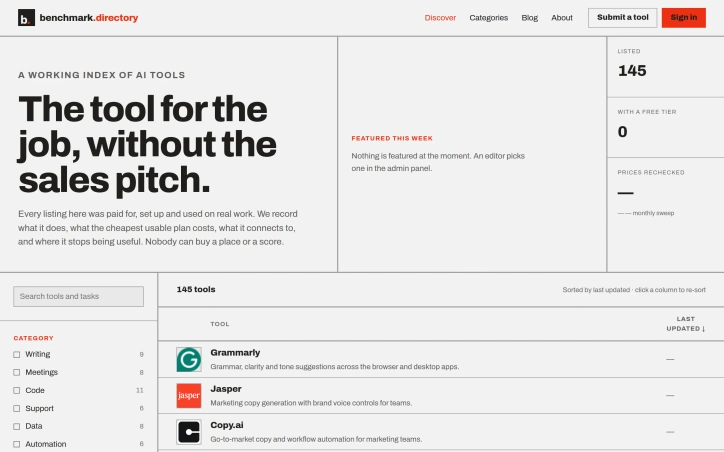
An editorial index of AI tools solves a growing discovery problem in a crowded market. Benchmark.directory addresses the challenge many organizations face when evaluating software: vendor marketing obscures real capabilities and limitations. The directory catalogs 145 tools organized by the practical work they perform rather than technological category, making it genuinely useful for matching problems to solutions. What distinguishes this project is its hands-on editorial approach. Every tool must pass a validation threshold: setup and active use on genuine projects for at least one week before earning inclusion. This practical testing replaces sales collateral with direct experience. The founders document concrete information that typically remains hidden: the actual cost of the cheapest functional plan, what free tiers genuinely permit, which integrations work after setup, and crucially, where each tool's utility boundaries lie. The directory maintains editorial integrity through transparent rejection of pay-to-play arrangements. Listings are completely free, and tools offering payment for placement are documented and declined. This structural decision eliminates the perverse incentive that corrupts most software directories, where prominent positioning correlates with marketing budget rather than usefulness. In 2026 alone, the project rejected 71 submissions and delisted 12 tools, indicating active curation rather than passive accumulation. The categorization strategy reflects how people actually hire software. Rather than grouping by AI methodology or technical architecture, tools appear under practical functions like writing, code, data analysis, and design. This mirrors genuine workflow organization and decision-making patterns. Current coverage spans categories including writing, meetings, code, support, data, automation, design, research, sales, finance, marketing, and specialized domains like legal operations and people management. The interface offers filtering by pricing model and free tier availability, accommodating both individual exploration and organizational procurement processes. The project captures information typically scattered or hidden: training data policies, integration requirements, and usage ceilings. For organizations concerned about whether tools train on proprietary work or evaluating integration feasibility before vendor conversations, this transparency provides tangible value. The regularly updated sort indicates active maintenance of the directory, though opportunity exists for expanded editorial features.

Fragmented workflows plague service and production businesses of all sizes. Quotations live in emails, approvals happen over chat, job progress gets tracked in spreadsheets, and payment records scatter across multiple systems. The result is data re-entered countless times, customers left guessing about status, and team members wasting hours searching for information instead of doing actual work. QUFO addresses this coordination problem by creating a single workspace where the entire customer journey flows from initial quotation through final payment. The product's core strength is its simplification of a genuinely complex process. Rather than asking businesses to adopt yet another tool, QUFO consolidates five critical functions—customer management, quotations, approvals, job tracking, and payment monitoring—into one connected system. This consolidation matters because it eliminates handoffs where information gets lost or requires manual re-entry. Several features stand out for their practical design. The online approval system lets customers review quotations and request changes from a secure link without needing an account, removing friction from the approval stage. The automatic payment balance calculation keeps financial tracking current without manual math errors. Customer tracking links provide visibility without exposing internal notes, solving a genuine tension between transparency and business privacy. The dashboard approach offers business owners a unified view of active work, payment status, and outstanding balances—information typically scattered across spreadsheets and separate accounting tools. Job progress moves automatically to customer-facing tracking pages as the team updates production status, reducing the need for repeated status update messages. The onboarding experience appears intentionally low-friction. A free 30-day trial requires no credit card, and the marketing language emphasizes "quick setup," suggesting the founders designed for businesses that want results without lengthy implementation. The three-minute demo video is positioned as watchable without signup, lowering the barrier to evaluation. No detailed pricing information is disclosed on the homepage, which is typical for early-stage SaaS but limits assessment of the business model's competitiveness. The free trial structure suggests a freemium or conversion-based model, though this remains unstated. QUFO targets a real inefficiency in small-to-medium service businesses, where operations currently depend on mixing purpose-built tools with improvisation. Its workflow-centric design and emphasis on reducing repeated data entry address genuine pain points. Whether the execution delivers on this promise requires direct experience with the product, but the problem is legitimate and the positioning is clear.


Winning enterprise deals shouldn't require an engineering team to abandon feature development for weeks of compliance busywork. Yet this exact scenario has become routine for startups seeking customers among large organizations that demand SOC 2 certification and exhaustive security questionnaires before signing contracts. DELTARQ targets this friction point with a unified platform combining AI-native threat detection, security operations automation, and compliance management designed specifically for resource-constrained technical teams. The core insight driving the product is sound: traditional security tools divide into two inadequate categories for startups. Enterprise-grade SIEM and SOAR platforms command high costs, lengthy implementation timelines, and require dedicated security personnel to manage alert noise. Compliance software delivers checklists without actually preventing breaches. DELTARQ attempts to collapse this false choice by automating both active threat detection and compliance documentation simultaneously. The product's technical differentiation centers on two commitments. First, it embeds AI throughout its architecture to function as an autonomous security engineer, identifying and blocking network threats without human intervention. Second, it operates entirely within a customer's local infrastructure rather than routing sensitive data through external cloud systems, addressing data residency concerns that often derail enterprise evaluations. For startups navigating sales processes with large customers, this architecture choice eliminates a common objection while reducing the compliance surface area. The platform consolidates three distinct functions—SIEM for log analysis and threat detection, SOAR for automated response workflows, and SOC 2 compliance automation—into a single integration point. This consolidation matters operationally: it reduces deployment complexity and tool proliferation, keeping total cost of ownership low while maintaining enterprise-grade capabilities. The compliance automation piece directly addresses the quantified pain point from the founder's experience: the ability to generate required documentation and evidence automatically rather than through manual effort substantially accelerates enterprise sales cycles. The target customer appears precisely defined: technical teams at SaaS companies that have achieved product-market fit and face enterprise sales requirements but lack dedicated security infrastructure. These organizations typically have the engineering sophistication to deploy and maintain local infrastructure but insufficient scale to justify a full security operations center. The positioning emphasizes pragmatism over comprehensiveness. DELTARQ makes an implicit acknowledgment that startups need adequate security and compliance, not maximum-sophistication security theater. For founders tired of compliance friction, the value proposition translates directly into recovered engineering velocity and shorter sales cycles.


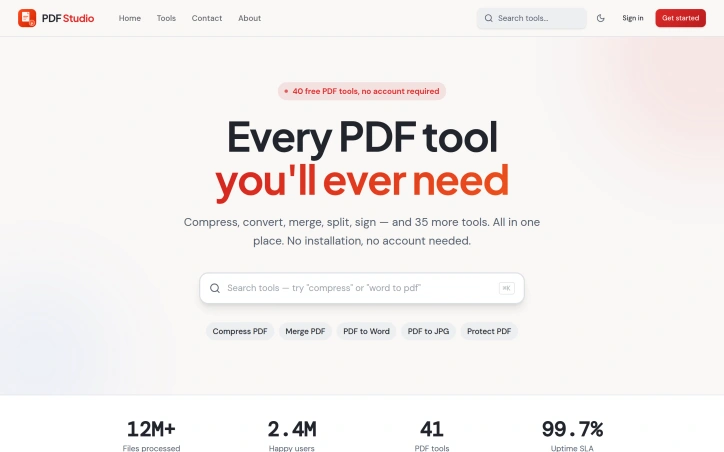
Managing PDF documents has traditionally required either expensive software subscriptions, local installations, or compromised functionality. PDF Studio addresses this gap with a web-based toolkit designed to streamline common document workflows without additional friction. The platform targets a broad audience spanning students managing academic assignments, professionals organizing business documents, and general users handling everyday PDF tasks. The core promise centers on accessibility and simplicity, removing barriers that often exist with desktop solutions or feature-restricted online alternatives. The feature set covers the essential PDF operations most users encounter. Conversion capabilities allow documents to be transformed between formats, while compression tools reduce file sizes for easier sharing. Document manipulation features include merging multiple files and splitting them into sections, along with editing functionality to modify content directly in the browser. Security features provide password protection for sensitive documents and unlocking capabilities for restricted files. What distinguishes PDF Studio in a crowded market is its fully browser-based architecture. This design choice eliminates the need for software installation entirely, allowing users to work with documents from any device with internet access. The emphasis on browser-based operation prioritizes immediacy over setup complexity. The platform has been featured on prominent AI and tools directories including AgentHunter and TakeAI, establishing recognition within tech communities. These inclusions demonstrate the service has differentiated itself enough to merit placement in curated collections. The product's architecture targets removing friction points commonly associated with PDF management. Rather than catering to power users with advanced features, the design prioritizes reliability and straightforward access to core functions. The stated commitment to security and user-friendliness reflects a focus on building trust with users handling sensitive documents. For users evaluating PDF management solutions, PDF Studio delivers a no-installation alternative that emphasizes common operations. The browser-based approach addresses a specific pain point for users who want immediate access without software setup or maintenance overhead. The platform's viability depends on execution quality relative to established competitors in the online PDF tools market, but it stakes out a clear position for users prioritizing accessibility and simplicity over advanced capabilities.

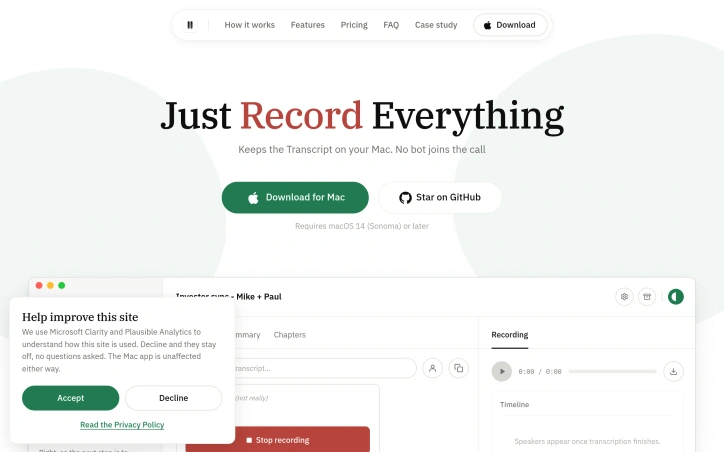
Record any meeting on macOS. Speakers labelled, transcript searchable. No bot joins the call, and your recordings stay on your Mac. No third participant ever joins

Browser tabs containing bank logins, client files, and sensitive emails remain completely unprotected throughout the workday. Locksy solves this by adding encryption and automatic locking directly within the browser, eliminating the need for traditional password managers or manual security rituals. The product targets anyone who handles confidential information in a browser but finds existing security tools either invasive or inconvenient—remote workers, consultants, and professionals dealing with sensitive client materials fall into this category. Locksy's defining characteristic is its refusal to rely on cloud infrastructure. All encryption happens locally on the user's device, meaning data never leaves the browser itself. This architecture eliminates an entire category of risk that cloud-based competitors cannot escape: the possibility of a central breach, subpoenaed logs, or a company pivoting toward data monetization. The product functions offline, removing dependency on internet connectivity for basic security operations. Auto-locking addresses the behavioral side of security—where users fail to manually protect information. By making protection automatic rather than optional, the product closes the gap between intention and action. The company's bootstrapped foundation shapes its entire approach differently than venture-backed security startups. While competitors pile on features to justify premium subscriptions, Locksy provides free access to core functionality. This reflects confidence in the value proposition and an emphasis on removing adoption friction rather than maximizing revenue per user immediately. The founders articulate their philosophy clearly: they built Locksy out of frustration with security products that sacrifice usability in the name of safety. That focus on combining practical convenience with actual security distinguishes the positioning. Rather than attempting to replace password managers or become an identity platform, Locksy tackles one specific problem exceptionally rather than many problems adequately. The product mentions military-grade encryption, though specifics on cryptographic standards or implementation details aren't disclosed in available materials. For a security product, greater technical transparency would strengthen confidence among informed users, though the offline-first architecture already eliminates major attack surfaces that cloud competitors face. Locksy represents a meaningful attempt to solve a real problem—unprotected browser tabs—without the surveillance capitalist undertones that plague many privacy-focused tools.


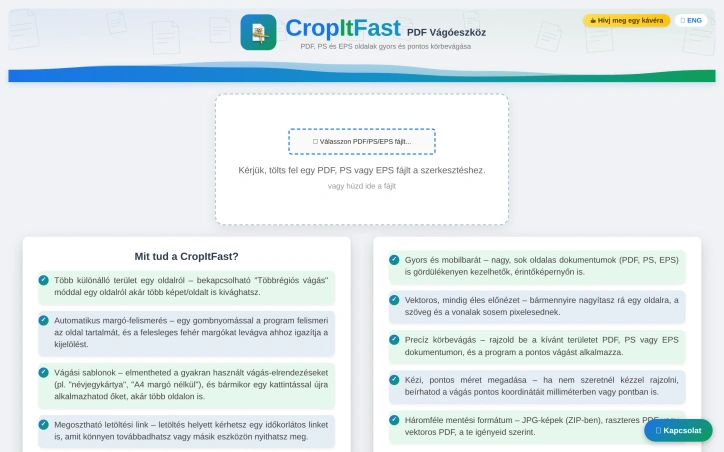
PDF cropping remains a friction point for anyone regularly handling document design, printing, or content extraction. Most available solutions force users toward bloated desktop applications or complex workflows that feel overkill for a single task. CropItFast tackles this directly by offering a streamlined browser-based alternative that prioritizes speed and precision without requiring any software installation. The product addresses a specific but genuine need: making batch document processing accessible. Whether you're preparing business cards, cutting out specific sections from longer documents, or preparing files for print, CropItFast handles these jobs without unnecessary complexity. The target audience spans designers, print professionals, content managers, and anyone who frequently manipulates PDF, PostScript, or EPS files. What distinguishes CropItFast from basic crop tools is its feature depth. Automatic margin detection eliminates manual adjustment for documents with uneven white space, a substantial time-saver when processing multiple pages. The multi-region cropping mode lets users extract several independent areas from a single page without relying on workarounds. Equally useful is the template system, which remembers frequently used crop layouts and applies them consistently across pages or even different documents. For users who prefer precision over clicking, exact coordinate input in millimeters or points ensures mathematical accuracy. The platform's output flexibility warrants attention. Users can export to JPG, raster PDF, or vector PDF depending on their downstream needs, with adjustable quality settings for DPI and JPEG compression. This adaptability matters for professionals who might need sharp screen-ready images one day and print-ready files the next. The option to generate shareable download links with time restrictions adds a collaboration layer, allowing users to distribute results without permanently hosting sensitive files. The interface shows thoughtfulness toward modern usage patterns. Vector-based preview rendering ensures crisp text and lines regardless of zoom level, while mobile support acknowledges that PDF handling increasingly happens on phones and tablets. The tool's claimed ability to handle large, multi-page documents smoothly suggests engineering attention to performance. One note: the website references missing JavaScript files required for the interface library. This indicates either outdated documentation or a production concern worth investigating before evaluating the tool. For users tired of desktop PDF editors or struggling through complex alternatives, CropItFast delivers focused functionality optimized for the actual task rather than general document editing.

Buying a car in Europe means navigating fragmented dealer networks, conflicting reviews, and sales pitches designed to prioritize dealer margins over buyer needs. This Greek startup tackles that friction with a structured research tool that pulls from live listings, safety data, and actual running costs to surface recommendations you can trust. The product addresses a genuine gap. While generalist AI chatbots can discuss cars in the abstract, they cannot access current inventory, calculate real total cost of ownership for a specific market, or save your research across sessions. KAR aggregates listings across European dealers, compares trim specifications on fuel consumption and maintenance costs, and cross-references safety ratings from Euro NCAP. The result is a shortlist of one to five vehicles that match your budget and requirements with reasoning attached. The delivery mechanism is straightforward. Users fill out a preference form specifying budget, body type, driving patterns, and must-have features. The system then returns recommendations with estimated pricing, running cost breakdowns, availability, and where to purchase. The founder built this to counter the incentive structure that makes dealers push what maximizes their margins rather than what serves the buyer. The company takes no dealer commissions and publishes no review fees, positioning itself as genuinely neutral. What distinguishes KAR from both traditional automotive review sites and AI assistants is its focus on actionable, structured output. The platform doesn't just talk about cars; it saves your shortlist, garage history, and prior comparisons so your research persists. It also extends beyond car selection into accessories and parts matching, comparing OEM options against quality aftermarket alternatives with fitment verification and pricing from multiple suppliers. Early traction suggests the model resonates. The company has matched over 100 drivers with recommendations and delivered 200-plus car suggestions. It covers 40 brands across Europe and has secured coverage in GOCAR.gr, Greece's leading automotive publication. The narrowest limitation is geographic focus. KAR emphasizes availability and pricing across European listings, making it most useful for buyers in that market. Buyers seeking broader research on vehicle performance will find less value. The platform also requires users to trust that its AI research methodology is sound without transparency into how recommendations are weighted or how it compares against expert automotive reviewers. For European buyers tired of dealer-driven car shopping, KAR offers a genuinely different model grounded in data rather than commission.