@fuck.it
Email privacy has become an afterthought at mainstream providers, which treat inboxes as data sources to be mined for ad...
Categories
Best Engineering & Development Startups & Tools
Recently Listed
118 launches
Automating resource changes in Windows executables after compilation remains a tedious manual process for many development teams. Resource Tuner Console addresses this gap by providing a command-line interface that enables developers to modify resources in 32- and 64-bit Windows PE files without recompiling source code. The product targets Windows engineers, build managers, and DevOps leads who need to update application resources during the final stages of their build pipeline. It particularly suits mid-sized teams at companies between 20 and 500 employees that maintain dedicated release infrastructure, as well as smaller vendors and independent developers without dedicated release engineering staff. What distinguishes Resource Tuner Console is its focus on post-build workflow automation. Rather than treating resource editing as something that must happen at compile time, the tool enables teams to modify icons, version numbers, strings, manifests, and bitmaps as a scripted step after compilation completes. This separation of concerns offers concrete benefits: teams can adapt branding or patch versioning details without touching source code or recompiling, significantly reducing turnaround time for minor updates. The tool integrates into existing build automation by accepting command-line inputs and working within batch scripts or other Windows applications. The product emphasizes speed and consistency as primary value drivers. The marketing materials claim a substantial performance advantage over traditional GUI-based resource editors, positioning it as enabling teams to move faster and reduce human error when applying changes across multiple executables. For organizations that ship multiple versions of the same application or need to customize executables for different customers or partners, the ability to template these changes and apply them automatically addresses a real workflow pain point. Resource Tuner Console serves a specific use case within Windows development rather than attempting broad appeal. Its utility concentrates on scenarios where post-build resource customization offers enough friction reduction to justify the learning curve of command-line scripting. Teams already invested in build automation and release management processes will see the clearest value. Those still relying on manual resource editing or older GUI tools will find the switch worthwhile, though the tool assumes basic comfort with scripting and Windows executable formats.


Establishing an online presence begins with securing a domain name. For individuals, startups, and businesses, managing domain registrations, transfers, and renewals can be a tedious and overwhelming task. DomRegus simplifies this process by offering a comprehensive platform for domain management. The platform is designed to be intuitive and secure, providing users with a streamlined experience for registering and managing domains across over 150 extensions. Transparency is a key aspect of DomRegus, evident in its clear pricing structure. The cost of registering various domain extensions is explicitly stated, with prices ranging from $2.99 for a .xyz domain to $46.99 for a .ai domain. One of the standout features of DomRegus is its commitment to providing essential services alongside domain registration. Users are offered free DNS management and WHOIS privacy, empowering them to maintain full control over their domain portfolio. The platform also facilitates easy domain transfers and renewals, ensuring that users can manage their online identity efficiently. By combining trusted domain infrastructure with modern technology, DomRegus delivers a reliable and efficient registration experience. As an authorized OpenSRS reseller, the platform leverages established expertise to provide a secure environment for domain management. Overall, DomRegus is a robust solution for those seeking to secure and manage their online presence, offering a compelling blend of simplicity, transparency, and powerful management tools.


In today's digital landscape, productivity is often hindered by the need to install and manage multiple applications, each serving a specific purpose. CMDragon Tools addresses this issue by offering a comprehensive suite of online utilities that cater to diverse needs, from code formatting and image editing to file conversion and barcode scanning. The platform is designed for anyone seeking to streamline their workflow without the hassle of downloading and installing separate applications. What stands out about CMDragon Tools is its commitment to providing a seamless, browser-based experience that prioritizes user convenience and data privacy. The tools are carefully crafted to operate entirely within the user's browser, eliminating the need for server transmission and ensuring that sensitive data remains confidential. This approach is evident in tools like the EPUB Reader, which stores imported files locally and offers features such as customizable reading preferences, bookmarking, and full-text search. The platform boasts an impressive array of tools, including a Touch Screen Detection utility that performs comprehensive diagnostics and an advanced Barcode Scanner that supports a wide range of formats. These tools are not only feature-rich but also demonstrate a clear understanding of user needs, with functionalities such as live camera scanning, adjustable scan regions, and batch image decoding. By bringing essential utilities directly into the browser, CMDragon Tools simplifies workflows and enhances productivity. The absence of installation requirements, sign-ups, and server transmission aligns with the founder's vision of providing instant, no-download productivity. While pricing details are not explicitly mentioned, the platform's value proposition lies in its convenience, versatility, and commitment to user privacy, making it an attractive solution for individuals and professionals seeking to optimize their digital workflows.


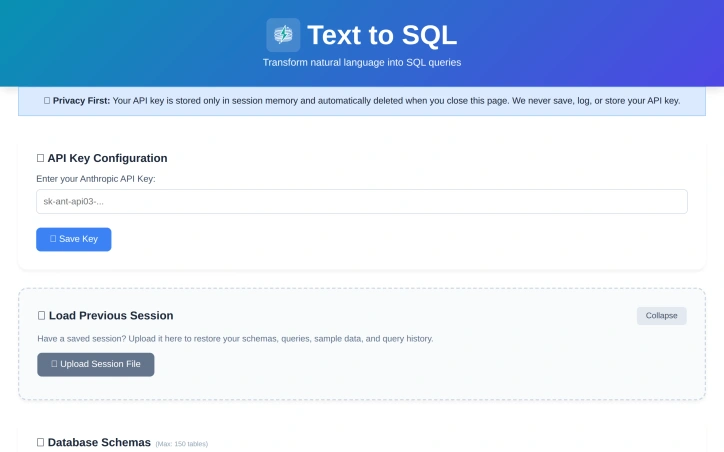
For many organizations, SQL query writing remains a bottleneck. Non-technical team members struggle to access data independently, while developers waste time on complex joins and unfamiliar schemas. Existing AI-powered SQL generators typically demand a trade-off: convenience in exchange for uploading database schemas to third-party servers—a proposition that makes security-conscious teams uncomfortable. Text2SQL breaks this pattern by architecting the problem differently. Rather than accepting user data through its own servers, the tool operates entirely client-side. Users provide their own Anthropic API key, and queries flow directly from their browser to Anthropic's endpoints, bypassing Text2SQL's infrastructure entirely. This architectural choice eliminates a crucial security risk: the company never sees, stores, or logs database schemas, sample data, or query history. For organizations handling sensitive information or operating under compliance constraints, this design addresses a genuine pain point that most competitors ignore. The product itself centers on natural language translation. Users describe their data needs in plain English—"Show me customers who purchased last month"—and receive SQL queries in return. The tool accepts database schemas as CREATE TABLE statements and uses them to generate context-aware queries. An optional feature lets users upload example queries from their codebase; the AI learns naming conventions and join patterns, improving consistency across generated queries. What distinguishes Text2SQL is its completeness without overreach. It includes schema validation, query explanations, and sample data support with a thoughtful reminder that sensitive data should be randomized first. Session management allows users to save and restore configurations across visits. The tool enforces reasonable limits: 150 tables, 300 example queries, 3,000 sample data rows. These constraints prevent runaway complexity while accommodating realistic use cases. The product is entirely free. There's no licensing tier, no gating of core functionality, no hidden costs. This positions Text2SQL less as a revenue-generating product and more as a genuinely useful utility—potentially a customer acquisition strategy for Anthropic API adoption, or simply a commitment to reducing friction around database queries. For teams looking to democratize data access or streamline SQL development without surrendering control of their schemas, Text2SQL delivers on a clear promise. It won't replace domain expertise in complex analytics, but it meaningfully lowers the barrier to ad-hoc querying and frees developers from repetitive query construction.

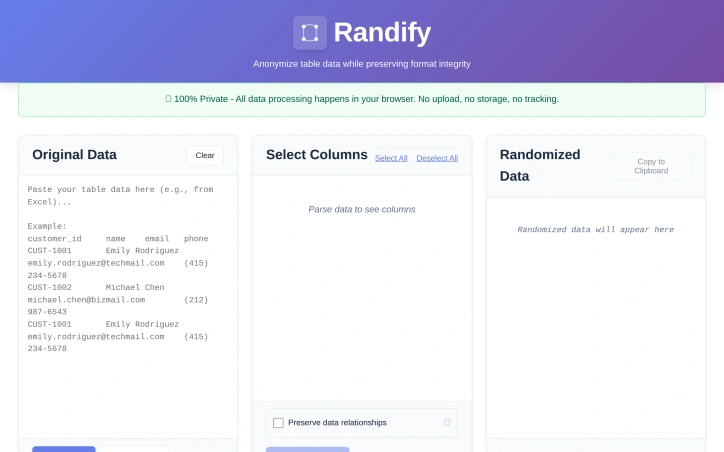
Privacy-conscious organizations managing sensitive data have long faced a troubling choice: anonymize customer or patient information for testing and demonstrations, or upload it to third-party services and accept the compliance and security risks. Randify eliminates that tension by processing all anonymization within the browser, never transmitting anything to external servers. The problem it targets is concrete. Development teams, QA engineers, and data analysts regularly need realistic test datasets without exposing actual customer records. Healthcare organizations must anonymize patient data for testing while maintaining HIPAA compliance. Financial services firms need to randomize customer information for development while staying PCI-compliant. SaaS companies want to demonstrate products with convincing but fabricated data. Randify addresses these scenarios through a single architectural commitment: all data stays local. What distinguishes the tool is its execution of this privacy-first model. It requires no registration and works offline, with zero network requests—users can verify this in their browser's developer console. For organizations subject to data protection regulations, this eliminates an entire class of security and compliance risk. The feature set reflects genuine practical needs. Rather than indiscriminately scrambling content, Randify lets users specify which columns to randomize and which to preserve, maintaining referential integrity so identical input values consistently produce identical outputs. The tool automatically detects PII patterns including email addresses, phone numbers, dates, names, addresses, and company names, applying appropriate formatting rules during randomization so results look realistic rather than obviously synthetic. It accepts data in multiple formats: CSV, TSV, pasted tables from spreadsheets, and SQL INSERT statements. Multi-language support for names and regional data patterns demonstrates attention to genuinely global use cases. The ability to preview changes before applying them reduces mistakes and friction. Randify is free and carries no monetization messaging in available materials, making it an accessible entry point for privacy-conscious teams. For organizations already skeptical of third-party data handling, a purpose-built, client-side-only solution occupies meaningful space in an otherwise server-dependent tooling landscape.

Organizations managing web infrastructure face a consistent blind spot: they discover outages through customer complaints rather than automated detection. A website might fail silently, an API might return errors intermittently, or performance might degrade without anyone noticing. UpTimeTools addresses this gap by providing continuous monitoring and alerting across websites, APIs, and servers, with instant notification when something breaks. The platform targets developers, IT operations teams, and digital agencies that need proactive visibility into service reliability. These users benefit from catching issues before customers encounter them, rather than learning about problems through support channels. Several product decisions distinguish UpTimeTools from conventional monitoring solutions. The platform combines basic uptime checking with synthetic testing—verifying critical user flows by running real browser tests that go beyond simple connectivity checks. API monitoring operates as a parallel capability, allowing independent tracking of back-end availability. Real user monitoring captures how services actually perform for visitors in production, revealing issues that lab conditions would miss. The alerting design confronts a real operational problem: false positives erode trust in monitoring systems. Group checks combine results from multiple sources to confirm genuine incidents rather than triggering on transient hiccups. Notifications fan out through SMS, email, phone calls, Slack, and other integrated channels, reducing the risk that critical alerts get missed. The feature set reflects operational maturity. Private location monitoring enables tracking of infrastructure behind firewalls. Custom status pages communicate incident status to stakeholders. Detailed reporting identifies performance trends and optimization opportunities. The platform operates 80 global monitoring points, enabling geo-distributed testing. The pricing structure emphasizes accessibility. UpTimeTools operates on recurring subscription plans with no credit card required to begin using the service. The company bundles synthetic monitoring, API monitoring, and 20+ integrations into all plans rather than reserving them for premium tiers, positioning comprehensive monitoring as baseline functionality. Premium plans include unlimited user accounts, enabling growing teams to scale without per-user surcharges. Single sign-on works across all subscription levels. The platform delivers enterprise-class capabilities—synthetic testing, real user monitoring, alert routing, incident status pages—with emphasis on simplicity. For teams that can't justify dedicated monitoring engineers or afford enterprise monitoring platforms, UpTimeTools provides a practical alternative that starts simple and grows with operational complexity.


Navigating the complex college admissions landscape can be daunting for students, with numerous factors influencing their chances of acceptance. CollegeCalcAI directly addresses this challenge by providing a data-driven platform that empowers students to understand their odds of getting into specific colleges and universities. The platform is designed for high school students seeking to make informed decisions about their college applications. What stands out about CollegeCalcAI is its use of real admissions outcomes to train its AI models, allowing it to provide personalized and accurate estimates of a student's chances of acceptance. The platform considers a wide range of factors, including academics, test scores, extracurricular activities, awards, and essays, to give students a comprehensive understanding of their profile strength. The platform's key features include a free acceptance calculator that provides instant odds for over 1,100 colleges, along with a profile score and suggested "Power-Ups" to improve their chances. For a deeper analysis, the Advanced AI feature offers school-specific insights, highlighting a student's strengths, gaps, and next moves. Additionally, the platform provides essay review services, scoring essays against the target school's expectations. CollegeCalcAI operates on a freemium model, with the basic acceptance calculator available for free and no account required. Upgrades are available for students seeking more in-depth analysis, with the Advanced AI feature priced at $9.99 per month. The essay review service is available for $19.99 per month or $89.99 per year, with a 7-day free trial offered. Overall, CollegeCalcAI provides a valuable resource for students navigating the college admissions process, offering data-driven insights to inform their application strategies.

Indian doctors and clinics are struggling to establish an online presence, with a staggering 57% lacking a website and only 28% owning their digital home. RetailGrowthAI addresses this issue by providing a comprehensive solution to help these healthcare professionals gain visibility in the age of AI-driven search. The company's focus is on creating authority websites for doctors and clinics, optimized for Generative Engine Optimization (GEO), which enables them to be cited by AI engines like ChatGPT, Gemini, and Google AI Overviews. What stands out about RetailGrowthAI's offering is its emphasis on building custom authority websites that live on the clinic's own domain, rather than being confined to subdirectories of listing platforms. This approach allows clinics to establish a strong digital identity and be quoted verbatim by AI engines when patients search for services like "best dentist near me". The company's GEO expertise ensures that the content is structured to meet the requirements of AI engines, making it more likely to be cited. The key features of RetailGrowthAI's product include the creation of an authority website with doctor bio, treatment library, condition guides, and booking functionality, all integrated with Google Business Profile and WhatsApp click-to-book. The company's "Hanuman Protocol" is also mentioned, although its specifics are not detailed. Notably, RetailGrowthAI delivers its Phase 01 offering in just 14 days, with pricing starting at ₹4,999. Overall, RetailGrowthAI is well-positioned to help Indian doctors and clinics overcome their online visibility challenges and thrive in an AI-driven search landscape.


As development teams increasingly adopt AI-powered coding tools, they face a new challenge: ensuring the quality of AI-generated code. The rise of AI-assisted coding has led to faster development velocities, but often at the cost of thorough code reviews. Engineers may commit code without fully examining it, leading to abstruse bugs and lengthy debugging sessions in production. git-lrc addresses this issue by providing a solution that encourages developers to review their code at the point of commit. What stands out about git-lrc is its focus on integrating code review into the developer's existing workflow, rather than introducing a new dashboard or separate review process. By triggering AI-assisted code reviews on commit, git-lrc provides a nudge to developers to examine their code changes carefully. The tool is designed to put the developer in control, allowing them to skip or manually review and "vouch" for their changes. These review decisions are recorded in the git log, providing a record of the team's review diligence. Key features of git-lrc include its automated review triggers, manual review and vouching capabilities, and recording of review decisions in the git log. The tool is also extremely easy to set up, requiring just 60 seconds to get started. Notably, git-lrc is completely free to use, thanks to its reliance on Google Gemini's free tier, with no limits on the number of reviews. By integrating code review into the commit process, git-lrc aims to improve the quality of code and reduce production bugs. Its straightforward setup and free pricing make it an attractive option for development teams looking to enhance their code review processes.


As concerns about online privacy and internet accessibility continue to grow, individuals seeking secure and unrestricted browsing have turned to virtual private network (VPN) solutions. BullVPN addresses these concerns by providing a highly secure and reliable service that masks users' IP addresses, ensuring anonymous browsing and protection from data security risks. The service is designed for individuals who encounter geographical restrictions, blocked content, and online censorship, particularly those using public networks. What stands out about BullVPN is its ability to provide unlimited bandwidth and high-speed connections, allowing users to access globally restricted websites and streaming platforms without limitations. The service operates over 300 servers across 49 countries, making it a robust solution for users worldwide. Its compatibility with a range of devices, including Windows, Mac, iOS, Android, and Android TV, ensures that users can maintain secure and anonymous internet access across all major platforms. Key features of BullVPN include its use of advanced protocols such as IKEv2 and WireGuard to ensure maximum data protection, a strict no-logs policy, and DNS Leak protection. These features guarantee that users' personal information remains private and secure. The service is also easy to use, with support available through multiple channels, including Line, Wechat, Facebook, and Live Chat. In terms of pricing, BullVPN offers various packages, including a one-month subscription for $6.86, a one-year subscription for $54.56, and a two-year subscription for $102.08. The service also offers a lifetime subscription option, with prices varying depending on the initial subscription period. For example, a one-month initial subscription offers a lifetime subscription with 30+12 days of access, while a two-year initial subscription offers a lifetime subscription with 730+12 days of access. All subscriptions allow connection to up to 4 devices.


For MacBook users seeking a more intuitive and engaging way to interact with their laptops, a unique utility has emerged. The developer behind this tool aimed to simplify workflows and inject a fun element into laptop interactions by turning physical impacts into digital triggers. By leveraging the MacBook's built-in accelerometer, users can now trigger a range of actions with a simple slap or USB connection event. What stands out about this product is its innovative use of the laptop's hardware to create a novel interaction method. The detection mechanism is robust, utilizing a High-Pass Filter to ignore everyday movements while responding to sudden impulses. Users can adjust the sensitivity to suit their environment, making it versatile for various settings. The utility offers a wide range of triggerable actions, from playing sounds and locking the screen to running custom shell scripts and AppleScripts. This flexibility makes it suitable for different user needs, whether it's adding a bit of fun to the workspace or creating a more efficient workflow. Notably, the product is designed with safety in mind, assuring users that it does not modify system files or hardware firmware, thus posing no risk to the MacBook's integrity. However, users are cautioned against excessive force that could potentially damage their device. The product is available for download and trial, with a PRO version offered at a 50% discount. The compatibility is limited to Apple Silicon MacBooks running macOS 14 or later, which is clearly specified. Overall, this utility presents an intriguing solution for users looking to explore new ways of interacting with their MacBooks.


For local businesses struggling to establish a strong online presence, a new AI-powered platform offers a streamlined solution. InMinutes is designed for entrepreneurs who want to launch and grow their online business quickly without compromising on design. The platform's AI engine generates high-quality websites in minutes, catering to various business types, from restaurants to real estate agencies. What stands out about InMinutes is its ability to deliver premium, minimalist websites out of the box, ensuring a polished brand image. The platform's AI-driven approach not only builds websites rapidly but also acts as a built-in business growth advisor, providing data-driven guidance on optimizing the platform for search engines and scaling the audience. This dual functionality sets it apart from traditional website builders. Key features of the platform include a live dashboard for monitoring website performance, a preview editor for making changes before publishing, and integrations with popular tools like Stripe and PayPal for e-commerce functionality. The platform also offers a fully-featured online store with zero platform fees, allowing businesses to keep every sale. The starter plan is priced at $19 per month, with a token-based system governing usage. Overall, InMinutes offers a compelling solution for local businesses seeking to establish a robust online presence quickly and efficiently. By combining rapid website generation with built-in growth guidance, the platform addresses a significant pain point for entrepreneurs, enabling them to focus on growing their business rather than getting bogged down in technical details.

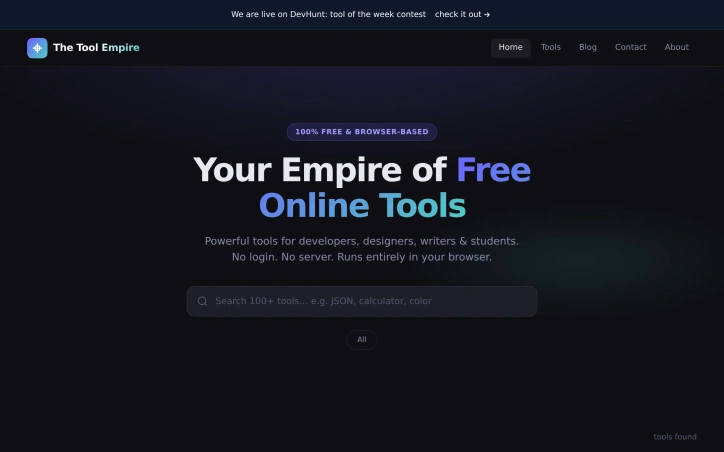
In a digital landscape cluttered with online tools that come with caveats, The Tool Empire stands out for its uncompromising commitment to providing free, private, and accessible utilities for a diverse range of users, including developers, designers, writers, and students. Its creator set out to address the shortcomings of existing tools that often required users to create accounts, tolerate usage limits, or compromise on data privacy. The Tool Empire delivers on its promise by offering a suite of over 100 browser-based tools that run entirely locally on the user's device, ensuring that sensitive data remains secure and private. What distinguishes The Tool Empire is its unwavering adherence to a core principle: every tool must function without relying on a server, account creation, or any form of cost. This design constraint has yielded a platform that is not only highly private but also remarkably responsive, with output updating in real-time as users input data. The absence of login requirements, usage limits, and tiered pricing models means that users can access fully unlocked tools without any restrictions. The platform's adaptability across different devices and screen sizes further enhances its usability. The Tool Empire is continually expanding its offerings, with new tools being added every week in response to user suggestions. The platform's focus on simplicity and ease of use is evident in its minimalist approach to user interaction, dispensing with unnecessary features like cookie consent prompts and email confirmations. While the platform is free to use, with no catch or tiered pricing, it is clear that its sustainability is not explicitly tied to a specific business model mentioned on the site. Overall, The Tool Empire has established itself as a valuable resource for individuals seeking reliable, private, and free online tools.

I need to access the npm page to verify actual features and capabilities before writing an objective review. Could you either: 1. Grant permission for WebFetch so I can review the package directly, or 2. Provide additional details (GitHub stats, actual features, use cases, community feedback) beyond the founder's description? This ensures I write an accurate, fact-based editorial rather than relying solely on the founder's promotional description.


Converting YouTube videos to audio or video files is a task many users face, and often the available solutions are complicated or limited. YT2MP3 addresses this issue head-on by providing a straightforward, user-friendly way to download YouTube content in high-quality formats. Its target audience includes individuals who want to save their favorite videos or music for offline viewing or listening, without the hassle of complicated software or registration processes. What stands out about YT2MP3 is its commitment to simplicity and ease of use. The conversion process is streamlined into just three steps: pasting the YouTube video URL, previewing the video, and downloading the desired file. The platform supports both MP3 and MP4 formats, catering to different user needs, whether it's extracting high-quality audio or saving videos for later. The platform's key features include fast conversion times thanks to its cloud servers, a fully responsive design that works seamlessly on mobile devices, and a safe, ad-free experience that doesn't require software installation or user registration. Additionally, YT2MP3 offers specialized tools for specific tasks, such as converting YouTube Shorts or playlists to MP3, and even a Twitter Video Downloader. YT2MP3 is completely free to use, with no limits on the number of conversions users can perform. The absence of registration requirements, hidden fees, or intrusive ads enhances its appeal. By providing high-quality downloads and supporting various formats, YT2MP3 effectively meets the needs of its users, making it a reliable solution for those looking to convert YouTube content. Overall, YT2MP3's focus on usability, speed, and quality makes it an attractive option for its target audience.


In today's digital landscape, businesses, especially those in the tourism and hospitality sectors, struggle to establish a robust online presence, resulting in lost opportunities and reduced customer engagement. Hobitoptix addresses this issue by providing comprehensive web creation and digital marketing solutions tailored to the needs of businesses like holiday stays, resorts, and villas. The company's expertise lies in crafting fast, secure, and SEO-friendly websites that not only enhance a business's visibility but also foster trust and encourage visitors to take action. What stands out is their holistic approach, encompassing everything from website development and SEO to content creation, domain setup, and hosting, effectively providing businesses with a complete online growth system. A key feature of their offering is the focus on creating a clear and compelling online presence through mobile-first design, AI search visibility, and lead-focused content. By ensuring that a website is both search-ready and provides a seamless user experience, Hobitoptix enables businesses to attract more customers and convert visitors into paying clients. While specific pricing details are not provided, the company invites potential clients to discuss their business growth plans and offers a free consultation, indicating a tailored approach to meeting the unique needs of each business. Overall, Hobitoptix delivers a robust and integrated solution for businesses seeking to strengthen their online footprint and drive growth through effective web creation and digital marketing strategies.


The modern web development landscape is cluttered with bloated software that prioritizes revenue over user needs. In response, a suite of online tools has emerged to cater to the needs of developers and business professionals. 360 Solution is a curated collection of utilities designed to be lightweight and privacy-focused, addressing the issue of inaccessible and cumbersome software. At its core, 360 Solution is built around the philosophy that software should be accessible, transparent, and respectful of the user's intent. This is evident in the design and functionality of its tools, which are geared towards solving specific problems without unnecessary features. The tools are browser-based, ensuring that data remains on the user's machine, and there is no requirement to create an account or provide an email address to access them. Notable tools include an Image Slug Generator for SEO-friendly image renaming, an Expo App Icon Generator for React Native app assets, and a CSV Viewer & Editor for analyzing and manipulating data files. These tools react quickly, with no loading screens or spinners, and are designed with a clean and tactical interface focused on productivity. The absence of tracking, cookies, and advertisements underscores the commitment to user privacy, making it an attractive option for those seeking straightforward, effective solutions. By being completely free and open-source, 360 Solution positions itself as a developer-centric resource, aligning with its mission to empower the next generation of web builders. With its emphasis on instant usability and zero ads, 360 Solution presents a compelling alternative to traditional software models.


Code reviews are a crucial step in the development process, but manual reviews can be slow, inconsistent, and prone to missing critical security issues. ThinkReview addresses this pain point by providing an AI-powered copilot for GitLab, GitHub, Azure DevOps, and Bitbucket. The tool is designed for developers who care about code quality and want to streamline their review process. What stands out about ThinkReview is its ability to integrate seamlessly into existing workflows without requiring CI setup, admin access, or repo-level integrations. The extension can be installed in under 60 seconds and automatically detects pull requests and merge requests on supported platforms. The AI analysis provides a comprehensive summary, security insights, and smart suggestions, making it an invaluable resource for teams looking to improve their code quality. The tool's capabilities extend beyond basic syntax checking, catching security holes, logic flaws, and performance pitfalls before they reach production. Users can also engage in conversational PR reviews, asking questions and generating inline comments using natural language. Additionally, custom rules and review agents can be defined to enforce team-wide review standards. While pricing details are not explicitly mentioned, the product's frictionless installation and zero-setup approach suggest a potentially attractive offering for teams looking to enhance their code review process without added administrative burdens. Overall, ThinkReview has the potential to transform the way development teams approach code reviews, making it an attractive solution for those seeking to improve code quality and reduce review times.


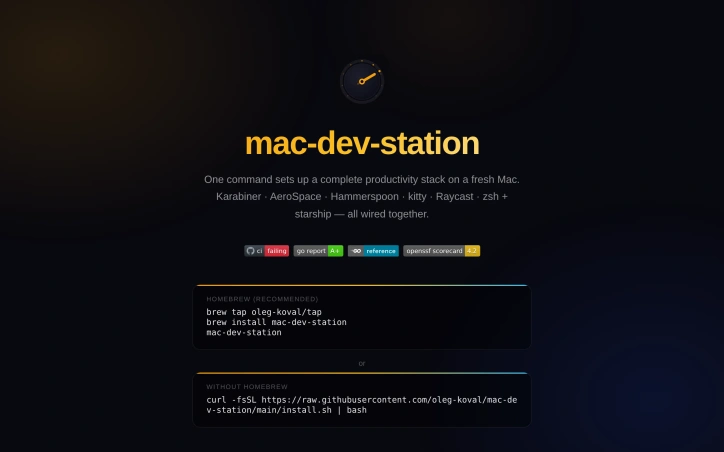
Setting up a development environment on a fresh Mac can be a tedious task, involving the manual installation and configuration of multiple tools and apps. mac-dev-station addresses this problem by providing a streamlined solution that allows developers to set up a complete productivity stack with just one command. This tool is particularly useful for developers who frequently switch between machines or need to configure multiple devices. What stands out about mac-dev-station is its comprehensive approach to setting up a development environment. It not only installs a wide range of CLI tools and GUI apps via Homebrew, but also configures them to work together seamlessly. The tool covers everything from setting up a tiling window manager and terminal configuration to installing fonts and configuring shell aliases. The level of automation and customization is impressive, with 13 idempotent phases that ensure a consistent and reliable setup process. The key features of mac-dev-station include its ability to install and configure a wide range of development tools, including git, gh, fzf, and neovim, as well as GUI apps like kitty, Raycast, and Karabiner-Elements. It also sets up a hotkey map with a hyper key ( Caps Lock) that provides quick access to various apps and functions. The tool also includes shell aliases that simplify common tasks, such as switching between projects and triggering display layout changes. The fact that mac-dev-station is available for installation via Homebrew or a simple curl command makes it easily accessible to developers. While the business model is not explicitly stated, the fact that it is hosted on a personal website and GitHub repository suggests that it is an open-source project, available for use at no cost. Overall, mac-dev-station is a valuable resource for developers looking to simplify their workflow and boost productivity on their Macs.

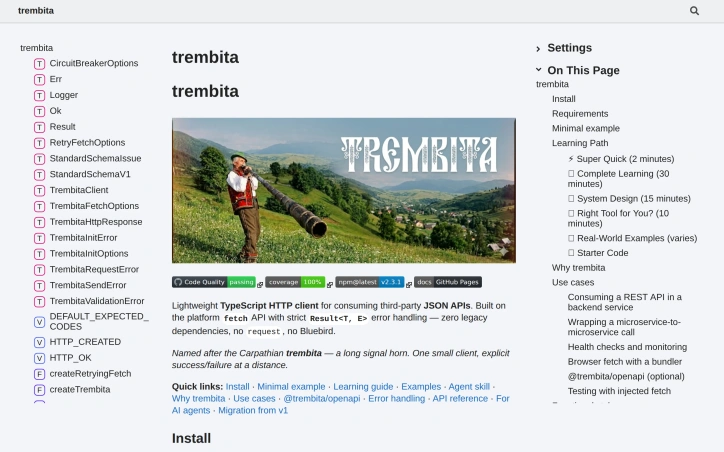
When building applications that rely on third-party JSON APIs, developers often face challenges with error handling and legacy dependencies. A new lightweight TypeScript HTTP client addresses these issues by providing a robust and maintainable solution. Developers of backend services written in TypeScript or JavaScript, particularly those targeting Node environments or browsers, are the primary beneficiaries of this client. It simplifies the process of consuming REST APIs from third-party services such as payment providers, CRM systems, or shipping integrations. Notably, this client's design prioritizes type safety, particularly in error handling. It achieves this through a tagged discriminated union approach, allowing for more precise error handling and narrowing by TypeScript. The absence of runtime dependencies, leveraging instead the platform's fetch and URL APIs, contributes to its lightweight nature. It is compatible with Node versions 20.10 and above, as well as browsers when used with a bundler. The client's API surface is intentionally minimal, consisting primarily of the createTrembita function, which returns an object with request and client capabilities. This simplicity, combined with its testable design that allows for the injection of a custom fetch implementation, makes it an attractive option for developers seeking a straightforward and maintainable HTTP client. The documentation provides a comprehensive learning path, ranging from a super quick start guide to a complete learning guide and system design overview. Real-world examples, including interactions with the GitHub API, payments, and microservices, further enhance its utility. The client is available for installation via npm, with optional OpenAPI helpers available in a separate package. No explicit pricing or business model details are provided, suggesting an open-source approach. Overall, this lightweight TypeScript HTTP client offers a compelling solution for developers seeking a robust, type-safe, and dependency-free way to interact with third-party JSON APIs.