Best Design & Creative Startups & Tools

Recently Listed

220 launches

Sort
AI Mixer - AI Photo | AI Video | AI Voice. All AI tools in one app!

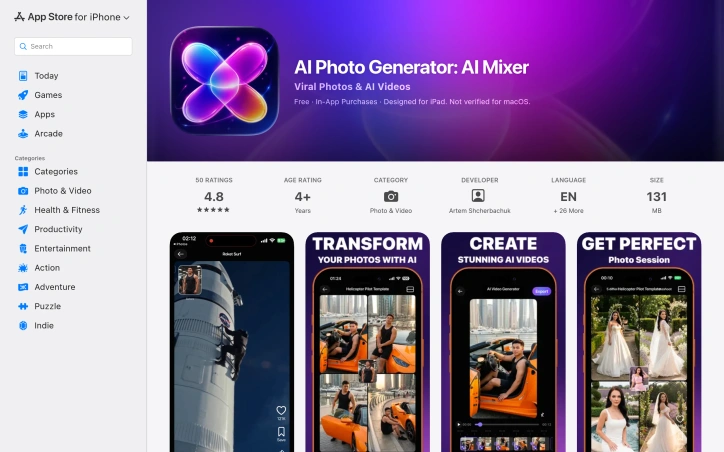
The fragmentation of AI creativity is a significant hurdle for individuals seeking to leverage AI tools for their content creation needs. Currently, users are forced to navigate multiple apps, subscriptions, and interfaces, resulting in a complicated and time-consuming process. AI Mixer addresses this issue by consolidating various AI-powered tools into a single creative studio. At its core, AI Mixer is designed for individuals who want to produce high-quality content quickly and efficiently, without requiring extensive technical expertise. The app caters to a diverse range of users, including creators, marketers, small business owners, influencers, and casual users. By providing an all-in-one platform, AI Mixer simplifies the creative process, allowing users to generate images from text, edit and enhance photos, create AI videos and reels, generate voiceovers, and engage in AI chat, all within a single interface. One of the standout features of AI Mixer is its comprehensive suite of AI-powered tools. Users can create stunning portraits, headshots, and selfies, as well as remove backgrounds, upscale images, and apply creative effects. The app also offers a range of templates for photos, videos, and voiceovers, which are regularly updated to keep content fresh and on-trend. Additionally, AI Mixer's flexible pricing model is based on a credit system, where users pay only for what they create, with an optional subscription available that offers premium benefits, including reduced credit usage and access to a full library of tools and templates. By streamlining the creative process and providing a wide range of AI-powered tools, AI Mixer makes AI creativity more accessible, flexible, and enjoyable for its users.
Ai-generative-media
A
Artem SHCHERBARCHUK

The fragmentation of AI creativity is a significant hurdle for individuals seeking to leverage AI tools for their content creation needs. Currently, users are forced to navigate multiple apps, subscriptions, and interfaces, resulting in a complicated and time-consuming process. AI Mixer addresses this issue by consolidating various AI-powered tools into a single creative studio. At its core, AI Mixer is designed for individuals who want to produce high-quality content quickly and efficiently, without requiring extensive technical expertise. The app caters to a diverse range of users, including creators, marketers, small business owners, influencers, and casual users. By providing an all-in-one platform, AI Mixer simplifies the creative process, allowing users to generate images from text, edit and enhance photos, create AI videos and reels, generate voiceovers, and engage in AI chat, all within a single interface. One of the standout features of AI Mixer is its comprehensive suite of AI-powered tools. Users can create stunning portraits, headshots, and selfies, as well as remove backgrounds, upscale images, and apply creative effects. The app also offers a range of templates for photos, videos, and voiceovers, which are regularly updated to keep content fresh and on-trend. Additionally, AI Mixer's flexible pricing model is based on a credit system, where users pay only for what they create, with an optional subscription available that offers premium benefits, including reduced credit usage and access to a full library of tools and templates. By streamlining the creative process and providing a wide range of AI-powered tools, AI Mixer makes AI creativity more accessible, flexible, and enjoyable for its users.

AI Mixer - AI Photo | AI Video | AI Voice. All AI tools in one app! preview

Key features

  • Text-to-Image Generation: Create images from text descriptions within the app
  • AI Video Creation: Generate AI videos and reels with regularly updated templates
See full listing
P

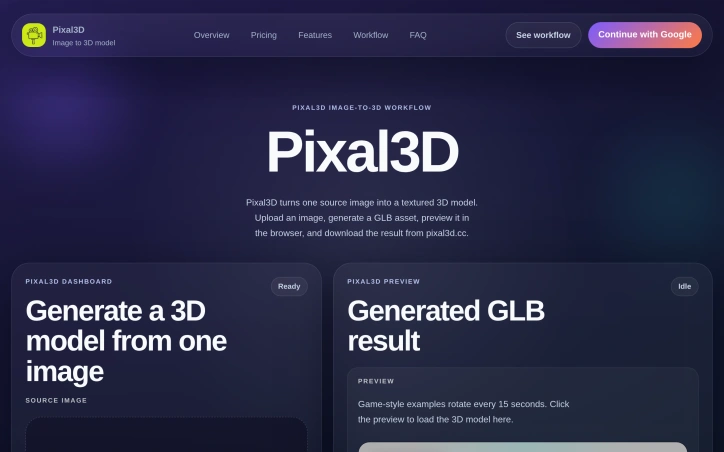
The process of creating 3D models can be a daunting task, often requiring extensive technical expertise and tedious manual work. Pixal3D addresses this challenge by providing a streamlined solution that generates textured 3D models from a single image. This innovative tool is geared towards creators who want to quickly bring their ideas to life without getting bogged down in complex geometry building or lengthy video prompts. What sets Pixal3D apart is its focused approach to image-to-3D model generation. By simplifying the process to just a few steps - uploading an image, selecting a resolution, and downloading the resulting GLB model - the platform makes it easy for users to produce high-quality 3D assets. The dashboard provides a user-friendly interface for managing uploads, tracking progress, and previewing results. Notably, Pixal3D offers a range of features that enhance its usability and output. Users can choose between standard and high-resolution outputs, with the latter providing more detailed textures. The generated models are also previewable directly in the browser, allowing for instant feedback. Additionally, the platform provides a gallery of example 3D models that demonstrate its capabilities. In terms of pricing, Pixal3D operates on a credit-based system, with different tiers offering varying numbers of credits per month or year. The basic plan is geared towards hobbyists and beginners, while the standard plan is more suited to creators who require more credits. Annual billing comes with a 50% discount, making it a more cost-effective option for those who plan to use the service regularly. The pricing plans also include a commercial use license, making it suitable for professional applications. Overall, Pixal3D offers a compelling solution for creators looking to simplify their 3D model creation workflow.

Ai-generative-media
J
Jimmy Lee

The process of creating 3D models can be a daunting task, often requiring extensive technical expertise and tedious manual work. Pixal3D addresses this challenge by providing a streamlined solution that generates textured 3D models from a single image. This innovative tool is geared towards creators who want to quickly bring their ideas to life without getting bogged down in complex geometry building or lengthy video prompts. What sets Pixal3D apart is its focused approach to image-to-3D model generation. By simplifying the process to just a few steps - uploading an image, selecting a resolution, and downloading the resulting GLB model - the platform makes it easy for users to produce high-quality 3D assets. The dashboard provides a user-friendly interface for managing uploads, tracking progress, and previewing results. Notably, Pixal3D offers a range of features that enhance its usability and output. Users can choose between standard and high-resolution outputs, with the latter providing more detailed textures. The generated models are also previewable directly in the browser, allowing for instant feedback. Additionally, the platform provides a gallery of example 3D models that demonstrate its capabilities. In terms of pricing, Pixal3D operates on a credit-based system, with different tiers offering varying numbers of credits per month or year. The basic plan is geared towards hobbyists and beginners, while the standard plan is more suited to creators who require more credits. Annual billing comes with a 50% discount, making it a more cost-effective option for those who plan to use the service regularly. The pricing plans also include a commercial use license, making it suitable for professional applications. Overall, Pixal3D offers a compelling solution for creators looking to simplify their 3D model creation workflow.

Pixal3D preview
P

Key features

  • Image Upload: allows users to generate 3D models from a single image
  • Resolution Options: users can choose between standard and high-resolution outputs
See full listing
Square Face Generator

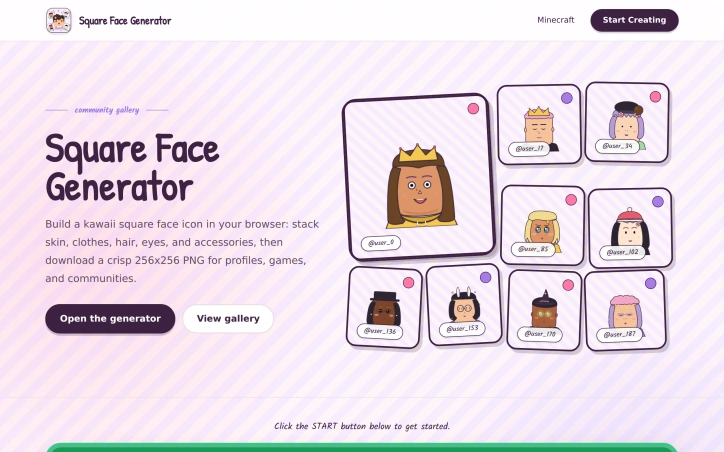
Avatar creation tools rarely balance simplicity with aesthetic personality, but Square Face Generator succeeds at both. This browser-based avatar maker targets creative professionals, gaming communities, and casual social media users who want distinctive profile icons without learning design software or committing to complex creation systems. The tool addresses a genuine gap: the need for quick, expressive avatars that feel personal rather than corporate. The product's visual identity anchors its appeal. Rather than adopting generic neutral tones, Square Face Generator embraces a Japanese anime aesthetic complete with soft pink and lavender backgrounds, sticker-like avatar cards, and hand-drawn styling cues. School-uniform details, gentle blush marks, and carefully designed hair silhouettes create avatars that feel intentionally cute rather than accidentally childish. This visual coherence extends to the interface itself, which presents the gallery as a creator booth rather than an admin dashboard, reinforcing that avatar-making here is meant to be playful exploration. Mechanically, the tool works through a layering system. Users select from categories including face shapes and skin tones, clothes, hair, eyebrows, eyes, mouths, glasses, hats, and accessories, then adjust colors for each element. The interface supports rapid experimentation—a randomize button generates unexpected combinations, and a reset option returns to defaults. The final output is a crisp 256x256 PNG with transparency, optimized for social platforms like Discord, TikTok, and X, as well as game development and community projects. The feature set is deliberately constrained. Rather than offering infinite customization or 3D rendering, Square Face Generator maintains the square pixel canvas as its defining visual unit. This constraint actually sharpens the tool's purpose: it generates avatars specifically designed to read clearly at small sizes and feel cohesive across gaming, streaming, and community contexts. The documented face shape styles suggest moderate part variety without overwhelming choice paralysis. Square Face Generator is free to use with no mentioned restrictions on commercial deployment, and exports happen directly to the local disk. The stated goal—removing barriers to personal, playful avatar creation—translates directly into product decisions that prioritize speed and personality over feature bloat. For communities and creators seeking an alternative to generic avatar factories, it delivers both functional simplicity and distinctive aesthetic character.

Avatar-generators
W
weifeng chu

Avatar creation tools rarely balance simplicity with aesthetic personality, but Square Face Generator succeeds at both. This browser-based avatar maker targets creative professionals, gaming communities, and casual social media users who want distinctive profile icons without learning design software or committing to complex creation systems. The tool addresses a genuine gap: the need for quick, expressive avatars that feel personal rather than corporate. The product's visual identity anchors its appeal. Rather than adopting generic neutral tones, Square Face Generator embraces a Japanese anime aesthetic complete with soft pink and lavender backgrounds, sticker-like avatar cards, and hand-drawn styling cues. School-uniform details, gentle blush marks, and carefully designed hair silhouettes create avatars that feel intentionally cute rather than accidentally childish. This visual coherence extends to the interface itself, which presents the gallery as a creator booth rather than an admin dashboard, reinforcing that avatar-making here is meant to be playful exploration. Mechanically, the tool works through a layering system. Users select from categories including face shapes and skin tones, clothes, hair, eyebrows, eyes, mouths, glasses, hats, and accessories, then adjust colors for each element. The interface supports rapid experimentation—a randomize button generates unexpected combinations, and a reset option returns to defaults. The final output is a crisp 256x256 PNG with transparency, optimized for social platforms like Discord, TikTok, and X, as well as game development and community projects. The feature set is deliberately constrained. Rather than offering infinite customization or 3D rendering, Square Face Generator maintains the square pixel canvas as its defining visual unit. This constraint actually sharpens the tool's purpose: it generates avatars specifically designed to read clearly at small sizes and feel cohesive across gaming, streaming, and community contexts. The documented face shape styles suggest moderate part variety without overwhelming choice paralysis. Square Face Generator is free to use with no mentioned restrictions on commercial deployment, and exports happen directly to the local disk. The stated goal—removing barriers to personal, playful avatar creation—translates directly into product decisions that prioritize speed and personality over feature bloat. For communities and creators seeking an alternative to generic avatar factories, it delivers both functional simplicity and distinctive aesthetic character.

Square Face Generator preview

Key features

  • Layering System: Users select and customize from multiple categories including face shapes, clothes, hair, eyes, and accessories with individual color adjustment.
  • Anime Aesthetic: Features soft pink and lavender backgrounds, hand-drawn styling cues, school-uniform details, and blush marks designed to feel playfully cute.
See full listing
4mapper

Projection mapping has long been constrained by proprietary software suites and expensive hardware requirements that put the technology out of reach for independent creators and artists. 4mapper dismantles these barriers by delivering a browser-based solution that works directly in Chrome or Edge, eliminating installation friction and compatibility headaches across Windows, Mac, and Linux systems. The platform serves a broad creator community—from VJs working live events and nightlife venues to artists building permanent or temporary installations, and even casual experimenters setting up projection mapping at home for parties or seasonal installations. The founder's motivation was clear: to democratize a tool that had become unnecessarily gatekept behind expensive licenses and locked ecosystems. What distinguishes 4mapper is its aggressive simplicity. There's no software to download, no proprietary dongle to purchase, and no expensive graphics card requirements. Opening a browser and uploading video content or images is enough to define projection surfaces and begin mapping. The free tier removes trial friction entirely—users get a full project, 100MB of storage, and up to 10 files to experiment with indefinitely, with no credit card required. This signals that the company trusts its product enough to let people learn it completely free. The feature set covers the essentials: video and image mapping with quad surface definitions, scene management for sequencing, and watermark-free exports on the PRO tier. The PRO exclusive features—live widgets that stream real-time data like weather or crypto prices, and Arduino controller support via USB for custom hardware triggers—show the platform thinking beyond static projection toward interactive, reactive installations. The open-source Arduino library suggests a commitment to community-driven extensibility. Pricing is refreshingly straightforward. The lifetime model at €59 for PRO, rather than a recurring subscription, appeals to independent creators with limited budgets and those who work sporadically. The storage jumps from 100MB free to 5GB in PRO—a meaningful upgrade for artists storing multiple video assets. 4mapper targets a specific, underserved niche: creators who want projection mapping capability without months of learning complex software or thousands in licensing fees. Its browser-based accessibility and low floor to entry position it as a genuine alternative to legacy tools designed for post-production houses and large installations. For hobbyists, performers, and independent artists, this removes a significant barrier to entry.
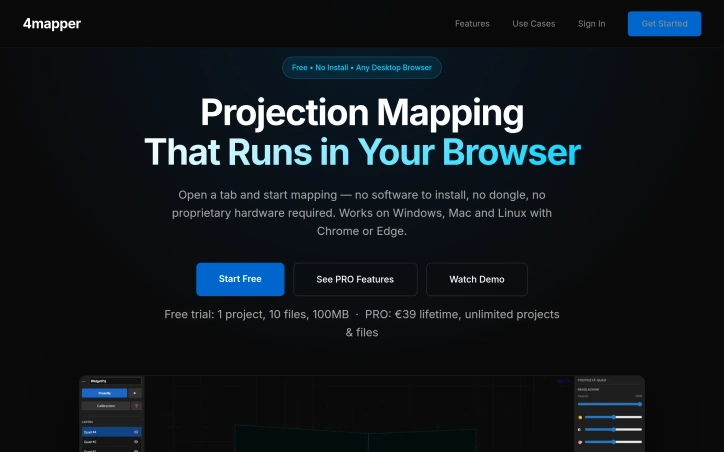

Projection mapping has long been constrained by proprietary software suites and expensive hardware requirements that put the technology out of reach for independent creators and artists. 4mapper dismantles these barriers by delivering a browser-based solution that works directly in Chrome or Edge, eliminating installation friction and compatibility headaches across Windows, Mac, and Linux systems. The platform serves a broad creator community—from VJs working live events and nightlife venues to artists building permanent or temporary installations, and even casual experimenters setting up projection mapping at home for parties or seasonal installations. The founder's motivation was clear: to democratize a tool that had become unnecessarily gatekept behind expensive licenses and locked ecosystems. What distinguishes 4mapper is its aggressive simplicity. There's no software to download, no proprietary dongle to purchase, and no expensive graphics card requirements. Opening a browser and uploading video content or images is enough to define projection surfaces and begin mapping. The free tier removes trial friction entirely—users get a full project, 100MB of storage, and up to 10 files to experiment with indefinitely, with no credit card required. This signals that the company trusts its product enough to let people learn it completely free. The feature set covers the essentials: video and image mapping with quad surface definitions, scene management for sequencing, and watermark-free exports on the PRO tier. The PRO exclusive features—live widgets that stream real-time data like weather or crypto prices, and Arduino controller support via USB for custom hardware triggers—show the platform thinking beyond static projection toward interactive, reactive installations. The open-source Arduino library suggests a commitment to community-driven extensibility. Pricing is refreshingly straightforward. The lifetime model at €59 for PRO, rather than a recurring subscription, appeals to independent creators with limited budgets and those who work sporadically. The storage jumps from 100MB free to 5GB in PRO—a meaningful upgrade for artists storing multiple video assets. 4mapper targets a specific, underserved niche: creators who want projection mapping capability without months of learning complex software or thousands in licensing fees. Its browser-based accessibility and low floor to entry position it as a genuine alternative to legacy tools designed for post-production houses and large installations. For hobbyists, performers, and independent artists, this removes a significant barrier to entry.

4mapper preview

Key features

  • Video Mapping: allows uploading video content to define projection surfaces
  • Quad Surface Definitions: enables mapping on quad surfaces
See full listing
FaceSwaply

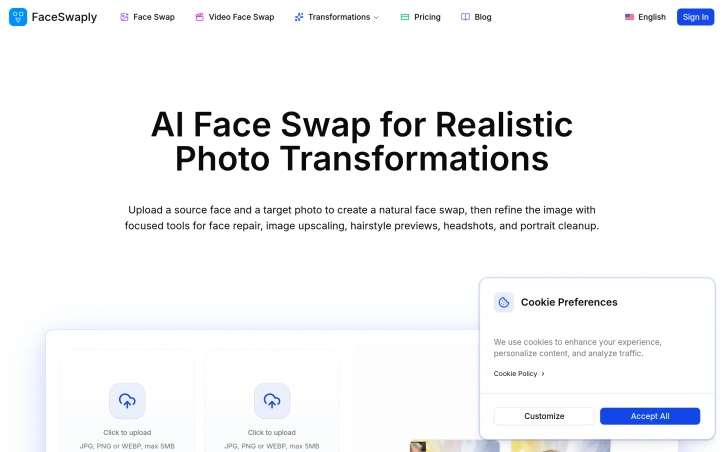
Simplifying photo transformations with AI is the core objective of FaceSwaply, addressing the long-standing issue of manual editing being labor-intensive and requiring specialized skills. The platform is geared towards individuals and professionals seeking to modify or enhance existing photos and videos, such as those looking to create professional headshots, preview hairstyles, or improve portrait quality. What stands out about FaceSwaply is its comprehensive suite of AI-driven tools, which not only enable face swapping in both photos and videos but also offer a range of post-swap editing capabilities. The technology is designed to maintain the integrity of the target image, preserving the original pose, camera angle, and background, and focusing the transformation solely on the face. Key features include the ability to swap faces in images and short videos, generate professional headshots from existing portraits, preview different hairstyles, and upscale or retouch images to improve clarity and quality. Additionally, the platform offers a "Restore Face" tool, which can recover facial detail in soft, damaged, or low-resolution portraits. The developer's goal is to streamline the photo editing process, making it more accessible to users without extensive editing experience. By providing a focused set of tools tailored to specific tasks, FaceSwaply aims to deliver high-quality results with ease. Unfortunately, the pricing structure is not explicitly detailed on the platform, leaving potential users to inquire directly for cost information. Overall, FaceSwaply presents a robust solution for those seeking to efficiently transform and enhance their visual content.

Ai-generative-media
0
0 Kong (‪Kong‬)

Simplifying photo transformations with AI is the core objective of FaceSwaply, addressing the long-standing issue of manual editing being labor-intensive and requiring specialized skills. The platform is geared towards individuals and professionals seeking to modify or enhance existing photos and videos, such as those looking to create professional headshots, preview hairstyles, or improve portrait quality. What stands out about FaceSwaply is its comprehensive suite of AI-driven tools, which not only enable face swapping in both photos and videos but also offer a range of post-swap editing capabilities. The technology is designed to maintain the integrity of the target image, preserving the original pose, camera angle, and background, and focusing the transformation solely on the face. Key features include the ability to swap faces in images and short videos, generate professional headshots from existing portraits, preview different hairstyles, and upscale or retouch images to improve clarity and quality. Additionally, the platform offers a "Restore Face" tool, which can recover facial detail in soft, damaged, or low-resolution portraits. The developer's goal is to streamline the photo editing process, making it more accessible to users without extensive editing experience. By providing a focused set of tools tailored to specific tasks, FaceSwaply aims to deliver high-quality results with ease. Unfortunately, the pricing structure is not explicitly detailed on the platform, leaving potential users to inquire directly for cost information. Overall, FaceSwaply presents a robust solution for those seeking to efficiently transform and enhance their visual content.

FaceSwaply preview

Key features

  • Face Swapping: swap faces in images and short videos
  • Professional Headshots: generate headshots from existing portraits
See full listing
RemoveLayer

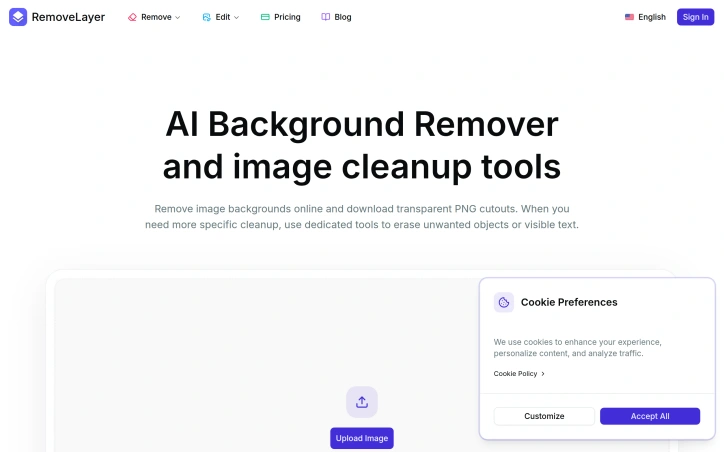
Simplifying image editing for ecommerce, marketing, and creative professionals is a pressing need, and one that RemoveLayer addresses head-on. The company's AI-powered background remover and image cleanup tools offer a streamlined solution for tedious tasks like background removal and object cleanup. At its core, RemoveLayer is designed to cater to product, creator, and marketing teams who require fast and easy image editing capabilities. What stands out about RemoveLayer is its focused approach to image editing, breaking down complex tasks into distinct tools, each with a straightforward workflow. The Background Remover is the primary workflow, while Object Remover and Text Remover serve as specialized tools for more specific cleanup jobs. This modular design ensures that users can tackle a range of image editing tasks with ease. The tools themselves are intuitive, following a consistent upload-process-download flow that makes it easy to get started and achieve results quickly. The AI-powered technology behind these tools is robust, capable of automatically removing backgrounds, objects, and text with a high degree of accuracy. The fact that these tools are independent, yet maintain a consistent user expectation, is a testament to the company's thoughtful design. In terms of pricing, RemoveLayer offers a simple, transparent model that starts with a free tier, allowing users to upgrade when they need more background removals, image cleanup, or recurring usage. The company also offers pay-as-you-go credits for one-time tasks, providing flexibility for users with varying needs. Overall, RemoveLayer has created a valuable solution for professionals seeking to simplify their image editing workflows.

Background-removal-tools
0
0 Kong (‪Kong‬)

Simplifying image editing for ecommerce, marketing, and creative professionals is a pressing need, and one that RemoveLayer addresses head-on. The company's AI-powered background remover and image cleanup tools offer a streamlined solution for tedious tasks like background removal and object cleanup. At its core, RemoveLayer is designed to cater to product, creator, and marketing teams who require fast and easy image editing capabilities. What stands out about RemoveLayer is its focused approach to image editing, breaking down complex tasks into distinct tools, each with a straightforward workflow. The Background Remover is the primary workflow, while Object Remover and Text Remover serve as specialized tools for more specific cleanup jobs. This modular design ensures that users can tackle a range of image editing tasks with ease. The tools themselves are intuitive, following a consistent upload-process-download flow that makes it easy to get started and achieve results quickly. The AI-powered technology behind these tools is robust, capable of automatically removing backgrounds, objects, and text with a high degree of accuracy. The fact that these tools are independent, yet maintain a consistent user expectation, is a testament to the company's thoughtful design. In terms of pricing, RemoveLayer offers a simple, transparent model that starts with a free tier, allowing users to upgrade when they need more background removals, image cleanup, or recurring usage. The company also offers pay-as-you-go credits for one-time tasks, providing flexibility for users with varying needs. Overall, RemoveLayer has created a valuable solution for professionals seeking to simplify their image editing workflows.

RemoveLayer preview

Key features

  • Background Remover: automatically removes backgrounds with high accuracy
  • Object Remover: specialized tool for removing specific objects
See full listing
AImageResize

Image resizing is a common task for creators, but it often comes with a trade-off in quality. AImageResize tackles this problem head-on with an AI-powered tool that intelligently fills the expanded canvas for a natural, seamless look. The target audience is clearly creators who need to resize images for various purposes, such as social media, advertisements, and wallpapers. What stands out about AImageResize is its ability to maintain image quality during resizing. The tool uses AI outpainting to expand the canvas instead of stretching pixels, and applies smart interpolation when downscaling to preserve sharpness. This results in high-quality images with minimal artifacts, even when resizing to exact dimensions. The fact that it works entirely in the browser, without requiring any app installations, adds to its convenience. The tool boasts a range of features that make it versatile and user-friendly. It supports various file formats, including JPG, PNG, and WebP, and allows for precise dimension control. Social media presets are also available for one-click resizing to popular aspect ratios. Client-side processing ensures fast results, with no long upload waits or server queues. Additionally, the privacy-first approach, where images are not stored and deleted immediately after processing, is a significant advantage for users handling sensitive content. AImageResize operates on a credit-based pricing model, with no subscriptions or hidden fees. Credits never expire, and users can purchase them according to their needs. The PRO plan, which is highlighted as the most popular, offers 200 credits for $19, along with benefits like better consistency for product images, cleaner edge blending, and priority processing speed. Overall, AImageResize simplifies the image resizing process while maintaining high quality, making it a valuable tool for creators.
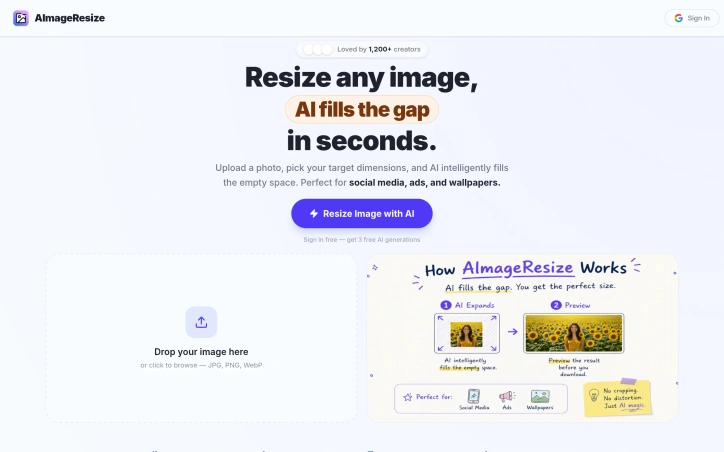
Photo-editing
T
Tommy Pham

Image resizing is a common task for creators, but it often comes with a trade-off in quality. AImageResize tackles this problem head-on with an AI-powered tool that intelligently fills the expanded canvas for a natural, seamless look. The target audience is clearly creators who need to resize images for various purposes, such as social media, advertisements, and wallpapers. What stands out about AImageResize is its ability to maintain image quality during resizing. The tool uses AI outpainting to expand the canvas instead of stretching pixels, and applies smart interpolation when downscaling to preserve sharpness. This results in high-quality images with minimal artifacts, even when resizing to exact dimensions. The fact that it works entirely in the browser, without requiring any app installations, adds to its convenience. The tool boasts a range of features that make it versatile and user-friendly. It supports various file formats, including JPG, PNG, and WebP, and allows for precise dimension control. Social media presets are also available for one-click resizing to popular aspect ratios. Client-side processing ensures fast results, with no long upload waits or server queues. Additionally, the privacy-first approach, where images are not stored and deleted immediately after processing, is a significant advantage for users handling sensitive content. AImageResize operates on a credit-based pricing model, with no subscriptions or hidden fees. Credits never expire, and users can purchase them according to their needs. The PRO plan, which is highlighted as the most popular, offers 200 credits for $19, along with benefits like better consistency for product images, cleaner edge blending, and priority processing speed. Overall, AImageResize simplifies the image resizing process while maintaining high quality, making it a valuable tool for creators.

AImageResize preview

Key features

  • AI Outpainting: Intelligently expands canvas using AI for natural, seamless content instead of stretching pixels.
  • Smart Interpolation: Applies intelligent downscaling that preserves sharpness and minimizes artifacts.
See full listing
CapMP3.com

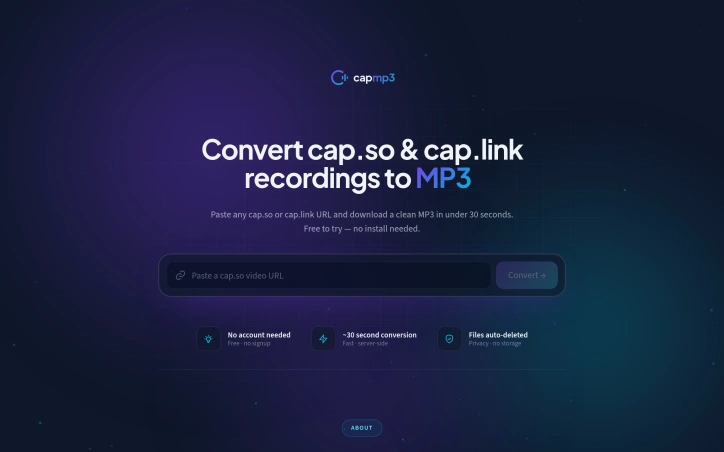
For those who regularly use cap.so or cap.link for screen recordings, extracting the audio can be a tedious task, involving downloading the full video and manually converting it. CapMP3 addresses this need by providing a straightforward online solution that converts these recordings into downloadable MP3 files. The tool is designed with product teams, engineers, and individuals who frequently share screen recordings in mind, catering to their needs for transcription, archiving, or offline playback of the audio content. What stands out about CapMP3 is its simplicity and efficiency. By simply pasting the URL of the cap.so or cap.link recording, users can obtain the audio in high-quality MP3 format without requiring any software installation. The process is server-side, meaning the audio extraction and conversion happen on the server, and the resulting MP3 is delivered directly to the user's browser. The key features of CapMP3 include its ability to extract the audio track from the specified URLs, convert it to MP3 at 190 kbps, and ensure the files are deleted immediately after download, emphasizing a commitment to user privacy. The service is free for one download, with no credit card required, making it easily accessible. Overall, CapMP3 offers a convenient, privacy-first solution for users looking to extract audio from their cap.so or cap.link recordings. Its straightforward functionality and lack of upfront costs make it an attractive option for those seeking a simple, effective tool for audio conversion.

Podcasting-tools
C
CapMP3.com

For those who regularly use cap.so or cap.link for screen recordings, extracting the audio can be a tedious task, involving downloading the full video and manually converting it. CapMP3 addresses this need by providing a straightforward online solution that converts these recordings into downloadable MP3 files. The tool is designed with product teams, engineers, and individuals who frequently share screen recordings in mind, catering to their needs for transcription, archiving, or offline playback of the audio content. What stands out about CapMP3 is its simplicity and efficiency. By simply pasting the URL of the cap.so or cap.link recording, users can obtain the audio in high-quality MP3 format without requiring any software installation. The process is server-side, meaning the audio extraction and conversion happen on the server, and the resulting MP3 is delivered directly to the user's browser. The key features of CapMP3 include its ability to extract the audio track from the specified URLs, convert it to MP3 at 190 kbps, and ensure the files are deleted immediately after download, emphasizing a commitment to user privacy. The service is free for one download, with no credit card required, making it easily accessible. Overall, CapMP3 offers a convenient, privacy-first solution for users looking to extract audio from their cap.so or cap.link recordings. Its straightforward functionality and lack of upfront costs make it an attractive option for those seeking a simple, effective tool for audio conversion.

CapMP3.com preview

Key features

  • Audio Extraction: extracts the audio track from specified URLs
  • MP3 Conversion: converts audio to MP3 at 190 kbps
See full listing
MetaScope

For professionals in the creative industry, managing metadata across a vast library of files is a daunting task. Photographers, archivists, and digital asset managers need a reliable tool to edit EXIF, IPTC, and XMP metadata with precision and control. MetaScope is a native macOS app that simplifies metadata management, allowing users to accurately edit and batch process metadata across 50+ file formats, including RAW files. What stands out about MetaScope is its comprehensive approach to metadata management, offering nine focused capabilities within a single app. The app's capabilities range from image and video viewing with advanced rendering and color management, to metadata browsing and editing with a 125-field registry and integrated search. The metadata editing feature is particularly noteworthy, allowing for inline field editing, template management, and batch application to thousands of files. The app's intelligence features, such as on-device NLP enrichment and smart keyword suggestions, further enhance its capabilities. The automation features, including keyword rules and transformation rules, enable users to streamline their workflow and ensure consistency across their metadata. The export system also offers a range of formats, including PDF and HTML portfolio generation with custom branding. Built for libraries with hundreds of thousands of files, MetaScope is designed to handle large-scale metadata management tasks with ease. While pricing details are available on the MetaScope website, the app's developer has clearly focused on creating a robust tool that meets the needs of professionals who require accuracy, scale, and control over their metadata. Overall, MetaScope is a powerful solution for creative professionals seeking to simplify their metadata management workflow.
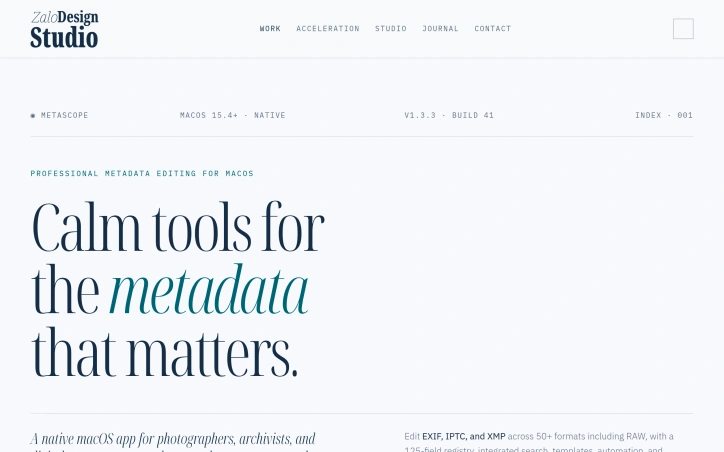

Photo-editing
G
Geert Zaal

For professionals in the creative industry, managing metadata across a vast library of files is a daunting task. Photographers, archivists, and digital asset managers need a reliable tool to edit EXIF, IPTC, and XMP metadata with precision and control. MetaScope is a native macOS app that simplifies metadata management, allowing users to accurately edit and batch process metadata across 50+ file formats, including RAW files. What stands out about MetaScope is its comprehensive approach to metadata management, offering nine focused capabilities within a single app. The app's capabilities range from image and video viewing with advanced rendering and color management, to metadata browsing and editing with a 125-field registry and integrated search. The metadata editing feature is particularly noteworthy, allowing for inline field editing, template management, and batch application to thousands of files. The app's intelligence features, such as on-device NLP enrichment and smart keyword suggestions, further enhance its capabilities. The automation features, including keyword rules and transformation rules, enable users to streamline their workflow and ensure consistency across their metadata. The export system also offers a range of formats, including PDF and HTML portfolio generation with custom branding. Built for libraries with hundreds of thousands of files, MetaScope is designed to handle large-scale metadata management tasks with ease. While pricing details are available on the MetaScope website, the app's developer has clearly focused on creating a robust tool that meets the needs of professionals who require accuracy, scale, and control over their metadata. Overall, MetaScope is a powerful solution for creative professionals seeking to simplify their metadata management workflow.

MetaScope preview

Key features

  • Metadata Editing: allows for inline field editing, template management, and batch application to thousands of files
  • Image and Video Viewing: offers advanced rendering and color management
See full listing
Modelfy

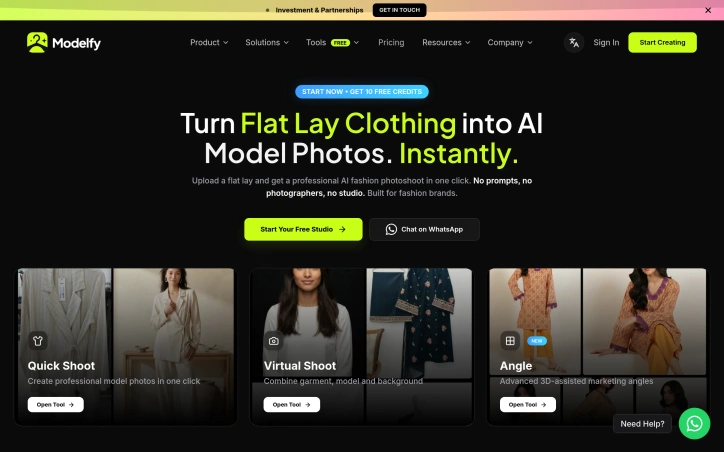
Fashion brands and creators have long struggled with the complexities and costs associated with producing high-quality product images. The process typically involves expensive studio setups, photographers, and models, not to mention the time and effort required to achieve the desired outcome. Modelfy directly addresses this challenge by offering a streamlined solution that transforms flat lay clothing images into professional-looking AI model photos. What sets Modelfy apart is its focus on the specific needs of the fashion industry. Unlike more general e-commerce AI tools, Modelfy has been purpose-built to understand the nuances of clothing and garment representation. This specialization enables the platform to deliver results that are more accurate and realistic, capturing details such as fabric drape, garment fit, and stitching. The process is straightforward: users upload their garment images, select a model and scene, and the AI handles the rest, including lighting, background, pose, and fit. This one-click approach eliminates the need for technical expertise and lengthy instruction, making it accessible to a wide range of users. The platform's ability to generate high-resolution, campaign-ready images instantly is a significant advantage, allowing brands to quickly produce and publish content across various channels. Modelfy's dedication to the fashion industry is evident in its features, such as the ability to combine garments, models, and backgrounds, and its advanced 3D-assisted marketing angles. While specific pricing details are not provided, the company offers a free starting point, with 10 free credits to get users started, and invites users to begin their journey via a WhatsApp chat. Overall, Modelfy presents a compelling solution for fashion brands looking to simplify their product photography process while maintaining high-quality results.

Ai-generative-media
M
Modelfy

Fashion brands and creators have long struggled with the complexities and costs associated with producing high-quality product images. The process typically involves expensive studio setups, photographers, and models, not to mention the time and effort required to achieve the desired outcome. Modelfy directly addresses this challenge by offering a streamlined solution that transforms flat lay clothing images into professional-looking AI model photos. What sets Modelfy apart is its focus on the specific needs of the fashion industry. Unlike more general e-commerce AI tools, Modelfy has been purpose-built to understand the nuances of clothing and garment representation. This specialization enables the platform to deliver results that are more accurate and realistic, capturing details such as fabric drape, garment fit, and stitching. The process is straightforward: users upload their garment images, select a model and scene, and the AI handles the rest, including lighting, background, pose, and fit. This one-click approach eliminates the need for technical expertise and lengthy instruction, making it accessible to a wide range of users. The platform's ability to generate high-resolution, campaign-ready images instantly is a significant advantage, allowing brands to quickly produce and publish content across various channels. Modelfy's dedication to the fashion industry is evident in its features, such as the ability to combine garments, models, and backgrounds, and its advanced 3D-assisted marketing angles. While specific pricing details are not provided, the company offers a free starting point, with 10 free credits to get users started, and invites users to begin their journey via a WhatsApp chat. Overall, Modelfy presents a compelling solution for fashion brands looking to simplify their product photography process while maintaining high-quality results.

Modelfy preview

Key features

  • High-Resolution Images: Generates campaign-ready images instantly
  • 3D-Assisted Marketing Angles: Offers advanced marketing angles
See full listing
Cosmic Films

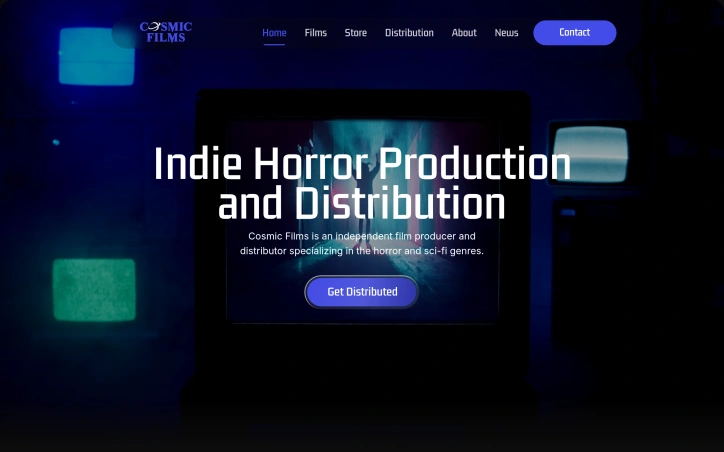
Independent filmmakers and horror fans have a new ally in the global distribution of niche content. Cosmic Films tackles the longstanding issue of indie horror and sci-fi films struggling to reach their target audience. By partnering with filmmakers, the company brings distinctive, atmospheric genre films to streaming platforms, carving out a space for stylish works that diverge from mainstream releases. The company's evolution is noteworthy, having started as a YouTube channel in 2021 showcasing short horror films before expanding into feature film distribution in 2023. By 2025, Cosmic Films had honed its focus on international horror distribution, leveraging strategic platform placement, strong visual branding, and targeted marketing to connect films with their ideal viewers. Recent acquisitions, including the North American rights to a Lovecraft-inspired film and director's cuts of Giallo thrillers, demonstrate the company's commitment to curating a unique slate of titles. Cosmic Films' emphasis on the streaming VOD market allows it to tap into a growing demand for on-demand content. The company's ability to position each film for success is rooted in its understanding of the global audience for horror and sci-fi. While pricing and business model details are not explicitly stated, it is clear that Cosmic Films is dedicated to forging partnerships with filmmakers and navigating the complexities of international distribution. As a result, Cosmic Films is an attractive option for creators seeking to bring their niche content to a broader audience. The company's focus on distinctive, atmospheric works sets it apart in a crowded market, making it a notable player in the indie horror and sci-fi distribution landscape.

Design-creative
D
Danny Takacs

Independent filmmakers and horror fans have a new ally in the global distribution of niche content. Cosmic Films tackles the longstanding issue of indie horror and sci-fi films struggling to reach their target audience. By partnering with filmmakers, the company brings distinctive, atmospheric genre films to streaming platforms, carving out a space for stylish works that diverge from mainstream releases. The company's evolution is noteworthy, having started as a YouTube channel in 2021 showcasing short horror films before expanding into feature film distribution in 2023. By 2025, Cosmic Films had honed its focus on international horror distribution, leveraging strategic platform placement, strong visual branding, and targeted marketing to connect films with their ideal viewers. Recent acquisitions, including the North American rights to a Lovecraft-inspired film and director's cuts of Giallo thrillers, demonstrate the company's commitment to curating a unique slate of titles. Cosmic Films' emphasis on the streaming VOD market allows it to tap into a growing demand for on-demand content. The company's ability to position each film for success is rooted in its understanding of the global audience for horror and sci-fi. While pricing and business model details are not explicitly stated, it is clear that Cosmic Films is dedicated to forging partnerships with filmmakers and navigating the complexities of international distribution. As a result, Cosmic Films is an attractive option for creators seeking to bring their niche content to a broader audience. The company's focus on distinctive, atmospheric works sets it apart in a crowded market, making it a notable player in the indie horror and sci-fi distribution landscape.

Cosmic Films preview

Key features

  • Strategic Platform Placement: positions films for success on streaming platforms
  • Strong Visual Branding: creates distinctive visual identity for the company
See full listing
Zilivo AI

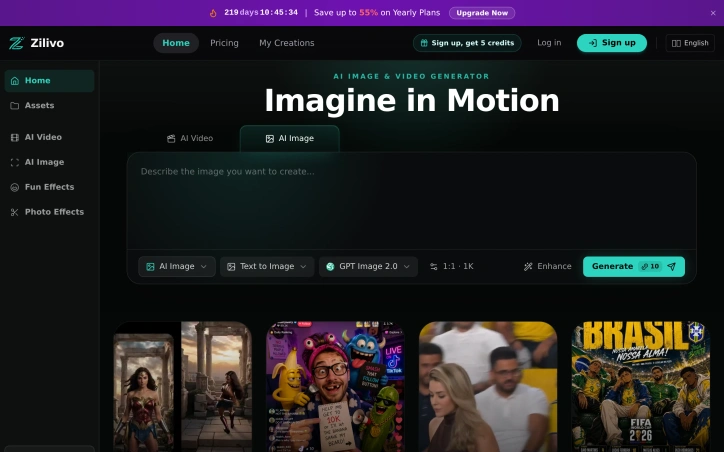
Content creation is a complex task that often involves juggling multiple AI tools to produce the desired outcome. Zilivo AI addresses this challenge by providing a unified platform for generating and editing AI images and videos. The product is designed for a diverse range of users, including content creators, marketing teams, indie developers, and agencies, all of whom can benefit from streamlining their creative workflows. What sets Zilivo AI apart is its multimodal creation engine, which integrates AI image generation, AI video generation, image editing, video editing, and motion transfer capabilities into a single creative platform. This allows users to move seamlessly from idea to publishable asset without having to switch between disparate tools. The platform's ability to generate campaign-ready images, concept art, and social graphics from a clear creative brief is particularly noteworthy. Key features of the platform include its text-aware design capabilities, which enable the creation of posters, ads, and layouts with readable text, as well as its image-to-video and video retake features, which allow users to turn still images into motion clips and adjust existing footage. The platform also offers a range of stylized clip options and a workflow-ready API for integrating its capabilities into existing workflows. Zilivo AI offers a yearly plan with a discount of up to 55% for upgrading, indicating a tiered pricing structure that rewards long-term commitments. Overall, Zilivo AI is a powerful solution for content creators and teams looking to simplify their workflows and produce high-quality visual content. By providing a single platform for generating and editing AI images and videos, Zilivo AI has the potential to revolutionize the content creation process.

Ai-generative-media
T
thomas.kiko

Content creation is a complex task that often involves juggling multiple AI tools to produce the desired outcome. Zilivo AI addresses this challenge by providing a unified platform for generating and editing AI images and videos. The product is designed for a diverse range of users, including content creators, marketing teams, indie developers, and agencies, all of whom can benefit from streamlining their creative workflows. What sets Zilivo AI apart is its multimodal creation engine, which integrates AI image generation, AI video generation, image editing, video editing, and motion transfer capabilities into a single creative platform. This allows users to move seamlessly from idea to publishable asset without having to switch between disparate tools. The platform's ability to generate campaign-ready images, concept art, and social graphics from a clear creative brief is particularly noteworthy. Key features of the platform include its text-aware design capabilities, which enable the creation of posters, ads, and layouts with readable text, as well as its image-to-video and video retake features, which allow users to turn still images into motion clips and adjust existing footage. The platform also offers a range of stylized clip options and a workflow-ready API for integrating its capabilities into existing workflows. Zilivo AI offers a yearly plan with a discount of up to 55% for upgrading, indicating a tiered pricing structure that rewards long-term commitments. Overall, Zilivo AI is a powerful solution for content creators and teams looking to simplify their workflows and produce high-quality visual content. By providing a single platform for generating and editing AI images and videos, Zilivo AI has the potential to revolutionize the content creation process.

Zilivo AI preview

Key features

  • Multimodal Creation Engine: integrates AI image generation, AI video generation, image editing, video editing, and motion transfer capabilities
  • Text-Aware Design: enables creation of posters, ads, and layouts with readable text
See full listing
24Picture

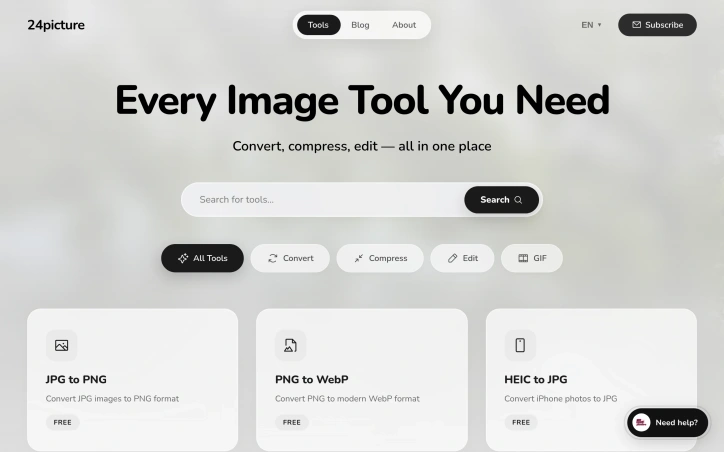
For creators seeking a comprehensive and streamlined solution for their image editing needs, 24Picture offers a robust platform that consolidates a wide range of image tools in one place. The problem of navigating multiple complicated and scattered image editing tools is a significant pain point that 24Picture aims to alleviate. By providing an all-encompassing suite of image tools, the platform caters to the diverse needs of creators worldwide. What stands out about 24Picture is its commitment to being fast, free, and powerful, making it an attractive solution for creators who require efficient and cost-effective image editing capabilities. The platform boasts over 20 professional image tools that enable users to convert, compress, and edit images with ease. The availability of AI-powered batch processing is a notable feature that enhances the platform's capabilities. Noteworthy features of 24Picture include its image conversion tools, which support a wide range of formats, including JPG, PNG, WebP, HEIC, SVG, AVIF, and TIFF. Additionally, the platform offers image compression, resizing, and cropping capabilities, as well as a full-featured image editor and a GIF maker. The presence of specialized tools like the SVG optimizer and Base64 converter further underscores the platform's versatility. The platform's blog is also a valuable resource, offering tips, tutorials, and industry insights on topics such as image compression, resizing best practices, and the benefits of using WebP. While 24Picture's pricing model is not explicitly stated, the platform is touted as being "free," suggesting that it may operate on an open-core or freemium model. Overall, 24Picture is a valuable resource for creators seeking a comprehensive and user-friendly image editing solution.
Graphic-design-tools
�
董子航

For creators seeking a comprehensive and streamlined solution for their image editing needs, 24Picture offers a robust platform that consolidates a wide range of image tools in one place. The problem of navigating multiple complicated and scattered image editing tools is a significant pain point that 24Picture aims to alleviate. By providing an all-encompassing suite of image tools, the platform caters to the diverse needs of creators worldwide. What stands out about 24Picture is its commitment to being fast, free, and powerful, making it an attractive solution for creators who require efficient and cost-effective image editing capabilities. The platform boasts over 20 professional image tools that enable users to convert, compress, and edit images with ease. The availability of AI-powered batch processing is a notable feature that enhances the platform's capabilities. Noteworthy features of 24Picture include its image conversion tools, which support a wide range of formats, including JPG, PNG, WebP, HEIC, SVG, AVIF, and TIFF. Additionally, the platform offers image compression, resizing, and cropping capabilities, as well as a full-featured image editor and a GIF maker. The presence of specialized tools like the SVG optimizer and Base64 converter further underscores the platform's versatility. The platform's blog is also a valuable resource, offering tips, tutorials, and industry insights on topics such as image compression, resizing best practices, and the benefits of using WebP. While 24Picture's pricing model is not explicitly stated, the platform is touted as being "free," suggesting that it may operate on an open-core or freemium model. Overall, 24Picture is a valuable resource for creators seeking a comprehensive and user-friendly image editing solution.

24Picture preview

Key features

  • Image Conversion Tools: support a wide range of formats, including JPG, PNG, WebP, HEIC, SVG, AVIF, and TIFF
  • AI-Powered Batch Processing: enhances the platform's capabilities
See full listing
Brand Maker

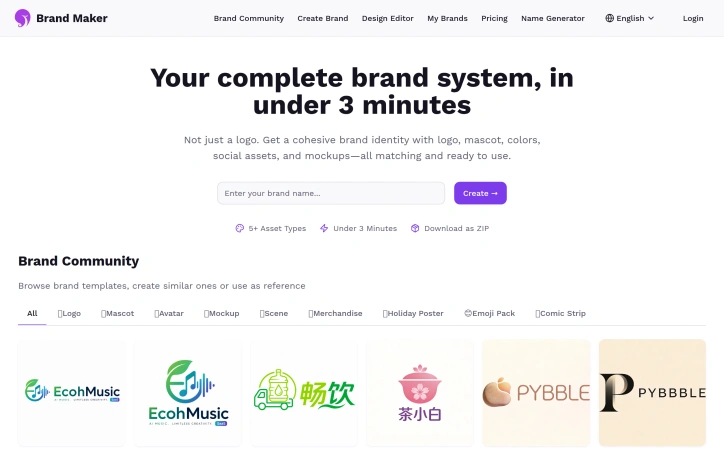
Creating a strong brand identity is a daunting task for many startups and small businesses. The challenge lies in establishing a consistent visual presence across various channels, from logos and mascots to merchandise. Brand Maker tackles this issue head-on with its AI-powered brand identity system. The platform is designed for businesses seeking to streamline their branding process. By leveraging artificial intelligence, Brand Maker generates a range of branding elements, ensuring a cohesive look and feel across different platforms. One notable aspect of Brand Maker is its featured presence on several prominent startup directories and platforms, such as Turbo0, The One Startup, and LaunchIgniter. This visibility underscores the product's relevance and potential within the startup ecosystem. The key features of Brand Maker include the generation of logos, mascots, and merchandise, all of which are created with a focus on maintaining visual consistency. This capability is particularly valuable for businesses looking to establish a robust brand identity without the need for extensive design expertise or resources. Unfortunately, the available information does not provide insight into Brand Maker's pricing or business model. However, the fact that it has been featured on multiple platforms suggests a level of maturity and stability in its operations. Overall, Brand Maker presents a compelling solution for businesses aiming to simplify and enhance their brand identity creation process. By harnessing the power of AI, the platform offers a streamlined approach to generating consistent branding elements, making it an attractive option for startups and small businesses navigating the complexities of establishing a strong brand presence.

Ai-generative-media
L
LownRain Seven

Creating a strong brand identity is a daunting task for many startups and small businesses. The challenge lies in establishing a consistent visual presence across various channels, from logos and mascots to merchandise. Brand Maker tackles this issue head-on with its AI-powered brand identity system. The platform is designed for businesses seeking to streamline their branding process. By leveraging artificial intelligence, Brand Maker generates a range of branding elements, ensuring a cohesive look and feel across different platforms. One notable aspect of Brand Maker is its featured presence on several prominent startup directories and platforms, such as Turbo0, The One Startup, and LaunchIgniter. This visibility underscores the product's relevance and potential within the startup ecosystem. The key features of Brand Maker include the generation of logos, mascots, and merchandise, all of which are created with a focus on maintaining visual consistency. This capability is particularly valuable for businesses looking to establish a robust brand identity without the need for extensive design expertise or resources. Unfortunately, the available information does not provide insight into Brand Maker's pricing or business model. However, the fact that it has been featured on multiple platforms suggests a level of maturity and stability in its operations. Overall, Brand Maker presents a compelling solution for businesses aiming to simplify and enhance their brand identity creation process. By harnessing the power of AI, the platform offers a streamlined approach to generating consistent branding elements, making it an attractive option for startups and small businesses navigating the complexities of establishing a strong brand presence.

Brand Maker preview

Key features

  • Logo Generation: Generates logos as part of branding elements
  • Mascot Creation: Creates mascots to enhance brand identity
See full listing
Protato

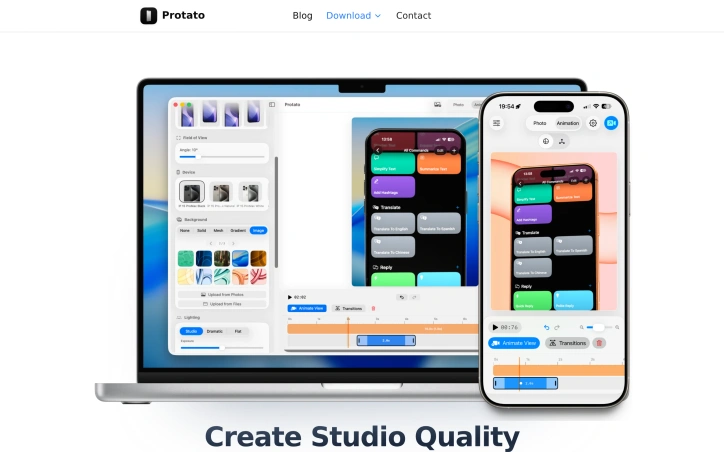
Creating high-quality, polished visuals for product launches, marketing campaigns, and internal presentations can be a time-consuming and complex task. Protato addresses this challenge by providing a straightforward and intuitive solution for generating studio-quality 3D mockups. The tool is designed for a broad range of users, including developers, designers, content creators, and product teams, who need to produce professional-looking visuals without requiring extensive design experience. What stands out about Protato is its emphasis on simplicity and ease of use, making it accessible to users without prior 3D experience. The application's touch-first controls and real-time preview capabilities enable users to quickly adjust lighting, materials, and composition to create high-quality visuals. The ability to import screenshots or videos and instantly render them on real devices is particularly noteworthy, as is the flexibility to export images and videos in up to 4K resolution. Key features of Protato include its animation timeline, which allows users to record camera moves and create cinematic clips with keyframe editing, and its studio lighting presets, which enable users to switch between different lighting styles with a single tap. The application's optimization for mobile workflows is also a significant advantage, allowing users to create high-quality mockups on their iPhone or iPad. In terms of pricing, Protato offers a flexible business model, with options for monthly or annual subscriptions, as well as a lifetime purchase. The pricing tiers are clearly outlined, with costs starting at $4.99 per month. Overall, Protato provides a valuable solution for teams and individuals seeking to create professional-looking visuals without the complexity and steep learning curve associated with traditional design tools.

Design-mockups
B
Bao Phuc Tran

Creating high-quality, polished visuals for product launches, marketing campaigns, and internal presentations can be a time-consuming and complex task. Protato addresses this challenge by providing a straightforward and intuitive solution for generating studio-quality 3D mockups. The tool is designed for a broad range of users, including developers, designers, content creators, and product teams, who need to produce professional-looking visuals without requiring extensive design experience. What stands out about Protato is its emphasis on simplicity and ease of use, making it accessible to users without prior 3D experience. The application's touch-first controls and real-time preview capabilities enable users to quickly adjust lighting, materials, and composition to create high-quality visuals. The ability to import screenshots or videos and instantly render them on real devices is particularly noteworthy, as is the flexibility to export images and videos in up to 4K resolution. Key features of Protato include its animation timeline, which allows users to record camera moves and create cinematic clips with keyframe editing, and its studio lighting presets, which enable users to switch between different lighting styles with a single tap. The application's optimization for mobile workflows is also a significant advantage, allowing users to create high-quality mockups on their iPhone or iPad. In terms of pricing, Protato offers a flexible business model, with options for monthly or annual subscriptions, as well as a lifetime purchase. The pricing tiers are clearly outlined, with costs starting at $4.99 per month. Overall, Protato provides a valuable solution for teams and individuals seeking to create professional-looking visuals without the complexity and steep learning curve associated with traditional design tools.

Protato preview

Key features

  • Animation Timeline: allows users to record camera moves and create cinematic clips with keyframe editing
  • Studio Lighting Presets: enable users to switch between different lighting styles with a single tap
See full listing
GPTIMG2 AI

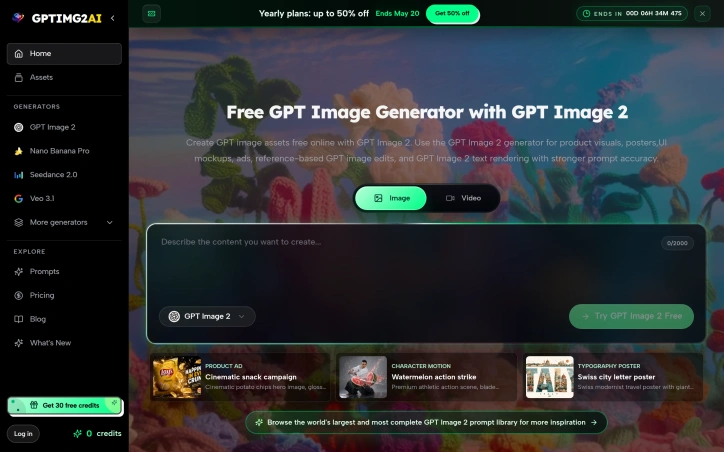
The challenge of generating accurate and visually appealing images has long plagued creators and businesses. GPTIMG2 AI tackles this issue head-on by providing a platform for producing high-quality product visuals, posters, UI mockups, and ads with clear text. The company was founded to address the shortcomings of existing image generation tools, specifically the problem of inaccurate text rendering and image generation. What stands out about GPTIMG2 AI is its focus on delivering precise and realistic images, as evident in its showcase of product ads, character action scenes, and typography-heavy visuals. The platform's GPT Image 2 generator is particularly noteworthy for its ability to produce e-commerce-ready images, stylized edits, and commerce mockups with a high degree of accuracy. The extensive prompt library and comparison of different image and video models across various parameters further underscore the platform's capabilities. GPTIMG2 AI's key features include its GPT Image 2 generator, which offers stronger prompt accuracy and text rendering, as well as its range of image and video models catering to diverse creative needs. The platform also provides a library of real-world use cases, demonstrating its potential applications in various industries. Currently, GPTIMG2 AI is offering 30 free credits to users, with yearly plans available at a discounted rate of up to 50% off until May 20. A promotional offer of 50% off is also available, although the specific details of the offer's terms are not specified. Overall, GPTIMG2 AI presents a compelling solution for creatives and businesses seeking to generate high-quality images with precision and accuracy.
Ai-generative-media
H
hao kang

The challenge of generating accurate and visually appealing images has long plagued creators and businesses. GPTIMG2 AI tackles this issue head-on by providing a platform for producing high-quality product visuals, posters, UI mockups, and ads with clear text. The company was founded to address the shortcomings of existing image generation tools, specifically the problem of inaccurate text rendering and image generation. What stands out about GPTIMG2 AI is its focus on delivering precise and realistic images, as evident in its showcase of product ads, character action scenes, and typography-heavy visuals. The platform's GPT Image 2 generator is particularly noteworthy for its ability to produce e-commerce-ready images, stylized edits, and commerce mockups with a high degree of accuracy. The extensive prompt library and comparison of different image and video models across various parameters further underscore the platform's capabilities. GPTIMG2 AI's key features include its GPT Image 2 generator, which offers stronger prompt accuracy and text rendering, as well as its range of image and video models catering to diverse creative needs. The platform also provides a library of real-world use cases, demonstrating its potential applications in various industries. Currently, GPTIMG2 AI is offering 30 free credits to users, with yearly plans available at a discounted rate of up to 50% off until May 20. A promotional offer of 50% off is also available, although the specific details of the offer's terms are not specified. Overall, GPTIMG2 AI presents a compelling solution for creatives and businesses seeking to generate high-quality images with precision and accuracy.

GPTIMG2 AI preview

Key features

  • GPT Image 2 Generator: produces e-commerce-ready images with high accuracy
  • Prompt Library: offers extensive library of prompts for diverse creative needs
See full listing
ColorsLabs

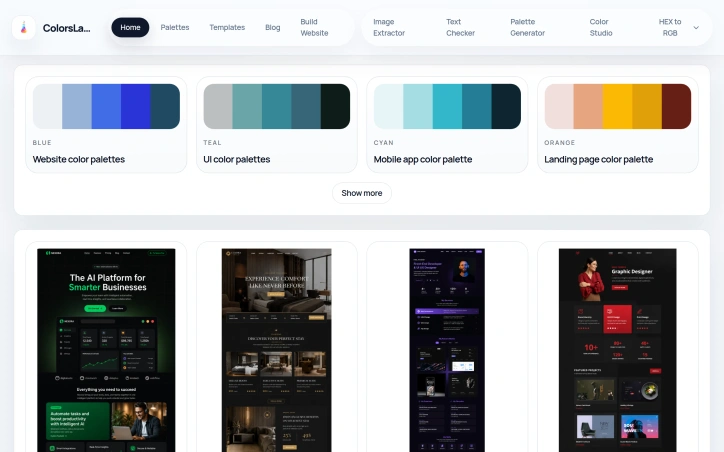
Designing a visually appealing website or brand theme can be a daunting task, especially when it comes to selecting a harmonious color palette. The process of finding and creating color schemes is simplified by ColorsLabs, a suite of tools catering to designers and developers. The platform is geared towards professionals seeking to streamline their workflow and elevate their brand's visual identity. What stands out about ColorsLabs is its focus on providing a range of color palettes for various applications, including websites, mobile apps, and landing pages. The diversity of pre-curated palettes is complemented by a collection of website templates, showcasing the versatility of the color schemes. These templates, such as Nexora AI SaaS Template and Luxora Hotel Template, demonstrate how the color palettes can be effectively applied to real-world projects. A key feature of ColorsLabs is its image extractor tool, which allows users to upload a screenshot or image and instantly extract the dominant HEX colors. This functionality is particularly useful for designers looking to derive inspiration from existing designs or to maintain brand consistency. Additionally, the platform offers a text checker tool, providing a range of font options and styles to complement the color palettes. The creator of ColorsLabs aimed to address the need for a streamlined color palette creation process, coupled with handy color conversion tools. By doing so, they have developed a valuable resource for designers and developers seeking to enhance their UI and brand design. Notably, the website does not explicitly mention its pricing or business model, leaving potential users to explore these details further. Overall, ColorsLabs presents a valuable solution for creatives seeking to refine their design workflow and produce high-quality visual content.

Design-inspiration-websites
U
Unfiltered Developer

Designing a visually appealing website or brand theme can be a daunting task, especially when it comes to selecting a harmonious color palette. The process of finding and creating color schemes is simplified by ColorsLabs, a suite of tools catering to designers and developers. The platform is geared towards professionals seeking to streamline their workflow and elevate their brand's visual identity. What stands out about ColorsLabs is its focus on providing a range of color palettes for various applications, including websites, mobile apps, and landing pages. The diversity of pre-curated palettes is complemented by a collection of website templates, showcasing the versatility of the color schemes. These templates, such as Nexora AI SaaS Template and Luxora Hotel Template, demonstrate how the color palettes can be effectively applied to real-world projects. A key feature of ColorsLabs is its image extractor tool, which allows users to upload a screenshot or image and instantly extract the dominant HEX colors. This functionality is particularly useful for designers looking to derive inspiration from existing designs or to maintain brand consistency. Additionally, the platform offers a text checker tool, providing a range of font options and styles to complement the color palettes. The creator of ColorsLabs aimed to address the need for a streamlined color palette creation process, coupled with handy color conversion tools. By doing so, they have developed a valuable resource for designers and developers seeking to enhance their UI and brand design. Notably, the website does not explicitly mention its pricing or business model, leaving potential users to explore these details further. Overall, ColorsLabs presents a valuable solution for creatives seeking to refine their design workflow and produce high-quality visual content.

ColorsLabs preview

Key features

  • Color Palettes: diverse pre-curated palettes for various applications
  • Image Extractor Tool: extracts dominant HEX colors from uploaded images
See full listing
AIToolIntel

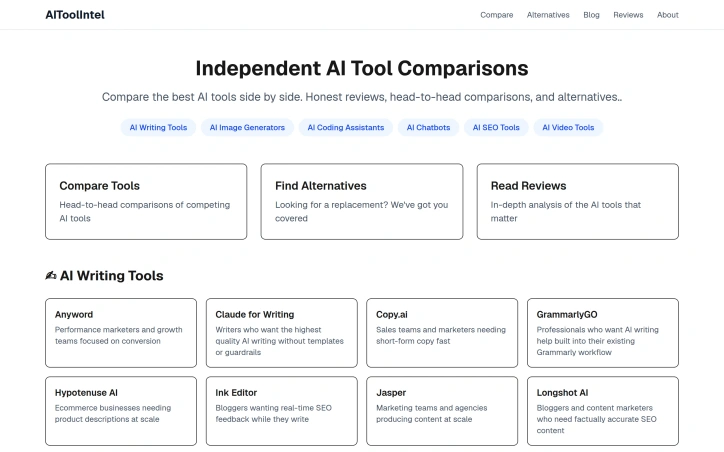
Navigating the ever-expanding landscape of AI tools can be a daunting task for individuals and businesses alike. The sheer number of options available makes it challenging to identify the most suitable tool for specific needs. AIToolIntel addresses this issue by providing a comprehensive comparison platform that enables users to make informed decisions. The platform is designed for a diverse range of users, from performance marketers and growth teams to artists, designers, and developers. By categorizing AI tools into distinct categories such as AI writing tools, image generators, coding assistants, and chatbots, AIToolIntel makes it easier for users to find relevant tools. The platform's focus on independent reviews and head-to-head comparisons sets it apart from other review sites. One of the standout features of AIToolIntel is its in-depth analysis of various AI tools. For instance, its AI writing tools section provides detailed descriptions of each tool, highlighting their strengths and ideal user profiles. This level of detail allows users to quickly identify the most suitable tool for their specific needs. The platform also offers alternatives to popular tools, giving users a broader range of options to consider. By providing honest and unbiased comparisons, AIToolIntel empowers users to choose the best AI tool for their specific requirements. While the platform doesn't explicitly mention its pricing or business model, its value proposition lies in its ability to simplify the process of finding the right AI tool, saving users time and effort in the long run. Overall, AIToolIntel is a valuable resource for anyone looking to navigate the complex world of AI tools.
Ai-generative-media
V
VS

Navigating the ever-expanding landscape of AI tools can be a daunting task for individuals and businesses alike. The sheer number of options available makes it challenging to identify the most suitable tool for specific needs. AIToolIntel addresses this issue by providing a comprehensive comparison platform that enables users to make informed decisions. The platform is designed for a diverse range of users, from performance marketers and growth teams to artists, designers, and developers. By categorizing AI tools into distinct categories such as AI writing tools, image generators, coding assistants, and chatbots, AIToolIntel makes it easier for users to find relevant tools. The platform's focus on independent reviews and head-to-head comparisons sets it apart from other review sites. One of the standout features of AIToolIntel is its in-depth analysis of various AI tools. For instance, its AI writing tools section provides detailed descriptions of each tool, highlighting their strengths and ideal user profiles. This level of detail allows users to quickly identify the most suitable tool for their specific needs. The platform also offers alternatives to popular tools, giving users a broader range of options to consider. By providing honest and unbiased comparisons, AIToolIntel empowers users to choose the best AI tool for their specific requirements. While the platform doesn't explicitly mention its pricing or business model, its value proposition lies in its ability to simplify the process of finding the right AI tool, saving users time and effort in the long run. Overall, AIToolIntel is a valuable resource for anyone looking to navigate the complex world of AI tools.

AIToolIntel preview

Key features

  • Comprehensive Comparison: enables users to make informed decisions
  • Categorization: categorizes AI tools into distinct categories
See full listing
Logophi - Original logos with instant vector download

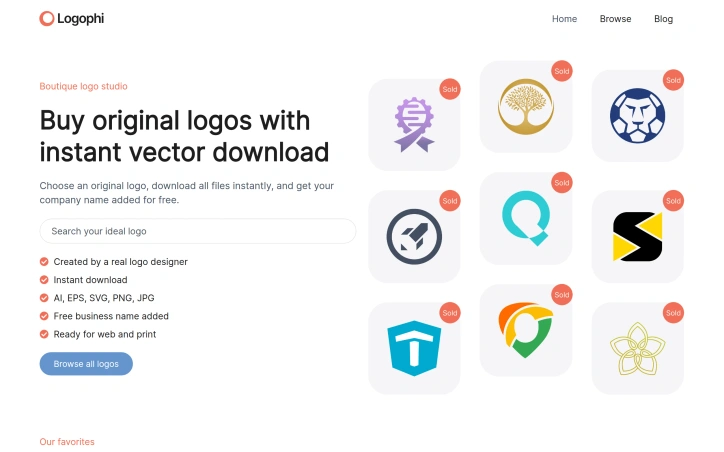
For entrepreneurs and small business owners who need a professional logo quickly, Logophi offers a compelling solution. The website provides a curated collection of original, handcrafted logos that can be purchased and downloaded instantly, eliminating the wait associated with custom design processes. What stands out about Logophi is its commitment to exclusivity; each logo is sold only once, ensuring that buyers receive a unique brand identity. The logos are designed by a real logo designer, and the website showcases a diverse range of designs, from minimalist to bold and symbolic. The process is straightforward: customers browse the collection, select a logo they like, and receive instant digital downloads in various formats, including AI, EPS, SVG, PNG, and JPG. The purchased logo comes with the buyer's business name added for free, and optional color adjustments are available at no extra cost. The commercial license is included, giving buyers full rights to use the logo across various platforms. Logophi's business model is based on a one-time sale for each logo, with prices ranging from $300 to $800. The website features a selection of logos at different price points, giving customers a sense of the design quality and variety available. Overall, Logophi provides a convenient and reassuring solution for startups and small businesses seeking a strong, memorable logo to establish their brand identity. By offering professionally designed, exclusive logos with instant download, Logophi helps new brands launch with confidence.

Design-resources
L
Ljubo Struharik

For entrepreneurs and small business owners who need a professional logo quickly, Logophi offers a compelling solution. The website provides a curated collection of original, handcrafted logos that can be purchased and downloaded instantly, eliminating the wait associated with custom design processes. What stands out about Logophi is its commitment to exclusivity; each logo is sold only once, ensuring that buyers receive a unique brand identity. The logos are designed by a real logo designer, and the website showcases a diverse range of designs, from minimalist to bold and symbolic. The process is straightforward: customers browse the collection, select a logo they like, and receive instant digital downloads in various formats, including AI, EPS, SVG, PNG, and JPG. The purchased logo comes with the buyer's business name added for free, and optional color adjustments are available at no extra cost. The commercial license is included, giving buyers full rights to use the logo across various platforms. Logophi's business model is based on a one-time sale for each logo, with prices ranging from $300 to $800. The website features a selection of logos at different price points, giving customers a sense of the design quality and variety available. Overall, Logophi provides a convenient and reassuring solution for startups and small businesses seeking a strong, memorable logo to establish their brand identity. By offering professionally designed, exclusive logos with instant download, Logophi helps new brands launch with confidence.

Logophi - Original logos with instant vector download preview

Key features

  • Instant Download: Receive logo files immediately after purchase
  • Exclusive Logos: Each logo is sold only once to ensure uniqueness
See full listing
Uitly

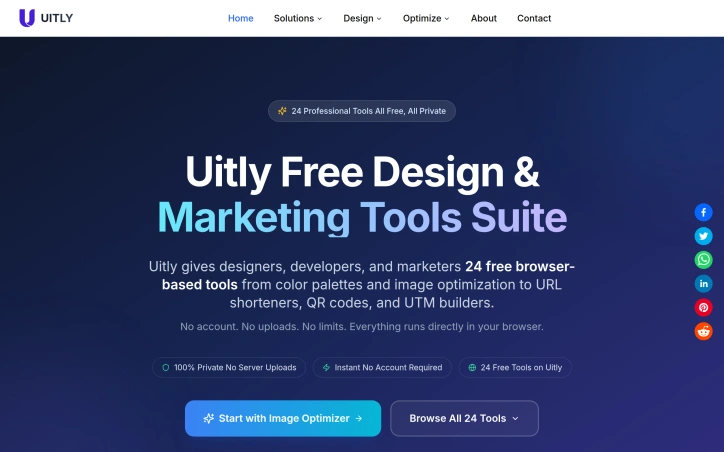
Designers, developers, and marketers often juggle multiple online tools to get their work done, only to be hindered by tedious signups, file uploads, and subscription fees. Uitly addresses this pain point by offering a suite of 24 professional-grade tools that run entirely within the browser, eliminating the need for account creation, file uploads, and payment. The target audience is clear: creatives and professionals seeking a convenient, private, and free solution for their design and marketing needs. What sets Uitly apart is its commitment to user privacy and convenience. By processing all data locally within the browser, Uitly ensures that users' files never leave their device, providing a secure experience. This approach also enables instant access to the tools without requiring registration or login. The breadth of tools available is impressive, covering tasks such as URL shortening, QR code generation, barcode scanning, and password creation, among others. Notable features include the ability to generate code-ready output in formats like CSS, JSON, and JSX, making it easy to integrate the results into production workflows. The tools are also designed to be device-agnostic, working seamlessly on desktop, tablet, or mobile devices. Additionally, features like the UTM builder, URL cleaner, and link preview generator demonstrate a clear understanding of marketers' needs. Uitly is completely free to use, with no paywalls or usage limits, making it an attractive option for individuals and teams alike. By forgoing traditional revenue streams like subscriptions, the platform relies on its simplicity and utility to drive user adoption, which has already resulted in 50,000 monthly users. With its robust feature set and commitment to privacy, Uitly is poised to become a go-to resource for designers, developers, and marketers seeking a reliable and hassle-free toolkit.
Design-resources
F
Fahad Ahmad

Designers, developers, and marketers often juggle multiple online tools to get their work done, only to be hindered by tedious signups, file uploads, and subscription fees. Uitly addresses this pain point by offering a suite of 24 professional-grade tools that run entirely within the browser, eliminating the need for account creation, file uploads, and payment. The target audience is clear: creatives and professionals seeking a convenient, private, and free solution for their design and marketing needs. What sets Uitly apart is its commitment to user privacy and convenience. By processing all data locally within the browser, Uitly ensures that users' files never leave their device, providing a secure experience. This approach also enables instant access to the tools without requiring registration or login. The breadth of tools available is impressive, covering tasks such as URL shortening, QR code generation, barcode scanning, and password creation, among others. Notable features include the ability to generate code-ready output in formats like CSS, JSON, and JSX, making it easy to integrate the results into production workflows. The tools are also designed to be device-agnostic, working seamlessly on desktop, tablet, or mobile devices. Additionally, features like the UTM builder, URL cleaner, and link preview generator demonstrate a clear understanding of marketers' needs. Uitly is completely free to use, with no paywalls or usage limits, making it an attractive option for individuals and teams alike. By forgoing traditional revenue streams like subscriptions, the platform relies on its simplicity and utility to drive user adoption, which has already resulted in 50,000 monthly users. With its robust feature set and commitment to privacy, Uitly is poised to become a go-to resource for designers, developers, and marketers seeking a reliable and hassle-free toolkit.

Uitly preview

Key features

  • Local Processing: All data is processed locally within the browser.
  • Code-Ready Output: Generates output in formats like CSS, JSON, and JSX.
See full listing