Xtra Hands Family Chore App
Household chore management remains one of parenting's persistent friction points, and Xtra Hands positions itself as the...
Recently Listed
1,034 launches
Creating stunning visuals from text prompts just got a lot easier, thanks to a innovative AI-powered solution designed specifically for creators. The problem it tackles is the tedious and time-consuming process of crafting complex prompts to achieve desired results, freeing up artists to focus on their craft. What stands out about this product is its ability to understand intent in any language, allowing users to simply write in plain language and receive high-quality images and videos on demand. The AI engine is capable of delivering diverse and unique outputs, making it an ideal tool for those who need rapid iterations and varied results. Notably, the product boasts a range of key features, including the ability to generate four variations in seconds, making it perfect for tight deadlines. It also offers style references, video generation, and more, built right in. Additionally, users can integrate the product into their workflow via a full REST API with comprehensive documentation and examples. The pricing model is straightforward, with a pay-as-you-go approach that eliminates forced subscriptions. Users can choose from a range of plans, including a novice pack with no commitment, or higher-tier plans with varying levels of support and credits. All plans include full commercial rights, with no hidden fees, and users can cancel anytime. With over 600 creators worldwide already trusting this product, it's clear that it's making a significant impact in the creative community. By simplifying the process of creating stunning visuals, this AI-powered solution is empowering artists to bring their ideas to life quickly and easily.


Outdated attendance tracking methods, such as punch cards and manual logs, are being replaced by more modern and secure solutions. FRANS is a solution for businesses looking to streamline their attendance management. It is designed for organizations with multiple locations or teams on the move, as well as those with fixed setups. The product stands out for its AI-powered facial recognition technology, which provides accurate and secure attendance tracking. It eliminates the need for physical contact, enhancing hygiene in environments like offices and hospitals. The system's GPS-based attendance verification feature ensures that attendance is logged only from approved locations, preventing off-site fraud. Key features of FRANS include real-time monitoring and analytics, secure and compliant data storage, and seamless integration with existing HR and payroll systems. The system's gesture control feature allows for intuitive use, making it accessible even in hands-free scenarios. The product is available in two flexible options: Mobile and Camera, catering to different workplace needs. By implementing FRANS, businesses can improve productivity, strengthen compliance, and manage their workforce with greater ease. The system's advanced security protocols protect sensitive biometric data from breaches, and its compliance with data protection regulations provides peace of mind. While the pricing and business model details are not explicitly stated, the company encourages potential customers to "Book A Demo" and "Get A Proposal", suggesting a tailored approach to meeting the needs of different organizations. Overall, FRANS is a robust attendance management solution that addresses the needs of modern workplaces.


Designers and developers often face a multitude of everyday tasks that slow them down, from creating harmonious color schemes to converting between different color formats. Devpalettes addresses this issue by providing a suite of free, instantly accessible online utilities that cater to the needs of designers, developers, students, and creators. What stands out about Devpalettes is its commitment to simplicity, speed, and privacy. The platform offers a range of professional-grade tools that work directly in the browser, eliminating the need for sign-ups or payments for basic features. The color palette generator, for instance, allows users to create stunning color combinations with a single click, while also providing features like automatic contrast checking to ensure compliance with WCAG contrast requirements. Key features worth noting include the interactive palette generator, CSS gradient builder, and image picker, which can extract dominant colors from any image. The platform also provides developer-ready code exports in various formats, including CSS, SCSS, JSON, and Tailwind config. Furthermore, Devpalettes offers practical resources and tutorials on color theory, accessibility, and design best practices. Notably, Devpalettes is entirely free to use, with no sign-up required, and the founder's goal is to continue expanding the platform into a comprehensive productivity hub. With its focus on speed, simplicity, and privacy, Devpalettes is poised to become a go-to destination for designers and developers looking to streamline their workflow and improve their productivity. Overall, Devpalettes is a valuable resource for anyone involved in digital design and development.


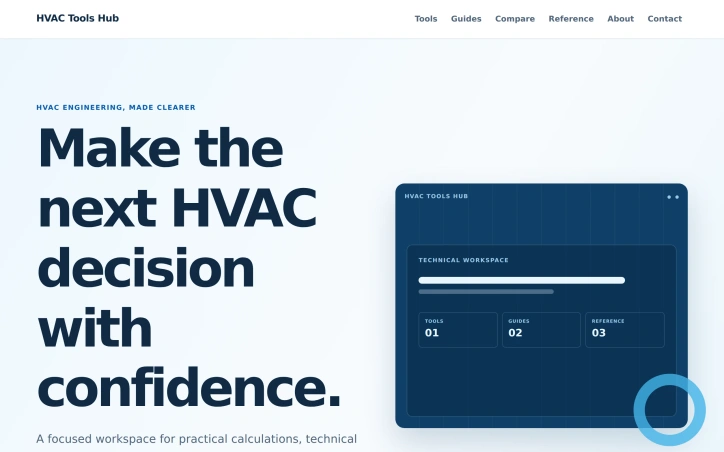
Engineering professionals in HVAC lose productivity shuffling between disconnected tools and reference materials to validate design decisions. This workspace addresses that friction by bundling calculators, technical data, and explanatory guides into a coherent system that moves engineers from problem to decision. The product centers on a practical workflow: engineers frame their inputs with known conditions, apply the appropriate calculator to the specific task, then validate assumptions through reference data and guides. This structure keeps decision-making grounded in context rather than isolated calculations. The toolkit spans three core HVAC domains. Duct design features sizing calculators for round and rectangular configurations, velocity checkers, friction loss analysis, and equivalent diameter comparisons. Load calculation tools aggregate cooling and heating components with documented inputs, alongside guides distinguishing design procedures from rule-of-thumb estimates. Refrigeration sections include capacity calculators and temperature-difference tools for evaluating system performance against measured state points. What distinguishes this workspace is the pairing of calculation tools with supporting reference material and decision guidance. Each tool sits within a broader context—guides explain methodology, references provide lookup data and formulas, and comparison sections help engineers choose between approaches. This architecture reflects a deliberate decision to treat context as foundational to sound engineering rather than optional validation. The update history suggests active maintenance, with multiple duct design and refrigeration tools updated within days of review. The workspace organizes itself around a clear taxonomy of paths: tools, reference material, decision comparisons, and explanatory guides. This structure should reduce time spent searching across disparate resources. The interface positions itself toward hands-on engineers rather than beginners. Terminology and tool complexity assume working knowledge of HVAC systems, pressure dynamics, and refrigeration cycles. Descriptions are direct and technical rather than introductory. No pricing model appears in available content. The workspace functions as a reference destination for professional use rather than a commercial product with listed costs. For HVAC design professionals managing multiple calculations daily, this hub addresses a real coordination problem: decision confidence depends on easy access to both the math and the reasoning behind it. By consolidating those elements, the tool eliminates the context-switching friction that fragments attention during design work.

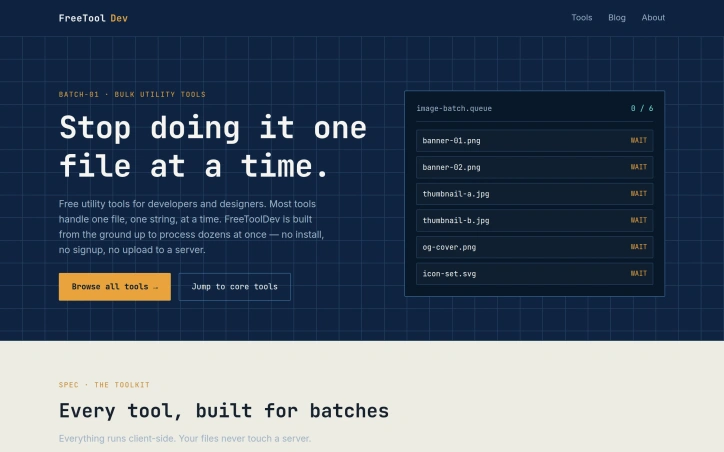
Developers spend countless hours processing files one at a time when bulk operations would save them significant time. FreeToolDev solves this problem by offering a free suite of utility tools built specifically for batch processing—everything from images to data formats to SEO metadata—all running directly in the browser. The product's core value proposition rests on three pillars: speed through parallel processing of dozens of files at once, privacy through client-side execution with no server uploads, and frictionless access requiring no installation, signup, or account creation. This combination addresses real friction points for developers who have either struggled with clunky command-line workflows or avoided online tools due to privacy concerns about uploading sensitive files. The feature set is impressively broad. Image tools handle batch resizing, conversion, and compression across PNG, JPG, and WebP formats. Data utilities cover CSV-to-JSON conversion, JSON-YAML bidirectional conversion, and JSON validation and formatting. For SEO professionals and developers, there's a site crawler that auto-generates sitemaps, RSS feeds, and llms.txt files while detecting broken links. Security-focused users get tools for bulk IP and DNS lookups, SSL expiry checks, and JWT decoding. The toolkit also includes niche utilities like QR code and barcode generators, bulk URL encoding and decoding, and meta title and description length checkers—the kinds of repetitive tasks developers typically cobble together from scattered tools. What distinguishes FreeToolDev from competitor tools is the genuine commitment to batch processing as a first-class feature rather than an afterthought. Most developer utilities handle one file or string at a time. FreeToolDev is architected around the assumption that users need to process multiple items in parallel. The browser-based architecture with client-side processing removes friction and addresses legitimate privacy concerns, ensuring files never leave the user's machine. The product positions itself squarely at developers and designers who regularly handle bulk file operations. The breadth of tools suggests the creator understood their own workflow bottlenecks and built solutions for each one. While the feature set is extensive, the unifying principle remains clear: take tedious, repetitive file processing and make it genuinely bulk-first. FreeToolDev operates on a pure free model with no indicated paid tier or monetization strategy. For developers seeking straightforward, privacy-first bulk utilities, the combination of breadth, accessibility, and zero cost makes this worth evaluating.

Homeowners tackling renovation projects face a familiar frustration: each calculation requires hunting for a different tool. Paint coverage, tile counts, grout amounts, and cost estimates each live on separate websites, forcing users to juggle tabs and context switch constantly. DIYCalcKit consolidates this scattered experience into one unified platform, offering 34 calculators designed for the most common home improvement tasks. The product targets do-it-yourself homeowners who need quick, reliable estimates without complexity. Its value proposition is straightforward: no account creation, no ads cluttering the interface, instant results presented clearly. The founder identified a real pain point—the repetitive search for relevant calculators—and built a single source of truth. The range of tools spans the typical home project lifecycle. Paint estimators cover gallons needed, cost projections, coverage areas, and primer requirements. Flooring tools address tile placement, carpet seaming, hardwood board counts, and grout quantities. Beyond surfaces, the platform includes roofing calculators, insulation assessments, and renovation cost breakdowns by room and scope. More niche additions like the Christmas lights calculator and home renovation ROI tool show the creator anticipated varied user needs and seasonal projects. What distinguishes DIYCalcKit from building spreadsheets or using generic calculators is the specialization. Each tool bakes in domain knowledge—accounting for pattern repeats in wallpaper, waste allowances in tile, angles in roofing installation. The decision to bundle 20 project guides alongside calculators acknowledges that homeowners don't just need numbers; they need direction. The business model is transparent. The entire platform is free and will remain so indefinitely, with no signup wall gating access. This removes hesitation for casual users and makes the product instantly accessible mid-project, when someone realizes they need an estimate but doesn't have time for lengthy onboarding. For a homeowner planning their first bathroom remodel or calculating materials for a weekend paint job, the platform eliminates the friction of sourcing multiple calculators and consolidates decision-making. It won't appeal to professionals who already have established estimation workflows, but for the DIY segment making project decisions at the hardware store or on the couch with a tape measure, having 34 relevant tools in one place shifts the calculus.


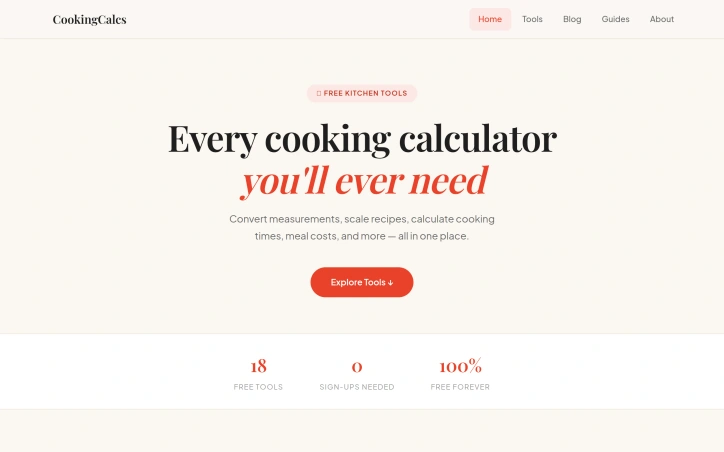
Kitchen experimentation becomes tedious when you're constantly context-switching between different conversion tools. CookingCalcs consolidates the scattered calculators that home cooks typically rely on into a single, no-friction platform. The core problem it solves is straightforward: reducing friction between having a recipe and executing it by eliminating the need to hunt across multiple websites or apps. The product targets anyone who cooks regularly enough to encounter measurement conversions, recipe scaling challenges, or questions about cooking temperatures and times. This includes casual home cooks, meal preppers, and anyone following recipes outside their native measurement system. The founder's motivation—frustration with existing fragmentation—directly translates into the product's value proposition. What stands out immediately is the complete absence of barriers to entry. There are no required sign-ups, no paywalls, and no freemium model pushing users toward premium tiers. The commitment to being free forever is stated explicitly. With 18 tools available, CookingCalcs covers the primary pain points: unit conversions, temperature conversions, recipe scaling, and meal cost calculations. The breadth indicates thoughtful scope—comprehensive enough to handle most kitchen scenarios without bloat from rarely used features. The tool selection reveals attention to specific use cases beyond basic conversions. Features like the egg size converter, fresh-to-dried herb converter, and slow cooker time converter indicate a product designed with actual cooking scenarios in mind, not generic measurement math. The inclusion of cooking time calculators and meat temperature guides moves the product beyond simple conversion into practical kitchen guidance. The raw-to-cooked weight converter and weekly meal prep cost calculator demonstrate understanding of different cooking contexts. This is software built by someone thinking about how people actually cook, not treating cooking math as an abstract problem. The minimalist feature set—no accounts, no complex workflows, no social sharing—keeps the interface focused on immediate utility. Users navigate directly to their needed tool and get results without friction or cognitive overhead. CookingCalcs fills a genuine gap in kitchen software. Rather than attempting to be a full recipe management platform or meal planning suite, it focuses tightly on calculation and conversion. For home cooks who want kitchen math solved quickly and without barriers, the product delivers exactly what it promises. The execution matches the problem statement: one focused tool instead of many scattered ones.

Pet owners often struggle to find quick, reliable information about their animals' health, nutrition, and care costs without wading through veterinary websites or paying for professional consultations. PetPawCalc addresses this directly by offering a collection of free calculation tools designed specifically for dog and cat owners who want straightforward answers in seconds. The platform removes traditional friction points that deter users from seeking information. There's no account creation, no email requirement, no upselling. Users select a calculator, input their pet's details, and receive an instant result. This accessibility-first approach reflects a deliberate design philosophy centered on transparency about costs and health management—areas where pet parents typically encounter confusion and scattered, unreliable information. The product differentiates itself through breadth and specificity rather than attempting to be everything. The 15-plus-calculator toolkit spans health, nutrition, reproduction, preventive care, and financial planning. The dog age calculator uses breed and size-specific formulas instead of the widely circulated but outdated 7x rule. Vaccination schedules factor in lifestyle. Heat cycle trackers map multiple estrous stages. Cost estimators break down discrete services like surgery, grooming, and dental care rather than providing vague total figures. This calculator selection suggests a founder who understands both common pet owner anxieties and legitimate knowledge gaps. Animal age conversion, nutrition calculations tied to activity level, and detailed cost forecasting genuinely help owners make informed decisions. The inclusion of pregnancy calculators and heat cycle trackers signals an attempt to serve both casual pet parents and those actively breeding, though the site doesn't explicitly differentiate these audiences or tailor messaging accordingly. The platform claims to rely on science-based formulas, and the sophistication of individual calculators lends credibility to this assertion. However, the site provides no links to underlying research or citations. That's a missed opportunity for authority, particularly around nutrition and breeding guidance, where misinformation spreads rapidly among pet owners seeking answers. The business model is transparent: completely free with no apparent ads, premium tiers, or data collection schemes. This aligns with the founder's stated commitment to accessibility, though the long-term sustainability model remains undefined on the public site. For pet owners seeking quick health and cost projections without creating another online account, PetPawCalc delivers on its promise efficiently and without friction.


When prospective car buyers sit down to make one of the largest purchases of their lives, they face a complexity problem. A vehicle decision isn't simply about the sticker price—it encompasses loan terms, depreciation curves, insurance premiums, fuel consumption, maintenance budgets, and financing alternatives that interact in non-obvious ways. AutoCalcHub addresses this fragmentation by consolidating 24 automotive financial calculators into a single, immediately accessible resource. The platform's core strength lies in its pragmatic approach to removing friction. There's no registration wall, no paywall, and no hidden fees to discover later. Users arrive at the site and can run any of the available calculators within seconds. This unobstructed access stands out in an era when personal finance tools typically demand email addresses or subscription commitments before delivering value. The calculator collection covers the full lifecycle of car ownership. On the purchase side, tools address loan payments, affordability thresholds using the 20/4/10 budgeting rule, down payment scenarios, lease-versus-buy comparisons, and cash-versus-finance trade-offs. A sales tax calculator factors in state-specific rates and trade-in deductions—a detail that many buyers overlook until payment time. For existing owners, the platform offers maintenance cost estimates, trade-in value assessments, refinance scenarios, and early payoff analysis. For the EV-curious, dedicated tools compare total cost of ownership between gas and electric vehicles and estimate charging expenses at home or public stations. Less commonly featured are some of the specialized calculators: a GAP insurance advisor that determines whether underwater loan coverage is worthwhile, a real-world MPG tracker for drivers who want to measure actual efficiency, and a road trip planner that bundles fuel, food, and lodging into a single estimate. These reflect thought about the actual decisions car owners need to make, not just the headline metrics. The business model is straightforward. The site operates on Google AdSense advertising, which the team acknowledges directly. This positioning—free tools supported by advertising rather than extracting user data or premium tiers—creates transparent incentives. The company profits when users find value in returning, not by upselling financial products or harvesting personal information. AutoCalcHub targets drivers who want math-driven decision-making without the sales pitch. It succeeds by avoiding the complexity tax that many fintech platforms impose: no accounts to create, no data to surrender, no friction between question and answer.


Helping homeowners quantify energy spending and environmental impact, EcoEnergyCalc offers a free suite of calculators designed to eliminate friction between users and sustainability decisions. The product targets homeowners and environmentally conscious individuals seeking concrete data on consumption patterns without signup walls or surprise fees. The breadth of the calculator library stands out immediately. Rather than a single-purpose tool, the platform bundles eighteen calculators spanning home energy costs, appliance consumption, solar returns, carbon accounting, and lifestyle impact. Users can model electric bill drivers, estimate LED bulb savings, calculate solar panel payback periods, or assess flight emissions from a unified interface. This variety appeals to people at different decision points, from those seeking quick cost-cutting wins to those evaluating capital investments like solar installation or electric vehicle purchases. The execution emphasizes frictionlessness. There is no account creation, no email verification, and critically, no hidden fees. Results appear instantly after entering location and usage data, which directly addresses a widespread frustration where competing energy tools bury actual calculations behind signup screens or gate analysis behind paywalls. The transparent free model removes the suspicion many users bring to digital tools in this category. The calculator scope reflects genuine homeowner priorities. Beyond standard energy cost tools, the platform includes fuel type comparisons, water usage tracking, rainwater harvesting analysis, and battery storage sizing. Carbon footprint calculators extend beyond home energy to cover diet, transport, and tree-planting offsets. This breadth signals the product recognizes that sustainability decisions span multiple domains and require different calculation frameworks rather than a monolithic one-size-fits-all approach. The platform's free-forever positioning stands in stark contrast to competitors that monetize through premium tiers or conversion funnels built into the calculation process itself. Users get results without the usual gatekeeping. What remains unclear is the depth of underlying data and methodology. Whether these calculators incorporate local utility rates, track equipment efficiency curves, or update carbon accounting as electrical grids decarbonize cannot be assessed from the interface description alone. A calculator's real utility depends entirely on data quality and update frequency. The gap between smooth user experience and analytical rigor will ultimately determine whether this becomes a genuinely trusted decision-support tool or merely a polished curiosity.


Insurance can feel overwhelming. Most people struggle to determine how much coverage they actually need, whether they're shopping for life insurance to protect their family or calculating disability coverage to safeguard their income. My Insurance Calc addresses this friction with a collection of over 20 free calculators designed to demystify insurance requirements across dozens of coverage types. The product serves a broad audience, from renters and homeowners to self-employed professionals and specialty vehicle owners. Each calculator walks users through relevant variables—income, dependents, assets, vehicle specifics, travel destinations—to generate personalized coverage recommendations and premium estimates. The platform covers expected categories like life, home, and car insurance, but also tackles niche needs such as EV insurance impacts, SR-22 requirements after driving violations, and business insurance for entrepreneurs. The specificity of these calculators suggests recognition of how insurance needs vary dramatically based on individual circumstances. What sets this offering apart is its commitment to accessibility. The entire platform is completely free with no account creation requirement, removing barriers that typically exist in insurance research. Results appear instantly, and the emphasis is on straightforward answers without hidden fees or signup obligations. This low-friction approach makes it practical for people making quick decisions or conducting preliminary research before consulting an agent. The breadth of coverage is notable. Beyond standalone calculators, the platform includes comparative tools, such as a term versus whole life comparison, helping users understand cost tradeoffs across insurance products. The addition of newer calculators for health insurance subsidies and EV-specific premiums suggests the tool evolves to address emerging insurance concerns. This responsiveness to market needs indicates active development and an understanding of shifting insurance priorities. For consumers tired of insurance confusion, My Insurance Calc delivers immediate utility without friction. The breadth of calculators and the explicit focus on removing signup barriers make it a practical starting point for anyone trying to understand their coverage needs.


Personalized health guidance typically demands friction—lengthy questionnaires, account creation, sometimes a subscription. This platform eliminates those obstacles by offering a stripped-down collection of health calculators that deliver results without mandatory signup or hidden charges. The product addresses a real gap in the market. People seeking personalized fitness data often face a choice between unreliable rules of thumb and apps that treat registration as a prerequisite. My Wellness Calc positions itself as a third path: immediate access to science-backed tools across a surprising breadth of health domains. What distinguishes the offering is its scope. Rather than a single calculator, the platform bundles over a dozen specialized tools spanning metabolic rates, cardiovascular fitness, body composition, and recovery protocols. The collection ranges from foundational measures like BMI and calorie expenditure to more sophisticated metrics such as VO2 max estimation and zone-specific heart rate training ranges. This variety attracts different user archetypes—from beginners validating their weight-management math to serious athletes fine-tuning training intensity zones. The execution reflects a deliberate philosophy around frictionless access. Each tool computes personalized results in seconds using metric or imperial inputs. The interface avoids the common trap of information overload, instead pairing calculations with explanatory context so users understand their numbers, not just receive them. For those planning fitness interventions—whether intermittent fasting windows, sleep-cycle alignment, or macro targets—the platform provides one-page clarity. Technically, the tools integrate one advertising network (Google AdSense), which supports the free model without paywalls or recurring revenue schemes. This decision trades subtle display clutter for zero financial barriers, a straightforward trade-off that aligns with the stated mission. The weaknesses are implicit in the design. Browser-based calculators live or die by accuracy; without independent validation or transparent methodology disclosure, users must trust the formulas blindly. No mobile app means the experience is tethered to desktop browsing. And while breadth is a strength, the tools lack the depth of specialized platforms—a VO2 max calculator that requires field test data cannot replace devices that measure it directly. Still, for someone seeking a quick, credible answer to a health calculation without the friction of authentication or cost, the platform delivers exactly what it promises. In a market often predicated on engagement through onboarding walls, the directness is refreshing.


Freelancers waste hours on administrative work that could go toward billable projects. GetSoloTools confronts this friction by providing a free, no-signup invoice generator that transforms business details, client information, and line items into polished PDF invoices within seconds. The platform is built specifically for solo professionals who need speed over complexity. Rather than forcing users through registration workflows or account setup, the generator launches directly into a form. Creators fill in their business name, address, and contact details, add client information, set invoice numbers and dates, then list the services or products being billed. The interface handles subtotals, tax calculations, and currency selection automatically across nine currencies from USD to INR. When finished, users download a clean PDF ready to send without watermarks or branding that signals the invoice was created by a third party. What distinguishes GetSoloTools is its commitment to true zero-friction design. The application works entirely in the browser with no account required, and the creator explicitly markets the tool as free forever with unlimited invoice generation. This model appeals to freelancers and contractors already stretched thin financially, removing a common barrier to professionalization. The platform also supports custom business logos, enabling users to maintain brand consistency in their invoicing without paying for premium features. The broader ecosystem around the core invoice tool strengthens its value proposition. GetSoloTools includes eighteen additional utilities tailored to freelancer workflows, such as late fee calculators, invoice tracking systems, and receipt generators. This suite positioning suggests the tool is designed as a primary hub for freelance administrative needs rather than a single-purpose utility. The automatic form-clearing feature and browser-based auto-saving of drafts reflect thoughtful UX considerations for users who might create invoices on different devices or during interrupted work sessions. The inclusion of guidance on invoice structure, payment terms, and the distinction between invoices and receipts adds educational value that helps users understand best practices rather than assuming competence. GetSoloTools targets the authentic need of freelancers for administrative tools that don't demand payment upfront or long-term commitment. Its zero-friction approach and comprehensive feature set eliminate common obstacles to professional invoicing, making the tool an efficient choice for anyone billing clients without organizational infrastructure.

American financial planning often forces an uncomfortable choice: use free calculators that obscure their methodology and monetize through data harvesting, or pay for tools that respect privacy. MoneyDecoded breaks this false binary by offering 25 free financial calculators and comparison tools with no signup required, no ads, and no data collection. The platform directly addresses a real friction point in personal finance: most calculators hide their assumptions and math behind black boxes. MoneyDecoded's commitment to mathematical transparency means users can understand not just the answers they get but why those answers emerge from their inputs. For Americans managing mortgages, retirement accounts, debt payoff strategies, or investment decisions, this pedagogical approach transforms calculators from simple utilities into learning tools. The calculator suite spans the full financial lifecycle. Retirement planning tools cover 401(k) projections with employer match scenarios, Roth IRA analysis, and Social Security benefit estimation across claiming ages. Debt management includes dedicated calculators for mortgages, student loans, personal loans, and car loans, each showing amortization schedules and true borrowing costs. The platform also includes less common but valuable utilities: a Rent vs. Buy calculator with break-even analysis, a FIRE calculator for financial independence tracking, and comparisons between debt payoff strategies like the avalanche versus snowball methods. The comparison section supplements calculators with rates and accounts data, helping users benchmark high-yield savings accounts, certificate of deposit terms, checking accounts, and ETF performance. A Send Money Abroad tool compares fees across Wise, traditional banks, and fintech options. What distinguishes MoneyDecoded from competitors is not feature quantity but accessibility and philosophy. Free tools for personal finance already exist, yet the service's explicit rejection of data monetization and advertising removes common friction. The no-data-collection commitment suggests a creator prioritizing user trust over growth metrics. All tools carry an updated date, signaling ongoing maintenance rather than abandonware. The site's URL indicates this calculator suite sits within a broader financial education ecosystem. For individuals seeking quick, transparent calculations without compromising privacy, the platform delivers. For financial educators or advisors recommending tools to clients, the free-with-explanation model eliminates gatekeeping. The primary limitation is that calculators alone don't constitute comprehensive financial advice, though the transparency-first approach sets a better foundation for independent decision-making than opaque alternatives.


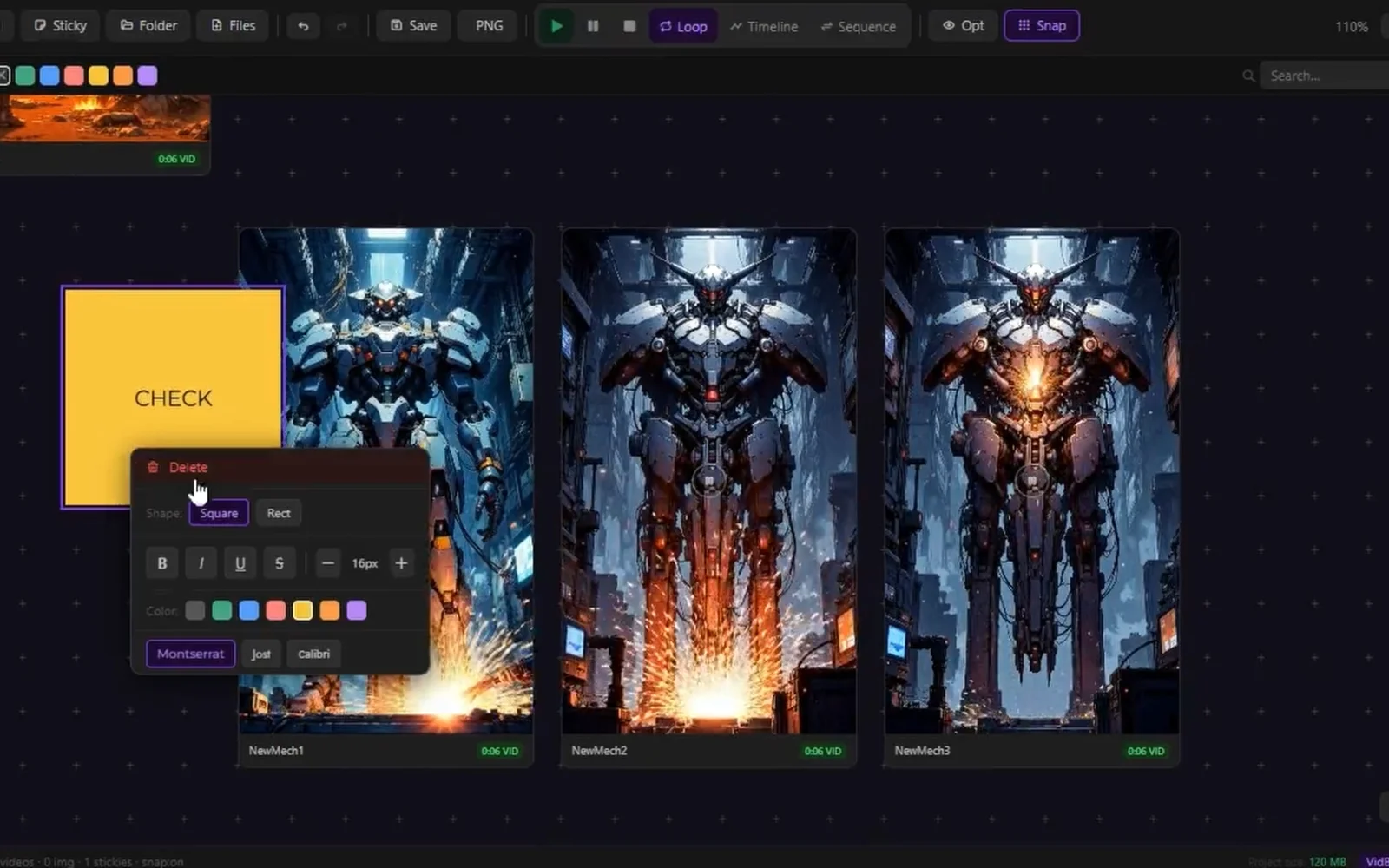
Creators working with AI-generated media face a fragmented workflow. After spending time generating images and videos across various AI tools, they must jump between multiple applications to organize, compare, and present their results. VidBoards consolidates this repetitive context-switching into a single, focused application designed specifically for reviewing and presenting generated batches. The product targets AI creators actively using generation tools like ComfyUI, Automatic1111, Stable Diffusion, and similar platforms. Rather than building yet another creation tool, VidBoards solves the problem that comes after generation: managing outputs efficiently, comparing results systematically, and presenting sequences without leaving the application. What distinguishes VidBoards is its philosophical foundation. The application operates entirely locally without subscriptions, accounts, or cloud services. It reads embedded metadata directly from generated files, eliminating manual documentation burden. This approach appeals to creators who prioritize privacy and control over their workflow. The interface centers on an infinite canvas where users arrange videos and images freely using standard gestures: middle-mouse panning, scroll-wheel zooming, and optional snap-to-grid alignment. Multiple boards support unlimited cards per project, saved as lightweight .vdb files. The architecture remains deliberately simple, keeping users focused on their media rather than fighting interface complexity. The shared timeline feature represents the core innovation. A single scrubber syncs all videos to the exact same frame simultaneously, enabling instant comparison across dozens of clips. Rather than opening multiple players and mentally tracking differences, creators see frame-by-frame variations across all takes at once. This directly addresses the time spent hunting for optimal shots. Sequence Mode transforms the application into a presentation tool. Users activate a full-screen overlay, arrange clips in order, and play them back-to-back like a showreel. Auto-advance between items and keyboard controls eliminate the need to export to external presentation software. Supporting tools include batch operations through multi-select, quick media controls for simultaneous playback or looping, and support for PNG, JPEG, WebP, MP4, and MKV formats. The application also handles metadata from multiple AI generation tools seamlessly. The pricing model is unambiguous: free, forever, with no subscription, no account requirement, and no cloud dependency. For a creator-focused tool addressing a specific workflow bottleneck, VidBoards demonstrates disciplined product design aligned with its audience's actual needs.
Encrypted file access loss represents a genuine problem for individuals and businesses storing sensitive data in compressed or password-protected formats. Catpasswd targets users who have forgotten passwords or lost access to RAR, ZIP, Microsoft Office, and Excel files—a surprisingly common scenario that often leaves people believing their data is permanently inaccessible. The core value proposition centers on cloud-based password recovery without requiring technical expertise. The platform maintains a database of tens of millions of password combinations, which it uses to attempt recovery matches against users' encrypted files. This crowdsourced password collection approach increases recovery success rates compared to brute-force alternatives, though it also raises implicit trust questions about how these password collections were sourced and secured. The product's standout features are its accessibility and speed. The recovery process appears straightforward enough for non-technical users, with testimonials indicating the service succeeds where other password-cracking tools fail. The existence of a free recovery mode acknowledges users in genuine need, differentiating it from competitors who monetize all recovery attempts. The platform claims to serve over 100,000 users globally, suggesting meaningful product-market fit in an underserved niche. A notable limitation is the scope restriction to specific file formats. Users needing recovery for database files, disk images, or other encrypted containers fall outside Catpasswd's coverage. The reliance on password database matching also means recovery depends on whether the password exists in the company's collection—unusual or recently created passwords may never be recovered, leaving users unaware of this constraint upfront. Pricing details remain absent from available materials. The 100,000-user metric indicates growth, though without churn or retention context it is unclear whether these represent active users or cumulative accounts created. The platform occupies a defensible position in the legitimate password recovery space, distinct from malicious credential-cracking tools. For users facing genuine file access loss, particularly with common passwords, Catpasswd offers a practical alternative to data resignation.


Handwriting is having a moment, at least in the digital age. One solo founder from Nepal has spotted an unusual niche: the demand for handwritten-looking text in an era when everyone types. Aipen.ink addresses this by converting plain text, ChatGPT responses, mathematical equations, and other written content into realistic handwriting styles, exportable as PDFs or SVG files. The product targets three distinct audiences. Students and educators can transform messy digital answers into clean, legible handwritten notes complete with rendered math and graphs, potentially useful for study materials or assignments. Founders and business professionals can convert written communications—emails, letters, financial projections—into text that reads as authentically human-written. A third segment involves technical audiences: engineers and researchers dealing with complex mathematics, quantum mechanics, and computational fluid dynamics who need these concepts rendered in handwriting rather than standard fonts. What distinguishes aipen.ink is its approach to a problem most would consider solved. While handwriting fonts exist, generating realistic handwriting at scale, especially with technical content, isn't trivial. The product leverages Google's Gemini API to handle the intelligence layer and employs twenty private Unicode variations to produce authentic-looking output. The tool runs entirely in the browser, meaning no user text is stored on servers, addressing privacy concerns. Users can select from existing handwriting styles or upload their own custom font. The feature set is practical. PDF and SVG export options provide flexibility across different workflows. Support for European languages broadens accessibility beyond English-speaking markets. The founder mentions video note generation as a forthcoming feature, suggesting active product development. The free trial removes friction for trying the product, though no explicit pricing model or revenue structure is disclosed. The sole founder status raises questions about sustainability and roadmap execution, but the technical foundation appears sound and the problem, if niche, is clearly defined. Aipen.ink occupies an interesting middle ground: not essential infrastructure but genuinely useful for specific workflows. Whether handwritten-style text becomes a mainstream requirement or remains a novelty depends heavily on adoption, but the product demonstrates that AI-powered writing interfaces can serve aesthetic and practical needs beyond traditional text generation.

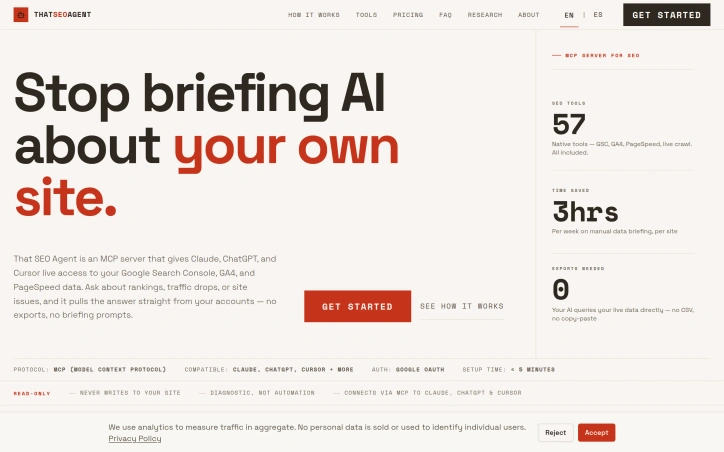
SEO professionals typically spend hours each week preparing data before AI tools can provide meaningful analysis. That SEO Agent directly addresses this inefficiency by eliminating what its creators call the "briefing tax" — the routine task of exporting metrics from Google Search Console, GA4, and PageSpeed, then manually copying and pasting them into conversation prompts. The product targets SEO consultants, particularly those managing multiple client properties. By connecting through the Model Context Protocol, the tool grants Claude, ChatGPT, and Cursor direct read-only access to a user's live Google accounts. This eliminates the need to manually assemble data exports before asking questions about rankings, traffic patterns, and technical site health. The platform distinguishes itself through scope and lack of constraints. It includes 57 native tools distributed across five functional categories: core Search Console queries, advanced GSC analysis, Google Analytics 4 reporting, technical SEO audits, and site management features. Critically, none of these tools hide behind pricing tiers or add-on fees. Users gain full access to the entire toolkit regardless of their plan. Setup requires minimal effort. After granting read-only Google OAuth access, users copy an API key and add a configuration block to their AI tool's settings in less than five minutes. The system then automatically discovers and registers sites by pulling Search Console properties directly. All communication flows through the MCP protocol, and the service never stores user credentials. The read-only architecture keeps the product strictly diagnostic. It retrieves and organizes existing data but cannot modify websites or accounts. This conservative design appeals to professionals managing client properties who need strict boundaries around account access. The core value proposition centers on workflow efficiency. By eliminating the copy-paste cycle, users avoid context-switching overhead and the contextual pollution of stuffing AI conversations with export files. For consultants managing multiple properties, this time savings compounds meaningfully. The platform explicitly promises zero additional costs per site or query, suggesting a straightforward pricing model. The product's appeal ultimately rests on a single thesis: getting live SEO data into AI conversations without manual intermediation.

Creative professionals and businesses struggling to generate high-quality visual content at scale now have access to a streamlined AI image generation platform that prioritizes both speed and ease of use. GeniusAI targets content creators managing production timelines, marketing teams running campaigns, and developers building AI-powered applications, offering a tiered approach that accommodates different user needs and budgets. The platform distinguishes itself through deliberate simplicity. Rather than overwhelming users with endless customization options, GeniusAI presents a three-step workflow: select from preset AI models and styles, describe what you want in natural language, and generate the image. This straightforward approach appeals to users without technical AI expertise while providing enough control for professionals seeking consistency across projects. The product features image generation with multiple model variants, photo editing tools, and image upscaling capabilities. Prompt enhancement automatically improves user descriptions before generation, reducing the friction of crafting perfect prompts. Teams can collaborate within a shared workspace, and all tiers include commercial licensing, removing legal uncertainty around using AI-generated content for business purposes. For developers, an API enables integration with existing workflows and the ability to enforce brand guidelines programmatically. GeniusAI's pricing structure reflects its market positioning. The entry-level Genius Creator tier at ten dollars monthly offers 700 monthly credits sufficient for casual creators, with images up to 896 by 896 pixels and access to eight preset styles. The Genius Studio tier at thirty-five dollars monthly jumps to 3,000 credits and increases resolution to 1024 by 1024 pixels while unlocking all 21 available styles. The Genius Pro tier at forty-five dollars monthly adds 5,000 monthly credits, extends creation history to unlimited, and includes twenty-four hour priority support. Each tier supports instant regeneration and full-size downloads. The generation process emphasizes speed; the platform can produce images in seconds rather than minutes, a meaningful advantage for professionals with tight deadlines. The inclusion of multiple generation modes allows users to balance output speed against visual polish depending on project requirements. The platform's positioning emphasizes both accessibility and professional capability, suggesting it serves as a bridge between casual users discovering AI-generated imagery and teams deploying it as part of their production workflows. The combination of competitive pricing, commercial licensing, and team features positions GeniusAI as a practical choice for businesses integrating generative AI into existing creative operations.


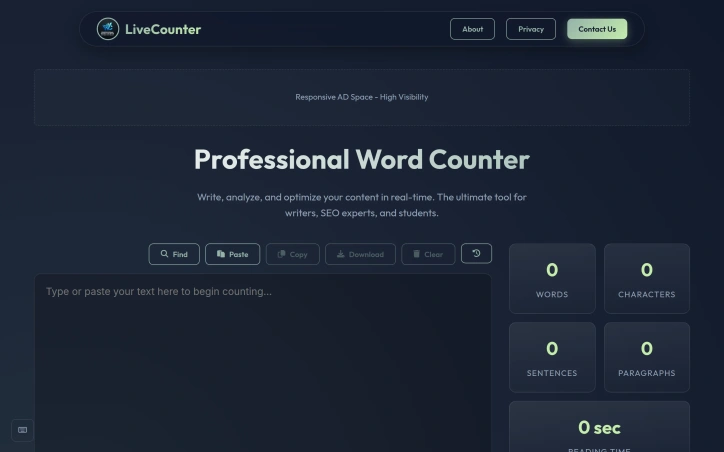
Content analysis tools have become essential for anyone publishing online, whether for search engine optimization, social media, or academic purposes. This word counter addresses a genuine need: writers and creators want instant feedback on their text's metrics without surrendering their privacy to cloud storage. The tool's core strength lies in its comprehensive real-time analysis. It delivers word, character, sentence, and paragraph counts as users type or paste content. Beyond basic metrics, it estimates both reading time using a standard 200 words per minute rate and speaking time at 130 words per minute. This dual-time feature proves particularly valuable for podcasters, presenters, and audiobook creators planning content duration. The readability scoring employs the Flesch-Kincaid scale, helping writers gauge text accessibility on a 0-100 scale where higher scores indicate easier comprehension. Combined with the character-limit tracking for Twitter/X posts, meta descriptions, and meta titles, the tool directly serves SEO practitioners optimizing content for search visibility and social media distribution. The word frequency analysis adds another layer, identifying repeated terms and helping refine content for both readability and keyword targeting. What distinguishes this offering is its commitment to privacy. The application processes all analysis client-side, meaning users' text never touches external servers. For writers working with sensitive material, confidential documents, or simply those concerned about data collection, this approach removes a significant barrier to adoption. The interface includes thoughtfully chosen shortcuts for power users: Ctrl+H for find and replace, Ctrl+Shift+C to copy, and Ctrl+Shift+D to download. The dark and light theme options accommodate different working environments and preferences. Mobile responsiveness ensures the tool functions equally well on phones and tablets, matching how many writers actually compose content today. The product positions itself at the intersection of multiple audiences. Casual Twitter users benefit from character counting. SEO professionals leverage the meta description and title length trackers alongside readability metrics. Students writing essays rely on word count verification. This multi-use approach broadens appeal without diluting focus. No pricing information appears on the site, suggesting the tool operates as a free offering, though the presence of ad space indicates an advertising-supported model rather than a premium subscription approach. For anyone seeking a straightforward, privacy-preserving text analysis solution with solid feature depth, this counter delivers practical value without friction.