
Xtra Hands Family Chore App
Household chore management remains one of parenting's persistent friction points, and Xtra Hands positions itself as the...
Recently Listed
1,034 launches
Simplifying complex financial processes is a formidable task, and Treeova tackles one such challenge by automating options trading without requiring users to have coding knowledge. The platform is designed for individuals who want to leverage automation in their trading activities but lack the technical expertise to develop their own systems. By providing a no-code solution, Treeova opens up options trading automation to a broader audience. This is a significant advantage, as it eliminates the barrier that often prevents non-technical individuals from implementing automated trading strategies. The fact that Treeova is described as an AI workspace suggests that it incorporates advanced technologies to support its automation capabilities. One of the standout aspects of Treeova is its focus on making a sophisticated financial tool accessible to users without a programming background. This indicates a clear understanding of the needs of its target market and a commitment to addressing those needs. The platform's AI-driven approach to options trading automation is also noteworthy, as it implies a high degree of sophistication and adaptability. Key features of Treeova include its no-code automation and AI workspace capabilities. These features are central to the platform's value proposition and are likely to be of significant interest to potential users. Unfortunately, the available information does not include details about Treeova's pricing or business model, leaving questions about its cost and revenue structure unanswered. Overall, Treeova presents itself as a powerful tool for automating options trading, leveraging AI to simplify a complex process and make it more accessible. Its focus on a no-code solution is a significant selling point, and its AI-driven approach suggests a high level of capability.

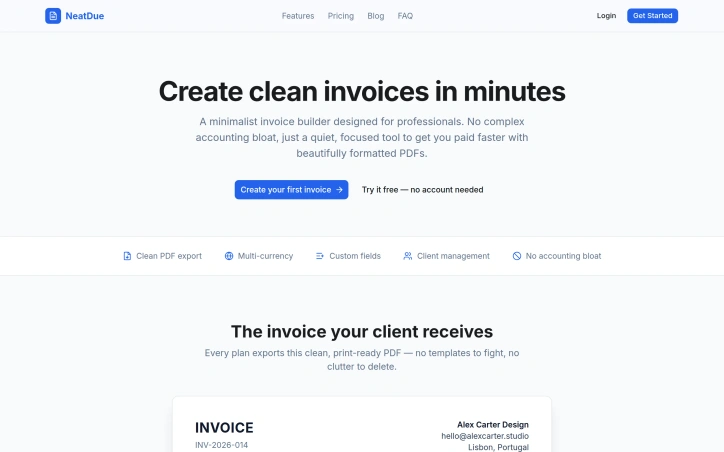
Creating professional invoices can be a tedious task for freelancers and small businesses, often due to the clutter and complexity of accounting software. NeatDue addresses this problem by providing a straightforward and minimalist invoice builder. The tool is designed to help professionals create clean and beautifully formatted invoices in minutes, focusing solely on the task at hand without unnecessary features. What stands out about NeatDue is its emphasis on simplicity and the quality of its output, ensuring that invoices are not only compliant but also visually appealing. NeatDue offers several key features that make it an attractive solution. It allows for multi-currency support, custom fields, and client management, making it versatile for various business needs. The tool also prioritizes data privacy and security, transmitting data over HTTPS and never sharing or selling it for advertising purposes. All plans export invoices to clean, print-ready PDFs, a core functionality that is consistent across NeatDue's offerings. The simplicity of its pricing structure is also noteworthy, with a clear distinction between its free and Pro plans. The free plan is suitable for individuals just starting out, allowing up to 5 invoices per month, while the Pro plan, priced at $9/month or $59/year, offers unlimited invoices, custom branding, and priority support. By stripping away unnecessary accounting features, NeatDue provides a focused solution for creating professional invoices, making it an ideal choice for freelancers and small businesses looking for a hassle-free invoicing experience.
Finding the right financial product in Cambodia can be a daunting task, especially with numerous options available. The MoneyKH AI Tool is designed to simplify this process by engaging users in a conversational interface that recommends suitable financial products based on their specific needs. The tool is particularly useful for individuals seeking financial products such as savings accounts, loans, wallets, insurance, and remittance services. It is tailored to the Cambodian market, drawing on data from over 50 verified institutions across seven product hubs. What sets the MoneyKH AI Tool apart is its adaptive questioning process. Unlike traditional quizzes that follow a fixed script, this AI-driven advisor asks follow-up questions based on the user's input, allowing for a more nuanced understanding of their requirements. The tool then provides a personalized recommendation, explaining why a particular product is suitable and offering a link to compare it with other options on the MoneyKH platform. The AI Tool's capabilities are noteworthy. It covers a wide range of financial products and is backed by directly verified data from institutions, rather than relying on scraped marketing information. The conversation is free, and users do not need to provide their email address to receive a recommendation. The average conversation lasts around 60 seconds, making it a quick and convenient solution for those seeking financial guidance. Notably, the tool's conversational nature allows users to ask follow-up questions and delve deeper into their financial options. The developer's goal is to provide an intuitive and user-friendly experience, moving away from rigid, pre-scored matrices that fail to account for individual circumstances. The service is offered at no cost to the user, with the cost to use being explicitly stated as $0.


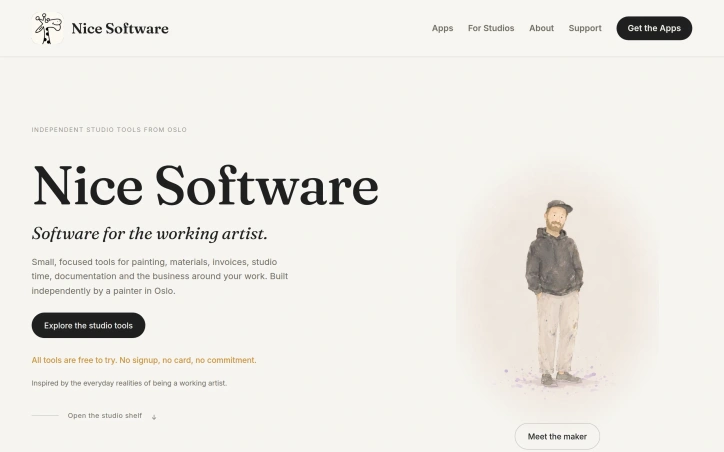
Artists often struggle with the business side of their craft, from managing studio time to creating professional invoices. Nice Software addresses these needs with a suite of focused tools designed to simplify the workflow of working artists. At its core, Nice Software is built around the idea that studios don't need more software, but rather fewer small frictions that can hinder creativity and productivity. The company's founder, an artist themselves, has created a range of applications that cater to the everyday realities of being a working artist. One of the standout features of Nice Software is its suite of specialized tools, each designed to tackle a specific task. For example, Wax & Pigment allows artists to create custom oil paint recipes with precision and ease, while Painting Mirror provides a way to check perspective, value, and composition on a phone. Other tools, such as NotaTime Studio and NotaBill Studio, help artists track their time and create professional invoices. What's notable about Nice Software is its commitment to simplicity and accessibility. All tools are free to try, with no signup or credit card required. The pricing model varies across applications, with some offering a one-time purchase fee, while others have a free tier with optional paid upgrades. For instance, Wax & Pigment has a free tier and a paid tier starting at $4.99, while NotaTime Studio costs €12.99 as a one-time purchase. Overall, Nice Software is a valuable resource for working artists looking to streamline their workflow and focus on their craft. By providing a range of practical, easy-to-use tools, the company is helping to remove the small frictions that can hold artists back.

Small businesses often struggle to stay ahead of their competitors, constantly playing catch-up as rivals make moves that impact their market share. MyIntelBrief addresses this pain point by providing daily competitor intelligence, delivered in a concise and actionable format. The platform is designed for small businesses that need to stay informed about their competitors' activities, including pricing changes, new offers, website updates, reviews, and local news. By monitoring these signals, businesses can respond promptly to changes in the market and make informed decisions to stay competitive. What stands out about MyIntelBrief is its focus on delivering clear and relevant insights, stripped of unnecessary noise. The daily brief is presented in a single page, making it easy to quickly scan and understand the key developments affecting a business. The platform's ability to detect and report on specific competitor activities, such as price changes or new website features, allows businesses to react swiftly and strategically. Key features of MyIntelBrief include daily monitoring of competitor activities, a 49-point heatmap to track local search rankings, and a business-plan gap analysis. The platform also offers a white-label resell option for agencies and consultants, enabling them to rebrand the service and offer it to their clients as a value-added proposition. For early adopters, MyIntelBrief is offering a limited-time discount of 50% off the regular price, exclusively for the first 100 customers. This founder's rate is automatically applied at checkout and is locked in for life.


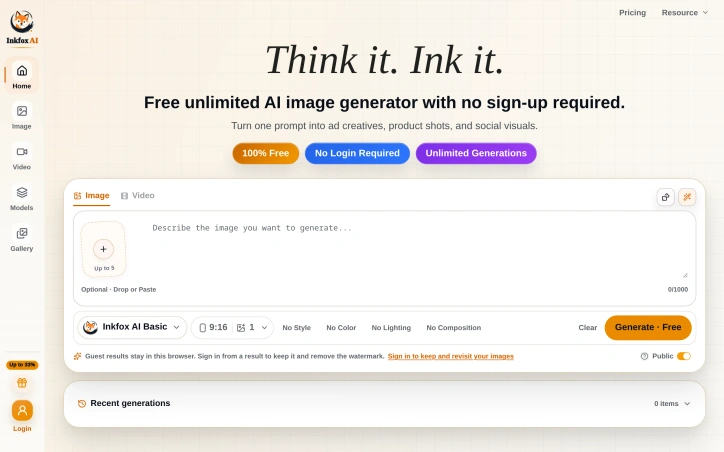
The demand for AI-generated images has surged across various industries, but existing solutions often come with limitations such as restricted generation capabilities and mandatory sign-ups. Inkfox AI addresses these pain points by offering a free, unlimited AI image generator that doesn't require users to create an account. At its core, the platform is designed to simplify the process of creating diverse visuals from a single prompt. Users can input their desired image description and generate multiple ad creatives, product shots, and social media visuals. The absence of a sign-up requirement makes it instantly accessible, allowing users to start generating images right away. One of the standout features of Inkfox AI is its ability to produce unlimited generations without charging users. The platform provides options to customize the output by selecting between image and video, and it allows for some level of control over the generation process through parameters such as style, color, lighting, and composition. However, users should be aware that results generated without signing in are confined to the current browser session and will include a watermark. Users who don't sign in will have their results stored locally in their browser, and these results will be watermarked. Signing in offers the benefit of retaining generated images and removing the watermark. The simplicity of the generation process, coupled with the flexibility to create a variety of visuals, makes Inkfox AI an attractive option for users seeking to leverage AI-generated imagery. Inkfox AI is notable for its straightforward, no-frills approach and commitment to being 100% free with unlimited generations. This business model is explicitly stated, with no additional pricing tiers or caveats mentioned on the website. Overall, Inkfox AI is well-suited for individuals and businesses looking for a hassle-free, cost-effective solution to generate AI-based visuals.

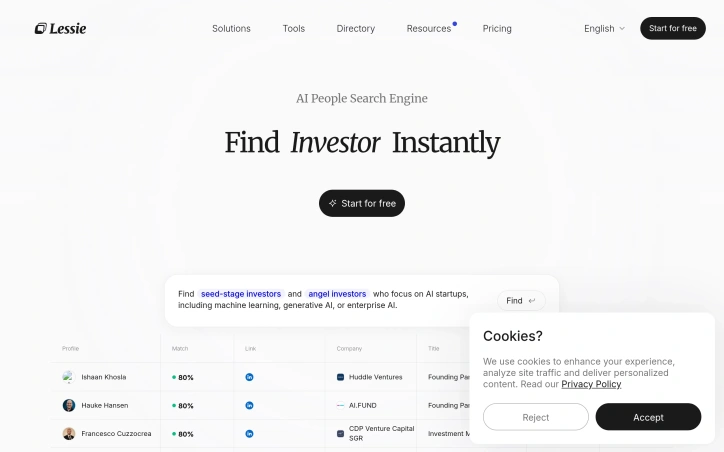
Discovering people across various online platforms can be a daunting and time-consuming task, especially for those seeking influencers, leads, or talent. A new tool aims to change that by streamlining the search process. By aggregating profiles from multiple sources, including LinkedIn, Twitter, and GitHub, Lessie AI provides a centralized hub to find the right connections. The platform appears to simplify the discovery process, making it easier for users to identify and vet potential candidates. Saving time and increasing productivity are key benefits for businesses and individuals who can now focus on other critical tasks. The service's ability to consolidate profiles from diverse platforms into a single, easily accessible location is a notable advantage. Lessie AI's potential to transform the way people search for and connect with others online is significant. Its effectiveness will likely depend on the accuracy and comprehensiveness of its profile aggregation, as well as the usability of its interface. As an emerging solution, it is worth considering for those looking to streamline their search processes.

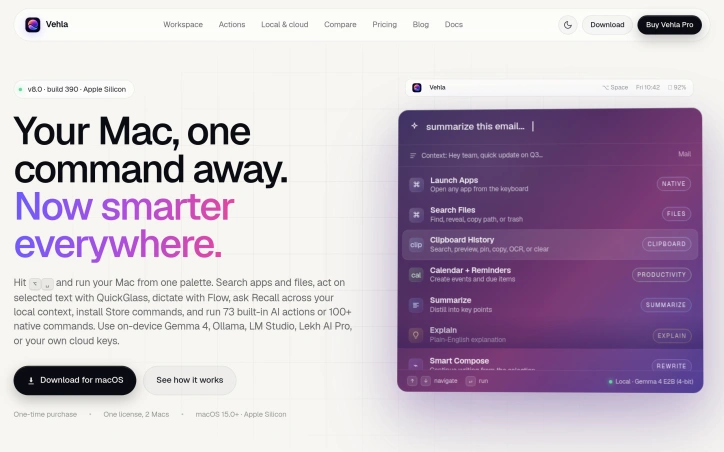
Streamlining workflows on Mac devices is a daunting task, especially when users have to juggle multiple utilities to accomplish various tasks. The solution lies in a comprehensive command center that integrates AI actions, dictation, and native commands, making it easier for users to manage their tasks efficiently. Vehla's product is designed to address this issue by providing a centralized platform that replaces the need for multiple Mac utilities. It is tailored for individuals who value productivity and are looking for a way to simplify their workflow. By doing so, it caters to professionals and power users seeking to maximize their efficiency on Mac devices. One of the standout aspects of Vehla is its integration of AI capabilities directly into the Mac command center. The product utilizes on-device AI models such as Gemma 4, Ollama, and LM Studio, among others, to enable advanced features like Recall, which builds a local search index across various sources, and Smart Compose, which assists in writing tasks. Key features worth noting include the ability to search for apps and files, act on selected text with QuickGlass, dictate with Flow, and access to 73 built-in AI actions or 100+ native commands. Additionally, the product offers functionalities like window management through Snap Wheel, note-taking, and task organization. The product is available for macOS 15.0+ on Apple Silicon devices, making it compatible with the latest Mac technology. The business model is straightforward, with a one-time purchase option that allows users to license the product for use on two Macs. Overall, Vehla presents a compelling solution for Mac users looking to simplify their workflow and enhance productivity. By integrating AI capabilities and native commands into a single command center, it effectively consolidates multiple utilities into one, making it an attractive option for those seeking to streamline their tasks.

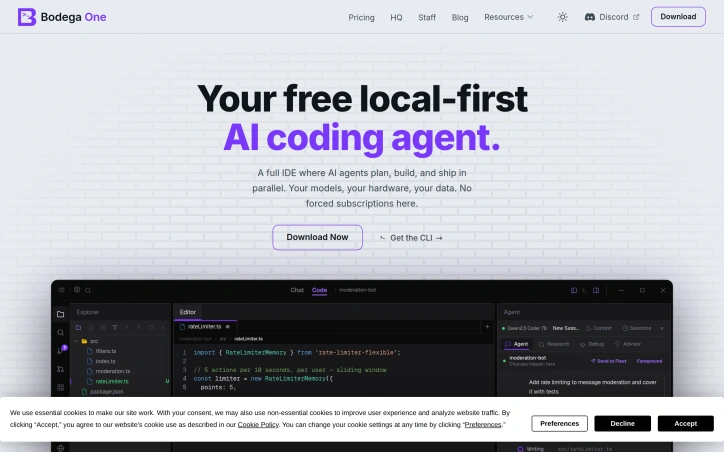
Developers who have grown weary of subscription-based AI coding assistants and the associated data privacy concerns now have an alternative. Bodega One Code addresses the issue of costly and proprietary coding tools by offering a local-first AI coding IDE that runs on the user's own hardware. What stands out about this product is its commitment to user ownership and control. By allowing users to choose their preferred large language model (LLM) and run it locally, Bodega One Code eliminates the need for reliance on third-party servers and the associated risks of data exposure. The product's air-gap mode ensures that sensitive information remains on the user's machine. The IDE itself is fully-featured, incorporating an AI chat and an autonomous agent that reviews its own work before completing tasks. Users can hand off tasks to the agent, which runs in the background on its own git worktree, allowing for parallel processing and isolated task management. The "Loops" feature enables users to automate recurring tasks, such as doc syncs and dead-code sweeps, on a scheduled basis. Notably, the product is available for download at no cost, with no forced subscriptions. Users have the flexibility to choose from over 10 LLM providers or run models locally using tools like Ollama or LM Studio. By decoupling the coding tool from subscription fees and proprietary infrastructure, Bodega One Code offers a compelling alternative for developers seeking a more autonomous and cost-effective solution. The product's design and features suggest that it is geared towards developers who value control over their coding environment and are looking for a customizable and extensible tool. By providing a local-first AI coding IDE, Bodega One Code is poised to appeal to developers who prioritize data privacy and are seeking a more flexible and cost-effective coding solution.

Seeking clarity without commitment, Tarovent offers a streamlined tarot reading experience that reduces the friction between curiosity and insight. The service addresses a specific frustration among tarot users: the need to determine whether a question requires a full reading before investing time and money into it. The product targets people navigating personal questions across relationships, career shifts, and daily decision-making. Rather than forcing users into lengthy readings or subscriptions, Tarovent allows anyone to pull a single card for free, answer a specific question, and decide whether deeper exploration makes sense. This low-stakes entry point works against the perception that tarot requires significant commitment or belief. What distinguishes Tarovent is its structured approach to question formation. Before selecting a spread, users articulate what they actually want to know rather than receiving generic readings. The interface offers entry points organized by context: love and relationship patterns, career pressures and transitions, crossroads requiring directional clarity, and daily mood checks. This specificity moves the reading away from fortune-telling theater toward directed self-reflection. The product depth mirrors this philosophy. Three spread options exist: the single card for immediate answers, the three-card spread for examining present dynamics, and the ten-card Celtic Cross for complex situations. Users who want to save readings and maintain a daily practice can create an account, receiving one free card daily while retaining full control over when and whether to pay for additional spreads. Transparency about tarot's limitations stands out in the interface itself. The product acknowledges that readings support personal guidance and self-reflection but cannot verify hidden facts, make promises, or reveal another person's private thoughts. This honesty counters the inflated claims that typically cloud tarot spaces, positioning the tool as genuinely useful rather than miraculous. The business model avoids subscription friction altogether. Users pay once per deeper reading if needed, keeping their relationship to the tool optional and exploratory. Combined with the daily free card for registered users, this approach removes pressure while sustaining revenue from people who find genuine value in the service. Tarovent ultimately succeeds because it respects user skepticism and autonomy, letting the experience justify itself through a single card rather than demanding upfront faith or commitment.


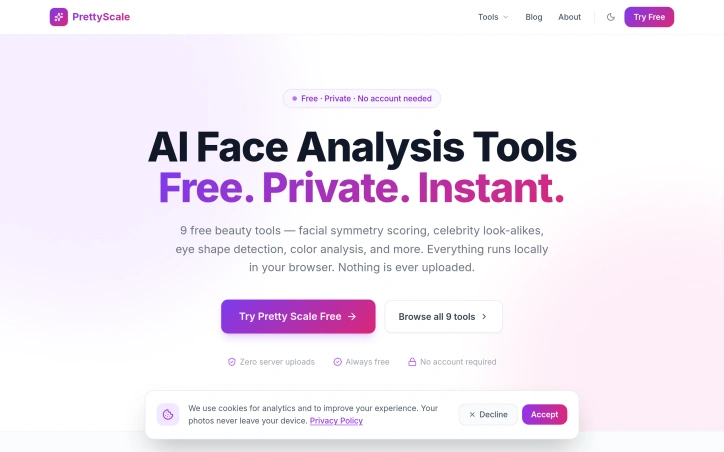
In the realm of beauty analysis, concerns about privacy often hinder users from exploring their features in-depth. To address this, a novel solution has emerged, prioritizing user privacy while providing a suite of AI-powered beauty tools. The driving force behind this innovation is the need for a secure and confidential platform where users can analyze their facial features without compromising their personal data. By ensuring that all analyses run locally within the user's browser, the solution effectively eliminates the risk of sensitive information being shared or stored. What stands out about this product is its commitment to maintaining user privacy while delivering a comprehensive range of beauty analysis tools. The absence of server uploads and data collection mechanisms underscores this commitment. Notably, the AI-driven tools are diverse, encompassing facial symmetry scoring, celebrity look-alikes, face shape detection, and color analysis, among others. Key features worth highlighting include the ability to analyze 468 facial landmarks for precise assessments and the availability of personalized style tips and recommendations based on the analysis. The product offers nine distinct tools, each designed to cater to different aspects of beauty analysis, from determining face shape and eye shape to estimating age and identifying the most flattering colors. The product is touted as being free forever, with no hidden costs or account requirements, making it accessible to a wide range of users. By forgoing a traditional revenue model that relies on user data or subscription fees, the developers have successfully created a unique value proposition centered around privacy and accessibility.

Incorporating traditional wellness practices into daily life can be challenging due to the hassle and complexity associated with them. The LingcoreHealth Navel Moxibustion Wellness Device addresses this issue by reimagining an ancient practice for modern times. It is designed for individuals seeking a simple, non-invasive way to add warmth and calm to their daily routine. This wearable device stands out for its ability to deliver a gentle, controlled sensation around the navel area without smoke or hassle. The technology behind it uses radiofrequency-based warmth at a specific frequency to provide a soothing experience. Users can adjust the warming level to their preference with four selectable comfort modes. Key features of the device include its hands-free wearable design, rechargeable lithium battery, and portable nature, making it suitable for use during rest, work, or travel. It is designed to fit naturally into daily moments, such as during a desk break, post-workout cooldown, or as an evening unwind ritual. The device is also drug-free and doesn't require any consumables or topicals. The product is built to professional wellness standards while maintaining consumer-friendly simplicity. It comes with a rechargeable battery, an elastic belt, and a USB charging cable. For those interested in trying it out, an individual sample is available for $399. Businesses can also inquire about wholesale pricing, bulk orders, and private labeling options. Overall, the Navel Moxibustion Wellness Device offers a unique blend of traditional wellness concepts and modern comfort, making it an attractive option for those seeking a simple self-care ritual.


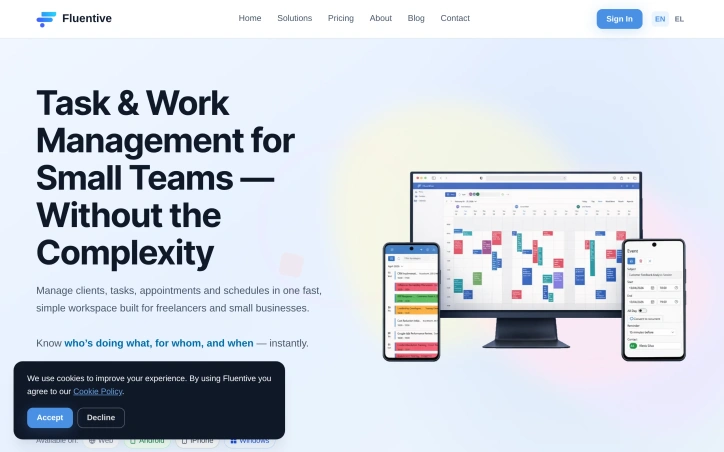
Small teams and freelancers often struggle with disorganized calendars, missed deadlines, and a lack of visibility into team activities. The complexity of traditional CRM and scheduling tools exacerbates these issues, as they are typically designed for larger companies with more resources. Fluentive addresses these pain points by providing a streamlined workspace for managing clients, tasks, appointments, and schedules in a single, intuitive platform. The product stands out for its focus on simplicity and clarity, eschewing the clutter and feature bloat that characterizes many CRM solutions. By integrating scheduling, client management, and team coordination into one place, Fluentive eliminates the need to juggle multiple apps, spreadsheets, and paper notebooks. Its flexible calendar allows teams to view schedules side-by-side, manage appointments, and avoid double-booking. Key features of Fluentive include its professional calendar, which adapts to the team's workflow and offers day, week, and month views, as well as timezone-aware scheduling for international teams. The platform also provides comprehensive client management capabilities, including contact profiles, rich text notes, and a complete history of tasks and events. Notably, Fluentive is built by the team behind Organizer, a product used by hundreds of businesses across multiple professions. This heritage is evident in Fluentive's design, which prioritizes the needs of small teams and freelancers. A free trial plan is available, with no credit card required, allowing potential customers to test the platform before committing. Overall, Fluentive offers a compelling solution for small teams seeking to simplify their job and scheduling management processes. Its intuitive design and robust feature set make it an attractive alternative to more complex and cumbersome CRM solutions.

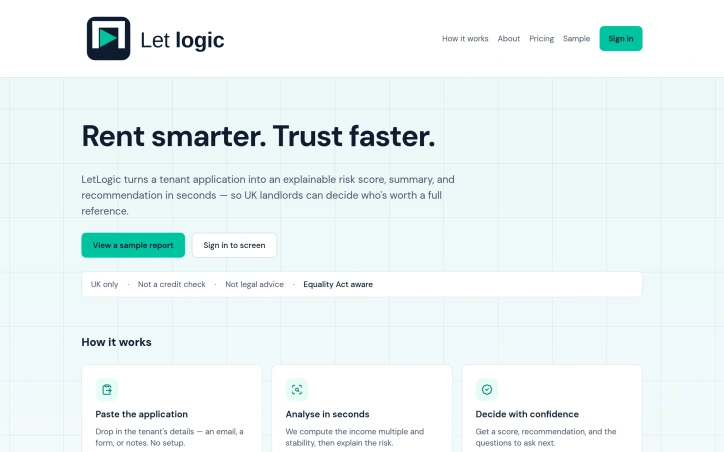
UK landlords often face a daunting task when dealing with multiple tenant applications, as the traditional referencing process is not only time-consuming but also costly. LetLogic addresses this issue by providing a streamlined solution that enables landlords to quickly and confidently assess potential tenants. The core problem LetLogic solves is the need for a fast and reliable way to screen tenant applications before deciding who is worth a full reference. By doing so, it saves landlords time and money that would be spent on unnecessary credit checks and referencing reports. What stands out about LetLogic is its ability to analyze tenant applications in seconds, providing an explainable risk score, summary, and recommendation. This is achieved through a simple process where landlords paste the applicant's details into the system, which then computes the income multiple and stability to explain the associated risk. Notably, LetLogic is designed with transparency and compliance in mind, being built with UK-focused data handling and minimal data collection, making it GDPR-aware. Additionally, it is Equality Act aware, focusing on affordability and stability while avoiding automated decisions about individuals. Key features of LetLogic include its ability to generate a score and recommendation in plain English, along with suggesting questions to ask next. It is also worth noting that LetLogic is not a credit check, nor does it provide legal advice, positioning itself as an aid to support landlords' decision-making. LetLogic offers a straightforward pricing model, with screenings starting from £4.99 or a 'Pro' option for 15 screenings a month. Overall, LetLogic offers a valuable solution for UK landlords, enhancing the tenant screening process with efficiency, transparency, and compliance.

Converting images into clean, usable outlines is a task that has long plagued creatives, requiring either expensive design software or tedious manual tracing. Image Outliner addresses this issue head-on, providing a straightforward solution for individuals looking to transform their photos into crisp line drawings. The tool is designed with a specific user in mind: crafters, designers, and artists seeking to create outlines for various applications such as Cricut projects, stickers, tattoo stencils, or coloring pages. It delivers on its promise by offering a range of output styles tailored to different use cases, including clean outlines, printable stencils, and Cricut cut lines. What stands out about Image Outliner is its commitment to a fast and private workflow. The entire process, from uploading an image to downloading a PNG, occurs locally in the browser, ensuring that users' data remains private. The tool also provides a range of controls to customize the output, including stroke width, smoothing, and threshold, allowing users to fine-tune their outlines to suit their needs. Key features include the ability to upload various image formats, preview and adjust the outline in real-time, and download transparent PNGs. For users requiring a more polished result, an AI Enhance feature is available, although this comes at a cost, with one credit being used per enhancement. The product's focus on practical output is evident in its design, with features such as edge map previews and Cricut-ready outlines demonstrating a clear understanding of the needs of its target users. Overall, Image Outliner offers a valuable solution for creatives looking to simplify the process of creating clean, usable outlines from their images.


Workforce scheduling has long been a time sink for managers, consuming hours weekly on tasks that should be routine. Staff Scheduling addresses this directly by condensing the scheduling workflow into minutes rather than hours, giving managers back time to focus on higher-value work. The platform targets growing teams, with particular emphasis on Canadian businesses, though its global presence across nine countries suggests broader appeal. The product handles the core scheduling functions: shift creation, employee availability tracking, leave request management, and team communication through real-time updates. Setup takes under ten minutes, removing friction for businesses that want to move quickly from sign-up to operational use. The standout element of Staff Scheduling's positioning is its Canadian foundation coupled with proven international traction. Rather than positioning as a global-first SaaS product, the company explicitly builds for Canadian businesses while serving teams worldwide. This suggests a strategy of deep regional expertise exported globally rather than generic internationalization. The platform consolidates multiple workflows into one interface. Rather than managing schedules in spreadsheets and leave requests through email, users handle both within the same system, reducing context switching and communication gaps. The inclusion of automatic time tracking bridges scheduling and payroll, two functions typically fragmented across tools. The free trial removes adoption friction: fifteen days with no credit card required. This is a reasonable trial length for managers to evaluate whether the tool meaningfully reduces their administrative load. On the business model side, the founder claims the platform cuts labor costs by eighteen percent. While unsupported by detailed case studies in the available material, the claim points toward a specific outcome: managers are expected to recoup the software cost through time savings and payroll efficiency. No pricing details are disclosed in the public messaging, suggesting the company may handle pricing through custom quotes or tiered plans typical of workforce management software. For managers juggling schedules across multiple channels or spreadsheets, Staff Scheduling offers consolidation and speed. The Canadian specificity is notable in a market where many competitors position as global platforms first, making it worth a closer look for teams in that region.


Assessing human compatibility is a challenging task, particularly in professional settings where effective collaboration is crucial. EQIQs addresses this issue by providing a compatibility platform for founders, hiring teams, advisors, and individuals. The platform's core strength lies in its ability to synthesize 21 psychometric frameworks, including well-known models such as MBTI, Enneagram, and Big Five, to deliver actionable relationship intelligence. By combining emotional intelligence and analytical intelligence, EQIQs decodes any relationship and provides measurable fit in a remarkably short time - just 5 minutes. The platform caters to two primary user groups: professionals and individuals. Professionals, such as coaches, therapists, matchmakers, and recruiters, can utilize EQIQs to manage client compatibility at scale with features like branded reports, batch analysis, and API access. Individuals, on the other hand, can gain insights into their relationships through science-backed compatibility scores, behavioral predictions, and personalized coaching tips. Notably, the platform's patented scoring engine is a key differentiator, enabling it to deliver fast and accurate results. The availability of a live interactive demo and sample reports allows potential users to experience the platform's capabilities firsthand. Additionally, the platform offers a developer API, indicating a potential revenue stream through integrations with other services. The platform provides information on pricing, along with sample reports and a live interactive demo, giving users a comprehensive understanding of its capabilities and cost. Overall, EQIQs presents a compelling solution for those seeking to understand and improve their relationships, whether personal or professional.


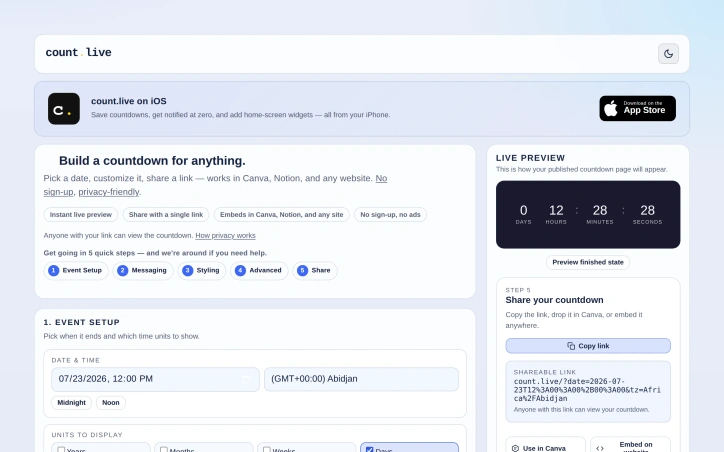
Creating engaging and shareable content is a challenge many event organizers, marketers, and individuals face. Count.live offers a straightforward solution to this problem with its free shareable countdown timer for any date. The platform is designed for users who need to count down to a specific event or deadline and share it across various platforms. What stands out about count.live is its ease of use and flexibility. Users can set up a countdown in five quick steps, customizing the date, time units, title, subtitle, and end message. The platform also offers styling options, including themes, colors, fonts, and background images, allowing users to tailor the countdown's appearance to their brand or event. Advanced features such as recurrence, celebrations, redirects, and progress tracking further enhance the product's versatility. The platform is particularly user-friendly, with features like instant live preview and the ability to share the countdown via a single link or embed it in Canva, Notion, or any website. This makes it an ideal tool for a wide range of users, from event organizers and marketers to individuals looking to count down to a personal milestone. The absence of ads and trackers on the shared countdown links is also a notable benefit, ensuring a clean and distraction-free user experience. Notably, count.live operates on a free model with no sign-up required, making it accessible to anyone. The platform does, however, ask users to help cover server costs, suggesting a reliance on user contributions to sustain its operations. Overall, count.live is a valuable resource for anyone looking to create a customizable and shareable countdown timer without the hassle of sign-ups or ads.
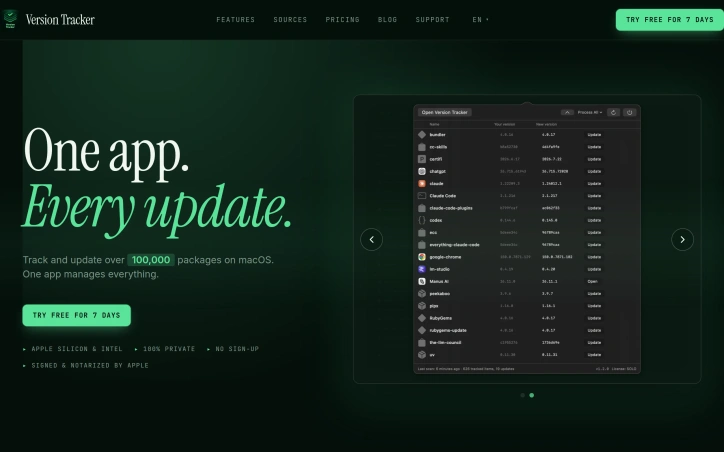
Managing numerous software packages on macOS can be a daunting task, with multiple updates to track and install across various sources. Version Tracker addresses this challenge by providing a unified solution to monitor and update over 100,000 packages, ensuring users stay current with the latest software versions. The developer's primary goal is to simplify the update process, catering to individuals who value staying up-to-date with the latest software releases. By doing so, Version Tracker brings efficiency and security to the forefront, verifying code signing, notarization, and known vulnerabilities for every app. One of the standout aspects of Version Tracker is its comprehensive coverage of various package sources, including package managers, development runtimes, and app updaters. The app integrates data from 47 sources, encompassing Adobe Creative Cloud, npm, pip, Cargo, and many more. This breadth of coverage allows users to manage their entire software ecosystem within a single dashboard. Key features of Version Tracker include a real-time dashboard displaying outdated counts, charts, and categories, as well as one-click updates with progress tracking and auto-removal from the outdated list. The app also prioritizes security, with Apple code signing verification, notarization validation, and CVE database enrichment. Users can try Version Tracker free for 7 days, with no sign-up required. The app is signed and notarized by Apple, ensuring a secure user experience. The developer also highlights that Version Tracker is a natural replacement for MacUpdater, which is now discontinued. Overall, Version Tracker offers a robust solution for managing software updates on macOS, making it an attractive option for individuals seeking to streamline their update process.

Managing tasks efficiently is a challenge that solo entrepreneurs and teams face daily. The complexity of task management often increases as a solo operation grows into a team, requiring a shift to more sophisticated tools. Taskyard addresses this issue by providing a task management system designed to work seamlessly for both solo users and teams, eliminating the need for migration as the user base expands. At its core, Taskyard offers a kanban board that integrates with Large Language Models (LLMs) through the MCP protocol, allowing users to manage tasks via conversational interfaces. This integration enables a high degree of automation, where tasks can be created, updated, and completed without manual intervention. The platform's strength lies in its ability to scale from a simple, personal task manager to a team-oriented tool with granular roles and permissions, ensuring that each team member has the appropriate level of access and responsibility. One of Taskyard's standout features is its automation capability, which goes beyond basic task management. Users can set up workflows with triggers, conditions, and actions that automate task assignments, status updates, and interactions with other tools, all without requiring human intervention. Additionally, Taskyard's compatibility with various LLMs through a single API key provides flexibility and avoids vendor lock-in. The platform also offers smart reminders, offline capability as a Progressive Web App, and maintained task management through AI-driven updates and cleanups. Taskyard caters to both solo operators and teams by providing a free tier that covers most solo use cases, with the option to upgrade to more comprehensive plans that support unlimited workflows for teams. This tiered approach makes it accessible to a wide range of users, from individuals looking for a personal task manager to teams requiring more advanced collaboration and automation features.