
1,226 startups launched 14,976 upvotes cast 64 submitted this week

Recently Listed

1,226 launches
Sort
semantic-release-npm-github-publish

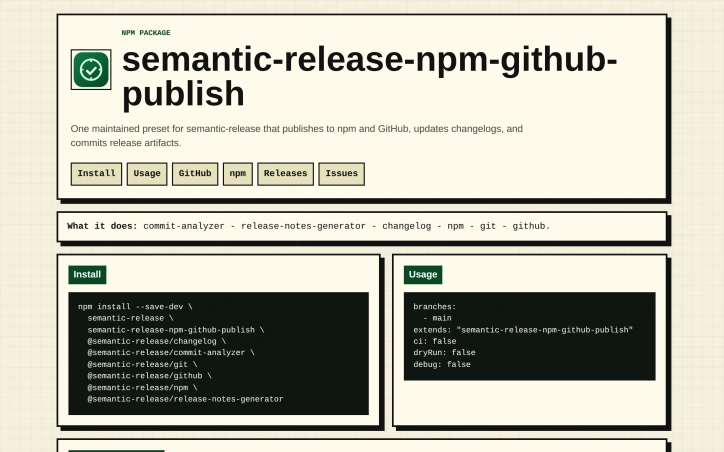
Release automation for Node.js developers typically demands orchestrating numerous plugins and configurations—a process that becomes tedious when repeated across multiple projects. This semantic-release preset consolidates the most common components of an automated release workflow into a single, reusable configuration that handles commit analysis, changelog generation, version bumping, npm publishing, and GitHub release management without requiring developers to wire them together manually. The target audience is JavaScript developers who maintain open-source projects or applications that need reliable, standards-based release automation. The preset implements conventional commit semantics out of the box, mapping commit types (feat, fix, refactor, docs, etc.) to semver version increments automatically. Breaking changes trigger major version bumps, while feature commits produce minor increments and patch fixes advance patch versions—eliminating manual version management entirely. What distinguishes this preset is its comprehensiveness. Rather than asking developers to select, install, and configure five to ten separate semantic-release plugins independently, it presents a single drop-in configuration that orchestrates the full pipeline. The setup is straightforward—installing a few npm packages and writing a minimal .releaserc file—and the release logic follows conventions that most JavaScript developers already understand. This reduction in configuration friction directly addresses a genuine pain point for open-source maintainers repeating this setup across projects. The preset covers the essential release operations: analyzing commits to determine version increments, generating release notes and changelogs, publishing packages to npm, pushing release commits back to git, and creating GitHub releases. The workflow operates on the main branch by default and supports dry-run and debug modes during development. The configuration is opinionated but functional, reducing decision-making without restricting typical use cases. Built from the founder's own maintenance workflow, the preset reflects practical priorities—eliminating repetitive scaffolding so developers focus on writing code rather than managing release infrastructure. The project is open-source and free to use, making it accessible to teams of any size. For Node.js projects adopting conventional commits and needing automated releases, this preset removes a significant setup burden and operational complexity from the development lifecycle.
Git-clients
O
Oleg Koval

Release automation for Node.js developers typically demands orchestrating numerous plugins and configurations—a process that becomes tedious when repeated across multiple projects. This semantic-release preset consolidates the most common components of an automated release workflow into a single, reusable configuration that handles commit analysis, changelog generation, version bumping, npm publishing, and GitHub release management without requiring developers to wire them together manually. The target audience is JavaScript developers who maintain open-source projects or applications that need reliable, standards-based release automation. The preset implements conventional commit semantics out of the box, mapping commit types (feat, fix, refactor, docs, etc.) to semver version increments automatically. Breaking changes trigger major version bumps, while feature commits produce minor increments and patch fixes advance patch versions—eliminating manual version management entirely. What distinguishes this preset is its comprehensiveness. Rather than asking developers to select, install, and configure five to ten separate semantic-release plugins independently, it presents a single drop-in configuration that orchestrates the full pipeline. The setup is straightforward—installing a few npm packages and writing a minimal .releaserc file—and the release logic follows conventions that most JavaScript developers already understand. This reduction in configuration friction directly addresses a genuine pain point for open-source maintainers repeating this setup across projects. The preset covers the essential release operations: analyzing commits to determine version increments, generating release notes and changelogs, publishing packages to npm, pushing release commits back to git, and creating GitHub releases. The workflow operates on the main branch by default and supports dry-run and debug modes during development. The configuration is opinionated but functional, reducing decision-making without restricting typical use cases. Built from the founder's own maintenance workflow, the preset reflects practical priorities—eliminating repetitive scaffolding so developers focus on writing code rather than managing release infrastructure. The project is open-source and free to use, making it accessible to teams of any size. For Node.js projects adopting conventional commits and needing automated releases, this preset removes a significant setup burden and operational complexity from the development lifecycle.

semantic-release-npm-github-publish preview

Key features

  • Automated Version Bumping: Maps commit types to semantic version increments automatically
  • Changelog Generation: Generates release notes and changelogs without manual effort
See full listing
Schedio Smart Audio Player

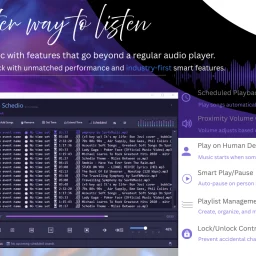
Automating audio playback based on presence and proximity, Schedio positions itself as an intelligent upgrade to standard media players for Windows users who want hands-free control over their listening environment. The application targets two distinct use cases: event organizers and presenters who need scheduled playback, and home or workspace users seeking ambient music that responds dynamically to occupancy. The product's core distinction lies in its sensor-driven features. Rather than requiring manual volume adjustments or playback commands, Schedio detects nearby movement via webcam and alters audio behavior accordingly. The proximity volume function continuously adjusts levels based on distance—playing softer as listeners approach and louder as they move away. This approach eliminates constant volume tweaking and creates a responsive listening experience that adapts in real time. The human detection feature automates play and pause entirely, starting playback when movement is detected and stopping when a space empties. For events or presentations, the scheduled playback capability lets users queue content to activate at predetermined times without oversight. The feature set extends beyond these core functions. Smart play/pause works as a persistent version of human detection, automatically resuming music when someone reenters a space. Playlist management provides standard organizational tools, while lock/unlock controls prevent accidental setting changes—useful in shared or public environments. An "extend scheduled time" feature allows single-click adjustments to ongoing playback, and the company emphasizes a professional audio engine tuned for clarity and depth. Schedio operates as a lightweight desktop application rather than a cloud-dependent service. It requires Windows 10 or 11 and needs internet connectivity only for initial setup; afterward, it functions entirely offline. A webcam and sound card are the only hardware prerequisites beyond the operating system itself. The product occupies a narrow but potentially valuable niche. Most audio players prioritize music discovery or library management. Schedio instead optimizes for environmental control and automation, making it suited for retail spaces, hospitality venues, presentation rooms, or homes where occupancy-responsive audio adds value. The execution strategy—offline-first architecture, minimal system overhead—suggests practical deployment considerations. What remains unclear from available information is pricing structure, licensing model, and whether the application serves individual consumers or targets businesses. The feature sophistication implies either paid or freemium positioning, though no details appear publicly documented.


Scheduling-software
D
Dushshantha R.

Automating audio playback based on presence and proximity, Schedio positions itself as an intelligent upgrade to standard media players for Windows users who want hands-free control over their listening environment. The application targets two distinct use cases: event organizers and presenters who need scheduled playback, and home or workspace users seeking ambient music that responds dynamically to occupancy. The product's core distinction lies in its sensor-driven features. Rather than requiring manual volume adjustments or playback commands, Schedio detects nearby movement via webcam and alters audio behavior accordingly. The proximity volume function continuously adjusts levels based on distance—playing softer as listeners approach and louder as they move away. This approach eliminates constant volume tweaking and creates a responsive listening experience that adapts in real time. The human detection feature automates play and pause entirely, starting playback when movement is detected and stopping when a space empties. For events or presentations, the scheduled playback capability lets users queue content to activate at predetermined times without oversight. The feature set extends beyond these core functions. Smart play/pause works as a persistent version of human detection, automatically resuming music when someone reenters a space. Playlist management provides standard organizational tools, while lock/unlock controls prevent accidental setting changes—useful in shared or public environments. An "extend scheduled time" feature allows single-click adjustments to ongoing playback, and the company emphasizes a professional audio engine tuned for clarity and depth. Schedio operates as a lightweight desktop application rather than a cloud-dependent service. It requires Windows 10 or 11 and needs internet connectivity only for initial setup; afterward, it functions entirely offline. A webcam and sound card are the only hardware prerequisites beyond the operating system itself. The product occupies a narrow but potentially valuable niche. Most audio players prioritize music discovery or library management. Schedio instead optimizes for environmental control and automation, making it suited for retail spaces, hospitality venues, presentation rooms, or homes where occupancy-responsive audio adds value. The execution strategy—offline-first architecture, minimal system overhead—suggests practical deployment considerations. What remains unclear from available information is pricing structure, licensing model, and whether the application serves individual consumers or targets businesses. The feature sophistication implies either paid or freemium positioning, though no details appear publicly documented.

Schedio Smart Audio Player preview

Key features

  • Proximity Volume: Automatically adjusts audio levels based on listener distance from the device
  • Human Detection: Starts playback when movement is detected and stops when the space empties
See full listing
Tru Bond cleaning Brisbane

Moving house in Brisbane means juggling packing trucks, utility transfers and a looming property inspection that can cost hundreds of dollars in lost bond money if the place is not returned in near-showroom condition. Tru Bond Cleaning Brisbane exists to remove that last anxiety: a deep-clean operation calibrated to the REIQ inspection checklist and fronted by crews who have worked on more than two thousand vacates, each backed by a bond-return guarantee. The company solves a narrow but high-stakes problem for tenants facing tight hand-over deadlines and zero margin for error with real-estate agents. Beyond mopping floors, it tackles grease-laden range-hoods, oven carbon build-up, carpet stains and whatever else might trigger a deduction. Should a property manager still find fault inside the warranty window, the team returns at no extra charge to remedy the list. Stand-out elements include a single “gold standard” package that bundles bond cleaning, optional carpet steam and pest-control treatments so a renter can outsource the entire compliance stack with one phone call. An express online booking form quotes on the spot and currently knocks ten percent off the first job. Experience is institutionalised: the field staff average ten years each in commercial and residential work, suggesting they know the difference between a quick wipe and the forensic standard demanded during exit inspections. Pricing starts at $60, a deliberately entry-level figure that covers a compact kitchen or studio; larger houses scale upward without hidden add-ons as long as a standard bond-clean scope is selected. Bond-back assurance is the main commercial lever—payment is only truly final once the agent signs off. For renters who would rather risk fifty-odd dollars on a callback than risk a four-figure bond, Tru Bond Cleaning delivers a straightforward pressure valve at exactly the moment it is needed most.


Moving house in Brisbane means juggling packing trucks, utility transfers and a looming property inspection that can cost hundreds of dollars in lost bond money if the place is not returned in near-showroom condition. Tru Bond Cleaning Brisbane exists to remove that last anxiety: a deep-clean operation calibrated to the REIQ inspection checklist and fronted by crews who have worked on more than two thousand vacates, each backed by a bond-return guarantee. The company solves a narrow but high-stakes problem for tenants facing tight hand-over deadlines and zero margin for error with real-estate agents. Beyond mopping floors, it tackles grease-laden range-hoods, oven carbon build-up, carpet stains and whatever else might trigger a deduction. Should a property manager still find fault inside the warranty window, the team returns at no extra charge to remedy the list. Stand-out elements include a single “gold standard” package that bundles bond cleaning, optional carpet steam and pest-control treatments so a renter can outsource the entire compliance stack with one phone call. An express online booking form quotes on the spot and currently knocks ten percent off the first job. Experience is institutionalised: the field staff average ten years each in commercial and residential work, suggesting they know the difference between a quick wipe and the forensic standard demanded during exit inspections. Pricing starts at $60, a deliberately entry-level figure that covers a compact kitchen or studio; larger houses scale upward without hidden add-ons as long as a standard bond-clean scope is selected. Bond-back assurance is the main commercial lever—payment is only truly final once the agent signs off. For renters who would rather risk fifty-odd dollars on a callback than risk a four-figure bond, Tru Bond Cleaning delivers a straightforward pressure valve at exactly the moment it is needed most.

Tru Bond cleaning Brisbane preview

Key features

  • REIQ Inspection Certified: Deep-clean operation calibrated to REIQ inspection checklist standards
  • Bond-Back Guarantee: Team returns at no charge within warranty window to fix any issues found by inspectors
See full listing
mac-onboarding

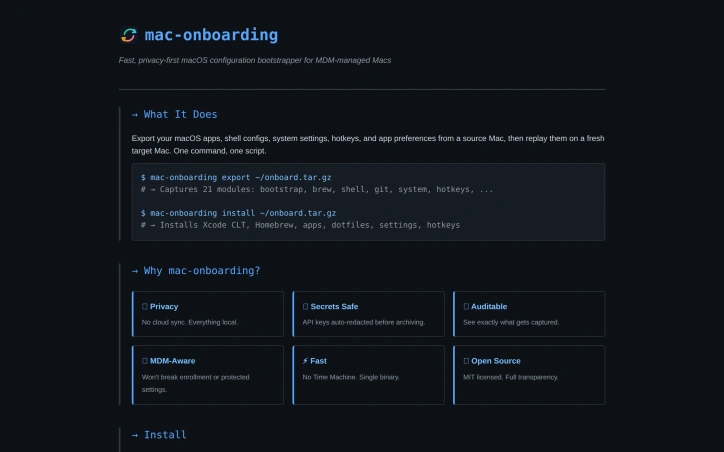
Configuring a fresh Mac is a repetitive slog. Every new machine means reinstalling Homebrew packages, copying dotfiles, adjusting system preferences, syncing hotkeys, and reconfiguring shell environments. For developers juggling multiple machines—whether freelancers working across client infrastructure or IT teams managing MDM-enrolled fleets—this overhead drains productivity and invites consistency errors. Mac-onboarding solves this by capturing an entire configuration state from one machine and replaying it on another with a single command. The export step archives 21 distinct configuration modules, spanning Homebrew packages, shell configs, system settings, application preferences, hotkeys, and dozens of specialized tools. The install step unpacks everything onto a fresh target Mac, automating what would otherwise require manual recreation. What distinguishes this tool from simpler dotfile repos or conventional configuration management approaches is its explicit respect for the constraints of managed environments. Organizations using Mobile Device Management to enforce security policies risk breaking enrollment if configuration tooling overwrites protected system defaults. Mac-onboarding acknowledges this friction—it explicitly refuses to touch settings that MDM controls, and it avoids migrating SSH keys that require careful per-environment handling. This pragmatism signals the tool was built by someone who has actually operated within corporate infrastructure, not just imagined it. Privacy is similarly foregrounded as a first-class concern rather than an afterthought. The entire workflow runs offline and locally. Secrets—API keys, git credentials, and other sensitive material extracted from shell configuration files—are automatically redacted before archiving, preventing accidental leakage. The archive is inspectable via standard tar utilities, giving users genuine transparency about what gets captured and stored. The product supports 21 modules covering major development tools (Kitty, Claude, Tailscale, OrbStack), utilities (Alfred, Synology, 1Password), and system-level preferences. A bridge mode allows pulling configuration directly from a source machine via Tailscale SSH, bypassing the archive step entirely for environments with direct network access. The tool is open source under the MIT license, available via Homebrew or direct download, and built as a single compiled binary with no runtime dependencies. There is no mention of pricing or proprietary licensing, confirming this is a free utility maintained by its creator for the developer community.

Command-line-tools
O
Oleg Koval

Configuring a fresh Mac is a repetitive slog. Every new machine means reinstalling Homebrew packages, copying dotfiles, adjusting system preferences, syncing hotkeys, and reconfiguring shell environments. For developers juggling multiple machines—whether freelancers working across client infrastructure or IT teams managing MDM-enrolled fleets—this overhead drains productivity and invites consistency errors. Mac-onboarding solves this by capturing an entire configuration state from one machine and replaying it on another with a single command. The export step archives 21 distinct configuration modules, spanning Homebrew packages, shell configs, system settings, application preferences, hotkeys, and dozens of specialized tools. The install step unpacks everything onto a fresh target Mac, automating what would otherwise require manual recreation. What distinguishes this tool from simpler dotfile repos or conventional configuration management approaches is its explicit respect for the constraints of managed environments. Organizations using Mobile Device Management to enforce security policies risk breaking enrollment if configuration tooling overwrites protected system defaults. Mac-onboarding acknowledges this friction—it explicitly refuses to touch settings that MDM controls, and it avoids migrating SSH keys that require careful per-environment handling. This pragmatism signals the tool was built by someone who has actually operated within corporate infrastructure, not just imagined it. Privacy is similarly foregrounded as a first-class concern rather than an afterthought. The entire workflow runs offline and locally. Secrets—API keys, git credentials, and other sensitive material extracted from shell configuration files—are automatically redacted before archiving, preventing accidental leakage. The archive is inspectable via standard tar utilities, giving users genuine transparency about what gets captured and stored. The product supports 21 modules covering major development tools (Kitty, Claude, Tailscale, OrbStack), utilities (Alfred, Synology, 1Password), and system-level preferences. A bridge mode allows pulling configuration directly from a source machine via Tailscale SSH, bypassing the archive step entirely for environments with direct network access. The tool is open source under the MIT license, available via Homebrew or direct download, and built as a single compiled binary with no runtime dependencies. There is no mention of pricing or proprietary licensing, confirming this is a free utility maintained by its creator for the developer community.

mac-onboarding preview

Key features

  • Configuration Replication: Exports entire Mac setup from one machine and replays it on another with a single command
  • Comprehensive Modules: Supports 21 configuration modules including Homebrew packages, shell configs, system settings, and application preferences
See full listing
LumaEcho

Language learning has long suffered from a fundamental disconnect: most tools prioritize convenience over authenticity. Flashcard apps, AI tutors, and traditional courses optimize for completion rates, not for the messy, rewarding experience of actually communicating with another human being. LumaEcho inverts this priority entirely. The premise is deceptively straightforward. Users record or type messages in their target language, which are instantly translated for readers. Replies flow back in the same transparent way—native speakers or fellow learners responding in real time. What emerges is genuine exchange: someone practices speaking, someone else understands them immediately, and the conversation unfolds naturally. This sidesteps the performative awkwardness of most language learning platforms. The product targets anyone genuinely motivated to improve through conversation rather than isolated study. This excludes absolute beginners with zero foundation, but suits learners at intermediate stages seeking context and engagement. Solo learners benefit from the public feed model, which surfaces new conversation partners; structured group learners have classrooms where small cohorts practice together. The dual-mode approach accommodates both spontaneity and accountability. What sets LumaEcho apart is its rejection of the AI-as-tutor trend. Instead of pairing users with chatbots that simulate conversation, it bets on actual human interaction—messier, less responsive, but infinitely more motivating for most people. The instant translation layer is the enabling technology; it removes language barriers without inserting an intermediary to sanitize the exchange. You are conversing with a real person, not a language engine. The classroom feature suggests recognition that unstructured practice has limits. Some learners benefit from guided progression and peer accountability. Others thrive in the open-ended social discovery of a public feed. This flexibility is valuable, though the success of either mode depends entirely on community health and active membership. The business model remains unspecified in the available information, leaving questions about sustainability and monetization unanswered. For a solo founder scaling a two-sided network, that matters—community platforms live or die based on unit economics and retention. LumaEcho makes a coherent bet: that language learners will choose genuine human connection over algorithmic convenience. Whether that bet succeeds depends less on the product itself and more on whether its founder can build and retain the community to make that connection possible at scale.


Language-learning
L
LumaEcho

Language learning has long suffered from a fundamental disconnect: most tools prioritize convenience over authenticity. Flashcard apps, AI tutors, and traditional courses optimize for completion rates, not for the messy, rewarding experience of actually communicating with another human being. LumaEcho inverts this priority entirely. The premise is deceptively straightforward. Users record or type messages in their target language, which are instantly translated for readers. Replies flow back in the same transparent way—native speakers or fellow learners responding in real time. What emerges is genuine exchange: someone practices speaking, someone else understands them immediately, and the conversation unfolds naturally. This sidesteps the performative awkwardness of most language learning platforms. The product targets anyone genuinely motivated to improve through conversation rather than isolated study. This excludes absolute beginners with zero foundation, but suits learners at intermediate stages seeking context and engagement. Solo learners benefit from the public feed model, which surfaces new conversation partners; structured group learners have classrooms where small cohorts practice together. The dual-mode approach accommodates both spontaneity and accountability. What sets LumaEcho apart is its rejection of the AI-as-tutor trend. Instead of pairing users with chatbots that simulate conversation, it bets on actual human interaction—messier, less responsive, but infinitely more motivating for most people. The instant translation layer is the enabling technology; it removes language barriers without inserting an intermediary to sanitize the exchange. You are conversing with a real person, not a language engine. The classroom feature suggests recognition that unstructured practice has limits. Some learners benefit from guided progression and peer accountability. Others thrive in the open-ended social discovery of a public feed. This flexibility is valuable, though the success of either mode depends entirely on community health and active membership. The business model remains unspecified in the available information, leaving questions about sustainability and monetization unanswered. For a solo founder scaling a two-sided network, that matters—community platforms live or die based on unit economics and retention. LumaEcho makes a coherent bet: that language learners will choose genuine human connection over algorithmic convenience. Whether that bet succeeds depends less on the product itself and more on whether its founder can build and retain the community to make that connection possible at scale.

LumaEcho preview

Key features

  • Instant Translation: Users record or type messages in their target language which are instantly translated for readers
  • Real-Time Human Conversation: Native speakers and fellow learners respond in real time creating genuine exchange
See full listing
BD SaaS Zone

Bangladeshi SaaS builders finally have a stage that speaks their language. Home-grown ventures now face the daily struggle of getting noticed once they leave small chat groups and lean-meetup circles; global launchpads overflow with Silicon Valley flash and foreign celebrities, leaving local founders shouting into the void. BD SaaS Zone corrals that scattered audience into one easy-to-scan gallery, giving each product oxygen instead of noise. The directory is deliberately narrow in scope: real SaaS, mobile apps, and digital utilities that ship from Bangladesh. Every listing is curated first, which keeps the pixel-brochure clutter down to zero and ensures the feed stays focused on working products rather than pitch decks. Visitors come looking for quick inspiration, teammates, or acquisition targets; founders arrive to plant a flag and stay visible long after launch-day buzz fades. Nothing fancy or bloated: a simple search, taxonomy filters covering fourteen niches from AI to HR, and cleanly marked “For Sale” or “Seeking Co-Founder” tags when the listing signals intent to exit or scale. Pricing clings to reality—one advert slot in the sponsored marquee costs exactly ৳120 per month, a figure that fits better coffee than most AWS bills. Founders can also claim a discount on security audits through the site’s partnership with Cyenetic Solutions, a welcome perk at a stage where every saved taka goes toward product polish. For now the site stays refreshingly minimal: add your startup, grab the ranking badge code, and let organic traffic do the rest. Early adopters get prime category placement before every vertical is filled, making the current moment unusually favorable for anyone shipping code from Dhaka, Chittagong, or Sylhet.


Advertising-tools
I
Ishtiaq Dishan

Bangladeshi SaaS builders finally have a stage that speaks their language. Home-grown ventures now face the daily struggle of getting noticed once they leave small chat groups and lean-meetup circles; global launchpads overflow with Silicon Valley flash and foreign celebrities, leaving local founders shouting into the void. BD SaaS Zone corrals that scattered audience into one easy-to-scan gallery, giving each product oxygen instead of noise. The directory is deliberately narrow in scope: real SaaS, mobile apps, and digital utilities that ship from Bangladesh. Every listing is curated first, which keeps the pixel-brochure clutter down to zero and ensures the feed stays focused on working products rather than pitch decks. Visitors come looking for quick inspiration, teammates, or acquisition targets; founders arrive to plant a flag and stay visible long after launch-day buzz fades. Nothing fancy or bloated: a simple search, taxonomy filters covering fourteen niches from AI to HR, and cleanly marked “For Sale” or “Seeking Co-Founder” tags when the listing signals intent to exit or scale. Pricing clings to reality—one advert slot in the sponsored marquee costs exactly ৳120 per month, a figure that fits better coffee than most AWS bills. Founders can also claim a discount on security audits through the site’s partnership with Cyenetic Solutions, a welcome perk at a stage where every saved taka goes toward product polish. For now the site stays refreshingly minimal: add your startup, grab the ranking badge code, and let organic traffic do the rest. Early adopters get prime category placement before every vertical is filled, making the current moment unusually favorable for anyone shipping code from Dhaka, Chittagong, or Sylhet.

BD SaaS Zone preview

Key features

  • Curated Directory: Only real SaaS, mobile apps, and digital utilities shipping from Bangladesh
  • Taxonomy Filters: Fourteen industry niches from AI to HR with intent signaling tags
See full listing
AI Doctor Notes

Doctor visits speed past faster than most minds can process, leaving patients, parents, and adult children who coordinate care stuck with fuzzy memories and half-remembered instructions. AI Doctor Notes attacks that gap by turning the conversation into a tangible, shareable record while nudging every participant to prepare beforehand. The app keeps the entire lifecycle in one place: users jot down symptoms, medications, and questions before leaving home, record the live discussion during the appointment, then receive an auto-generated set of questions and a concise next-steps summary once the visit ends. A built-in sharing layer lets a child’s caregiver, an aging parent’s helper, or any member of a care circle see only the important excerpts without forcing anyone to retype disjointed recollections. What quickly catches attention is the deliberate focus on psychological friction. Instead of broad “clinical” features, the product hangs its value on mental bandwidth—reducing the pre-visit scramble, the mid-visit nodding amnesia, and the post-visit parking-lot panic. Recording and transcription already exist in other tools, yet tying them to an explicit prep module and a ready-to-email recap separates this from generic note apps. The App Store rating sits at a perfect five stars after a handful of public reviews, and the company makes the download itself free; beyond that it has not yet laid out any paid tier or monetization scheme. Early adopters are therefore getting all current capabilities without subscription gates. For anyone who has ever left a consultation wondering what was actually decided, AI Doctor Notes delivers a structured memory when memory fails most.


Doctor visits speed past faster than most minds can process, leaving patients, parents, and adult children who coordinate care stuck with fuzzy memories and half-remembered instructions. AI Doctor Notes attacks that gap by turning the conversation into a tangible, shareable record while nudging every participant to prepare beforehand. The app keeps the entire lifecycle in one place: users jot down symptoms, medications, and questions before leaving home, record the live discussion during the appointment, then receive an auto-generated set of questions and a concise next-steps summary once the visit ends. A built-in sharing layer lets a child’s caregiver, an aging parent’s helper, or any member of a care circle see only the important excerpts without forcing anyone to retype disjointed recollections. What quickly catches attention is the deliberate focus on psychological friction. Instead of broad “clinical” features, the product hangs its value on mental bandwidth—reducing the pre-visit scramble, the mid-visit nodding amnesia, and the post-visit parking-lot panic. Recording and transcription already exist in other tools, yet tying them to an explicit prep module and a ready-to-email recap separates this from generic note apps. The App Store rating sits at a perfect five stars after a handful of public reviews, and the company makes the download itself free; beyond that it has not yet laid out any paid tier or monetization scheme. Early adopters are therefore getting all current capabilities without subscription gates. For anyone who has ever left a consultation wondering what was actually decided, AI Doctor Notes delivers a structured memory when memory fails most.

AI Doctor Notes preview

Key features

  • Pre-Visit Checklist: Document symptoms, medications, and questions before appointments.
  • Live Recording & Transcription: Capture and automatically transcribe appointment conversations.
See full listing
GrooveJar

Shoppers abandon carts when urgency and context disappear. GrooveJar tackles that gap with a compact, four-in-one funnel that lets any merchant set persuasive timing devices, embed branching video popups, and automate follow-up email sequences without juggling separate apps. The latest rebuild, distilled from seven years of e-commerce feedback, aims squarely at small to midsize online stores who want more performance out of their existing traffic without waiting for developers. Central to the pitch is the interactive branching video popup: viewers click story paths tailored to their interest, stay longer, and leave an email address at the exact moment of highest engagement. The feature runs inside the same script that drives countdown timers pitched as “real” rather than cosmetic, and the dashboard gives visibility on which moments convert. Pairing this with immediate email journeys that fire while the brand sleeps rounds out the promise of an end-to-end micro-funnel. Speed is another differentiator. Installation advertises a five-minute live window, implying a lightweight script and ready templates instead of days of configuration. A free plan is available, so teams can test funnel variants without a card, and the pricing tiers live on the same page for transparent upgrades when volume or advanced branching logic kick in. No complex biographies, no spec-sheet inflation—the material simply claims a fresh codebase and the same mission. GrooveJar speaks to merchants who have outgrown single-purpose popup widgets but are not ready for enterprise suites or agency retainers; its scope from first popup to post-purchase sequence fits that slice precisely without promising to run the entire CRM.


Lead-generation-software
D
Daniel Juma

Shoppers abandon carts when urgency and context disappear. GrooveJar tackles that gap with a compact, four-in-one funnel that lets any merchant set persuasive timing devices, embed branching video popups, and automate follow-up email sequences without juggling separate apps. The latest rebuild, distilled from seven years of e-commerce feedback, aims squarely at small to midsize online stores who want more performance out of their existing traffic without waiting for developers. Central to the pitch is the interactive branching video popup: viewers click story paths tailored to their interest, stay longer, and leave an email address at the exact moment of highest engagement. The feature runs inside the same script that drives countdown timers pitched as “real” rather than cosmetic, and the dashboard gives visibility on which moments convert. Pairing this with immediate email journeys that fire while the brand sleeps rounds out the promise of an end-to-end micro-funnel. Speed is another differentiator. Installation advertises a five-minute live window, implying a lightweight script and ready templates instead of days of configuration. A free plan is available, so teams can test funnel variants without a card, and the pricing tiers live on the same page for transparent upgrades when volume or advanced branching logic kick in. No complex biographies, no spec-sheet inflation—the material simply claims a fresh codebase and the same mission. GrooveJar speaks to merchants who have outgrown single-purpose popup widgets but are not ready for enterprise suites or agency retainers; its scope from first popup to post-purchase sequence fits that slice precisely without promising to run the entire CRM.

GrooveJar preview

Key features

  • Branching Video Popups: Interactive video popups where viewers click story paths tailored to their interests and provide emails at peak engagement moments
  • Countdown Timers: Real countdown timers embedded in the script that create urgency without being cosmetic
See full listing
SFM - Surface Filter Mode

Web pages rarely look the way you want them to. Designers, content creators, and power users constantly grab screenshots, open DevTools, or drop designs into Figma just to preview the same page with a warmer palette, higher contrast, or an alternate color theme. SFM short-circuits that dance by embedding a full creative suite directly into any browser tab. Install the extension, open a site, and the page becomes your canvas—no separate editor, no third-party server, no code pushed live. Instead of forcing one universal filter, SFM gives granular control. Interactive selection boxes let you darken just the hero banner or sepia-tone the article body while leaving the navigation untouched. A slider-driven panel adjusts brightness, saturation, or vintage intensity in real time; hit save and the settings persist next time you return. If the goal is drama rather than subtle polish, animated border frames wrap elements in pulsing neon, cascading matrix characters, or glowing fire waves, all rendered on the fly with standard web APIs. Advanced users switch to the code layer. A lightweight editor accepts custom CSS or JavaScript that executes only on your machine, letting you swap fonts, add hover micro-animations, or prototype new components without touching the real codebase. Combine that with gradient map overlays or blend modes like multiply and screen and you can push a page from stock Bootstrap into surreal digital art within minutes. The absence of any mention of subscriptions, enterprise tiers, or even a paywall implies that SFM is currently offered as a free extension distributed from its Netlify site. Whether that model holds or shifts to a paid license the team has not disclosed, but for now the barrier to experimentation is exactly zero. In practice, anyone who remixes visuals for moodboards, pitch decks, or social media will find SFM a rapid-fire entry point; traditional designers gain an inspection playground; casual users can finally stop squinting at white backgrounds on dark-themed laptops.


Chrome-extensions
I
Interthwelstd

Web pages rarely look the way you want them to. Designers, content creators, and power users constantly grab screenshots, open DevTools, or drop designs into Figma just to preview the same page with a warmer palette, higher contrast, or an alternate color theme. SFM short-circuits that dance by embedding a full creative suite directly into any browser tab. Install the extension, open a site, and the page becomes your canvas—no separate editor, no third-party server, no code pushed live. Instead of forcing one universal filter, SFM gives granular control. Interactive selection boxes let you darken just the hero banner or sepia-tone the article body while leaving the navigation untouched. A slider-driven panel adjusts brightness, saturation, or vintage intensity in real time; hit save and the settings persist next time you return. If the goal is drama rather than subtle polish, animated border frames wrap elements in pulsing neon, cascading matrix characters, or glowing fire waves, all rendered on the fly with standard web APIs. Advanced users switch to the code layer. A lightweight editor accepts custom CSS or JavaScript that executes only on your machine, letting you swap fonts, add hover micro-animations, or prototype new components without touching the real codebase. Combine that with gradient map overlays or blend modes like multiply and screen and you can push a page from stock Bootstrap into surreal digital art within minutes. The absence of any mention of subscriptions, enterprise tiers, or even a paywall implies that SFM is currently offered as a free extension distributed from its Netlify site. Whether that model holds or shifts to a paid license the team has not disclosed, but for now the barrier to experimentation is exactly zero. In practice, anyone who remixes visuals for moodboards, pitch decks, or social media will find SFM a rapid-fire entry point; traditional designers gain an inspection playground; casual users can finally stop squinting at white backgrounds on dark-themed laptops.

SFM - Surface Filter Mode preview

Key features

  • Browser Extension: Embeds a full creative suite directly into any browser tab without separate editors or servers
  • Interactive Selection: Granular control to filter specific page elements like headers or article bodies independently
See full listing
CortexOS - Private AI Journal

Privacy-sensitive journaling stops feeling like an oxymoron once CortexOS is in your pocket. The app speaks squarely to anyone whose diary carries real emotional weight—mental-health trackers, therapy students, individuals under legal or personal threat—yet winces at uploading raw thoughts to external servers. Its blunt thesis is that the only trustworthy steward of your psyche is the phone already in your hand. CortexOS encrypts every entry with AES-256-GCM and locks the key behind a six-word recovery phrase generated locally during installation. Because the phrase produces keys through Argon2id on-device, the developer cannot reproduce it even when served a warrant or data request. The same isolation philosophy powers an impressive technical feat: Meta’s Llama 3.2 language model—either 1 B or 3 B parameters—runs entirely within the app, slicing prompts and producing summaries without a single packet crossing the network. That means reflection, weekly chapter analysis, and 20-point emotion classification happen on silicon you control, not in some distant GPU farm. A Whisper-based speech engine follows the same rule: speak into the microphone and the transcription never leaves the handset, supporting 99 languages and demanding zero cloud credits. The intelligence glows brighter because it feeds solely on your corpus. Each entry contributes to a living psychological profile; the AI highlights persistent cognitive distortions, charts mood against daily variables, and can export a clinician-ready PDF report stripped of any raw text. A still-optional encrypted cloud vault syncs ciphertext blobs that even the company’s servers treat as opaque, preserving offline-first peace of mind whenever you prefer it. Crucially, the company never dangles paywalls over the core promise: the full on-device LLM and zero-knowledge encryption ship to every user on day one. Revenue talk is absent from the pitch, making the product feel less like a trial and more like a manifesto delivered in code. If journals are the R&D lab of the self, CortexOS finally treats that research as classified material—and keeps the clearance level where it belongs.


Mental-health
O
Orlin Martinov

Privacy-sensitive journaling stops feeling like an oxymoron once CortexOS is in your pocket. The app speaks squarely to anyone whose diary carries real emotional weight—mental-health trackers, therapy students, individuals under legal or personal threat—yet winces at uploading raw thoughts to external servers. Its blunt thesis is that the only trustworthy steward of your psyche is the phone already in your hand. CortexOS encrypts every entry with AES-256-GCM and locks the key behind a six-word recovery phrase generated locally during installation. Because the phrase produces keys through Argon2id on-device, the developer cannot reproduce it even when served a warrant or data request. The same isolation philosophy powers an impressive technical feat: Meta’s Llama 3.2 language model—either 1 B or 3 B parameters—runs entirely within the app, slicing prompts and producing summaries without a single packet crossing the network. That means reflection, weekly chapter analysis, and 20-point emotion classification happen on silicon you control, not in some distant GPU farm. A Whisper-based speech engine follows the same rule: speak into the microphone and the transcription never leaves the handset, supporting 99 languages and demanding zero cloud credits. The intelligence glows brighter because it feeds solely on your corpus. Each entry contributes to a living psychological profile; the AI highlights persistent cognitive distortions, charts mood against daily variables, and can export a clinician-ready PDF report stripped of any raw text. A still-optional encrypted cloud vault syncs ciphertext blobs that even the company’s servers treat as opaque, preserving offline-first peace of mind whenever you prefer it. Crucially, the company never dangles paywalls over the core promise: the full on-device LLM and zero-knowledge encryption ship to every user on day one. Revenue talk is absent from the pitch, making the product feel less like a trial and more like a manifesto delivered in code. If journals are the R&D lab of the self, CortexOS finally treats that research as classified material—and keeps the clearance level where it belongs.

CortexOS - Private AI Journal preview

Key features

  • AES-256-GCM Encryption: Every entry encrypted with AES-256-GCM, with keys generated locally using Argon2id and a six-word recovery phrase.
  • Local Language Model: Meta's Llama 3.2 (1B or 3B parameters) runs entirely within the app for summaries and analysis without network access.
See full listing
Agentiqa — AI QA Testing Agent

Teams shipping web or mobile apps with limited QA headcount end up choosing between slow manual testing and brittle scripted automation. Agentiqa eliminates that compromise by letting product managers or engineers paste a URL and have an autonomous AI act as a tireless human tester. The tool starts where most cloud services stop: it runs directly on the developer’s machine so localhost and internal staging environments are covered without any CI setup. That fact alone makes it indispensable for startups that push nightly builds to feature branches hidden behind firewalls. Beyond local support, the agent examines the rendered interface as a user would, relying on computer vision instead of brittle DOM selectors. Once it discovers a bug—visual glitches, broken states, or purely frustrating UX—it records a video, writes concise reproduction steps, and folds the new insight into a reusable QA plan. Each iteration refines the plan, making the test suite self-healing and continuously more valuable over time. Privacy concerns have been addressed head-on: source code never leaves the developer’s workstation, and credentials are encrypted so the AI can type a password without ever learning its value. Companies bound by GDPR, HIPAA, or internal compliance rules can therefore invite the agent onto sensitive apps without opening a proverbial back door. The product is offered as a downloadable desktop client, complemented by Agentiqa Web for cloud runs that can be triggered from any browser. Pricing or usage tiers are not yet disclosed, yet “no per-run cloud overhead” signals an approachable model for smaller teams, while local-first execution removes the queueing penalty that often sabotages fast iterations.


Testing-and-qa-software
R
Radik Zagirov

Teams shipping web or mobile apps with limited QA headcount end up choosing between slow manual testing and brittle scripted automation. Agentiqa eliminates that compromise by letting product managers or engineers paste a URL and have an autonomous AI act as a tireless human tester. The tool starts where most cloud services stop: it runs directly on the developer’s machine so localhost and internal staging environments are covered without any CI setup. That fact alone makes it indispensable for startups that push nightly builds to feature branches hidden behind firewalls. Beyond local support, the agent examines the rendered interface as a user would, relying on computer vision instead of brittle DOM selectors. Once it discovers a bug—visual glitches, broken states, or purely frustrating UX—it records a video, writes concise reproduction steps, and folds the new insight into a reusable QA plan. Each iteration refines the plan, making the test suite self-healing and continuously more valuable over time. Privacy concerns have been addressed head-on: source code never leaves the developer’s workstation, and credentials are encrypted so the AI can type a password without ever learning its value. Companies bound by GDPR, HIPAA, or internal compliance rules can therefore invite the agent onto sensitive apps without opening a proverbial back door. The product is offered as a downloadable desktop client, complemented by Agentiqa Web for cloud runs that can be triggered from any browser. Pricing or usage tiers are not yet disclosed, yet “no per-run cloud overhead” signals an approachable model for smaller teams, while local-first execution removes the queueing penalty that often sabotages fast iterations.

Agentiqa — AI QA Testing Agent preview

Key features

  • Autonomous AI Testing: Paste a URL and have an autonomous AI act as a tireless human tester for web and mobile apps
  • Local Machine Execution: Runs directly on the developer's machine to cover localhost and internal staging environments without CI setup
See full listing
Remove Handwriting

Teachers who share old exam papers, legal clerks who reuse signed agreements, and archivists who scan historical files all face the same tedious task: printing a page covered in looping ink, barely legible notes, or stubborn annotations that OCR engines confuse with text. Remove Handwriting tackles that exact pain point, turning cluttered pages back into reusable, print-ready documents. What makes the product pop is its refusal to remain a gimmicky background-eraser. Instead of simply piling on another “magic eraser” layer, it folds handwriting removal into a complete document rehabilitation kit: skew correction, curl flattening, shadow suppression, and edge trimming all operate in one pass. The underlying AI focuses on protecting words that were actually typeset, so copies of textbooks keep their formulas and tables intact while hand-scribbled exercises vanish. For day-to-day use, three workflows matter. A browser engine handles single images—snap a worksheet, drop the file, collect a clean JPG. Stretch that workload to PDFs and multi-page folders and the engine respects original page order, exports in PDF format, and lets users pick only the pages that need cleanup. When pages arrive mangled—water damage, deep folds, or overlapping ink smears that confuse the automatic pass—users flip to a manual processing channel that keeps human judgment in the loop. Mobile counterparts on iOS and Android extend the same feature set beyond the desktop, letting office scanners and classroom iPads act as clean-up stations. The front-page proposal is straightforward: start without even a credit card and use the free tier, then upgrade to paid plans whose details begin at the ‘View Plans’ button. No hidden subscription prompts trip you at the first upload, and batch or API access sits ready when file counts jump from “a few worksheets” to “full semester archives.”


Pdf-editor
L
lily

Teachers who share old exam papers, legal clerks who reuse signed agreements, and archivists who scan historical files all face the same tedious task: printing a page covered in looping ink, barely legible notes, or stubborn annotations that OCR engines confuse with text. Remove Handwriting tackles that exact pain point, turning cluttered pages back into reusable, print-ready documents. What makes the product pop is its refusal to remain a gimmicky background-eraser. Instead of simply piling on another “magic eraser” layer, it folds handwriting removal into a complete document rehabilitation kit: skew correction, curl flattening, shadow suppression, and edge trimming all operate in one pass. The underlying AI focuses on protecting words that were actually typeset, so copies of textbooks keep their formulas and tables intact while hand-scribbled exercises vanish. For day-to-day use, three workflows matter. A browser engine handles single images—snap a worksheet, drop the file, collect a clean JPG. Stretch that workload to PDFs and multi-page folders and the engine respects original page order, exports in PDF format, and lets users pick only the pages that need cleanup. When pages arrive mangled—water damage, deep folds, or overlapping ink smears that confuse the automatic pass—users flip to a manual processing channel that keeps human judgment in the loop. Mobile counterparts on iOS and Android extend the same feature set beyond the desktop, letting office scanners and classroom iPads act as clean-up stations. The front-page proposal is straightforward: start without even a credit card and use the free tier, then upgrade to paid plans whose details begin at the ‘View Plans’ button. No hidden subscription prompts trip you at the first upload, and batch or API access sits ready when file counts jump from “a few worksheets” to “full semester archives.”

Remove Handwriting preview

Key features

  • Handwriting Removal: removes handwritten annotations and notes while preserving typed text and formulas
  • Document Rehabilitation: includes skew correction, curl flattening, shadow suppression, and edge trimming in one pass
See full listing
TurboConvert - Image Converter

Web designers, marketers, and casual users who routinely bounce between image formats finally have an option that skips the predictable ritual of opening another tab, waiting for uploads, and hoping their files don’t land on a random server. TurboConvert is a lightweight Chrome extension engineered to squash that workflow friction by letting every conversion happen inside the browser, on the user’s own machine. The product emerges from one developer’s frustration with the day-to-day chore of producing client-ready assets—icons in PNG, hero images in WebP, print hand-offs in PDF—without ever touching a backend. TurboConvert re-creates this pipeline as a single popup: drag files or right-click any image already on the page, pick an output format, and receive a download within seconds. Formats supported span PNG, JPG, WebP, GIF, and SVG, while PDF handling goes both ways—burst a multi-page document into crisp images or compile a stack of photos into a single PDF. Quality sliders prevent the usual blurred-down exports that plague one-click converters, and every operation is executed inside the browser sandbox, so no data ever crosses the internet. Operationally, the extension adds native hooks to the right-click context menu, eliminating the need to save images elsewhere before converting them. A compact 817 KB footprint keeps Chrome’s RAM diet intact, and the interface defaults to plain English (with German, Spanish, French, Russian, Chinese, and Japanese translations shipping in the same package). The developer formalizes privacy with an explicit statement that user activity data—nothing more granular than location and interaction logs—is not sold, repurposed, or used for credit scoring, a move that clarifies expectations in a space where “no upload” often isn’t enough. Pricing is refreshingly absent from the pitch; TurboConvert as listed is free, and no upsell or subscription gate appears in the Web Store copy. That stance, plus the one-person authorship, frames the extension as a focused utility rather than a venture-scale product. Any user who prefers immediacy over features sheets will find TurboConvert the fastest detour around the clunky web-based converters it seeks to displace.
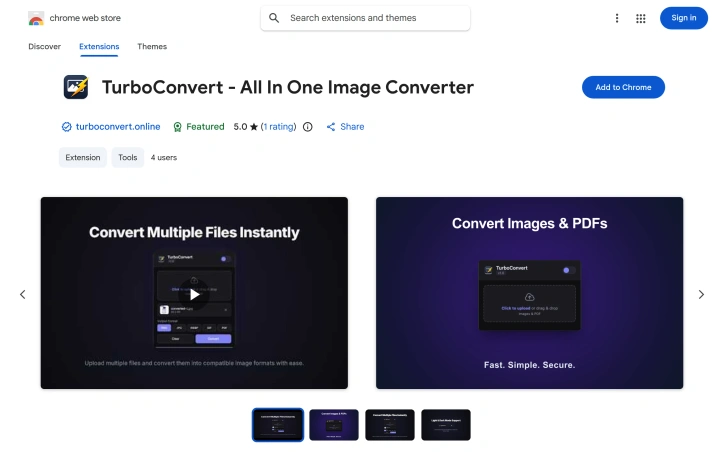

Photo-editing
A
Artem K.

Web designers, marketers, and casual users who routinely bounce between image formats finally have an option that skips the predictable ritual of opening another tab, waiting for uploads, and hoping their files don’t land on a random server. TurboConvert is a lightweight Chrome extension engineered to squash that workflow friction by letting every conversion happen inside the browser, on the user’s own machine. The product emerges from one developer’s frustration with the day-to-day chore of producing client-ready assets—icons in PNG, hero images in WebP, print hand-offs in PDF—without ever touching a backend. TurboConvert re-creates this pipeline as a single popup: drag files or right-click any image already on the page, pick an output format, and receive a download within seconds. Formats supported span PNG, JPG, WebP, GIF, and SVG, while PDF handling goes both ways—burst a multi-page document into crisp images or compile a stack of photos into a single PDF. Quality sliders prevent the usual blurred-down exports that plague one-click converters, and every operation is executed inside the browser sandbox, so no data ever crosses the internet. Operationally, the extension adds native hooks to the right-click context menu, eliminating the need to save images elsewhere before converting them. A compact 817 KB footprint keeps Chrome’s RAM diet intact, and the interface defaults to plain English (with German, Spanish, French, Russian, Chinese, and Japanese translations shipping in the same package). The developer formalizes privacy with an explicit statement that user activity data—nothing more granular than location and interaction logs—is not sold, repurposed, or used for credit scoring, a move that clarifies expectations in a space where “no upload” often isn’t enough. Pricing is refreshingly absent from the pitch; TurboConvert as listed is free, and no upsell or subscription gate appears in the Web Store copy. That stance, plus the one-person authorship, frames the extension as a focused utility rather than a venture-scale product. Any user who prefers immediacy over features sheets will find TurboConvert the fastest detour around the clunky web-based converters it seeks to displace.

TurboConvert - Image Converter preview

Key features

  • In-Browser Conversion: All image conversions happen locally on your machine with no uploads to external servers.
  • Context Menu Integration: Right-click any image on a webpage to convert it directly without saving files separately.
See full listing
PSFutureMail

Memory fades faster than we admit, yet we rarely pause to capture who we are at a specific moment before rushing to the next. PSFutureMail arms anyone who wants to interrupt that amnesia: students planting checkpoints before graduation, new parents scripting love letters for the day a child finishes school, couples queuing yearly anniversary notes, or anyone simply seeking an honest conversation with tomorrow’s self. UX discipline separates this from forum gimmicks or crude reminder bots. Draft once, assign an exact future send date, then close the page; nothing fires early, no awkward “oops” deliveries. You retain full editing rights right up to dispatch, so words can keep pace with shifting opinions or circumstances. A no-login write option adopts private-first encryption, while an opt-in public gallery lets strangers read anonymous letters, turning individual introspection into a light community experience. Operational muscle sits behind the minimal interface: automatic backups, multi-region database replication, and a 24/7 monitored delivery engine built on enterprise hardware give a credible promise that letters will still budge from cold storage in ten, twenty, perhaps fifty years. The closest commercial analogue, delayed email schedulers, typically limit retention to months and fold the second annual fees lapse. PSFutureMail’s value proposition instead leans on the long game, using free entry to seed critical mass and calming nervous recipients with jargon-free trust language about redundancy and uptime. No tiers, credits or subscription language appear on the site, so users begin without a credit card and presumably sustain the same zero-pressure cost as the calendar drifts forward—revenue if any must live in unannounced premium avenues or generous patrons. For anyone who has ever wished they could mail encouragement or correction to the person they will become, PSFutureMail is a quiet, sturdy mailbox that simply waits until the appointed day and rings the bell.

Writing-assistants
P
Pawan Kumar

Memory fades faster than we admit, yet we rarely pause to capture who we are at a specific moment before rushing to the next. PSFutureMail arms anyone who wants to interrupt that amnesia: students planting checkpoints before graduation, new parents scripting love letters for the day a child finishes school, couples queuing yearly anniversary notes, or anyone simply seeking an honest conversation with tomorrow’s self. UX discipline separates this from forum gimmicks or crude reminder bots. Draft once, assign an exact future send date, then close the page; nothing fires early, no awkward “oops” deliveries. You retain full editing rights right up to dispatch, so words can keep pace with shifting opinions or circumstances. A no-login write option adopts private-first encryption, while an opt-in public gallery lets strangers read anonymous letters, turning individual introspection into a light community experience. Operational muscle sits behind the minimal interface: automatic backups, multi-region database replication, and a 24/7 monitored delivery engine built on enterprise hardware give a credible promise that letters will still budge from cold storage in ten, twenty, perhaps fifty years. The closest commercial analogue, delayed email schedulers, typically limit retention to months and fold the second annual fees lapse. PSFutureMail’s value proposition instead leans on the long game, using free entry to seed critical mass and calming nervous recipients with jargon-free trust language about redundancy and uptime. No tiers, credits or subscription language appear on the site, so users begin without a credit card and presumably sustain the same zero-pressure cost as the calendar drifts forward—revenue if any must live in unannounced premium avenues or generous patrons. For anyone who has ever wished they could mail encouragement or correction to the person they will become, PSFutureMail is a quiet, sturdy mailbox that simply waits until the appointed day and rings the bell.

PSFutureMail preview

Key features

  • Scheduled Delivery: Assign an exact future send date and letters arrive automatically on that date with no early firing.
  • Edit Until Send: Retain full editing rights until the exact dispatch moment.
See full listing
O

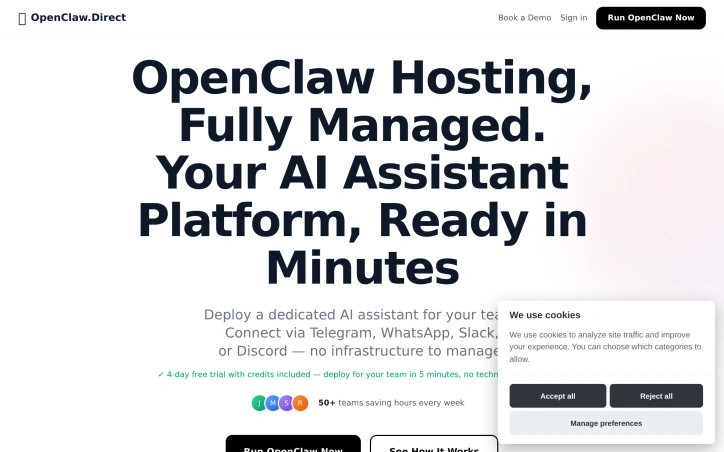
Teams that live inside Telegram, WhatsApp, Slack, or Discord spend their days dodging the accidental slog of opening yet another tab just to ask a bot for help. OpenClaw Direct dissolves that friction by putting a single, private AI coworker right where the messages already flow. Early adopters who lack the appetite—or hire—for DevOps but need Claude-grade intelligence on their own data can spin up a complete environment without writing a deployment script. The allure lies in the five-minute onboarding and the price lock of nineteen dollars a month, cancellable whenever the experiment loses its shine. Beyond provisioning, the platform behaves like an overstretched teammate who never forgets. It consumes inbox threads, staging deployments, support tickets, pull-request noise, SSL expirations, marketing figures, and half-written drafts, then surfaces only the decisions that still require human judgment. Code reviews happen in-chat, with critical issues patched and tests re-run before the reviewer reaches for coffee. Customer tickets get drafted replies, while feature requests bubble into a shared roadmap where community weight can be tracked with tags. Blog traffic gets analysed on the fly and turned into scheduled social threads with open rates reported back as early morning banter. Ownership stays with the customer: the assistant lives on a dedicated machine, listens exclusively to the API key they supply, and connects to the chat apps they already trust. Whatever internal context, documents, or repositories the team grants access to remains unseen by anyone else. The built-in dashboard simply tracks the number of messages, workflows completed, and time reclaimed—enough data to justify the monthly coffee budget the tool replaces.
Web-hosting-services
Y
Yuri Kovalov

Teams that live inside Telegram, WhatsApp, Slack, or Discord spend their days dodging the accidental slog of opening yet another tab just to ask a bot for help. OpenClaw Direct dissolves that friction by putting a single, private AI coworker right where the messages already flow. Early adopters who lack the appetite—or hire—for DevOps but need Claude-grade intelligence on their own data can spin up a complete environment without writing a deployment script. The allure lies in the five-minute onboarding and the price lock of nineteen dollars a month, cancellable whenever the experiment loses its shine. Beyond provisioning, the platform behaves like an overstretched teammate who never forgets. It consumes inbox threads, staging deployments, support tickets, pull-request noise, SSL expirations, marketing figures, and half-written drafts, then surfaces only the decisions that still require human judgment. Code reviews happen in-chat, with critical issues patched and tests re-run before the reviewer reaches for coffee. Customer tickets get drafted replies, while feature requests bubble into a shared roadmap where community weight can be tracked with tags. Blog traffic gets analysed on the fly and turned into scheduled social threads with open rates reported back as early morning banter. Ownership stays with the customer: the assistant lives on a dedicated machine, listens exclusively to the API key they supply, and connects to the chat apps they already trust. Whatever internal context, documents, or repositories the team grants access to remains unseen by anyone else. The built-in dashboard simply tracks the number of messages, workflows completed, and time reclaimed—enough data to justify the monthly coffee budget the tool replaces.

OpenClaw Direct preview
O

Key features

  • Private AI Coworker: Integrates directly into Telegram, WhatsApp, Slack, or Discord without leaving the chat platform.
  • Five-Minute Setup: Deploy a complete environment without DevOps skills or deployment scripts.
See full listing
dcli - docker and git workflows, stremlined

Micro-service teams waste untold hours sweeping up stale containers, juggling Git resets, and hunting down “it works on my machine” gremlins; dcli compresses that busywork into three verb-heavy commands. The utility targets any developer who juggles Docker Compose stacks and multiple source repositories on a daily basis—essentially anyone who has cursed at a half-dead dev environment five minutes before stand-up. What elevates dcli above a dusty binder full of shell aliases is its ruthless focus on single-shot outcomes. Resetting state means one shot, one story: ask for “docker clean api web” and it tears down the listed containers, purges volumes, rebuilds images, and restarts only the services you name, while keeping persistent volumes intact. Repeat the same mindset on the Git side when you tell it to “git reset develop”; the CLI fetches upstream and snaps each configured repository onto the exact branch without you ever having to open another window. It reports successes and failures in terse, colored lines, sparing you the Kubernetes-grade prose dump. The binary is delivered via Homebrew on macOS and Linux, with direct executables for Windows, so onboarding is literally two shell commands and a version check. No setup dance, no cloud service to register—just fetch, drop in your PATH, and start pruning noise from local dev. Because the entire surface area is nine sub-commands wrapped in a Go binary, updates are equally light; a new tag shows up in the tap, you pull, done. No pricing information is surfaced on the landing page, nor are there reference to paid tiers or enterprise licensing; the code lives in a public GitHub repository and binaries are distributed free of charge today. That leaves room for future monetization, but right now the pitch is simple: dcli trades ceremony for speed, and if you live in Docker and Git all day, that trade is convincingly one-sided.


Command-line-tools
O
Oleg Koval

Micro-service teams waste untold hours sweeping up stale containers, juggling Git resets, and hunting down “it works on my machine” gremlins; dcli compresses that busywork into three verb-heavy commands. The utility targets any developer who juggles Docker Compose stacks and multiple source repositories on a daily basis—essentially anyone who has cursed at a half-dead dev environment five minutes before stand-up. What elevates dcli above a dusty binder full of shell aliases is its ruthless focus on single-shot outcomes. Resetting state means one shot, one story: ask for “docker clean api web” and it tears down the listed containers, purges volumes, rebuilds images, and restarts only the services you name, while keeping persistent volumes intact. Repeat the same mindset on the Git side when you tell it to “git reset develop”; the CLI fetches upstream and snaps each configured repository onto the exact branch without you ever having to open another window. It reports successes and failures in terse, colored lines, sparing you the Kubernetes-grade prose dump. The binary is delivered via Homebrew on macOS and Linux, with direct executables for Windows, so onboarding is literally two shell commands and a version check. No setup dance, no cloud service to register—just fetch, drop in your PATH, and start pruning noise from local dev. Because the entire surface area is nine sub-commands wrapped in a Go binary, updates are equally light; a new tag shows up in the tap, you pull, done. No pricing information is surfaced on the landing page, nor are there reference to paid tiers or enterprise licensing; the code lives in a public GitHub repository and binaries are distributed free of charge today. That leaves room for future monetization, but right now the pitch is simple: dcli trades ceremony for speed, and if you live in Docker and Git all day, that trade is convincingly one-sided.

dcli - docker and git workflows, stremlined preview

Key features

  • Docker Container Management: Teardown, purge volumes, rebuild images, and restart services in one command.
  • Git Repository Reset: Snap configured repositories to exact branches with a single command.
See full listing
Bocto - All-in-one web3/web2 community Discord bot

Discord communities in the web3 space face a fragmentation problem: they need to manage token-gated access, track NFT activity, distribute rewards, and handle security—often requiring multiple bot integrations. Bocto consolidates these functions into a single bot, targeting community managers and builders who want to streamline Discord operations without juggling numerous point-solution tools. The appeal lies in breadth. Rather than piecemeal functionality, Bocto attempts to cover the full stack of community management demands within the web3/web2 context. It handles NFT and token-gated role assignment, monitors mints and sales activity across popular blockchains, processes token transfers and tips, and manages airdrops and raffles. The bot also displays collection statistics and includes security-focused guard features to protect servers from common exploits. Beyond blockchain-specific tasks, it offers a lightweight task manager built directly into Discord, making it genuinely useful for non-crypto community needs as well. What distinguishes Bocto from its competitors—assuming they exist and focus on narrower use cases—is the cross-chain support. Rather than locking communities into a single blockchain, the bot works across multiple popular networks, reducing friction for communities that operate across ecosystems or plan to expand. This flexibility addresses a real pain point in the current web3 landscape, where fragmentation across chains is the norm. The business model reflects pragmatism about its market. A free tier with generous limits recognizes that many communities are small or newly formed and shouldn't face artificial paywalls immediately. The premium tier accepts both fiat and cryptocurrency payments, a dual-payment approach that demonstrates real understanding of the audience—many web3 communities prefer on-chain transactions and may not have easy fiat payment mechanisms. This removes friction for potential paying customers and suggests the founders understand their user base beyond surface-level demographics. The primary limitation evident from available information is the sparse public presence: the website content is minimal, offering little transparency into adoption, performance, security audits, or technical reliability. For a bot handling token gating and blockchain interactions—inherently security-sensitive functions—this lack of transparency is notable. Community managers considering adoption would need more substantial documentation and proof points before integrating Bocto into production Discord servers. Bocto addresses a legitimate market gap and offers a coherent feature set. Whether it executes at the quality required for serious web3 communities remains unclear from the available information.


Discord communities in the web3 space face a fragmentation problem: they need to manage token-gated access, track NFT activity, distribute rewards, and handle security—often requiring multiple bot integrations. Bocto consolidates these functions into a single bot, targeting community managers and builders who want to streamline Discord operations without juggling numerous point-solution tools. The appeal lies in breadth. Rather than piecemeal functionality, Bocto attempts to cover the full stack of community management demands within the web3/web2 context. It handles NFT and token-gated role assignment, monitors mints and sales activity across popular blockchains, processes token transfers and tips, and manages airdrops and raffles. The bot also displays collection statistics and includes security-focused guard features to protect servers from common exploits. Beyond blockchain-specific tasks, it offers a lightweight task manager built directly into Discord, making it genuinely useful for non-crypto community needs as well. What distinguishes Bocto from its competitors—assuming they exist and focus on narrower use cases—is the cross-chain support. Rather than locking communities into a single blockchain, the bot works across multiple popular networks, reducing friction for communities that operate across ecosystems or plan to expand. This flexibility addresses a real pain point in the current web3 landscape, where fragmentation across chains is the norm. The business model reflects pragmatism about its market. A free tier with generous limits recognizes that many communities are small or newly formed and shouldn't face artificial paywalls immediately. The premium tier accepts both fiat and cryptocurrency payments, a dual-payment approach that demonstrates real understanding of the audience—many web3 communities prefer on-chain transactions and may not have easy fiat payment mechanisms. This removes friction for potential paying customers and suggests the founders understand their user base beyond surface-level demographics. The primary limitation evident from available information is the sparse public presence: the website content is minimal, offering little transparency into adoption, performance, security audits, or technical reliability. For a bot handling token gating and blockchain interactions—inherently security-sensitive functions—this lack of transparency is notable. Community managers considering adoption would need more substantial documentation and proof points before integrating Bocto into production Discord servers. Bocto addresses a legitimate market gap and offers a coherent feature set. Whether it executes at the quality required for serious web3 communities remains unclear from the available information.

Bocto - All-in-one web3/web2 community Discord bot preview

Key features

  • Token-Gated Access: Assigns roles based on NFT and token holdings for Discord communities
  • Cross-Chain Support: Operates across multiple popular blockchain networks
See full listing
VideoMP3Word

Transcription has long been the bane of knowledge workers—long recordings full of umms, ums, false starts, and throat-clearing that demands hours of manual cleanup. VideoMP3Word tackles this by combining multi-format transcription with an AI that understands context and industry-specific terminology, delivering polished, usable transcripts without the editorial drudgery. The product's core insight is that transcription quality isn't just about accuracy in speech recognition; it's about producing text that actually reads like finished writing. Rather than leaving filler words and repetitive phrasing intact, the system applies domain-aware filtering that strips verbal tics while preserving technical jargon. A laparoscopic cholecystectomy stays intact in medical transcripts, while casual "you knows" disappear—a distinction that generic speech-to-text tools routinely botch. This makes the output immediately usable for legal documents, medical records, educational content, and technical research where terminology precision matters. Speed stands out as a second major differentiator: the platform processes 60-minute recordings within three minutes, timestamped and ready for review. For content creators working under deadline pressure, this converts transcription from a bottleneck into a near-real-time capability. On the features side, VideoMP3Word handles multiple input formats (MP4, MOV, AVI, MP3, WAV, M4A, YouTube, Zoom links) and outputs to an extensive list—Word documents, PDFs, plain text with speaker labels, SRT/VTT/ASS subtitle files, and FLAC/MP3/WAV audio extraction. The system includes AI-generated summaries and millisecond-accurate timestamps, making it valuable for creators repurposing content into blogs and podcasts, as well as legal teams building searchable archives. Privacy is built into the architecture rather than bolted on as a feature. The company commits to zero-knowledge design, encrypted storage, non-retention of user files, and explicit task expiry controls—a direct answer to justified skepticism many professionals harbor about uploading sensitive recordings to cloud services. For regulated industries or confidential work, these guarantees provide clear value. The product invites users to test a single conversion free, a straightforward way to evaluate whether the accuracy and formatting align with specific needs. For organizations exhausted by post-transcription cleanup cycles, or professionals in regulated fields where both accuracy and privacy are non-negotiable, it's worth the trial.


Transcription
H
Henri Wang

Transcription has long been the bane of knowledge workers—long recordings full of umms, ums, false starts, and throat-clearing that demands hours of manual cleanup. VideoMP3Word tackles this by combining multi-format transcription with an AI that understands context and industry-specific terminology, delivering polished, usable transcripts without the editorial drudgery. The product's core insight is that transcription quality isn't just about accuracy in speech recognition; it's about producing text that actually reads like finished writing. Rather than leaving filler words and repetitive phrasing intact, the system applies domain-aware filtering that strips verbal tics while preserving technical jargon. A laparoscopic cholecystectomy stays intact in medical transcripts, while casual "you knows" disappear—a distinction that generic speech-to-text tools routinely botch. This makes the output immediately usable for legal documents, medical records, educational content, and technical research where terminology precision matters. Speed stands out as a second major differentiator: the platform processes 60-minute recordings within three minutes, timestamped and ready for review. For content creators working under deadline pressure, this converts transcription from a bottleneck into a near-real-time capability. On the features side, VideoMP3Word handles multiple input formats (MP4, MOV, AVI, MP3, WAV, M4A, YouTube, Zoom links) and outputs to an extensive list—Word documents, PDFs, plain text with speaker labels, SRT/VTT/ASS subtitle files, and FLAC/MP3/WAV audio extraction. The system includes AI-generated summaries and millisecond-accurate timestamps, making it valuable for creators repurposing content into blogs and podcasts, as well as legal teams building searchable archives. Privacy is built into the architecture rather than bolted on as a feature. The company commits to zero-knowledge design, encrypted storage, non-retention of user files, and explicit task expiry controls—a direct answer to justified skepticism many professionals harbor about uploading sensitive recordings to cloud services. For regulated industries or confidential work, these guarantees provide clear value. The product invites users to test a single conversion free, a straightforward way to evaluate whether the accuracy and formatting align with specific needs. For organizations exhausted by post-transcription cleanup cycles, or professionals in regulated fields where both accuracy and privacy are non-negotiable, it's worth the trial.

VideoMP3Word preview

Key features

  • AI Context Understanding: Applies domain-aware filtering to strip verbal tics while preserving technical jargon
  • Fast Processing: Processes 60-minute recordings within three minutes with timestamped output
See full listing
Web Clipper - Second Brain

Capturing web content at scale without sacrificing privacy or simplicity is a persistent friction point for knowledge workers. Web Clipper targets this gap by offering a browser extension that lets users save text, links, and images through a single keyboard shortcut, eliminating the common workflow of bookmarking, copying, or screenshotting scattered across multiple tools. The extension is built for researchers, students, designers, and anyone who mines the web for ideas and reference material. Its core appeal lies in speed and simplicity—content capture happens in under a second, with no configuration required. Rather than forcing users into account creation or cloud syncing, the product keeps all data local, meaning users maintain complete privacy and offline access to their collected material. The feature set addresses the common pain point of digital hoarding: the ability to save selected text, full web pages, links, and images directly into a side panel accessible from any tab. A search function lets users navigate their collection without the organizational overhead that plagues other capture tools. The interface supports both dark and light themes, catering to different usage contexts and reducing friction during extended browsing sessions. What distinguishes Web Clipper from competitors like Evernote or cloud-based clippers is philosophical. Rather than positioning itself as a complex note-taking platform or knowledge management system requiring subscriptions, it prioritizes a single job done well: fast, offline, privacy-preserving capture. The developer explicitly designed around the pain of feature bloat and recurring subscription costs, positioning the tool as an antidote to the complexity users encounter elsewhere. Upcoming functionality includes Spaces, a feature for organizing clips into collections, suggesting the roadmap will gradually introduce structure without compromising the core principle of simplicity. The extension is currently free, with no monetization layer disclosed, making it an accessible entry point for users skeptical of yet another subscription service. The product's positioning on privacy, speed, and local-first architecture creates a clear niche. It serves users frustrated by the gatekeeping of cloud-based alternatives and willing to sacrifice cloud synchronization and advanced collaboration for agency over their own data.

Note-and-writing-apps
A
Artem K.

Capturing web content at scale without sacrificing privacy or simplicity is a persistent friction point for knowledge workers. Web Clipper targets this gap by offering a browser extension that lets users save text, links, and images through a single keyboard shortcut, eliminating the common workflow of bookmarking, copying, or screenshotting scattered across multiple tools. The extension is built for researchers, students, designers, and anyone who mines the web for ideas and reference material. Its core appeal lies in speed and simplicity—content capture happens in under a second, with no configuration required. Rather than forcing users into account creation or cloud syncing, the product keeps all data local, meaning users maintain complete privacy and offline access to their collected material. The feature set addresses the common pain point of digital hoarding: the ability to save selected text, full web pages, links, and images directly into a side panel accessible from any tab. A search function lets users navigate their collection without the organizational overhead that plagues other capture tools. The interface supports both dark and light themes, catering to different usage contexts and reducing friction during extended browsing sessions. What distinguishes Web Clipper from competitors like Evernote or cloud-based clippers is philosophical. Rather than positioning itself as a complex note-taking platform or knowledge management system requiring subscriptions, it prioritizes a single job done well: fast, offline, privacy-preserving capture. The developer explicitly designed around the pain of feature bloat and recurring subscription costs, positioning the tool as an antidote to the complexity users encounter elsewhere. Upcoming functionality includes Spaces, a feature for organizing clips into collections, suggesting the roadmap will gradually introduce structure without compromising the core principle of simplicity. The extension is currently free, with no monetization layer disclosed, making it an accessible entry point for users skeptical of yet another subscription service. The product's positioning on privacy, speed, and local-first architecture creates a clear niche. It serves users frustrated by the gatekeeping of cloud-based alternatives and willing to sacrifice cloud synchronization and advanced collaboration for agency over their own data.

Web Clipper - Second Brain preview

Key features

  • Quick Capture: Browser extension saves text, links, and images via keyboard shortcut in under a second
  • Local Storage: All captured data stored locally with offline access and no cloud syncing required
See full listing
VibeLoop: AI Mood Journal

Emotion tracking has long suffered from competing impulses: the clinical efficiency of mood logging strips the practice of meaning, while open-ended journaling can feel like shouting into the void. VibeLoop attempts to thread this needle by treating daily emotional reflection as a ritual rather than a data collection exercise. The product's core interaction is deliberately minimal. Users record a single emotion per day—their "vibe"—refining it and adding a brief note before the distinctive part begins. Rather than leaving the reflection there, the app responds with observations from a group of AI personalities. These aren't uniform analyses; instead, they represent different perspectives, from poetic reframing to analytical dissection to unflinching honesty. This multiplicity works because a single AI voice risks becoming either a bland mirror or an unwelcome therapist. Multiple voices approximate conversation, each bringing a distinct lens to the same emotional moment. Where most mood trackers dead-end at daily entry, VibeLoop builds upward. The app surfaces patterns through calendar views and weekly summaries that transform discrete emotional snapshots into narrative. This framing is deliberate: summaries "turn your moods into a story" rather than into a chart. That narrative orientation reveals what the product actually values—pattern recognition and meaning-making, not optimization or self-improvement. The positioning reflects this clarity. VibeLoop explicitly distances itself from productivity-obsessed wellness apps. There's no claim that tracking mood improves performance or that patterns enable "better choices." Instead, the value proposition is direct: understanding yourself matters. For users fatigued by apps that treat emotions as inputs to be managed, this directness refreshes. The one-entry-per-day constraint is worth questioning. For some users, emotional life moves faster; for others, daily reflection already feels like journaling, just reframed. But the constraint likely serves the product's identity by resisting the obsessive data collection that makes many tracking apps feel extractive. It keeps the ritual focused. VibeLoop targets a specific user: someone who journaled once, found it meaningful but incomplete, and wants the space between reflection and response. Whether AI companions authentically fill that gap is the product's real test. But its resistance to the self-improvement framing that dominates wellness is itself valuable—it proves you can build in this space without abandoning honesty.

Emotion tracking has long suffered from competing impulses: the clinical efficiency of mood logging strips the practice of meaning, while open-ended journaling can feel like shouting into the void. VibeLoop attempts to thread this needle by treating daily emotional reflection as a ritual rather than a data collection exercise. The product's core interaction is deliberately minimal. Users record a single emotion per day—their "vibe"—refining it and adding a brief note before the distinctive part begins. Rather than leaving the reflection there, the app responds with observations from a group of AI personalities. These aren't uniform analyses; instead, they represent different perspectives, from poetic reframing to analytical dissection to unflinching honesty. This multiplicity works because a single AI voice risks becoming either a bland mirror or an unwelcome therapist. Multiple voices approximate conversation, each bringing a distinct lens to the same emotional moment. Where most mood trackers dead-end at daily entry, VibeLoop builds upward. The app surfaces patterns through calendar views and weekly summaries that transform discrete emotional snapshots into narrative. This framing is deliberate: summaries "turn your moods into a story" rather than into a chart. That narrative orientation reveals what the product actually values—pattern recognition and meaning-making, not optimization or self-improvement. The positioning reflects this clarity. VibeLoop explicitly distances itself from productivity-obsessed wellness apps. There's no claim that tracking mood improves performance or that patterns enable "better choices." Instead, the value proposition is direct: understanding yourself matters. For users fatigued by apps that treat emotions as inputs to be managed, this directness refreshes. The one-entry-per-day constraint is worth questioning. For some users, emotional life moves faster; for others, daily reflection already feels like journaling, just reframed. But the constraint likely serves the product's identity by resisting the obsessive data collection that makes many tracking apps feel extractive. It keeps the ritual focused. VibeLoop targets a specific user: someone who journaled once, found it meaningful but incomplete, and wants the space between reflection and response. Whether AI companions authentically fill that gap is the product's real test. But its resistance to the self-improvement framing that dominates wellness is itself valuable—it proves you can build in this space without abandoning honesty.

VibeLoop: AI Mood Journal preview

Key features

  • Daily Emotion Logging: Users record a single emotion per day called their vibe with refinement and brief notes
  • Multi-Perspective AI Feedback: Multiple AI personalities provide distinct perspectives including poetic reframing, analytical dissection, and unflinching honesty
See full listing